
1. Introduction
The CHIWENTHAG LC-100A is a digital LC meter designed for precise measurement of capacitance (C) and inductance (L) values. This module is an essential tool for electronics enthusiasts, engineers, and technicians working with circuits, component selection, and quality control. It offers a wide measurement range and clear LCD display for ease of use.
2. Safety Information
- Always ensure the component under test is fully discharged before connecting it to the LC-100A, especially for capacitors. High voltage stored in capacitors can cause damage to the device or personal injury.
- Do not apply external voltage to the test terminals. The device is designed for passive component measurement only.
- Operate the device in a dry environment, away from moisture and extreme temperatures.
- Use only the specified power supply (typically 5V DC via USB or dedicated power input) to prevent damage.
3. Package Contents
Please verify that all items are present in your package:
- 1 x CHIWENTHAG LC-100A Digital LC Meter Module
- 1 x Set of Test Clips (Red and Black)
4. Product Overview
The LC-100A module features a clear LCD display, control buttons, and test terminals for connecting components. Understanding its layout is crucial for proper operation.
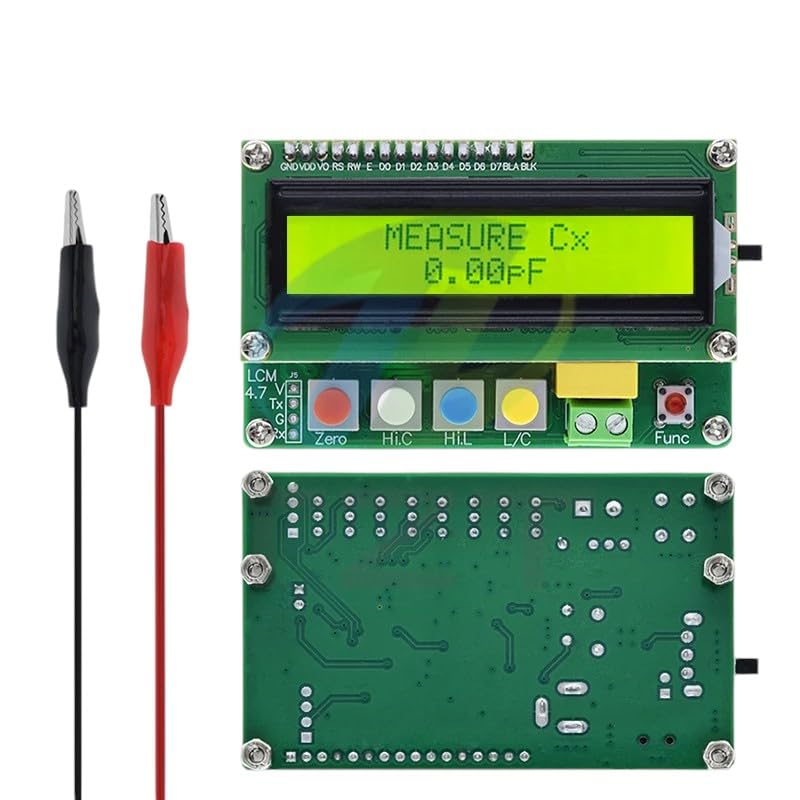
Image 4.1: The CHIWENTHAG LC-100A Digital LC Meter module shown with its LCD display, control buttons, and included test clips. The top section displays measurement results, while the lower section shows the circuit board with buttons labeled 'Zero', 'Hi.C', 'Hi.L', and 'L/C', along with connection points.
Key Components:
- LCD Display: Shows measurement values, units, and mode.
- Test Terminals: Connect the red and black test clips here for component measurement.
- 'Zero' Button: Used to calibrate the device before measurement, especially for capacitance.
- 'Hi.C' Button: Selects the high capacitance measurement range.
- 'Hi.L' Button: Selects the high inductance measurement range.
- 'L/C' Button: Toggles between inductance (L) and capacitance (C) measurement modes.
- Power Input: Typically a 5V DC input (e.g., USB mini/micro or DC jack).
5. Setup
- Power Connection: Connect a stable 5V DC power supply to the module's power input. The LCD display should illuminate.
- Test Clip Connection: Connect the red and black test clips to the corresponding test terminals on the LC-100A module. Ensure a secure connection.
- Initial Power On: The device will typically display a welcome message or default to a measurement mode.
6. Operating Instructions
Before measuring any component, ensure it is disconnected from any circuit and fully discharged.

Image 6.1: A variety of electronic components such as capacitors, resistors, inductors, and integrated circuits, which can be measured or tested using the LC-100A meter.
6.1. Zeroing the Device
Zeroing is crucial for accurate measurements, especially for small capacitance values.
- Ensure nothing is connected to the test clips. The clips should not be touching each other.
- Press the 'Zero' button. The display should show 'ZEROING...' and then '0.00pF' or a very small capacitance value.
- For inductance, short the test clips together and press 'Zero' to calibrate for lead inductance.
6.2. Measuring Capacitance (Cx)
- Press the 'L/C' button until 'MEASURE Cx' is displayed on the screen.
- If measuring a small capacitance (e.g., below 1uF), ensure the device is zeroed with open test clips.
- For larger capacitances, you may need to press 'Hi.C' to select the high capacitance range.
- Connect the capacitor to the test clips. The display will show the capacitance value in pF, nF, or uF.
6.3. Measuring Inductance (Lx)
- Press the 'L/C' button until 'MEASURE Lx' is displayed on the screen.
- If measuring a small inductance, ensure the device is zeroed by shorting the test clips.
- For larger inductances, you may need to press 'Hi.L' to select the high inductance range.
- Connect the inductor to the test clips. The display will show the inductance value in uH or mH.
7. Maintenance
- Cleaning: Use a soft, dry cloth to clean the device. Do not use abrasive cleaners or solvents.
- Storage: Store the LC-100A in a cool, dry place, away from direct sunlight and extreme temperatures.
- Battery (if applicable): If your model includes a battery, ensure it is charged or replaced as needed. (Note: This model is typically externally powered).
8. Troubleshooting
- Display shows 'Err': This usually indicates an out-of-range measurement or a faulty component. Verify the component is within the device's measurement range and is not shorted or open.
- Unstable Readings: Ensure test clips are securely connected and not picking up external interference. Re-zero the device.
- No Display: Check the power supply connection and ensure it provides the correct 5V DC.
- Inaccurate Readings: Perform a zero calibration before measurement. Ensure the component is fully discharged.
9. Specifications
| Parameter | Value |
|---|---|
| Capacitance Measurement Range | 1pF to 100mF |
| Inductance Measurement Range | 1uH to 100H |
| Display | Digital LCD |
| Power Supply | 5V DC (via USB or dedicated input) |
| Measurement Accuracy | Typical (specific accuracy not provided, depends on range) |
10. Warranty and Support
CHIWENTHAG is committed to providing high-quality products and customer satisfaction.
- Money-Back Guarantee: We offer a money-back guarantee, reflecting our confidence in product quality and continuous pursuit of perfection.
- Customer Support: For any questions, concerns, or technical assistance, please contact our customer support team. Our knowledgeable team is ready to assist you to ensure the best possible experience with your product.