
1. Introduction
This manual provides detailed instructions for the setup, configuration, and operation of the ENTMENITSEA HC-08 Bluetooth 4.0 Serial Port Module. The HC-08 is a low-power Bluetooth Low Energy (BLE) module designed for transparent serial communication, enabling wireless data transfer between microcontrollers and other Bluetooth-enabled devices.
2. Product Overview
The HC-08 module integrates a Bluetooth 4.0 chip, antenna, and necessary peripheral components onto a compact PCB. It operates as a slave device by default, allowing other Bluetooth master devices to connect and exchange data via a serial UART interface.
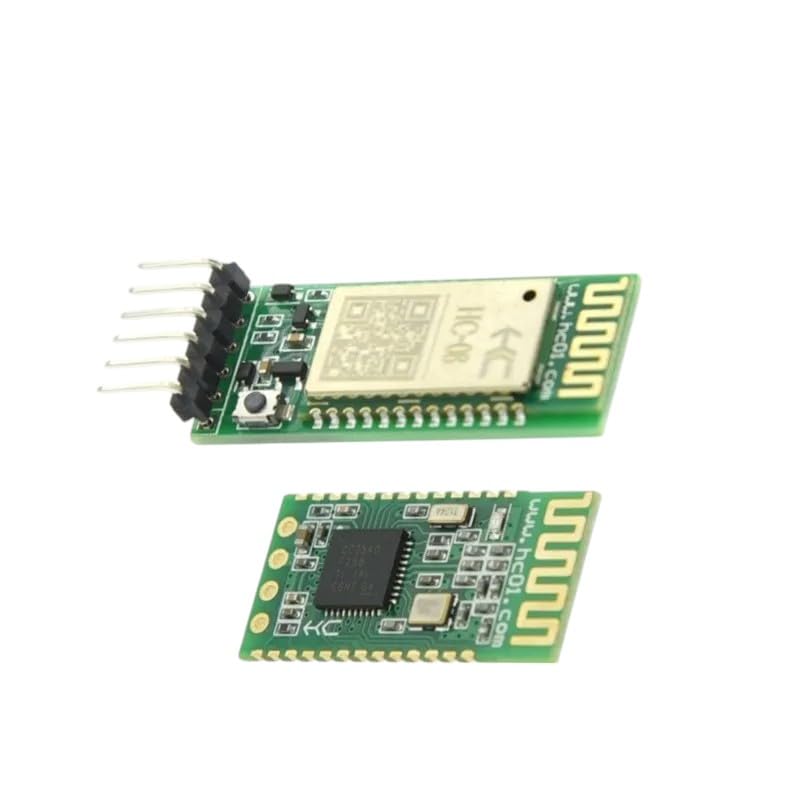
The image displays two views of the HC-08 Bluetooth 4.0 module. The top view shows the main chip and antenna, while the bottom view reveals the solder pads and additional components. Pin headers are visible on one side for connection.
3. Specifications
| Feature | Description |
|---|---|
| Model | HC-08 |
| Bluetooth Version | Bluetooth 4.0 (BLE) |
| Operating Voltage | 2.0V - 3.6V (typically 3.3V) |
| Communication Interface | UART (Serial) |
| Default Baud Rate | 9600 bps |
| Frequency Range | 2.4GHz ISM band |
| Operating Current | ~8mA (active), <1mA (sleep) |
| Transmission Distance | Up to 30 meters (line of sight) |
4. Pinout Description
The HC-08 module typically features the following pins:
| Pin Name | Description |
|---|---|
| VCC | Power supply input (2.0V - 3.6V) |
| GND | Ground |
| TXD | UART Transmit Data (connect to RXD of microcontroller) |
| RXD | UART Receive Data (connect to TXD of microcontroller) |
| STATE | Connection status indicator (High when connected, Low when disconnected) |
| EN | Enable pin (High to enable, Low to disable/sleep) |
5. Setup and Configuration
5.1 Hardware Connection
- Connect the VCC pin of the HC-08 module to a 3.3V power supply.
- Connect the GND pin of the HC-08 module to the ground of your system.
- Connect the TXD pin of the HC-08 module to the RXD pin of your microcontroller or serial-to-USB converter.
- Connect the RXD pin of the HC-08 module to the TXD pin of your microcontroller or serial-to-USB converter.
- The STATE pin can be connected to an LED or a digital input on your microcontroller to monitor connection status.
- The EN pin should be pulled HIGH for normal operation.
5.2 AT Command Configuration
The HC-08 module can be configured using AT commands sent via the serial interface. Ensure your serial terminal or microcontroller is set to the module's current baud rate (default 9600 bps).
- Test Command: Send
AT. The module should respond withOK. - Set Module Name: Send
AT+NAME<name>(e.g.,AT+NAMEHC08_Device). Response:OKsetname. - Set Baud Rate: Send
AT+BAUD<value>. Common values:1(1200),2(2400),3(4800),4(9600),5(19200),6(38400),7(57600),8(115200). Response:OKsetbaud. - Query Module Address: Send
AT+LADDR. Response:OK+LADDR:<address>. - Restore Factory Settings: Send
AT+RENEW. Response:OK+RENEW.
Note: AT commands must be sent without a newline character (CR/LF) unless specified by the module's firmware version. After sending a command, wait for the module's response.
6. Operating Instructions
6.1 Establishing a Connection
Once the HC-08 module is powered and configured, it will broadcast its presence. A Bluetooth 4.0 (BLE) enabled device (e.g., smartphone, computer with BLE adapter) can scan for and connect to the module using its configured name.
- Ensure the HC-08 module is powered on. The STATE pin will typically be LOW or an LED will be blinking, indicating it is discoverable.
- On your master device, scan for Bluetooth Low Energy devices.
- Select the HC-08 module (by its configured name) and initiate a connection.
- Upon successful connection, the STATE pin of the HC-08 module will go HIGH (or an LED will become solid), indicating an active link.
6.2 Data Transmission
After a connection is established, any data sent to the HC-08's RXD pin will be wirelessly transmitted to the connected master device. Conversely, data received wirelessly from the master device will be output through the HC-08's TXD pin.
- From Microcontroller to Master Device: Send data from your microcontroller's TXD to the HC-08's RXD.
- From Master Device to Microcontroller: The master device sends data wirelessly, which the HC-08 outputs via its TXD pin to your microcontroller's RXD.
7. Troubleshooting
- Module not discoverable:
- Verify power supply (VCC and GND) is correctly connected and within the 2.0V-3.6V range.
- Ensure the EN pin is pulled HIGH.
- Check if the module is already connected to another device.
- Cannot send AT commands:
- Confirm TXD/RXD connections are correct (cross-connected).
- Verify the serial terminal's baud rate matches the module's baud rate (default 9600 bps).
- Ensure no newline characters are appended to AT commands.
- Connection drops frequently:
- Check for interference from other 2.4GHz devices.
- Ensure the distance between devices is within the effective range.
- Verify power supply stability.
8. Safety Information
- Do not exceed the specified operating voltage range (2.0V - 3.6V) to prevent damage to the module.
- Handle the module with care to avoid electrostatic discharge (ESD) damage.
- Ensure proper ventilation when integrating into enclosures to prevent overheating.
- Keep the module away from water and moisture.
9. Warranty and Support
ENTMENITSEA provides a money-back guarantee for this product, reflecting confidence in its quality. For any questions, technical assistance, or support needs, please contact ENTMENITSEA customer service. Our knowledgeable team is available to assist you.