
1. Product Overview
The equlup S966 LCD Display Panel is designed for electric bicycles, providing essential riding information in a clear and intuitive format. This panel is compatible with 24-72V systems and is suitable for 22.2mm handlebars. Its lightweight and durable ABS construction ensures long-lasting performance.
Key Features:
- Wide Compatibility: Designed for 24-72V electric bicycle systems.
- Easy Installation: Equipped with a bracket for 22.2mm handlebars.
- Clear Visual Display: Large LCD screen for convenient viewing of speed, battery level, error codes, and other data.
- Durable Construction: Made from lightweight, waterproof ABS material for reliability.
- Communication Protocol: Requires a controller that supports communication protocol 2.
2. Package Contents
Upon opening the package, please verify that all items are present and in good condition:
- 1 x equlup S966 LCD Display Panel
- 1 x User Manual (this document)
3. Specifications
| Feature | Detail |
|---|---|
| Model | S966 |
| Brand | equlup |
| Voltage Compatibility | 24-72V |
| Handlebar Diameter | 22.2mm (0.9in) |
| Material | ABS |
| Weight | Approximately 228g (8.04oz) |
| Communication Protocol | Requires Protocol 2 compatible controller |
4. Setup and Installation
Follow these steps to properly install your S966 LCD Display Panel:
- Prepare Handlebars: Ensure your electric bicycle handlebars have a diameter of 22.2mm (0.9 inches) at the desired mounting location.
- Mount the Display: Attach the S966 LCD display panel to the handlebar using the integrated bracket. Secure it firmly but do not overtighten.
- Connect Wiring: Connect the display panel's wiring to your electric bicycle's controller. Ensure the controller supports communication protocol 2 for proper functionality. The interfaces are designed for easy connection to minimize failure rates.
- Mount Control Buttons: Attach the separate control button unit to a convenient location on your handlebar, typically near your thumb for easy access.
- Test Functionality: After installation, power on your electric bicycle and verify that the display panel illuminates and shows data correctly.

Image: The S966 LCD Display Panel shown mounted on an electric bicycle handlebar, illustrating its placement and connection.

Image: A rear view of the S966 LCD Display Panel, highlighting the mounting brackets and the wiring connections.
5. Operating Instructions
The S966 LCD Display Panel provides real-time data to enhance your riding experience. Familiarize yourself with the display and control buttons.
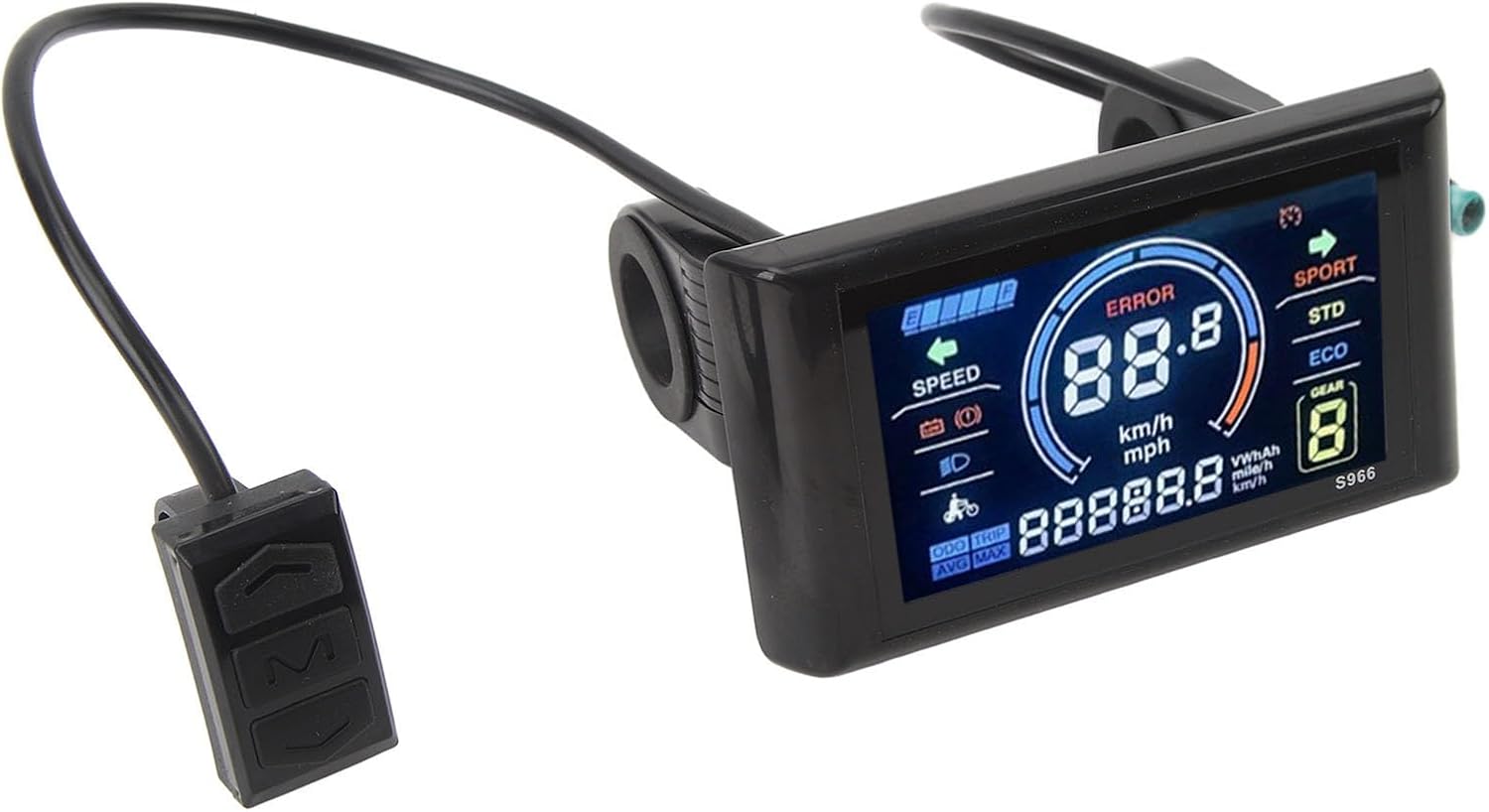
Image: A detailed view of the S966 LCD screen, displaying speed, battery level, error indicator, and riding modes.
Display Information:
- Speed: Current riding speed (km/h or mph).
- Battery Level: Graphical indicator of remaining battery charge.
- Error Indicator: Displays "ERROR" if a system fault is detected.
- Riding Modes: SPORT, STD (Standard), ECO modes.
- Gear Indicator: Current assist level or gear.
- Odometer/Trip Distance: Total distance traveled or current trip distance.
- Average/Max Speed: Displays average and maximum speed.
Control Buttons:
The separate control unit typically includes buttons for power, mode selection, and adjusting assist levels. Refer to your electric bicycle's main controller manual for specific button functions if not detailed here.
- Power Button: Usually to turn the display on/off (long press).
- Mode Button: To cycle through display information (e.g., ODO, TRIP, AVG, MAX).
- Up/Down Buttons: To adjust assist levels or navigate settings.
6. Maintenance
To ensure the longevity and optimal performance of your S966 LCD Display Panel, follow these maintenance guidelines:
- Cleaning: Wipe the display screen and casing with a soft, damp cloth. Avoid using abrasive cleaners or solvents, as these can damage the screen or plastic.
- Water Exposure: While the panel is designed to be waterproof, avoid submerging it in water or exposing it to high-pressure water jets.
- Cable Inspection: Periodically check all cables and connections for any signs of wear, fraying, or loose connections. Ensure they are securely plugged in.
- Storage: When not in use for extended periods, store your electric bicycle in a dry, temperate environment to protect the electronic components.
7. Troubleshooting
If you encounter issues with your S966 LCD Display Panel, refer to the following common problems and solutions:
- Display Not Turning On:
- Check if the electric bicycle's main power is on.
- Verify all cable connections between the display and the controller are secure.
- Ensure the battery has sufficient charge.
- "ERROR" Message on Display:
- An "ERROR" message indicates a system fault. The specific error code (if displayed) should be cross-referenced with your electric bicycle's main controller manual for detailed diagnostics.
- Common causes include motor issues, sensor malfunctions, or controller communication problems.
- Try restarting the electric bicycle. If the error persists, consult a qualified technician.
- Incorrect Speed/Distance Readings:
- Check the speed sensor and its magnet on your bicycle wheel for proper alignment and cleanliness.
- Ensure the wheel circumference setting in the controller (if adjustable) is correct.
- Buttons Not Responding:
- Ensure the control button unit is securely connected to the display panel.
- Check for any physical damage or debris obstructing the buttons.
If these steps do not resolve the issue, please contact your retailer or a certified electric bicycle service center.
8. Warranty and Support
The equlup S966 LCD Display Panel comes with a limited warranty. Please retain your proof of purchase for any warranty claims.
For technical support or warranty inquiries, please contact the retailer from whom you purchased the product. Specific warranty terms and conditions may vary by region and retailer.