
1. Introduction
This manual provides essential information for the proper setup, operation, maintenance, and troubleshooting of the EC Buying STM32H743VGT6 Core Board. This development board is designed for learning and advanced embedded system projects, featuring a high-performance STM32H743VGT6 microcontroller.
2. Product Overview
The STM32H743VGT6 Core Board is a versatile development module offering robust performance and extensive connectivity for various applications. Key features include:
- High-Performance Microcontroller: Equipped with a 480MHz STM32H743VGT6 processor, featuring 1MB Flash and 1MB SRAM for efficient operation in demanding projects.
- Expanded Memory: Includes an 8MB W25Q64 external memory, enhancing storage capacity for complex applications.
- Versatile Connectivity: Features a Type-C USB interface for direct connectivity to the STM32, facilitating data transfer and communication.
- Display and Imaging Support: Integrated SPI LCD and camera interfaces allow for easy integration of display and imaging modules.
- Robust Operating Range: Designed to operate reliably in temperatures ranging from -40℃ to 85℃, suitable for various environmental conditions.

Figure 2.1: Top-down view of the STM32H743VGT6 Core Board, showing the main microcontroller, USB Type-C port, and various pin headers.
3. Setup Instructions
- Unpacking: Carefully remove the STM32H743VGT6 Core Board from its packaging. Inspect for any visible damage.
- Power Connection: Connect the board to a power source using a standard USB Type-C cable. The board can be powered via the USB port from a computer or a compatible USB power adapter.
- PC Connection: Connect the USB Type-C port on the board to your computer. This connection will provide power and enable communication for programming and debugging.
- Software Installation: Install the necessary development environment (IDE) and drivers on your computer. Recommended IDEs include STM32CubeIDE or Keil MDK. Ensure the correct USB drivers for STM32 devices are installed.
- Initial Test: After installing the software, load a simple 'blink' example program to verify the board's functionality and your development setup.

Figure 3.1: Detailed top view of the STM32H743VGT6 Core Board, highlighting the STM32 microcontroller and various connectors.
4. Operating Instructions
Once the board is set up, you can begin developing and testing your applications:
- Programming the Microcontroller: Use your chosen IDE (e.g., STM32CubeIDE) to write, compile, and flash firmware to the STM32H743VGT6. The USB Type-C connection typically supports ST-Link debugging and programming.
- Interfacing with Peripherals: Utilize the available GPIO pins, SPI LCD interface, and camera interface to connect external modules. Refer to the STM32H743VGT6 datasheet and reference manuals for detailed pinout and peripheral configuration.
- Utilizing External Memory: The onboard 8MB W25Q64 external memory can be accessed via SPI. Implement appropriate drivers in your firmware to store and retrieve data.
- Power Management: Ensure your external components do not draw excessive current, which could destabilize the board or damage components. Monitor power consumption during development.
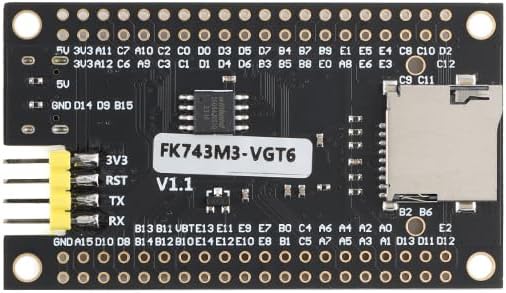
Figure 4.1: Bottom view of the STM32H743VGT6 Core Board, showing the FK743M3-VGT6 marking and an SD card slot, which can be used for additional storage.
5. Maintenance
To ensure the longevity and reliable operation of your STM32H743VGT6 Core Board, follow these maintenance guidelines:
- Handling: Always handle the board by its edges to avoid touching components, especially the pins, which can be sensitive to electrostatic discharge (ESD).
- Cleaning: Keep the board clean and free from dust and debris. Use a soft, dry brush or compressed air for cleaning. Avoid using liquids or solvents.
- Storage: Store the board in an anti-static bag in a dry, cool environment when not in use. Avoid extreme temperatures and humidity.
- Power Off: Disconnect power before making any physical connections or disconnections to the board or its peripherals.
6. Troubleshooting
If you encounter issues with your STM32H743VGT6 Core Board, consider the following troubleshooting steps:
- Board Not Powering On:
- Verify the USB Type-C cable is securely connected to both the board and the power source/PC.
- Try a different USB cable or power source.
- Check for any visible damage to the board or components.
- Connection Issues with PC:
- Ensure all necessary USB drivers for STM32 are correctly installed.
- Try connecting to a different USB port on your computer.
- Restart your computer and the development environment.
- Programming Errors:
- Check your code for syntax errors or logical flaws.
- Verify that the correct target device (STM32H743VGT6) is selected in your IDE.
- Ensure the ST-Link debugger is properly configured and recognized by the IDE.
- Peripheral Not Responding:
- Double-check all wiring connections to the peripheral.
- Verify the peripheral's power supply and ground connections.
- Review your firmware for correct initialization and communication protocols (e.g., SPI, I2C).
7. Specifications
| Feature | Detail |
|---|---|
| Processor | STM32H743VGT6 (480 MHz Cortex) |
| Internal Memory | 1 MB Flash, 1 MB SRAM |
| External Memory | 8 MB W25Q64 |
| Interfaces | USB Type-C, SPI LCD, Camera Interface |
| Operating Temperature | -40℃ to 85℃ |
| Dimensions | Approximately 64mm x 37mm (5 x 4 x 0.7 inches packaged) |
| Weight | Approximately 1 ounce |

Figure 7.1: Top view of the STM32H743VGT6 Core Board with key dimensions (64mm x 37mm) indicated.
8. Warranty and Support
For warranty information and technical support, please refer to the official EC Buying website or contact their customer service directly. Keep your purchase receipt for warranty claims.


