1. Introduction
Thank you for choosing this Generic brand remote control. This manual provides essential information for the proper setup, operation, and maintenance of your new remote control. This remote is designed to be compatible with various High One TV models, ensuring a seamless replacement or secondary control option for your television. Please read this manual thoroughly before use and retain it for future reference.
2. Safety Information
- Battery Handling: Always insert batteries with the correct polarity (+ and -) as indicated in the battery compartment.
- Do not mix old and new batteries, or different types of batteries (e.g., alkaline and rechargeable).
- Remove batteries if the remote control will not be used for an extended period to prevent leakage.
- Dispose of used batteries according to local regulations. Do not incinerate.
- General Use: Keep the remote control away from direct sunlight, heat sources, and moisture.
- Avoid dropping or subjecting the remote control to strong impacts.
- Do not attempt to disassemble or modify the remote control. This will void the warranty.
3. Package Contents
Please check that all items are present in your package:
- 1 x Generic Remote Control for High One TV
- 1 x Instruction Manual (this document)
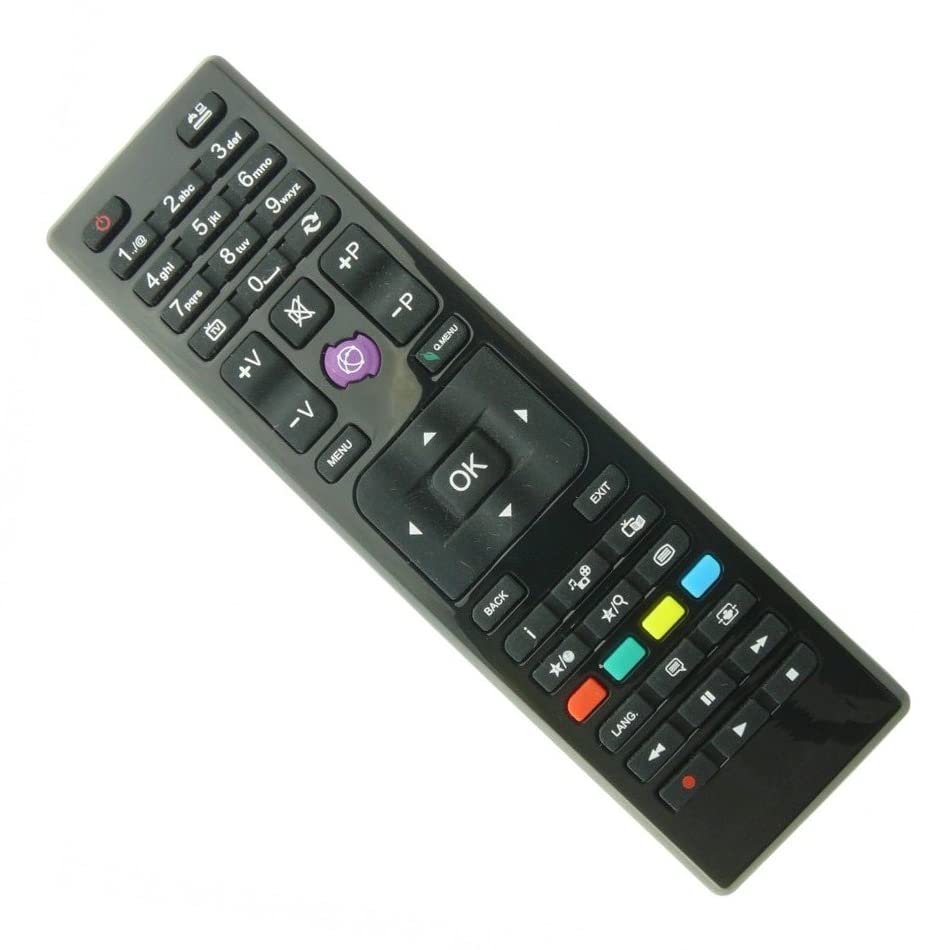
Image: The remote control, typically black, with various buttons for TV functions. It features a standard layout including number keys, navigation buttons, volume, channel, and power controls.
4. Setup
4.1 Battery Installation
- Locate the battery compartment on the back of the remote control.
- Slide the battery cover downwards or press the latch and lift to open.
- Insert two AAA batteries (not included) according to the polarity markings (+ and -) inside the compartment.
- Close the battery cover by sliding it back into place until it clicks securely.
4.2 First Use
This remote control is an infrared (IR) type and is pre-programmed for compatibility with the listed High One TV models. No special pairing or code setup is required. Simply insert the batteries and point the remote control directly at your High One TV to begin operation.
5. Operating Instructions
5.1 Button Functions
The remote control features a standard layout for easy navigation and control of your High One TV. Below is a general overview of common button functions:
Image: Close-up of the remote control showing its various buttons, including power, number pad, volume up/down, channel up/down, menu, navigation arrows, and input selection.
| Button | Function |
|---|---|
| Power (⏻) | Turns the TV on or off. |
| Number Pad (0-9) | Directly selects TV channels. |
| Volume Up/Down (VOL +/-) | Adjusts the sound volume. |
| Channel Up/Down (CH +/-) | Changes the TV channel. |
| Mute (🔇) | Mutes or unmutes the TV sound. |
| Input/Source | Selects the input source (HDMI, AV, etc.). |
| Menu | Opens the TV's main menu. |
| Navigation Arrows (▲ ▼ ◄ ►) | Navigates through menus and options. |
| OK/Enter | Confirms selections in menus. |
| Exit | Exits the current menu or function. |
| Back | Returns to the previous screen or menu. |
5.2 Basic Operations
- Turning On/Off: Press the Power button once to turn the TV on or off.
- Changing Channels: Use the CH +/- buttons to cycle through channels or enter the channel number directly using the Number Pad.
- Adjusting Volume: Press the VOL +/- buttons to increase or decrease the volume.
- Selecting Input: Press the Input/Source button to cycle through available input sources (e.g., HDMI 1, AV, TV).
- Accessing Menus: Press the Menu button to open the TV's main settings menu. Use the Navigation Arrows and OK button to make selections.
6. Maintenance
- Cleaning: Use a soft, dry cloth to clean the remote control. Do not use liquid cleaners or abrasive materials.
- Storage: Store the remote control in a cool, dry place when not in use for extended periods.
- Battery Replacement: Replace batteries when the remote control's response becomes sluggish or stops working. Always replace both batteries at the same time.
7. Troubleshooting
If you encounter issues with your remote control, please refer to the following table for common problems and solutions:
| Problem | Possible Cause | Solution |
|---|---|---|
| Remote control not working. | Dead or incorrectly inserted batteries. | Replace batteries with new ones, ensuring correct polarity. |
| Remote control range is poor. | Weak batteries; Obstruction between remote and TV; Remote not pointed directly at TV's IR sensor. | Replace batteries; Remove any obstructions; Ensure direct line of sight to TV's IR sensor. |
| Only some buttons work. | Specific button malfunction; TV model incompatibility for certain advanced functions. | Check if the remote is fully compatible with your specific TV model. If basic functions work, advanced features might not be supported by all compatible TVs. |
| TV does not respond to any remote commands. | TV's IR sensor is blocked or faulty; TV is off or unplugged. | Ensure TV is powered on and its IR sensor is clear. Try controlling the TV with its physical buttons. |
8. Specifications
- Brand: Generic
- Model Name: HI3201HD (Compatible Remote)
- Color: Black
- Connectivity Technology: Infrared (IR)
- Compatible Devices: High One Televisions (HI2400HD, HI3201HD, HI3202HD, HI3204HD, HI3224HD-VE, HI3900HD, HI3901HD, HI3902HD, HI4000UHD, HI4001FHD, HI4001UHD-VE, HI4901UHD-VE, HI4801FHD)
- Number of Buttons: 25
- Controller Type: Button Control
- Battery Description: Alkaline (AAA x 2, not included)
9. Warranty and Support
Manufacturer's Warranty: This product comes with a 1-year manufacturer's warranty from the date of purchase. This warranty covers defects in materials and workmanship under normal use.
Warranty Exclusions: The warranty does not cover damage caused by misuse, accidents, unauthorized modifications, battery leakage, or normal wear and tear.
Customer Support: For technical assistance, warranty claims, or further inquiries, please refer to the retailer or point of purchase for support contact information. Please have your purchase receipt and product model information ready when contacting support.
