
Introduction
This manual provides comprehensive instructions for the installation, operation, and maintenance of your GOTOTOP DC Brushless Motor Speed Controller, model B12 (YCK072080D). This 72V 260A SineWave controller is designed for use with 2000W QS motors in electric motorcycles and scooters, ensuring stable and efficient performance.
Product Features
- Stable Operation: Sinewave control ensures stability and seamless compatibility with QS hub or mid-drive motors.
- Enhanced Motor Performance: Boosts motor speed and power output for improved performance.
- Long Battery Life: Safeguards the battery, extending its lifespan and increasing travel distance.
- Highly Versatile: Ideal for electric motorcycles, scooters, and brushless DC drivers.
- Stylish Design: Features a transparent case that enhances the aesthetic of your vehicle.
Specifications
| Item Type | Brushless DC Motor Controller |
| Model | B12 (YCK072080D) |
| Voltage | 72V |
| Phase Wire Current | 260A |
| Busbar Current | 80A |
| Waterproof Grade | IP67 |
| Number of Tubes | 12 |
| Sensor Type | For Hall sensor |
| Applicable Motor Power | Equal to or less than 2000W |
| Fitment | Electric motorcycle, electric scooter brushless DC driver |
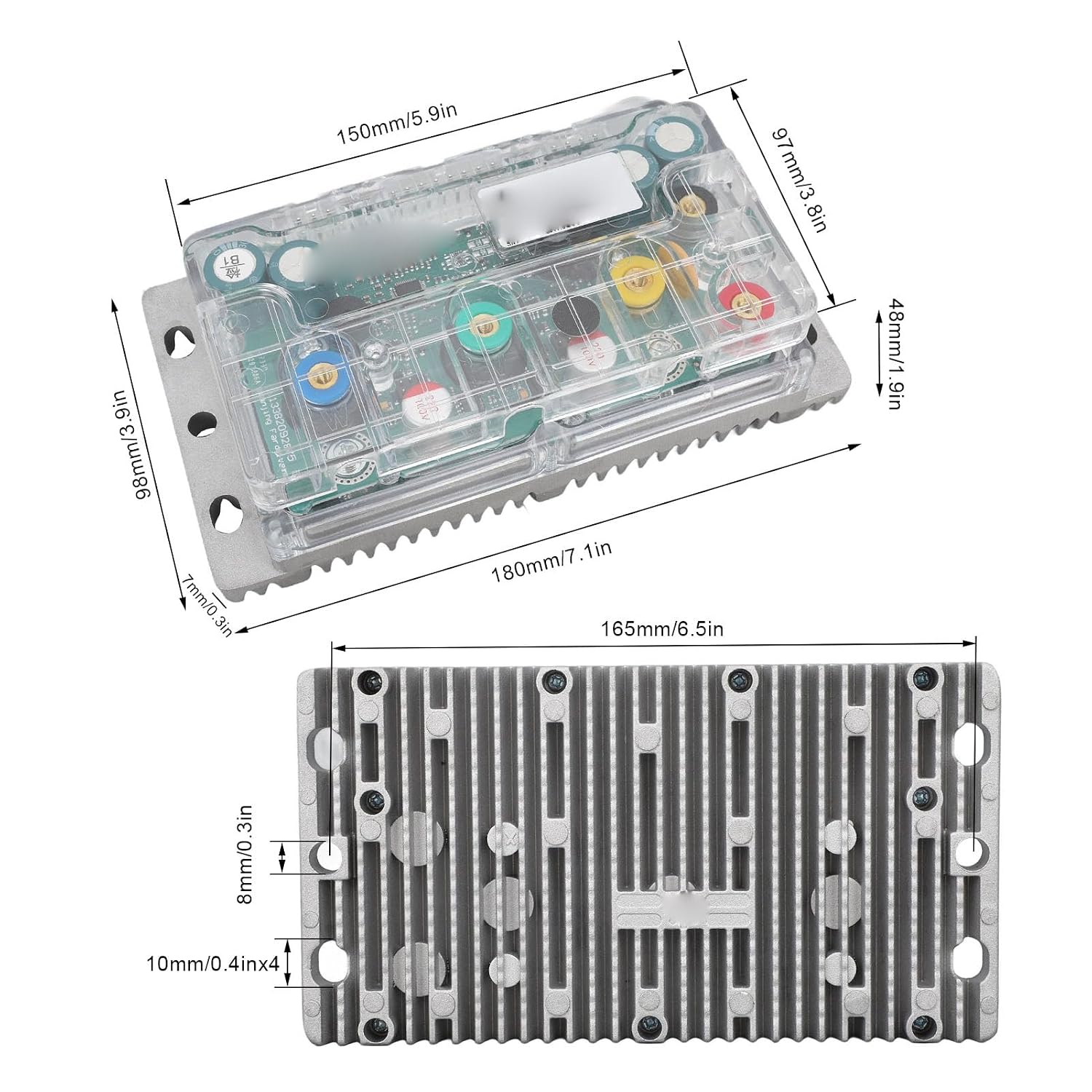
Image: Dimensional drawing of the controller, indicating measurements such as 180mm (7.1in) length, 97mm (3.8in) width, and 48mm (1.9in) height for the main unit, and 165mm (6.5in) length for the heat sink.
Package Contents
The package includes the following items:
- 1 x DC Brushless Motor Controller
- 2 x Wire Speeds
- 7 x Screws

Image: The complete wiring harness included with the controller, showing multiple color-coded wires and connectors for various functions.
Setup and Installation
Careful wiring is crucial for the correct function and safety of the controller. Refer to the diagram below for detailed connection instructions.

Image: Detailed wiring diagram for the controller. This image illustrates the connections for the handle wire, electric door lock, third speed wire, self-learning wire, brake wires, instrument cable, backup cable, S speed line, cruise line, computer debugging jack, and immobilizer cable.
Wiring Connections:
- Handle Wire (Black + Pink + Green): Black = negative, Pink = positive, Green = signal.
- Electric Door Lock Cable: Purple-grey wire.
- Third Speed Wire (Black + Black + Green + White): Black = negative, Green = low, White = high. Point: Black = negative, Black and White.
- Self-Learning Line (Yellow): After the plug is turned on, the motor automatically rotates. If it stops, reverse, then unplug the self-learning cable after learning.
- High Level Brake Wire: Purple wire.
- Low Level Brake Wire: Black + Black-grey wires.
- Instrument Cable: White wire. The latest protocol is first line sensing.
- Backup Cable: Black + Off-white wires.
- S Speed Line: Black + Yellow-white wires.
- Cruise Line (Brown): Connect to activate cruise mode. Click mode, need to open after full.
- Computer Debugging Jack: Bluetooth debugging plug.
- Immobilizer Cable: Red, Black, and Yellow wires.
- Hall Line: Multi-colored wires for Hall sensor connection.
Ensure all connections are secure and correctly matched to prevent damage to the controller or motor. If unsure, consult a qualified technician.
Operating Instructions
Once the controller is correctly installed and wired, follow these general steps for operation:
- Power On: Ensure all connections are secure before turning on the main power switch of your electric vehicle.
- Self-Learning (if applicable): If you have connected the self-learning line, follow the procedure described in the "Setup and Installation" section to calibrate the motor.
- Throttle Control: Use the throttle to control the motor speed. The controller will provide smooth and responsive power delivery.
- Braking: Apply brakes as needed. The controller supports both high and low-level brake signals.
- Speed Modes: If your vehicle supports multiple speed modes via the third speed wire, select the desired mode for optimal performance or efficiency.
- Cruise Function: If the cruise line is connected and activated, you can engage cruise control for consistent speed.
Always operate your electric vehicle responsibly and in accordance with local regulations.
Maintenance
To ensure the longevity and optimal performance of your DC Brushless Motor Speed Controller, consider the following maintenance guidelines:
- Regular Inspection: Periodically check all wiring connections for tightness and signs of wear or corrosion.
- Cleanliness: Keep the controller free from dust, dirt, and moisture. While the unit has an IP67 waterproof rating, excessive exposure to harsh conditions should be avoided. Use a soft, dry cloth for cleaning.
- Environmental Conditions: Operate and store the controller within recommended temperature and humidity ranges to prevent damage.
- Avoid Overloading: Do not exceed the specified voltage, current, or motor power ratings to prevent overheating and potential damage to the controller.
- Transparent Case: The transparent case allows for visual inspection of internal components. If any unusual signs (e.g., discoloration, burnt components) are observed, discontinue use and seek professional assistance.

Image: The GOTOTOP DC Brushless Motor Speed Controller, highlighting its transparent case and robust heat sink design. Regular visual inspection through the transparent case can help identify potential issues early.
Troubleshooting
If you encounter issues with your controller, consider the following basic troubleshooting steps:
- No Power: Check the main power supply, battery connections, and the electric door lock cable. Ensure all fuses are intact.
- Motor Not Responding: Verify the throttle connection and functionality. Check the Hall sensor connections and the motor phase wires. Ensure the self-learning process was completed successfully.
- Irregular Motor Operation: Re-check all wiring connections for looseness or incorrect pairing. Ensure the motor type (QS hub or mid-drive) is compatible.
- Brake Malfunction: Inspect the high and low-level brake wire connections.
- Overheating: Ensure the controller is mounted in a location with adequate airflow. Verify that the motor power does not exceed the controller's specifications.
If problems persist after performing these checks, it is recommended to consult a qualified technician or contact customer support.
Warranty and Support
For warranty information and technical support, please refer to the documentation provided with your purchase or visit the official GOTOTOP website. Keep your purchase receipt as proof of purchase for warranty claims.
Manufacturer: GOTOTOP
Brand Store: Visit the GOTOTOP Store on Amazon