
1. Introduction
Thank you for choosing the VBESTLIFE Portable AM/FM/SW Radio. This device offers versatile audio entertainment with AM, FM, and Shortwave radio reception, Bluetooth connectivity, USB playback, and TF card support. Designed for portability and ease of use, it features dual 5W speakers for clear stereo sound and a rechargeable battery for extended listening. Please read this manual carefully to ensure proper operation and maintenance of your radio.

Image: The VBESTLIFE portable radio highlighting its 4-in-1 functionality, including FM radio, Bluetooth streaming, USB playback, and memory card support.
2. Safety Information
- Do not expose the device to rain, moisture, or extreme temperatures.
- Avoid disassembling or modifying the radio, as this may void the warranty and pose safety risks.
- Keep the device away from strong magnetic fields.
- Use only the specified charging cable and power adapter to prevent damage.
- Clean the device with a soft, dry cloth. Do not use liquid cleaners.
3. Package Contents
Please check the package for the following items:
- VBESTLIFE Portable AM/FM/SW Radio
- USB Charging Cable
- User Manual

Image: The VBESTLIFE portable radio shown alongside its included USB charging cable.
4. Product Overview
Familiarize yourself with the various components of your radio:
- Antenna: Extendable for improved radio reception.
- Tuning Dial: Adjusts radio frequency.
- Volume Control: Adjusts audio output level.
- Mode Selector: Switches between AM, FM, SW, Bluetooth, USB, and TF card modes.
- USB Port: For USB drive playback.
- TF Card Slot: For TF (MicroSD) card playback.
- DC 5V Charging Port (Type-C): For recharging the internal battery.
- LED Indicator: Shows charging status or power on.

Image: A detailed view of the radio's control panel, showing the TF card slot, USB port, DC 5V charging port, LED indicator, and mode selector switch.
5. Setup
5.1 Battery Installation and Charging
The radio comes with a built-in rechargeable battery. Before first use, it is recommended to fully charge the battery.
- Locate the battery compartment on the back or bottom of the radio.
- If a removable battery is provided, ensure it is correctly inserted according to the polarity markings.
- Connect the supplied USB charging cable to the DC 5V Type-C port on the radio.
- Connect the other end of the USB cable to a compatible USB power adapter (not included) or a computer USB port.
- The LED indicator will illuminate during charging and turn off or change color when fully charged.
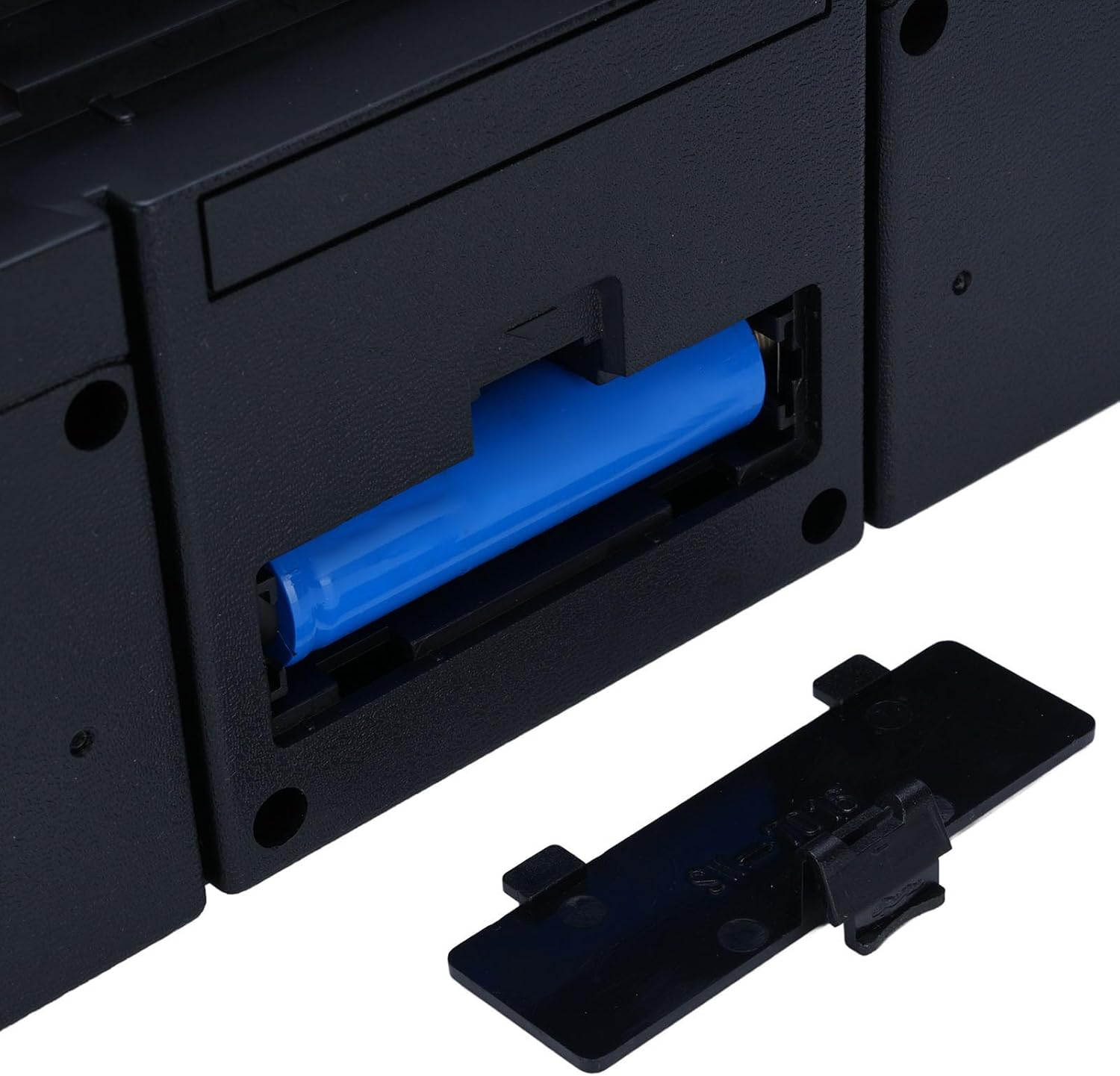
Image: The open battery compartment of the radio, showing a rechargeable battery inserted.
5.2 Initial Power On
After charging, turn the volume knob clockwise to power on the radio. The LED indicator will light up.
6. Operating Instructions
6.1 Power On/Off and Volume Control
- To power on, rotate the Volume Knob clockwise.
- To power off, rotate the Volume Knob counter-clockwise until it clicks.
- Adjust the volume by rotating the Volume Knob.
6.2 Mode Selection
Use the Mode Selector Switch to choose between different audio sources:
- AM: Amplitude Modulation radio band.
- FM: Frequency Modulation radio band.
- SW: Shortwave radio band.
- BT (Bluetooth): For wireless audio streaming from compatible devices.
- USB: For playing audio files from a USB flash drive.
- TF: For playing audio files from a TF (MicroSD) memory card.
6.3 Radio Tuning (AM/FM/SW)
- Extend the telescopic antenna for optimal reception, especially for FM and SW bands.
- Select the desired radio band (AM, FM, or SW) using the Mode Selector Switch.
- Rotate the Tuning Dial to scan for radio stations.
- Adjust the antenna position for the clearest signal.

Image: The portable radio depicted in multiple environments, illustrating its enhanced FM reception capabilities for clear sound without interference.
6.4 Bluetooth Pairing
- Switch the Mode Selector Switch to 'BT' (Bluetooth). The radio will enter pairing mode, indicated by an audible prompt or flashing LED.
- On your Bluetooth-enabled device (e.g., smartphone, tablet), enable Bluetooth and search for available devices.
- Select 'VBESTLIFE Radio' (or similar name) from the list of devices.
- Once paired, you will hear a confirmation sound, and you can now stream audio wirelessly to the radio.
6.5 USB/TF Card Playback
- Insert a USB flash drive into the USB Port or a TF (MicroSD) card into the TF Card Slot.
- Switch the Mode Selector Switch to 'USB' or 'TF' accordingly.
- The radio will automatically detect and begin playing audio files from the inserted storage device.
- Use the playback control buttons (if available) to skip tracks or pause/play.

Image: The portable radio being used in different locations, such as a living room, kitchen, and outdoors, demonstrating its versatility for enjoying music anywhere.
7. Maintenance
7.1 Cleaning
Wipe the exterior of the radio with a soft, dry, lint-free cloth. Do not use abrasive cleaners, waxes, or solvents.
7.2 Storage
When not in use for extended periods, store the radio in a cool, dry place away from direct sunlight and extreme temperatures. It is advisable to partially charge the battery every few months to maintain its lifespan.
7.3 Battery Care
To prolong battery life, avoid fully discharging the battery frequently. Recharge the battery when the low battery indicator appears or when audio quality degrades.
8. Troubleshooting
| Problem | Possible Cause | Solution |
|---|---|---|
| No power/Radio does not turn on | Battery is discharged; Power switch is off | Charge the battery; Turn the volume knob clockwise to power on |
| Poor radio reception | Antenna not extended; Weak signal area; Interference | Fully extend the antenna; Reposition the radio; Move away from electronic devices causing interference |
| No sound from Bluetooth/USB/TF | Incorrect mode selected; Volume too low; Device not paired (Bluetooth); File format not supported (USB/TF) | Select correct mode; Increase volume; Re-pair Bluetooth device; Ensure audio files are in a supported format |
| Bluetooth device cannot connect | Radio not in pairing mode; Device too far; Bluetooth off on source device | Ensure radio is in BT mode; Keep devices within range (approx. 10m); Enable Bluetooth on your source device |
9. Specifications
- Model Number: VBESTLIFE9aykfdh76g-12
- Power Output: Dual 5W Speakers
- Radio Bands: AM, FM, SW
- FM Frequency: 87-108 MHz
- AM Frequency: 522-1710 KHz
- SW Frequency: 5.6-22 MHz
- Connectivity: Bluetooth, USB, TF Card
- Power Source: Rechargeable Battery (AC/DC charging)
- Battery Life: Up to 8 hours (approx.)
- Product Dimensions: 9.44"L x 4.33"W x 4.33"H
- Item Weight: 1.84 pounds (835 Grams)

Image: The portable radio on a table, emphasizing its extended entertainment time with approximately 8 hours of playback.
10. Warranty and Support
This VBESTLIFE product is covered by a limited warranty. For specific warranty terms and conditions, please refer to the warranty card included with your purchase or contact your retailer. For technical support, troubleshooting assistance, or service inquiries, please contact VBESTLIFE customer service through the contact information provided on the product packaging or the official VBESTLIFE website.