
1. Introduction and Overview
This manual provides essential information for setting up, operating, maintaining, and troubleshooting your HIDevolution EVOC V5602B (V560TU) 16-inch laptop. Designed for high performance, this system features an Intel Core Ultra 7-255H processor, Intel ARC Graphics, 32 GB DDR5 RAM, and an 8 TB PCIe SSD, running on Windows 11 Pro.
HIDevolution ensures thorough quality control, including BIOS firmware and driver installation, burn-in stress testing, benchmark testing, and physical inspections, to deliver a reliable product.
2. Setup
2.1 Initial Power-On
Before first use, ensure the laptop is connected to a power source using the provided AC adapter. Open the laptop lid and press the power button, typically located above the keyboard or on the side. The system will guide you through the initial Windows 11 Pro setup process.
2.2 Connecting Peripherals
Utilize the available ports to connect external devices such as a mouse, external keyboard, monitor, or USB storage. The laptop includes multiple USB 3.0 ports for connectivity.

Image: Side view of the HIDevolution EVOC V5602B laptop, open, displaying its ports. This view emphasizes the thermal management with Gelid GC Extreme Compound for CPU and GPU.
3. Operating Instructions
3.1 Display and Visuals
The laptop features a 16-inch FHD+ (1920x1200) 60Hz wide view angle display with a matte finish to reduce glare. The Intel ARC Graphics card provides dedicated visual processing power.
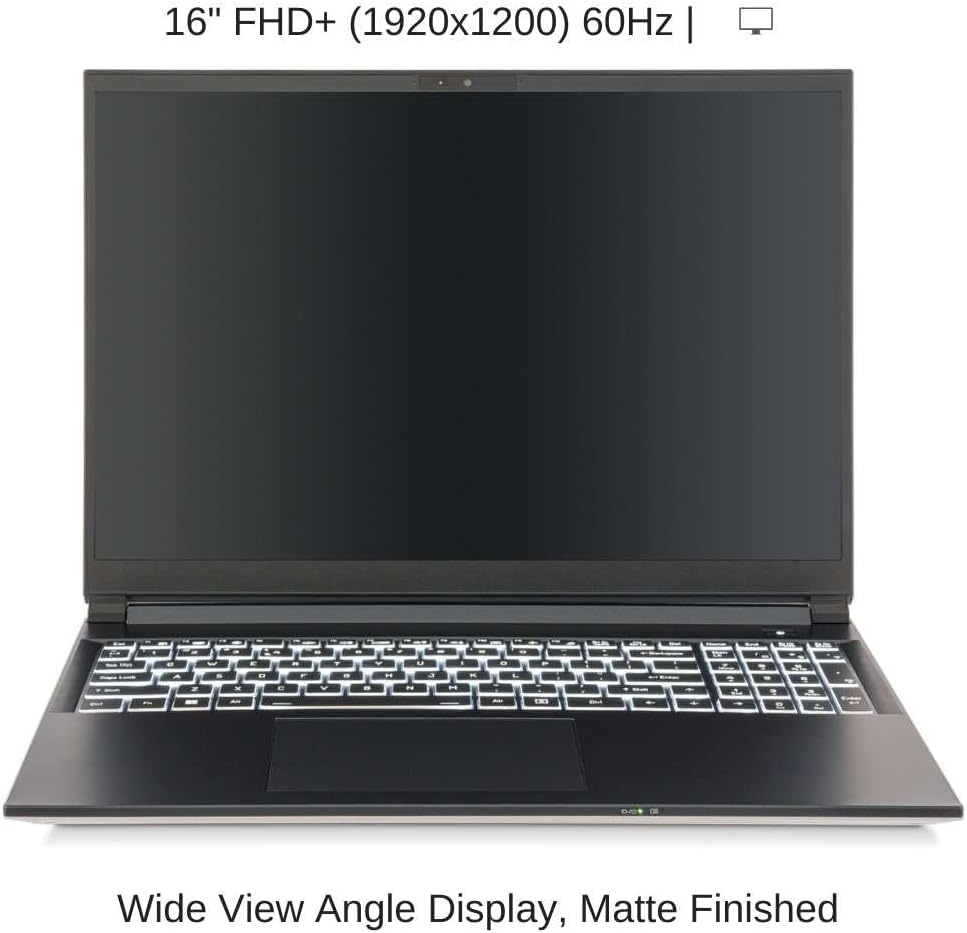
Image: Front view of the HIDevolution EVOC V5602B laptop, open, showcasing its 16-inch FHD+ wide view angle display with a matte finish.
3.2 Keyboard and Touchpad
The laptop is equipped with a multi-language, white-color illuminated full-size isolated keyboard, including a numeric pad. The integrated click pad supports Microsoft PTP multi-gesture and scrolling functions for intuitive navigation.
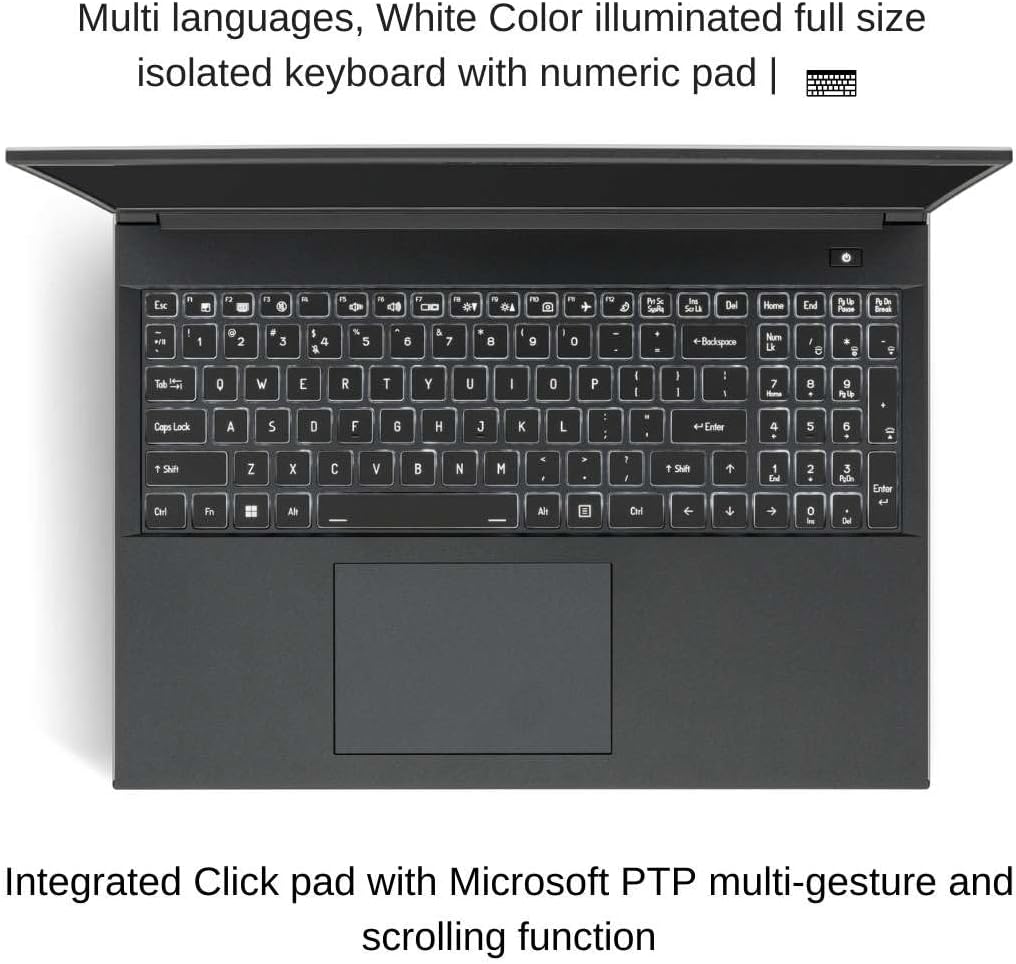
Image: Top-down view of the laptop's illuminated keyboard and integrated click pad, highlighting its multi-gesture capabilities.
3.3 Power Management
The system is powered by an embedded 73WH Polymer battery pack and can also operate via the AC adapter. Windows 11 Pro offers various power management settings to optimize battery life and performance.

Image: Side profile of the laptop, illustrating the screen's range of motion and indicating the embedded 73WH Polymer battery.
4. Maintenance
4.1 Thermal Management
Your HIDevolution laptop utilizes Gelid GC Extreme Thermal Interface Materials (TIM) on the CPU and GPU to ensure cooler system temperatures. To maintain optimal thermal performance, ensure ventilation openings are clear and avoid operating the laptop on soft surfaces that may block airflow.
4.2 Software Updates
Regularly update your operating system (Windows 11 Pro), drivers, and BIOS firmware to ensure system stability, security, and optimal performance. HIDevolution ensures the latest stable versions are installed upon delivery.
4.3 Cleaning
Use a soft, lint-free cloth to clean the screen and chassis. For stubborn marks, a slightly dampened cloth with water or a mild, non-abrasive cleaner suitable for electronics can be used. Avoid spraying liquids directly onto the laptop.
5. Troubleshooting
If you encounter issues with your laptop, consider the following basic troubleshooting steps:
- No Power: Ensure the AC adapter is securely connected to both the laptop and a working power outlet. Check the power indicator light.
- Display Issues: If the screen is blank, try connecting an external monitor to verify if the issue is with the laptop's display or graphics output. Restarting the system can often resolve temporary display glitches.
- Performance Slowdown: Close unnecessary applications, check for background processes consuming high resources, and ensure your system has sufficient free storage space. Regular software updates and maintenance can prevent performance degradation.
- Peripheral Not Detected: Ensure the peripheral is correctly plugged into the appropriate port. Try a different port or restart the laptop. Check the device manager in Windows for driver issues.
For persistent issues, refer to the Warranty and Support section for contact information.
6. Specifications
Detailed technical specifications for the HIDevolution EVOC V5602B (V560TU) laptop:
| Feature | Specification |
|---|---|
| Model Name | EVOC V5602B (V560TU) |
| Processor | Intel Core Ultra 7-255H (16 Core - 16 Thread, 2.0 GHz, Max Turbo 5.1 GHz, 24 MB Smart Cache) |
| Graphics | Intel ARC Graphics (Dedicated) |
| Display | 16-inch FHD+ (1920x1200) 60Hz, Wide View Angle, Matte Finished |
| RAM | 32 GB DDR5 5600MHz (2 x 16 GB) |
| Storage | 8 TB M.2 PCIe 4.0 x4 NVMe SSD (2 x 4 TB) |
| Operating System | Windows 11 Pro, 64-bit, English |
| Keyboard | Multi-language, White Color Illuminated, Full-size with Numeric Pad |
| Touchpad | Integrated Click Pad with Microsoft PTP multi-gesture |
| Battery | Embedded Polymer battery pack, 73WH |
| USB Ports | 3 x USB 3.0 Ports |
| Item Weight | 3.86 pounds |
| Product Dimensions | 14.1 x 10.18 x 0.71 inches |
7. Warranty and Support
Your HIDevolution EVOC V5602B (V560TU) laptop comes with a 1-Year EVOC Warranty. As an authorized EVOC Build to Order (BTO) dealer, HIDevolution provides an elevated level of service and product knowledge for both sales and support.
For any warranty claims, technical assistance, or support inquiries, please contact HIDevolution's expert support staff. They are available to assist with any questions or issues you may encounter.

Image: The HIDevolution Promise, highlighting authorized dealer status, quality testing, 1-year warranty, and expert support.
For additional customization options or specific inquiries, please reach out to HIDevolution directly.