
1. Introduction
The GK GAMAKAY x NaughShark NS68 is a 65% layout wired gaming keyboard designed for high-performance gaming. It features Hall Effect magnetic switches, rapid trigger technology, and a high polling rate for precise and responsive input.
Key Features:
- 0.01mm Rapid Trigger Accuracy: Detects minimal input for faster command execution.
- 8KHz Polling Rate: Achieves ultra-low latency of 0.125ms for competitive gaming.
- Adjustable Actuation Point: Customize key actuation from 0.1mm to 3.7mm in 0.01mm steps.
- Full Keys Hot-swappable: Allows for easy replacement of magnetic switches.
- Dynamic Keystroke (DKS): Assign up to four actions to a single keystroke.
- Snap Tap: Prioritize the latest input between two selected keys without releasing the previous one.
- 16.8 Million RGB Lighting: Customizable backlighting with 15 pre-set effects.
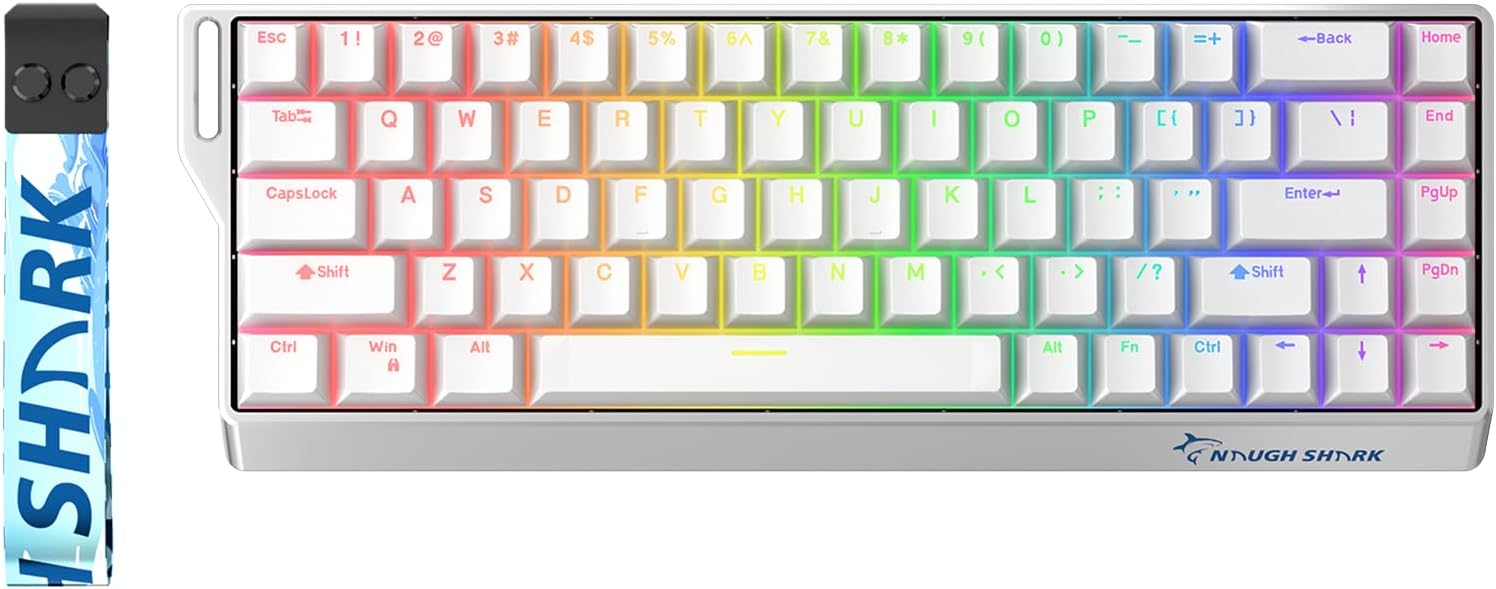
Image: The GK GAMAKAY x NaughShark NS68 wired gaming keyboard, showcasing its 65% layout and RGB backlighting.
2. Setup Guide
2.1 Package Contents
- GK GAMAKAY x NaughShark NS68 Gaming Keyboard
- USB-C Cable
- Keycap Puller (may vary by package)
- Switch Puller (may vary by package)
- User Manual (this document)
2.2 Connecting the Keyboard
- Locate the USB-C port on the back or side of the NS68 keyboard.
- Connect one end of the provided USB-C cable to the keyboard.
- Connect the other end of the USB-C cable to an available USB port on your computer (PC or Laptop).
- The keyboard will be automatically recognized by your operating system.
2.3 Software Installation (Gamakay Web Driver)
To unlock the full customization potential of your NS68 keyboard, download and install the Gamakay Web Driver software from the official GK GAMAKAY website. This software is compatible with both Mac and Windows operating systems.
- Visit the official GK GAMAKAY support page.
- Download the latest version of the NS68 software.
- Follow the on-screen instructions to complete the installation.

Image: Screenshot of the Gamakay Web Driver software interface, showing keyboard customization options.
3. Operating Features
3.1 Rapid Trigger (RT)
The NS68 features a highly accurate Rapid Trigger system with a 0.01mm actuation break and zero dead zone. This allows keys to register and reset with minimal movement, enabling faster repeated inputs and improved responsiveness in games.

Image: Illustration comparing the actuation and reset points of a traditional mechanical switch versus the rapid trigger mechanism.
3.2 Adjustable Actuation Point
Each Hall magnetic switch on the NS68 can have its actuation point adjusted from 0.1mm to 3.7mm in 0.01mm increments. This customization allows users to fine-tune the sensitivity of each key for specific tasks, from light touches for gaming to deeper presses for typing accuracy.

Image: Diagram illustrating the adjustable actuation range of the magnetic switches from 0.1mm to 3.7mm.
3.3 Snap Tap
Snap Tap functionality allows the keyboard to prioritize the latest input between two selected keys without requiring the release of the previous key. This feature is particularly useful in fast-paced games for quick directional changes.
Image: Visual representation of the Snap Tap feature, showing how key inputs are prioritized.
3.4 Dynamic Keystroke (DKS)
DKS enables the assignment of up to four different actions within a single keystroke. This provides advanced customization for complex commands or macros without automation, enhancing gameplay and productivity.

Image: Illustration demonstrating the Dynamic Keystroke (DKS) feature, showing multiple actions tied to a single key press.
3.5 RGB Lighting
The NS68 keyboard features 16.8 million RGB lighting colors and 15 pre-set lighting effects. The OEM ABS shine-through keycaps are designed to transmit light, enhancing the visual experience. Note that due to south-facing RGB backlighting, the shine-through effect may be more visible in darker environments.

Image: Close-up view of the NS68 keyboard showcasing its vibrant RGB backlighting through shine-through keycaps.
4. Software Customization (Gamakay Web Driver)
The Gamakay Web Driver software provides extensive customization options for your NS68 keyboard. After installation, launch the software to access the following settings:
- Custom Keys: Remap individual keys or assign new functions.
- Switch Settings: Adjust actuation points for each key, configure Rapid Trigger, Snap Tap, and DKS.
- Macro Editing: Create and manage complex macros for various applications.
- Light Settings: Customize RGB lighting effects, colors, and brightness.
- Advanced Keys: Configure Mod-Tap (MT) and Toggle Key (TGL) functions.

Image: The NS68 keyboard positioned in front of a monitor displaying the Gamakay Web Driver software, illustrating customization capabilities.
5. Maintenance
5.1 Cleaning the Keyboard
Regular cleaning helps maintain the keyboard's performance and appearance.
- Disconnect the keyboard from your computer before cleaning.
- Use a soft, lint-free cloth slightly dampened with water or a mild cleaning solution to wipe the keycaps and chassis.
- For dust and debris between keys, use compressed air.
- Avoid harsh chemicals or abrasive materials.
5.2 Hot-swappable Switches
The NS68 features full hot-swappability, allowing you to change switches without soldering. It supports Outemu Peach Crystal Magnetic Switches and other brands' magnetic switches (PS: N pole magnets).
- Using a switch puller, gently grip the switch from the top and bottom.
- Pull the switch straight up to remove it from the PCB.
- Align the pins of the new switch with the holes on the PCB.
- Press the new switch firmly until it clicks into place. Ensure it is seated correctly to avoid bent pins.

Image: A close-up showing a switch being removed from the keyboard using a switch puller, highlighting the hot-swappable feature.
6. Troubleshooting
6.1 Keyboard Not Responding
- Ensure the USB-C cable is securely connected to both the keyboard and the computer.
- Try connecting the keyboard to a different USB port on your computer.
- Test the keyboard on another computer to rule out system-specific issues.
- Restart your computer.
6.2 Chattering Keys or Ghosting
If you experience unintended key presses or keys registering multiple times, calibration may be required.
- Open the Gamakay Web Driver software.
- Navigate to the calibration settings (often found under 'Switch Settings' or 'Advanced Keys').
- Follow the on-screen instructions to recalibrate the affected keys or the entire keyboard.

Image: An illustration showing the keyboard and a graphic indicating how to fix chattering keys through software calibration, emphasizing accuracy and low latency.
6.3 RGB Lighting Not Working Correctly
- Ensure the Gamakay Web Driver software is running and updated.
- Check the 'Light Settings' section in the software to verify configurations.
- Try resetting the lighting effects to default within the software.
- Ensure no conflicting software is controlling RGB lighting.
7. Technical Specifications
| Feature | Detail |
|---|---|
| Model Name | NS68 |
| Brand | GK GAMAKAY |
| Keyboard Description | Magnetic Gaming Keyboard |
| Connectivity Technology | USB-C (Wired) |
| Compatible Devices | Laptop, PC |
| Special Features | 0.01mm Rapid Trigger (RT) Accuracy, Zero Dead Zone, 8000Hz Polling Rate, 0.125ms Ultra-Low Latency, Adjustable Actuation Points (0.1mm-3.7mm), Mod-Tap (MT), Toggle Key (TGL), Snap Tap, Dynamic Keystrokes (DKS) |
| Key Switch Type | Outemu Peach Crystal Magnetic Switch (Hot-swappable) |
| RGB Lighting | 16.8 Million Colors, 15 Pre-set Effects, South-facing RGB |
| Keycaps | ABS OEM Profile Shine-through keycaps |
| Layout | 65% Layout, 68 keys |
| Item Weight | 1.63 pounds (approx. 0.74 kg) |
| Package Dimensions | 14.65 x 5.59 x 2.32 inches (approx. 37.2 x 14.2 x 5.9 cm) |
| Date First Available | March 23, 2025 |
8. Warranty and Support
8.1 Warranty Information
GK GAMAKAY products typically come with a manufacturer's warranty. Please refer to the warranty card included with your product or visit the official GK GAMAKAY website for detailed warranty terms and conditions specific to the NS68 keyboard.
8.2 Customer Support
For technical assistance, troubleshooting, or general inquiries, please contact GK GAMAKAY customer support through their official website. You can often find FAQs, driver downloads, and contact information on their support pages.
Visit the GK GAMAKAY Store on Amazon for more product information and support resources.


