
Introduction
This manual provides comprehensive instructions for setting up, operating, and maintaining your BeiyoQSZ L106 4K Foldable Drone. Please read this guide thoroughly before your first flight to ensure safe operation and optimal performance. This drone features a 4K HD camera, brushless motors for stable flight, 60 minutes of flight time with three batteries, and is designed to be easy to fly for beginners.
What's in the Box
- BeiyoQSZ L106 4K Foldable Drone
- Remote Control
- 3 x Lithium Ion Batteries
- USB Charging Cable
- Screwdriver
- Screws
- Spare Fan Blades (Propellers)
- Instruction Manual (this document)

Image: All components included in the BeiyoQSZ L106 drone package, neatly arranged in its carrying case.
Setup Guide
1. Unfolding the Drone
Carefully unfold the drone arms until they lock into place. Ensure all four arms are fully extended before flight.

Image: The BeiyoQSZ L106 drone shown in its fully unfolded state, highlighting its readiness for operation.
2. Battery Installation & Charging
Insert a charged Lithium Ion battery into the designated slot at the rear of the drone. Ensure it clicks securely into place. Use the provided USB charging cable to charge batteries. The red indicator light on the battery will light up during charging and turn off when fully charged. Charging time is approximately 180 minutes. Do not overcharge.

Image: Multiple drone batteries connected to a USB charging station, indicating their charging status.
3. Remote Control Setup
Install 3 AA batteries (not included) into the remote control. Extend the phone holder if you plan to use your smartphone for FPV viewing.
Video: A detailed guide on setting up the drone, including remote control functions and initial preparations for flight.
4. App Installation & Connection (FPV)
Download the companion app (refer to the QR code in the printed manual or search for "BeiyoQSZ Drone" in your app store). Turn off your phone's cellular data, then connect to the drone's Wi-Fi network (usually named "BeiyoQSZ-XXXX"). Open the app to view the live FPV feed and access additional controls.
Video: Demonstrates the drone's features, including unfolding, battery insertion, and connecting to the mobile app for FPV viewing.
Operating Instructions
1. Pre-Flight Check & Calibration
Place the drone on a flat, level surface. Power on the drone and then the remote control. Push the left joystick up then down to pair the devices. Perform calibration by pressing the calibration button on the remote (refer to remote diagram in manual). The drone indicator lights will flash quickly then stay solid, indicating successful calibration.
2. Takeoff & Landing
One-Touch Takeoff/Landing: Press the dedicated takeoff/landing button on the remote for automatic ascent to a stable hover or gentle descent.
Manual Takeoff: Simultaneously pull both outer joysticks downward in a "V" shape to unlock and start the aircraft. Slowly push the left joystick up to ascend.
3. Basic Flight Controls
- Left Joystick: Controls altitude (up/down) and rotation (left/right).
- Right Joystick: Controls forward/backward and left/right strafing movements.
- Headless Mode: Press the Headless Mode button. The drone will orient itself relative to the pilot, simplifying controls regardless of the drone's front direction.
- 3-Speed Modes: Toggle between Low, Medium, and High speeds using the speed button on the remote to match your skill level and environment.
- 360° Flips: Press the 360° Flip button and move the right joystick in the desired direction for an acrobatic flip.
Image: The drone showcasing different flight features such as Headless Mode, Gesture Photography, Waypoint Fly, and 3 Speed Modes.
4. Camera Operation
4K HD Camera: Capture stunning high-resolution photos and crisp videos at 3840 x 2160 resolution. The 130° FOV lens provides a wide field of view.
Adjustable Lens: The camera lens can be adjusted 90° up or down via the remote control or app for optimal viewing angles.
FPV Transmission: Utilize the 5GHz FPV transmission for ultra-smooth real-time video streaming to your smartphone.
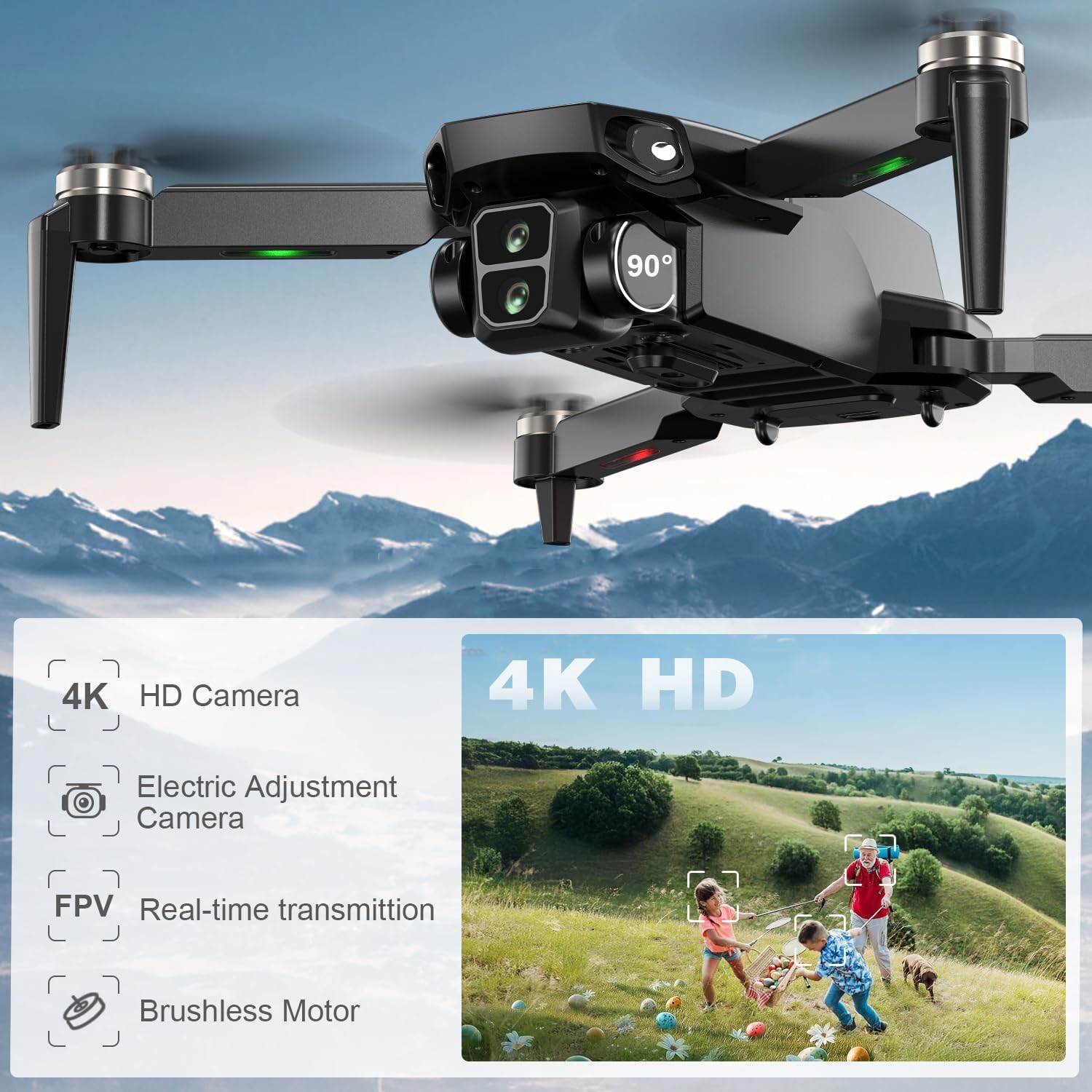
Image: Close-up of the drone's camera features, including 4K HD resolution, electric adjustment, FPV, and brushless motor technology.

Image: Illustration of the drone's dual cameras and 90° electric adjustment feature, showing perspectives from both front and bottom cameras.
5. Smart Flight Features
- Gesture Photography: Use specific hand gestures (e.g., "V" sign for photos, palm for video) in front of the camera to trigger photo or video capture.
- Waypoint Fly: Draw a flight path on the app screen, and the drone will automatically follow it.
- Smart Child Lock Safe Take Off: To activate, simultaneously pull both outer joysticks downward in a "V" shape to unlock and start the aircraft, preventing accidental launches.
Video: A flight test demonstrating the drone's stability and maneuverability in an outdoor setting.
Maintenance
1. Propeller Replacement
If a propeller is damaged, use the provided screwdriver to carefully remove the old propeller and install a new one. Ensure the correct propeller (A or B) is installed on the corresponding arm, as indicated by markings on the propellers and drone arms.
2. Battery Care
Always use UL-certified batteries. Avoid overcharging. Store batteries in a cool, dry place when not in use. For optimal battery life, do not fully discharge batteries before recharging.
3. General Cleaning
Wipe the drone with a soft, dry cloth after use. Avoid exposing the drone to water or extreme temperatures.
Troubleshooting
- Drone not responding: Ensure both the drone and remote control are powered on and properly paired. Recalibrate if necessary.
- Poor video quality/FPV connection: Check your phone's Wi-Fi connection to the drone. Ensure there are no obstructions between the drone and your phone. Avoid areas with strong signal interference.
- Unstable flight: Perform a full calibration of the drone. Check for damaged propellers and replace if needed. Ensure flight is in calm weather conditions.
- Drone crashes frequently: Practice in open areas. Utilize propeller guards (if available for this model) for indoor or beginner flights.
Specifications
| Feature | Detail |
|---|---|
| Brand | BeiyoQSZ |
| Model Name | BeiyoQSZ 4K Foldable Drone |
| Model Number | L106 |
| Video Capture Resolution | 4K |
| Effective Still Resolution | 8 MP |
| Connectivity Technology | Wi-Fi |
| Special Feature | 360 Degree Flip, Headless Mode, Altitude Hold, Brushless Motor |
| Flight Time | Up to 60 minutes (with 3 batteries) |
| Item Weight | 1.1 pounds (under 250g) |
| Material | Plastic |
Warranty & Support
For warranty information or technical support, please contact BeiyoQSZ customer service. Refer to the contact details provided in the original product packaging or on the official BeiyoQSZ website.
Email: Beiyoqsz@outlook.com (USA)