
1. Introduction
This manual provides detailed instructions for the safe and efficient operation of your HVGZDQQD RD6030 Adjustable DC Power Supply. The RD6030 is a high-performance, step-down regulated power supply designed for various applications requiring precise voltage and current control. Please read this manual thoroughly before use to ensure proper functionality and to prevent damage to the device or connected equipment.
2. Safety Instructions
- Power Source: Ensure the input power supply voltage and current are within the specified limits (7-70V input). Using an incorrect power source can damage the device.
- Ventilation: Operate the power supply in a well-ventilated area to prevent overheating. Do not block ventilation openings.
- Environment: Avoid operating the device in environments with high humidity, dust, or corrosive gases.
- Connections: Always ensure all connections are secure and correct before applying power. Incorrect wiring can cause short circuits or damage.
- Grounding: For safety, ensure the power supply is properly grounded if applicable.
- Maintenance: Do not attempt to disassemble or repair the device yourself. Refer all servicing to qualified personnel.
- Output Terminals: Avoid touching the output terminals when the device is powered on. High voltage and current can be present.
3. Product Overview
The HVGZDQQD RD6030 is a versatile DC power supply featuring a clear display and intuitive controls for precise voltage and current regulation. It supports USB communication for remote control and data logging.
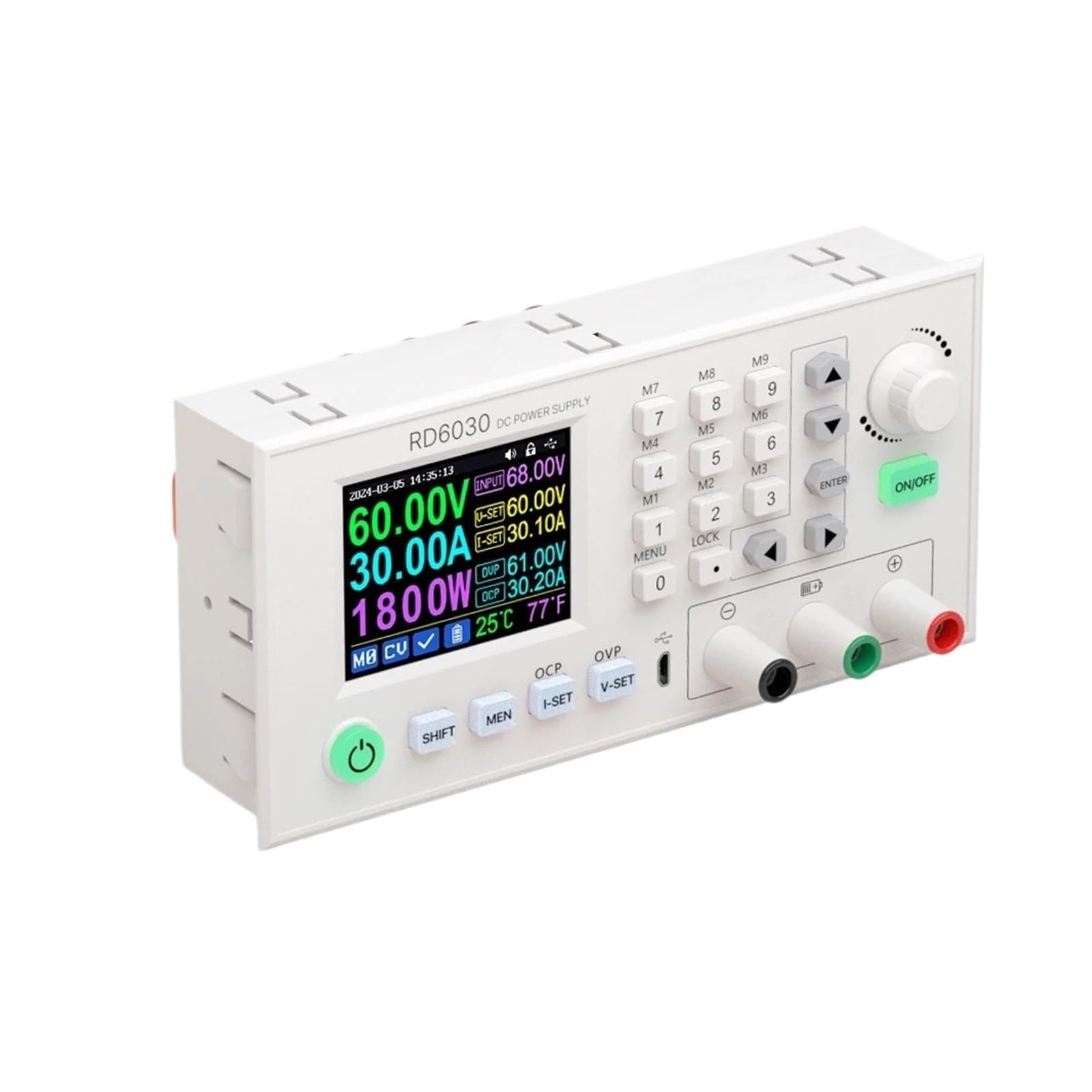
Figure 1: Front panel of the HVGZDQQD RD6030 DC Power Supply. The display shows input voltage (68.00V), set output voltage (60.00V), set output current (30.10A), actual output voltage (60.00V), actual output current (30.20A), output power (1800W), and internal temperature (25°C/77°F). Controls include a rotary encoder, numerical keypad (0-9), memory buttons (M1-M9), navigation buttons, ON/OFF, SHIFT, MENU, LOCK, I-SET, V-SET, OCP, OVP, and a power button. Output terminals are visible on the right, along with a USB communication port.
Key Features:
- Adjustable Output Voltage: 0-60.00V
- Adjustable Output Current: 0-30.00A
- Maximum Output Power: 1800W
- Input Voltage Range: 7-70.00V
- High-resolution LCD display
- USB Communication interface
- Over Current Protection (OCP) and Over Voltage Protection (OVP)
- Memory storage for frequently used settings (M1-M9)
4. Setup
- Unpacking: Carefully remove the power supply from its packaging and inspect for any signs of damage.
- Placement: Place the unit on a stable, flat surface, ensuring adequate ventilation around the device.
- Input Power Connection: Connect a suitable DC power source (7-70V) to the input terminals on the rear of the unit. Ensure correct polarity (+ to + and - to -). Note: The input power supply is not included.
- Output Connection: Connect your load to the output terminals on the front panel (red for positive, black for negative). Ensure the load's voltage and current requirements are within the RD6030's output range.
- Initial Power On: Press the main power switch (usually on the rear or side) to power on the unit. The display should illuminate.
5. Operating Instructions
5.1 Setting Voltage and Current
- Set Voltage (V-SET): Press the V-SET button. The voltage setting will blink on the display. Use the rotary encoder or the numerical keypad (0-9) to adjust the desired voltage. Press ENTER to confirm.
- Set Current (I-SET): Press the I-SET button. The current setting will blink. Use the rotary encoder or numerical keypad to adjust the desired current limit. Press ENTER to confirm.
- Output ON/OFF: Press the green ON/OFF button to enable or disable the output. When enabled, the output voltage and current will be supplied to the load.
5.2 Memory Functions (M1-M9)
- Saving Settings: Set the desired voltage and current. Press and hold the SHIFT button, then press one of the memory buttons (M1-M9) to save the current settings to that memory slot.
- Recalling Settings: Press one of the memory buttons (M1-M9) to recall the saved settings from that slot.
5.3 Protection Functions (OCP/OVP)
- Over Current Protection (OCP): Press the OCP button to enable/disable or adjust the over current protection limit. When enabled, the output will shut down if the current exceeds the set limit.
- Over Voltage Protection (OVP): Press the OVP button to enable/disable or adjust the over voltage protection limit. When enabled, the output will shut down if the voltage exceeds the set limit.
5.4 USB Communication
The RD6030 features a USB communication port for connecting to a computer. This allows for remote control, data logging, and firmware updates. Refer to the separate software manual or manufacturer's website for detailed instructions on using the USB interface and compatible software.
6. Maintenance
- Cleaning: Use a soft, dry cloth to clean the exterior of the power supply. Do not use abrasive cleaners or solvents.
- Ventilation: Periodically check that the ventilation openings are clear of dust and debris.
- Storage: When not in use for extended periods, store the device in a cool, dry place away from direct sunlight.
7. Troubleshooting
| Problem | Possible Cause | Solution |
|---|---|---|
| No display/No power | Input power not connected or faulty; main power switch off. | Check input power connections and ensure the main power switch is on. Verify input voltage. |
| No output voltage/current | Output is disabled; OCP/OVP triggered; incorrect settings. | Press the ON/OFF button to enable output. Check OCP/OVP settings. Verify V-SET and I-SET values. |
| Output unstable or incorrect | Poor output connections; load issue; device malfunction. | Check output wiring. Test with a different load. If problem persists, contact support. |
8. Specifications
- Model: RD6030
- Input Voltage Range: 7-70.00V
- Output Voltage Range: 0-60.00V
- Output Current Range: 0-30.00A
- Output Power Range: 0-1800W
- Item Weight: 200 Grams
- Communication: USB
9. Warranty and Support
For warranty information, technical support, or service inquiries, please contact the manufacturer, HVGZDQQD, or your authorized dealer. Please have your product model number (RD6030) and purchase details ready when contacting support.
Manufacturer: HVGZDQQD