1. Introduction
Welcome to the user manual for your EARFORU M62 V5.46 Wireless Earphone Translators. These earbuds are designed to provide real-time language translation, high-quality audio, and comfortable wear for various activities. This manual will guide you through the setup, operation, maintenance, and troubleshooting of your device to ensure optimal performance.
2. Package Contents
Please verify that all items are present in your package:
- EARFORU M62 V5.46 Wireless Earphone Translators (Left and Right Earbuds)
- Wireless Charging Case
- USB Charging Cable
- User Manual (This document)
3. Product Overview
The EARFORU M62 V5.46 earbuds combine advanced audio technology with real-time translation capabilities. They feature an ergonomic design for comfortable, open-ear wear, Bluetooth 5.3 for stable connectivity, and a charging case with a digital display for battery status.

Image 3.1: EARFORU M62 V5.46 Wireless Earphone Translators and Charging Case. The image shows the black earbuds with an open-ear design, nestled in their charging case, which features a digital battery display. A person is visible in the background, suggesting comfortable use while reading.
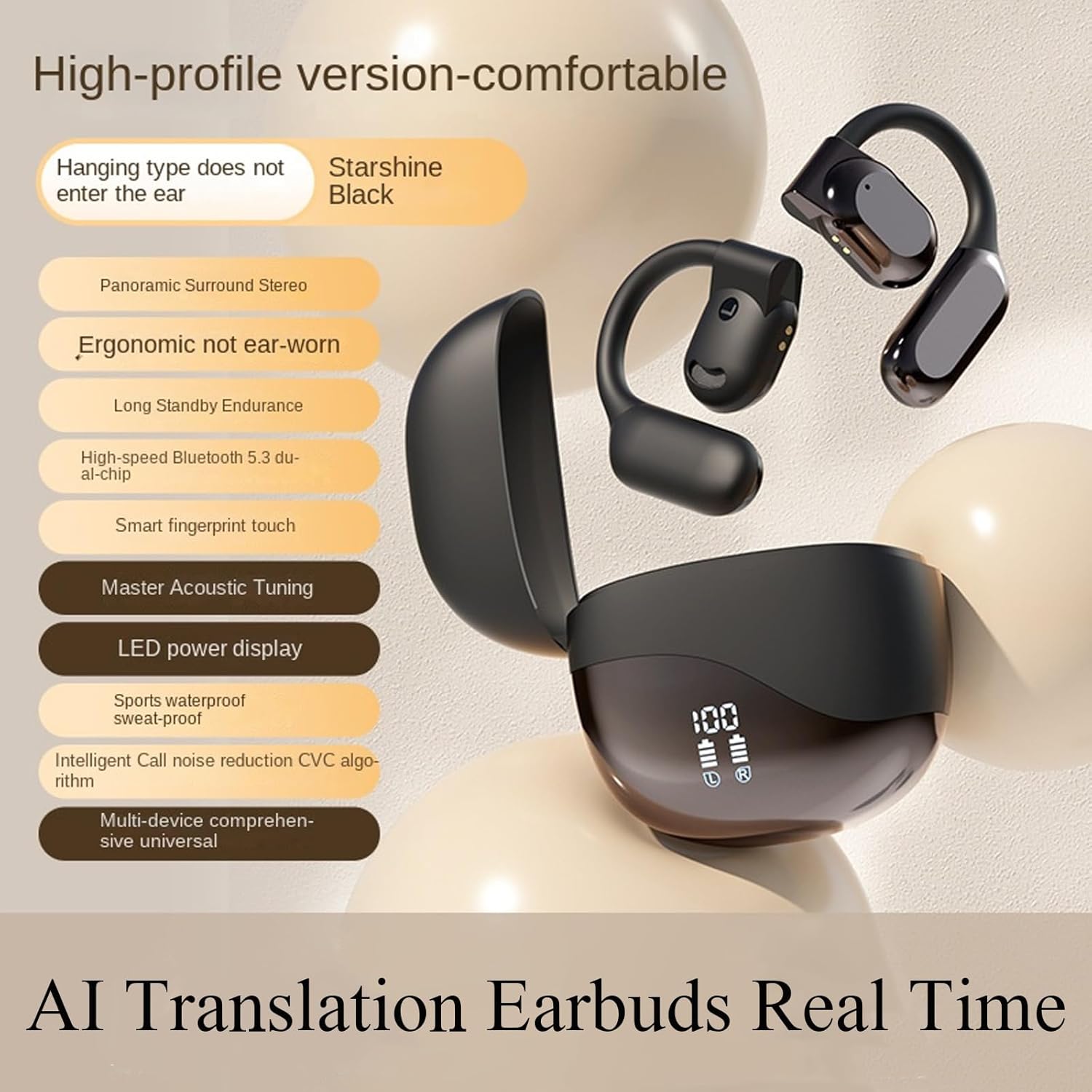
Image 3.2: Key features of the EARFORU M62 V5.46 Earbuds. This graphic highlights features such as panoramic surround stereo, ergonomic design, long standby endurance, high-speed Bluetooth 5.3, smart fingerprint touch, master acoustic tuning, LED power display, sports waterproof, intelligent call noise reduction, and multi-device compatibility.

Image 3.3: Internal components of an EARFORU M62 V5.46 earbud. The image provides an exploded view, showcasing the internal structure and sound drivers, emphasizing the wireless 5.3 technology.
4. Setup
4.1 Charging the Earbuds and Case
Before first use, fully charge the earbuds and the charging case.
- Place the earbuds into the charging case. Ensure they are correctly seated.
- Connect the USB charging cable to the charging port on the case and to a compatible USB power source (e.g., computer, wall adapter).
- The digital display on the charging case will show the current battery level and charging status.
- A full charge for the case typically takes approximately 1.5 hours. The earbuds charge while inside the case.

Image 4.1: The EARFORU M62 V5.46 charging case connected to a USB cable, displaying its HD digital battery level. The image indicates a usage duration of 6 hours for earbuds, 58 hours with the charging case, and a charging duration of 1.5 hours for the case.
4.2 Bluetooth Pairing
To connect your earbuds to a device:
- Ensure the earbuds are charged and removed from the charging case. They will automatically enter pairing mode.
- On your smartphone, tablet, or laptop, enable Bluetooth.
- Search for available Bluetooth devices. Select "M62 V5.46" (or similar name) from the list.
- Once connected, you will hear an audio prompt, and the earbuds will be ready for use.

Image 4.2: EARFORU M62 V5.46 earbuds shown alongside an iPhone and an Android smartphone, illustrating their compatibility with both iOS and Android operating systems for seamless pairing and use.
4.3 Translation Application
The real-time translation feature requires a dedicated application. Please refer to the product packaging or the manufacturer's official website for information on the recommended translation application and its installation instructions. Ensure the app is installed and configured correctly on your paired device for translation functionality.
5. Operating Instructions
The EARFORU M62 V5.46 earbuds feature touch controls for various functions.
5.1 Basic Audio Controls
- Play/Pause: Single tap on either earbud.
- Next Track: Double tap on the right earbud.
- Previous Track: Double tap on the left earbud.
- Volume Up: Triple tap on the right earbud.
- Volume Down: Triple tap on the left earbud.
5.2 Call Management
- Answer/End Call: Single tap on either earbud during an incoming call.
- Reject Call: Press and hold either earbud for 2 seconds during an incoming call.
5.3 Voice Assistant
- Activate Voice Assistant: Press and hold either earbud for 3 seconds.
5.4 Real-Time Translation
To utilize the real-time translation feature:
- Ensure the earbuds are paired with your device and the dedicated translation application is running.
- Follow the specific instructions within the translation application to select languages and initiate translation mode.
- The earbuds will transmit your speech for translation and play back the translated audio.

Image 5.1: A user wearing EARFORU M62 V5.46 earbuds while working on a laptop, with speech bubbles illustrating real-time language translation between English and another language. This demonstrates the earbuds' primary function as a language translator.

Image 5.2: An illustration of the EARFORU M62 V5.46's directional voice transmission technology, showing sound waves directed into the ear. This feature aims to protect privacy by minimizing sound leakage and ensuring efficient audio delivery.
6. Maintenance
6.1 Cleaning
- Gently wipe the earbuds and charging case with a soft, dry, lint-free cloth.
- Do not use abrasive cleaners, alcohol, or chemical solvents.
- Avoid getting moisture into any openings.
6.2 Storage
- Store the earbuds in their charging case when not in use to protect them and keep them charged.
- Store in a cool, dry place, away from extreme temperatures and direct sunlight.
6.3 Battery Care
- To prolong battery life, avoid fully discharging the earbuds and charging case frequently.
- Charge the device regularly, even if not used for extended periods.
7. Troubleshooting
If you encounter issues with your EARFORU M62 V5.46 earbuds, please refer to the following common solutions:
| Problem | Possible Solution |
|---|---|
| Earbuds not pairing |
|
| No sound from earbuds |
|
| Charging case not charging |
|
| Translation feature not working |
|
8. Specifications
| Feature | Detail |
|---|---|
| Model | M62 V5.46 |
| Brand | EARFORU |
| Connectivity Technology | Wireless (Bluetooth 5.3) |
| Noise Control | Sound Isolation |
| Frequency Range | 20 Hz - 20,000 Hz |
| Usage Duration (Earbuds) | Up to 6 hours |
| Total Usage Duration (with Case) | Up to 58 hours |
| Charging Duration (Case) | Approx. 1.5 hours |
| Material | Plastic |
| Item Weight | 3.84 ounces |
| Compatible Devices | Cellphones, Tablets, Laptops |
| Control Method | Touch |
| Ear Placement | Open Ear |
9. Warranty and Support
EARFORU products are designed for reliability and performance. For specific warranty information, please refer to the warranty card included with your product or visit the official EARFORU website. If you experience any issues or require technical assistance, please contact EARFORU customer support through their official channels.
For further assistance, you may visit the EARFORU Brand Store on Amazon.