1. Introduction
This manual provides instructions for the proper installation, use, and maintenance of your BOVUGAC Soft Silicone Tablet Case. This case is designed to offer robust protection and enhanced functionality for compatible 10-inch Android tablets.

Figure 1.1: BOVUGAC Soft Silicone Tablet Case with a tablet installed.
2. Compatibility
This BOVUGAC tablet case is specifically designed for the following 10-inch Android tablet models:
- BNCF Bpad 10
- PYNAREL P60
- HAOVM V5
Please verify your tablet model before installation to ensure proper fit and function. This case is not compatible with other tablet models.
3. Key Features
- Soft Silicone Material: Constructed from high-quality soft silicone for a comfortable grip and enhanced durability.
- Shockproof Design: Features reinforced corners and a robust structure to protect against drops and impacts.
- Heat Dissipation: The mesh pattern on the back cover promotes air circulation to help prevent tablet overheating during extended use.
- Adjustable Stand: Integrated kickstand allows for multiple viewing and typing angles.
- Precise Cutouts: Ensures easy access to all ports, buttons, and camera without removing the case.
- Capacitive Pen: Includes a capacitive pen for improved tablet interaction.
4. Setup and Installation
Follow these steps to properly install your tablet into the BOVUGAC case:
- Ensure your tablet is clean and free of dust or debris.
- Gently align the tablet with the case, starting with one corner.
- Carefully press the tablet into the case, ensuring all edges and corners are securely seated within the silicone frame.
- Verify that all ports, buttons, and the camera lens are correctly aligned with the case's cutouts.
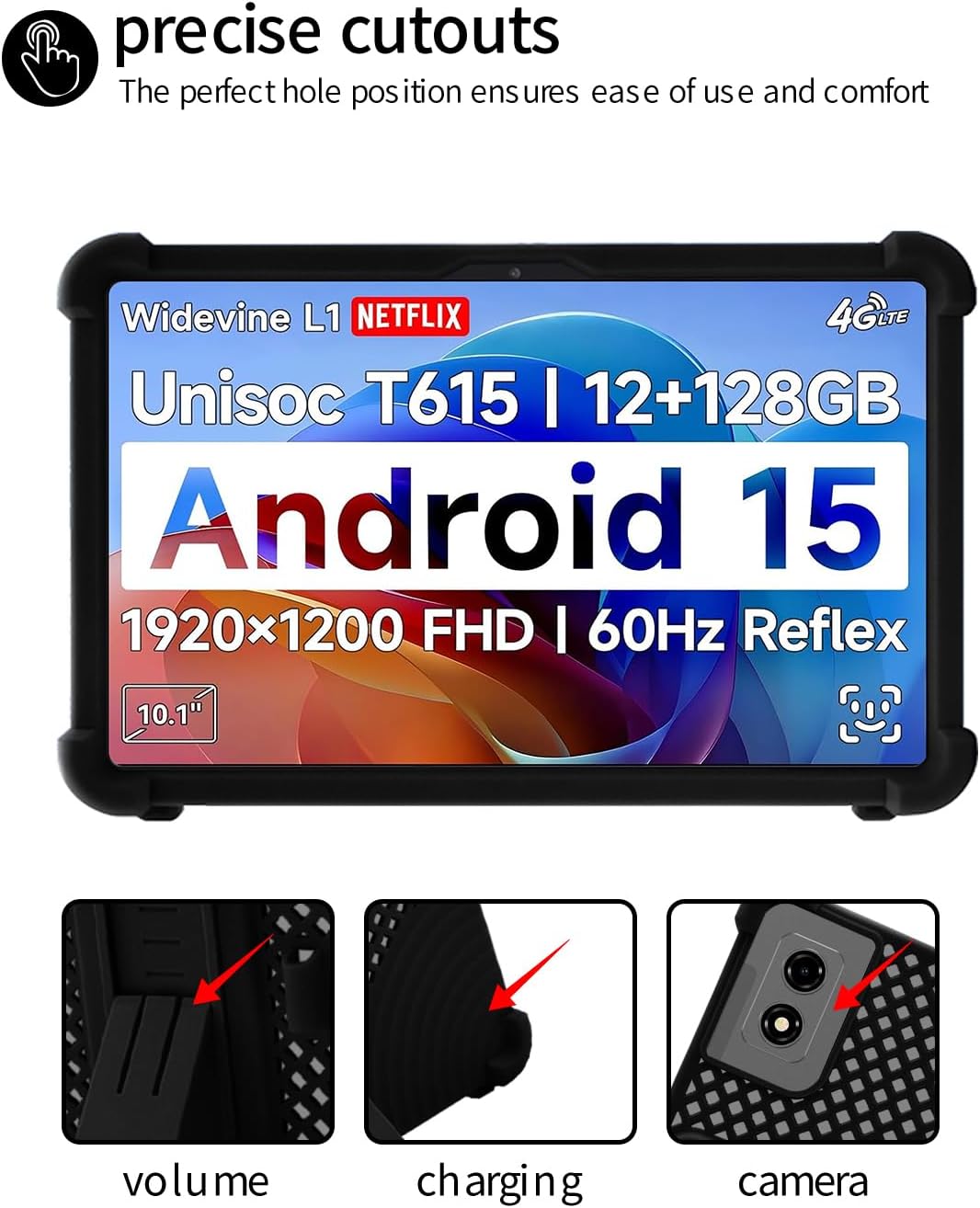
Figure 4.1: Precise cutouts for tablet functions, including volume, charging port, and camera.
5. Operating Instructions
5.1 Using the Adjustable Stand
The integrated kickstand allows for hands-free viewing and typing. To deploy the stand:
- Locate the kickstand on the back of the case.
- Gently pull the stand outwards until it clicks into position.
- Adjust the stand to your desired viewing or typing angle.
- To retract, push the stand back into its recess until it lies flat against the case.

Figure 5.1: The folding kickstand provides stable viewing and typing angles.
5.2 Using the Capacitive Pen
The included capacitive pen can be used for precise navigation, drawing, and writing on your tablet's touchscreen. Simply use the pen as you would your finger. Store the pen in the designated holder on the case when not in use.
6. Maintenance and Care
To keep your BOVUGAC tablet case in optimal condition:
- Cleaning: Wipe the case with a soft, damp cloth. For stubborn dirt, a mild soap solution can be used. Ensure the case is completely dry before re-installing your tablet.
- Avoid Harsh Chemicals: Do not use abrasive cleaners, solvents, or strong chemicals, as these can damage the silicone material.
- Storage: Store the case in a cool, dry place away from direct sunlight when not in use.

Figure 6.1: The case material is designed to be waterproof, flexible, and breathable for heat dissipation.
7. Troubleshooting
- Case Does Not Fit: Double-check your tablet's model number against the compatible models listed in Section 2. If your model is not listed, the case is not compatible.
- Buttons Are Stiff/Unresponsive: Ensure the tablet is correctly seated within the case and that the case's button covers are aligned with the tablet's buttons.
- Tablet Overheating: While the case has a heat dissipation design, prolonged heavy use can still generate heat. Ensure the mesh back is not obstructed. If overheating persists, remove the tablet from the case to allow it to cool.

Figure 7.1: The case offers drop resistance and anti-scratch protection with reinforced corners.
8. Specifications
| Feature | Detail |
|---|---|
| Brand | BOVUGAC |
| Model Number | Bpad 10 (Compatible with BNCF Bpad 10, PYNAREL P60, HAOVM V5) |
| Color | Black |
| Material | Soft Silicone |
| Form Factor | Case |
| Special Features | Adjustable Stand, Shockproof, Heat Dissipation Design, Precise Cutouts, Kids Friendly |
9. Warranty and Support
For warranty information or technical support, please contact BOVUGAC customer service through the retailer where the product was purchased. Please have your purchase details and product model number ready when contacting support.