
1. Product Overview
The Varstrom Mid Drive Motor Kit is designed to convert standard bicycles into electric bikes, offering enhanced power and a natural riding experience through its integrated torque sensor technology. This manual provides essential information for the installation, operation, and maintenance of the TSDZ-2B, TSDZ8, and TSDZ16 models.
Key Features:
- Torque Sensor Technology: Provides a smooth and intuitive pedal assist by detecting rider effort.
- Mid-Drive Motor Configuration: Positioned at the bottom bracket for balanced weight distribution, improved handling, and efficient power transfer.
- Universal Fit: Compatible with 68-73mm bottom brackets, suitable for a wide range of mountain and road bicycles.
- Durable Construction: Components are designed for long-lasting performance in various riding conditions.

Image 1.1: Comparison of TSDZ-2B, TSDZ8, and TSDZ16 motor specifications including power, torque, speed, and waterproof rating.
2. Packing List
Verify that all components are present in your kit before beginning installation.

Image 2.1: Visual representation of the components included in the Varstrom Mid Drive Motor Kit, such as the motor, display, throttle, cables, crank arms, speed sensor, and optional battery.
- Mid Drive Motor (TSDZ-2B, TSDZ8, or TSDZ16)
- Display (EKD01, DZ40, SW2-58, VD04, or VD18MT - optional)
- Battery (Optional)
- Brake Levers OR Brake Sensors
- Thumb Throttle
- Cranks
- Chainwheel (44T/46T)
- Speed Sensor & Magnets
- 1T4 Wiring Harness
- Lock Nuts & Mounting Accessories
3. Installation Guide
Follow these steps carefully to install your Varstrom Mid Drive Motor Kit. Professional installation is recommended if you are unfamiliar with bicycle mechanics.
3.1 Motor Installation
Ensure your bicycle's bottom bracket is clean and compatible (68-73mm width).
- Insert the motor into the bottom bracket shell from the drive side.
- Ensure proper alignment and clearance with the chainstay. If needed, use the provided washers and longer screws for the fixing plate.
- Install the fixing plate and tighten the fixing nut to 40Nm.
- Secure the motor with the additional screws.
3.2 Speed Sensor Installation
Mount the speed sensor on the non-drive side chainstay. The magnet should be installed on a spoke of the rear wheel.
- Attach the speed sensor to the chainstay using zip ties or appropriate fasteners.
- Install the magnet on a spoke of the rear wheel.
- Adjust the sensor and magnet position so that the gap between them is 10-15mm.
3.3 Cranks and Chainwheel Installation
Install the crank arms and chainwheel onto the motor spindle.
- Attach the chainwheel to the motor.
- Install the left and right crank arms, ensuring they are securely fastened.
- Route the bicycle chain correctly around the chainwheel and rear cassette.
3.4 Wiring Connections
Connect all components to the motor using the provided 1T4 wiring harness.

Image 3.1: Diagram illustrating the motor connector and wiring for the speed sensor, battery, shift sensor (if applicable), brake levers/sensors, thumb throttle, and display.
- Connect the speed sensor cable.
- Connect the battery cable.
- Connect the brake levers or brake sensors.
- Connect the thumb throttle.
- Connect the display unit.
- Ensure all connections are secure and waterproof.
Video 3.1: This video demonstrates the installation process for the Tongsheng Mid Drive Motor kit, covering motor mounting, speed sensor placement, and crank installation.
4. Operating Instructions
Familiarize yourself with the display and controls before riding.
4.1 Display Functions
The display unit provides essential information and control over the motor's functions.
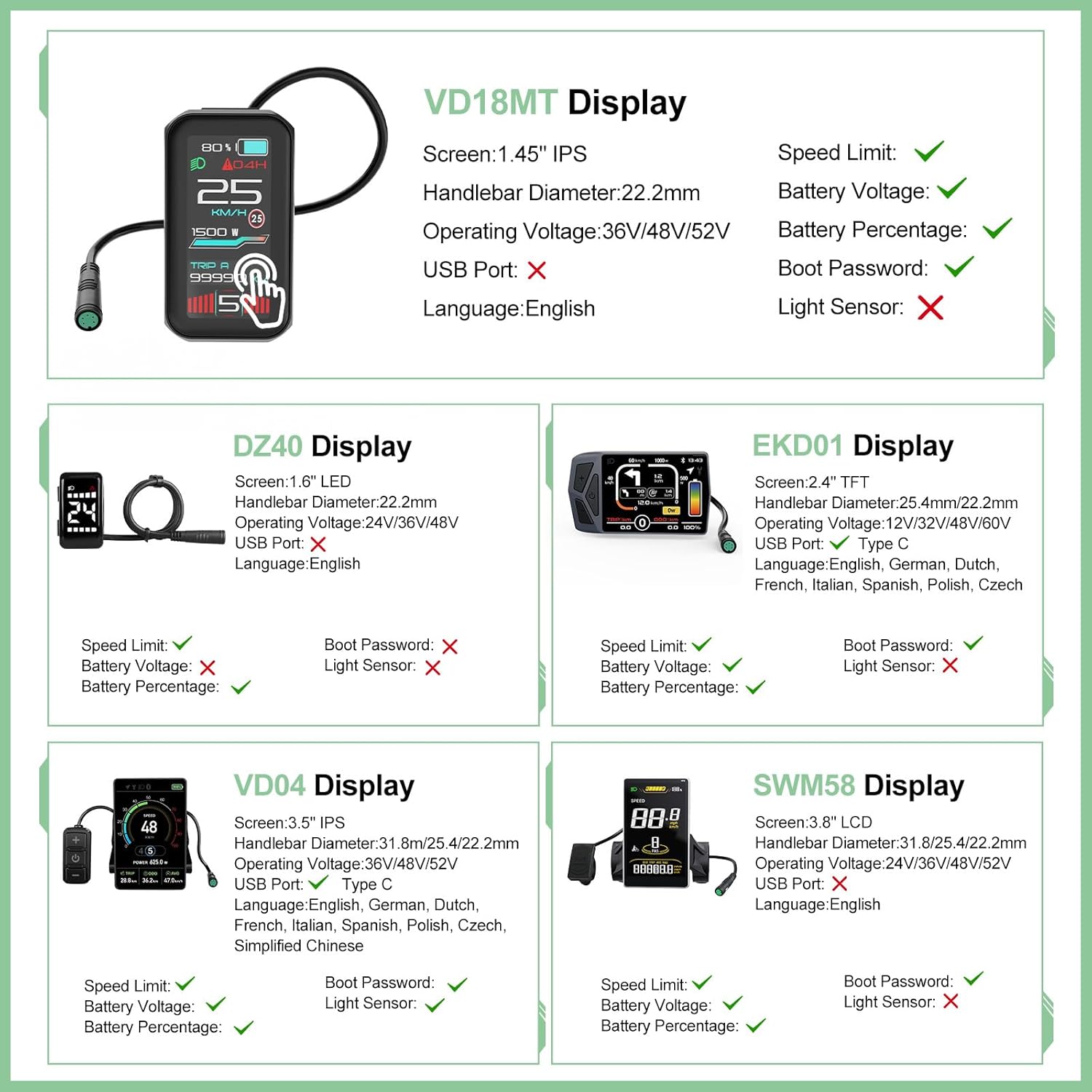
Image 4.1: Overview of various display options (VD18MT, DZ40, EKD01, VD04, SWM58) and their features, including screen size, operating voltage, USB port availability, and language support.
- Power On/Off: Press and hold the power button on the display.
- Assist Levels: Use the '+' and '-' buttons to cycle through different pedal assist levels (e.g., 0-5). Level 0 provides no assist.
- Information Display: View current speed, battery level, trip distance, and other metrics.
- Walk Mode: Some displays offer a walk assist mode, typically activated by holding the '-' button.
4.2 Riding with Torque Sensor
The torque sensor provides a natural riding feel by adjusting motor assistance based on your pedaling effort.
- The motor will provide assistance as you pedal. The harder you pedal, the more assistance you receive.
- Shift gears as you normally would on a bicycle to maintain an efficient cadence.
- Use the thumb throttle for additional power without pedaling, if your kit includes one.
5. Maintenance
Regular maintenance ensures the longevity and optimal performance of your ebike conversion kit.
- Cleanliness: Keep the motor, battery, and electrical connections clean and free from dirt and debris. Use a damp cloth; avoid high-pressure washing directly on electrical components.
- Connections: Periodically check all electrical connections for tightness and corrosion.
- Chain & Drivetrain: Maintain your bicycle chain and drivetrain (cassette, derailleur) as you would a regular bike. Lubricate the chain regularly.
- Battery Care: Store the battery in a cool, dry place. Avoid fully discharging the battery and charge it regularly, even when not in use, to prolong its lifespan.
- Fasteners: Ensure all bolts and nuts, especially those securing the motor and cranks, are tightened to the manufacturer's specifications.
6. Troubleshooting
This section addresses common issues you might encounter.
6.1 Motor Not Providing Assist
- Check Battery: Ensure the battery is charged and properly connected.
- Display On: Verify the display is powered on and not showing any error codes.
- Assist Level: Confirm that the pedal assist level is set above 0.
- Speed Sensor: Check if the speed sensor and magnet are correctly aligned (10-15mm gap) and clean.
- Brake Sensors: Ensure brake levers are not engaged, as brake sensors cut motor power.
6.2 Unusual Noises from Motor
- Loose Components: Check for any loose bolts on the motor, chainwheel, or cranks.
- Chain Rub: Ensure the chain is not rubbing against the motor casing or chain guard.
- Internal Issue: If the noise persists and is severe, discontinue use and contact customer support.
6.3 Display Not Turning On
- Battery Connection: Recheck the battery connection to the motor.
- Display Cable: Ensure the display cable is securely connected to the 1T4 harness.
- Battery Charge: Confirm the battery has sufficient charge.
7. Specifications
Detailed specifications for the Varstrom Mid Drive Motor Kits.

Image 7.1: Detailed diagrams showing the dimensions and compatibility requirements for TSDZ-2B, TSDZ8, and TSDZ16 motors, including bottom bracket width and chainstay clearance.
| Feature | TSDZ-2B | TSDZ8 | TSDZ16 |
|---|---|---|---|
| Rated Voltage | 48V | ||
| Wattage | 500W | 750W | 1000W |
| Max Torque | 80N·m | 140N·m | 160N·m |
| Max Speed | 38–45KM/H | 45–55KM/H | 50–60KM/H |
| Bottom Bracket Width | 68-73mm | ||
| Waterproof Grade | IP65 | IPX6 | |
| Motor Type | Brushless Geared Motor | ||
| Controller | Integrated, inside the Motor | ||
| Operating Temperature | -10-45℃ | ||
7.1 Battery Parameters (Optional)
If your kit includes a battery, refer to the following general parameters. Specific battery models may vary.

Image 7.2: Table detailing various battery options, including voltage, capacity (Ah), watt-hours, cell type, BMS, charger specifications, size, and weight.
8. Warranty and Support
Varstrom offers a warranty for its products to ensure customer satisfaction.
- Return Policy: 30 days return period.
- Repair/Replace: 365 days repair or replacement warranty.
For technical assistance, troubleshooting, or warranty claims, please contact Varstrom customer support through the retailer where the product was purchased.


