
1. Introduction
This user manual provides essential information for the safe and efficient operation of your Samsung 65-Inch Class OLED S95F 4K Glare Free Smart TV and accompanying Music Frame. Please read this manual thoroughly before using the product and retain it for future reference. This product combines advanced display technology with an integrated audio solution, designed to enhance your home entertainment experience.
2. Safety Information
Always follow basic safety precautions when using this product to reduce the risk of fire, electric shock, and injury.
- Do not expose this apparatus to rain or moisture.
- Do not block any ventilation openings. Install in accordance with the manufacturer's instructions.
- Do not install near any heat sources such as radiators, heat registers, stoves, or other apparatus (including amplifiers) that produce heat.
- Protect the power cord from being walked on or pinched, particularly at plugs, convenience receptacles, and the point where they exit from the apparatus.
- Only use attachments/accessories specified by the manufacturer.
- Refer all servicing to qualified service personnel. Servicing is required when the apparatus has been damaged in any way.
3. Package Contents
Verify that all items are present in your product packaging:
- Samsung 65-Inch Class OLED S95F 4K Glare Free Smart TV
- Music Frame Speaker
- Remote Control with Batteries
- Power Cable (for TV)
- Power Cable (for Music Frame)
- Stand Components (if applicable)
- User Manual (this document)
- Warranty Card
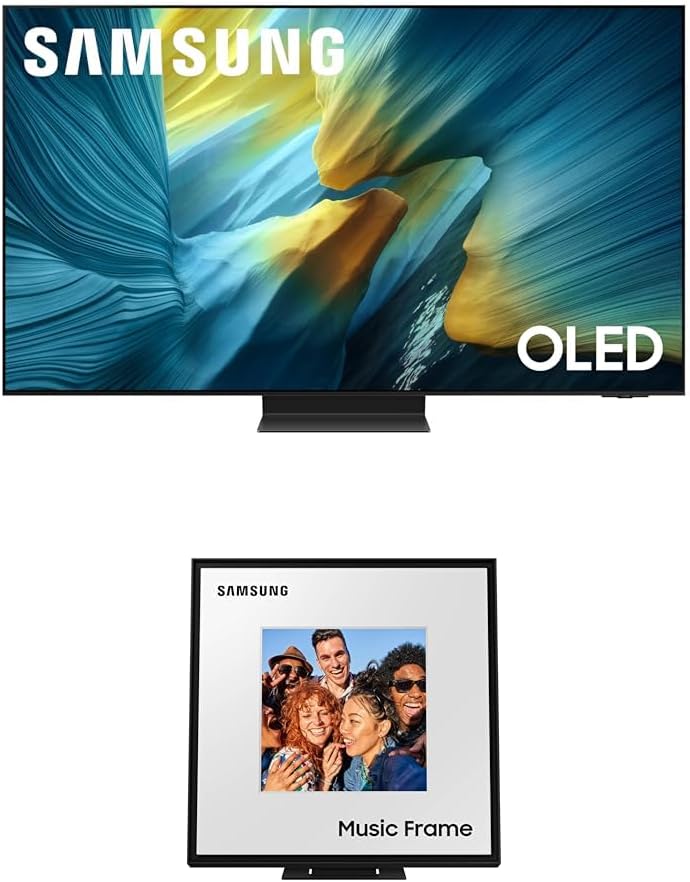
Figure 3.1: Samsung 65-Inch Class OLED S95F 4K Glare Free Smart TV and Music Frame. This image displays the television unit on top and the Music Frame speaker below, showcasing both primary components of the product package.
4. Setup
4.1. TV Stand Assembly / Wall Mounting
Follow the instructions provided in the separate stand assembly guide or wall mount kit for secure installation. Ensure the TV is placed on a stable, level surface or securely mounted to a wall according to safety guidelines.

Figure 4.1: Front view of the Samsung 65-Inch Class OLED S95F 4K Glare Free Smart TV. This image shows the television unit with its slim bezel and central stand, ready for setup.
4.2. Connecting Devices
Connect your external devices (e.g., cable box, Blu-ray player, gaming console) to the appropriate HDMI ports on the TV. For optimal performance, use high-speed HDMI cables. Connect the TV to a power outlet using the provided power cable.
4.3. Initial Setup and Network Connection
- Power on the TV using the remote control.
- Follow the on-screen prompts to select your language, country, and time zone.
- Connect the TV to your home Wi-Fi network. This is essential for Smart TV features and software updates.
- Log in to your Samsung account or create a new one to access all Smart TV functionalities.
4.4. Music Frame Setup
The Music Frame can be placed on a stand or wall-mounted. Connect the Music Frame to a power outlet. For seamless audio integration, ensure both the TV and Music Frame are connected to the same network. Refer to the Music Frame's dedicated guide for detailed setup instructions, including pairing with your TV via Q-Symphony.

Figure 4.2: Front view of the Samsung Music Frame Speaker. This image highlights the speaker's design, resembling a picture frame, with "Music Frame" text at the bottom.
5. Operating Instructions
5.1. Basic TV Functions
- Power On/Off: Press the Power button on the remote control.
- Input Selection: Use the Source button to switch between connected devices.
- Volume Control: Use the Volume Up/Down buttons.
- Channel Navigation: Use the Channel Up/Down buttons for broadcast channels.
5.2. Smart TV Features
Access the Smart Hub by pressing the Home button on your remote. From here, you can navigate through installed applications, streaming services, and connected devices. The TV's AI processor (NQ4 AI Gen3 Processor) enhances content for an optimized viewing experience.
5.3. Picture Settings
Your Samsung OLED S95F TV features advanced picture technologies:
- Glare Free Display: The screen is designed to minimize reflections, providing a clear view even in brightly lit rooms.
- OLED HDR Pro: Delivers powerful brightness and dramatic contrast for strikingly lifelike picture quality with deep blacks and vibrant highlights.
- 4K AI Upscaling Pro: Content is intelligently upscaled to impressive 4K resolution using 128 AI neural networks, ensuring sharp and smooth picture quality.
- Auto HDR Remastering: SDR content is transformed to HDR-like quality with enhanced colors, details, and highlights.
5.4. Sound Settings
Optimize your audio experience with the following features:
- Dolby Atmos: Experience multi-dimensional surround sound.
- Q-Symphony: Syncs your Samsung TV speakers with the Music Frame for a more robust and immersive audio output.
- Wide Range Speaker Technology (Music Frame): Provides clear and uniform sound distribution throughout the room.
- Active Voice Amplifier Pro & Adaptive Sound Pro: The AI processor optimizes sound and amplifies dialogue based on room acoustics and content.
5.5. Gaming Features
For an enhanced gaming experience:
- Motion Xcelerator 165Hz: Supports VRR gaming at up to 4K 165Hz for smooth visuals and reduced tearing.
- AI Motion Enhancer Pro: Smooths motion of fast-moving objects and text, reducing blur and flickering.
5.6. Music Frame Operation
The Music Frame functions as a speaker and can display personal artwork or photos. Its customizable design allows for swapping bezels to match your decor. Control audio playback and display settings via the SmartThings app or your TV's interface.
6. Maintenance
6.1. Cleaning the Screen and Frame
Gently wipe the screen with a soft, lint-free cloth. For stubborn marks, lightly dampen the cloth with water or a screen cleaner specifically designed for electronics. Avoid using abrasive cleaners or solvents.
6.2. Software Updates
Ensure your TV's software is up to date for optimal performance and access to the latest features. You can check for updates through the TV's settings menu (Settings > Support > Software Update > Update Now).
7. Troubleshooting
If you encounter issues with your TV or Music Frame, refer to the table below for common problems and solutions:
| Problem | Possible Solution |
|---|---|
| No Power | Check if the power cable is securely connected to both the TV/Music Frame and the power outlet. Try a different outlet. |
| No Picture / Distorted Picture | Verify input source selection. Check HDMI cable connections. Ensure external devices are powered on. Adjust picture settings. |
| No Sound / Distorted Sound | Check volume levels. Ensure Mute is off. Verify audio cable connections. Check sound output settings (e.g., Q-Symphony, TV speakers). |
| Remote Control Not Working | Replace batteries. Ensure no obstructions between remote and TV. Re-pair the remote if it's a Bluetooth remote. |
| Wi-Fi Connection Issues | Restart your router and modem. Reconnect to the Wi-Fi network via TV settings. Ensure correct password. |
If the issue persists after attempting these solutions, please contact Samsung customer support.
8. Specifications
| Feature | Description |
|---|---|
| Model Name | Samsung 65-Inch Class OLED S95F 4K Glare Free Smart TV w/Music Frame |
| Display Type | OLED, Glare Free |
| Resolution | 4K UHD (3840 x 2160) |
| Processor | NQ4 AI Gen3 Processor (Powered by 128 neural networks) |
| HDR Support | OLED HDR Pro, Auto HDR Remastering |
| Refresh Rate | Up to 4K 165Hz (VRR gaming) |
| Audio Technology | Dolby Atmos, Q-Symphony, Active Voice Amplifier Pro, Adaptive Sound Pro, Wide Range Speaker Technology (Music Frame) |
| Included Accessory | Music Frame Speaker |
| Brand | Samsung |
| ASIN | B0F25CBW95 |
| First Available | March 21, 2025 |
9. Warranty and Support
Your Samsung 65-Inch Class OLED S95F 4K Glare Free Smart TV with Music Frame is covered by a manufacturer's warranty. Please refer to the warranty card included in your package for detailed terms and conditions, including warranty period and coverage. For technical support, troubleshooting assistance, or service requests, please visit the official Samsung support website or contact their customer service hotline. Keep your purchase receipt and product serial number readily available when seeking support.
For more information, visit: Samsung Support


