
1. Overview
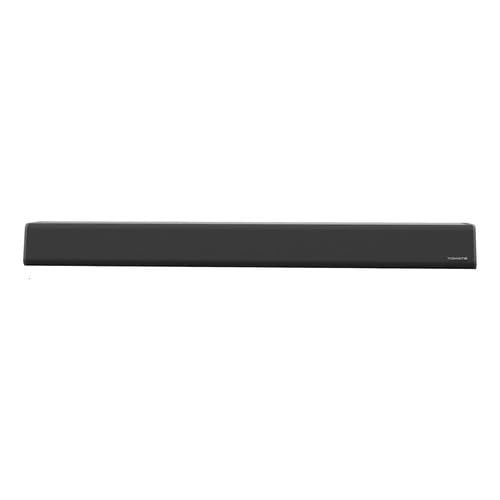
The Tomate MTS-2049 Soundbar is designed to enhance your audio experience with powerful 90W sound. It offers versatile connectivity options including Bluetooth, optical, and USB, making it suitable for various devices such as TVs, mobile phones, and notebooks. This manual provides essential information for safe and efficient use of your soundbar.
2. Package Contents
Ensure all items are present in the package:
- Tomate MTS-2049 Soundbar
- Coaxial Cable
- Optical Cable
- Auxiliary Cable
- Power Adapter
- Power Cable
- Remote Control
- User Manual (this document)
3. Features
- Powerful 90W Audio Output: Delivers high-quality sound for movies, music, and games.
- Versatile Connectivity: Includes Bluetooth, optical input, and USB for easy connection to TVs, mobile phones, notebooks, and other devices.
- 2.0 Channel Audio: Provides clear and balanced stereo sound for an improved listening experience.
- Universal Voltage Compatibility: Bivolt automatic (127V/220V) for convenient and safe use.
- Enhanced TV Audio: Ideal for upgrading TV sound without complex audio systems.
- Special Features: Noise cancellation and high-resolution audio capabilities.
4. Safety Instructions
Please read and follow these safety guidelines to ensure safe operation and prevent damage to the device:
- Read all instructions thoroughly before using the soundbar.
- Do not expose the soundbar to water, moisture, or extreme temperatures.
- Ensure adequate ventilation around the soundbar to prevent overheating.
- Use only the power adapter and cables supplied with the product.
- Keep the soundbar and its accessories out of reach of children and pets.
- Do not attempt to open or repair the soundbar yourself. Refer all servicing to qualified personnel.
- Unplug the soundbar during lightning storms or when unused for long periods.
5. Setup
5.1 Unpacking and Placement
- Carefully unpack the soundbar and all included accessories.
- Place the soundbar on a stable, flat surface in front of your TV, or mount it securely on a wall (mounting hardware not included).
5.2 Power Connection
- Connect the power cable to the power adapter.
- Plug the power adapter into the DC input port on the back of the soundbar.
- Insert the power cable into a suitable electrical outlet (127V/220V compatible).
5.3 Audio Connection Options
Choose one of the following methods to connect your audio source:
- Optical Connection: Connect one end of the optical cable to the OPTICAL OUT port on your TV or audio source and the other end to the OPTICAL IN port on the soundbar.
- Auxiliary (AUX) Connection: Connect one end of the auxiliary cable to the AUDIO OUT (3.5mm) port on your device and the other end to the AUX IN port on the soundbar.
- USB Connection: Insert a USB flash drive containing audio files into the USB port on the soundbar.
- Bluetooth Connection: This is a wireless connection. Refer to the 'Operating Instructions' section for pairing details.
6. Operating Instructions
6.1 Power On/Off
Press the POWER button on the soundbar or the remote control to turn the unit on or off.
6.2 Input Source Selection
Press the INPUT or MODE button on the soundbar or remote control repeatedly to cycle through the available input sources: Bluetooth, Optical, USB, and AUX.
6.3 Volume Control
Use the VOL+ and VOL- buttons on the soundbar or remote control to adjust the volume level.
6.4 Bluetooth Pairing
- Turn on the soundbar and select Bluetooth mode using the INPUT/MODE button. The Bluetooth indicator light will flash.
- Enable Bluetooth on your mobile phone, tablet, or other device.
- Search for available devices and select "Tomate MTS-2049" from the list.
- Once successfully paired, the Bluetooth indicator light on the soundbar will become solid.
6.5 USB Playback
When a USB flash drive is inserted into the USB port, the soundbar will automatically switch to USB mode and begin playing compatible audio files. Use the remote control for playback functions such as play/pause, next track, and previous track.
7. Maintenance
To maintain the performance and appearance of your soundbar:
- Clean the soundbar's exterior with a soft, dry, lint-free cloth.
- Do not use liquid cleaners, aerosol sprays, or abrasive materials, as they may damage the finish.
- Ensure that the ventilation openings are not blocked by dust or debris.
- Store the soundbar in a cool, dry place when not in use for extended periods.
8. Troubleshooting
| Problem | Possible Cause | Solution |
|---|---|---|
| No power | Power cable not connected; Power outlet not working. | Check if the power cable is securely connected to the soundbar and the power outlet. Test the outlet with another device. |
| No sound | Incorrect input source selected; Volume too low; Audio cables not connected properly. | Press the INPUT/MODE button to select the correct source. Increase the volume. Ensure all audio cables are securely connected. |
| Bluetooth pairing fails | Soundbar not in pairing mode; Bluetooth disabled on device; Device too far. | Ensure the soundbar is in Bluetooth mode and the indicator is flashing. Enable Bluetooth on your device. Move your device closer to the soundbar. |
| Remote control not working | Batteries are dead or incorrectly inserted; Obstruction between remote and soundbar. | Replace batteries with new ones, ensuring correct polarity. Remove any obstructions between the remote and the soundbar's sensor. |
9. Specifications
- Brand: Tomate
- Model Name: MTS-2049
- Speaker Type: Soundbar
- Special Features: Noise cancellation, High-resolution audio
- Included Components: Coaxial Cable, Optical Cable, Auxiliary Cable, Power Adapter, Power Cable, Remote Control
- Item Dimensions (L x W x H): 100 cm x 15 cm x 15 cm
- Power Source: Corded Electric
- Voltage Compatibility: 127V/220V (Bivolt Automatic)
- Manufacturer: Amazbrand
10. Warranty and Support
10.1 Warranty Information
This product comes with a 60-day warranty from the date of purchase. Please retain your proof of purchase (receipt or invoice) as it is required for any warranty claims. The warranty covers manufacturing defects and malfunctions under normal use conditions.
10.2 Customer Support
For technical assistance, troubleshooting, or any other inquiries regarding your Tomate MTS-2049 Soundbar, please contact your retailer or the manufacturer, Amazbrand. Contact details can typically be found on your purchase receipt or the retailer's website.