
Introduction
Thank you for choosing the Nautica Men's NST Chronograph 44mm Watch, model NAPNSS502. This manual provides essential information for the proper setup, operation, and maintenance of your timepiece. Please read these instructions carefully to ensure optimal performance and longevity of your watch.
Product Overview
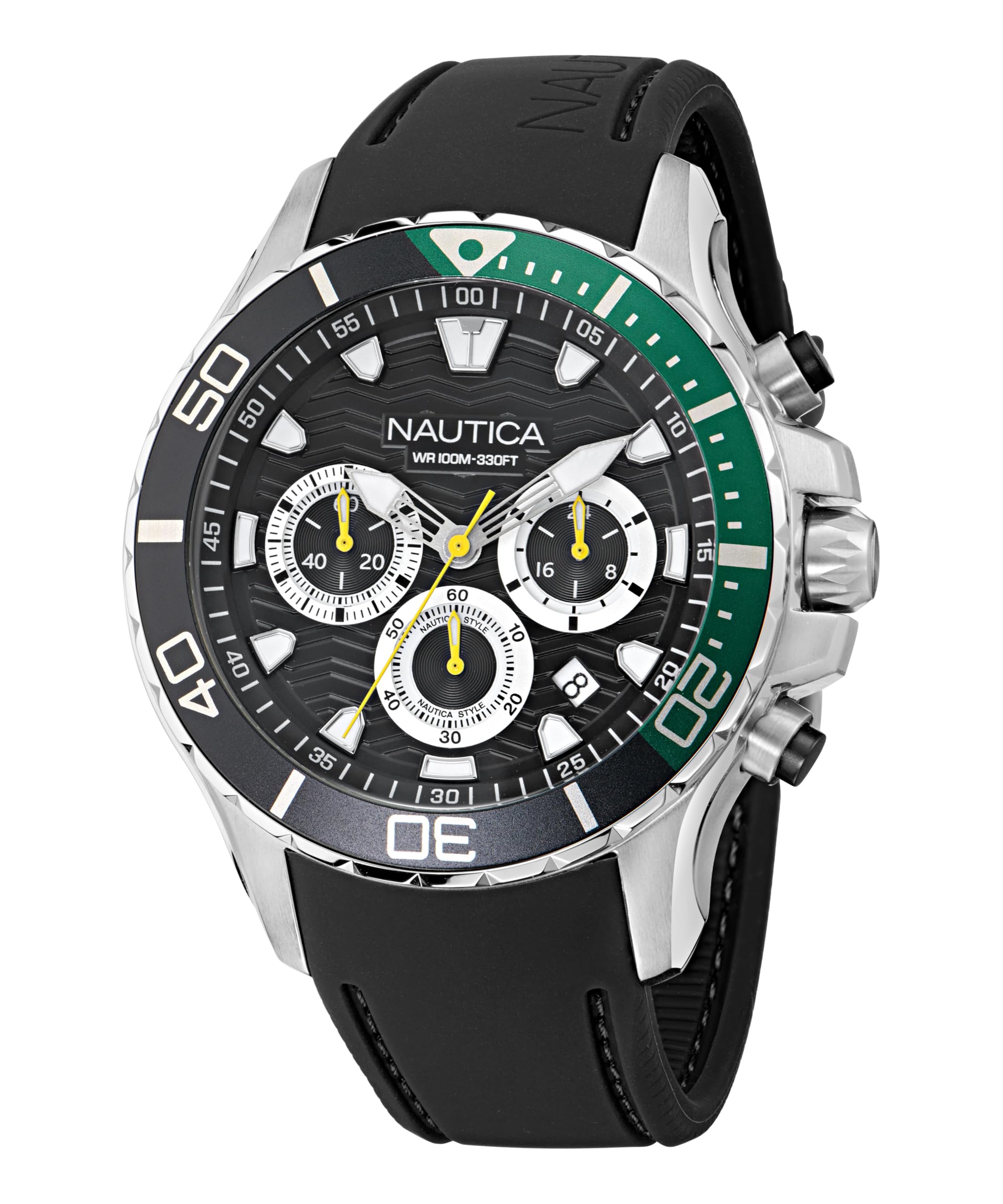
Image: Front view of the Nautica Men's NST Chronograph 44mm Watch. This image displays the black dial with chronograph subdials, luminous hands, and the silver-tone case with a green and black bezel.
The Nautica NST Chronograph is a robust and stylish timepiece featuring a 44mm recycled stainless steel case, a black dial with chronograph functionality, and a date display. It is equipped with a comfortable black silicone strap and is water-resistant up to 100 meters (330 feet).
Setup
1. Setting the Time
- Pull the crown (located on the right side of the watch case) out to the second click position.
- Turn the crown to move the hands clockwise until the desired time is set.
- Push the crown back into its normal position to start the watch.
2. Setting the Date
- Pull the crown out to the first click position.
- Turn the crown counter-clockwise to adjust the date.
- Once the correct date is displayed, push the crown back into its normal position.
- Note: Avoid setting the date between 9:00 PM and 3:00 AM, as this may interfere with the automatic date change mechanism.
3. Strap Adjustment
The watch features an adjustable silicone strap designed to fit wrist circumferences up to 8 inches. Adjust the buckle to achieve a comfortable and secure fit.
Operating the Chronograph
Your Nautica NST Chronograph watch is equipped with a stopwatch function.
- Start: Press the upper pusher (button) to start the chronograph. The chronograph second hand will begin to move.
- Stop: Press the upper pusher again to stop the chronograph. The elapsed time will be indicated by the chronograph hands.
- Reset: With the chronograph stopped, press the lower pusher to reset all chronograph hands to their zero positions.
Luminous Hands
The watch hands are treated with luminous infill, allowing for readability in low-light conditions after exposure to light.
Maintenance
Cleaning
To maintain the appearance of your watch, wipe the case and strap with a soft, damp cloth. For the silicone strap, mild soap and water can be used. Ensure the crown is fully pushed in before cleaning with water.
Water Resistance

Image: Back view of the Nautica Men's NST Chronograph 44mm Watch, showing the screw-down case back and water resistance rating.
This watch is water-resistant to 100 meters (330 feet). This makes it suitable for swimming and snorkeling, but not for diving. Always ensure the screw-down crown and screw-down case back are fully secured before any exposure to water to prevent damage. Do not operate the crown or pushers while the watch is wet or submerged.
Battery Replacement
When the watch stops running, it indicates that the battery needs replacement. Battery replacement should be performed by a qualified watch technician to ensure the water resistance seal is maintained.
Troubleshooting
- Watch not running: Check if the crown is fully pushed in. If the watch still does not run, the battery may need replacement.
- Date not changing: Ensure the time is set correctly, especially the AM/PM cycle. If the date changes at noon, the watch is set for the wrong 12-hour cycle. Advance the time by 12 hours.
- Water inside the watch: If condensation or water appears inside the watch, immediately take it to a qualified service center. This indicates a breach in the water resistance.
Specifications
| Feature | Detail |
|---|---|
| Model Number | NAPNSS502 |
| Case Material | Recycled (90%) Stainless Steel |
| Case Diameter | 44mm |
| Crystal | Mineral Glass |
| Movement | Chrono Movement with Date |
| Strap Material | Silicone (22x20mm) |
| Water Resistance | 100m (330ft) |
| Special Features | Luminous hands, Chronograph, Date display, Screw-down crown, Screw-down case back |

Image: The Nautica Men's NST Chronograph 44mm Watch worn on a wrist, demonstrating its size and fit.
Warranty and Support
For warranty information and customer support, please refer to the official Nautica website or contact your authorized dealer. Keep your proof of purchase for warranty claims.
Visit the Nautica Store on Amazon for more information.


