
Introduction
This manual provides comprehensive instructions for the setup, operation, and maintenance of your new AZBME RM-C3287 Replacement Voice Remote Control. Designed for seamless compatibility with various JVC Smart Android TV models, this remote offers intuitive control and voice functionality for an enhanced viewing experience. Please read this manual thoroughly before use to ensure proper functionality and longevity of your device.
Safety Information
Please observe the following safety precautions to prevent damage to the remote control or injury to yourself.
- Do not expose the remote control to direct sunlight, heat sources, or extreme temperatures.
- Avoid dropping the remote control or subjecting it to strong impacts.
- Do not immerse the remote control in water or any other liquids.
- Keep batteries out of reach of children. If swallowed, seek immediate medical attention.
- Dispose of used batteries according to local regulations. Do not incinerate batteries.
- Do not mix old and new batteries, or different types of batteries.
Package Contents
Verify that all items are present in the package:
- 1 x AZBME RM-C3287 Replacement Voice Remote Control
Note: Batteries and a separate user manual are not included in the package.
Setup
Battery Installation
The RM-C3287 remote control requires two (2) 1.5V AAA batteries (not included).
- Locate the battery compartment on the back of the remote control.
- Slide the battery cover downwards to open it.
- Insert two AAA batteries, ensuring the positive (+) and negative (-) terminals align correctly with the markings inside the compartment.
- Slide the battery cover back into place until it clicks securely.

This image shows the rear of the remote control with the battery cover removed, illustrating the correct orientation for inserting two AAA batteries into their respective slots.
Pairing Instructions (for Voice Functionality)
While the remote generally requires no programming for basic IR functions, voice control features may require pairing with your JVC Smart Android TV.
Initial Pairing (if TV is off or in standby)
- Press the POWER key on the remote to turn on your TV.
- Press and hold the BACK (
 ) and HOME () buttons simultaneously for 3-5 seconds.
 - The indicator light on the remote will flash, indicating it has entered pairing status.
- Once pairing is successful, the indicator light will go out.
Connecting New Remote with a Paired Remote (if you have an existing paired remote)
- Press the HOME key on your existing paired remote.
- Navigate to SETTING > Remotes & accessories.
- Select Add accessory, then press the OK key to confirm pairing.
- On the new RM-C3287 remote, press and hold the BACK () and HOME () buttons simultaneously for 3-5 seconds.
- The indicator light will flash, entering pairing status. After successful pairing, the indicator light will go out.
This image illustrates the remote control's layout and provides a visual guide for the pairing process, highlighting the Back and Home buttons used for initiating pairing, and the microphone icon for voice control.
Operating Instructions
Remote Control Layout and Functions
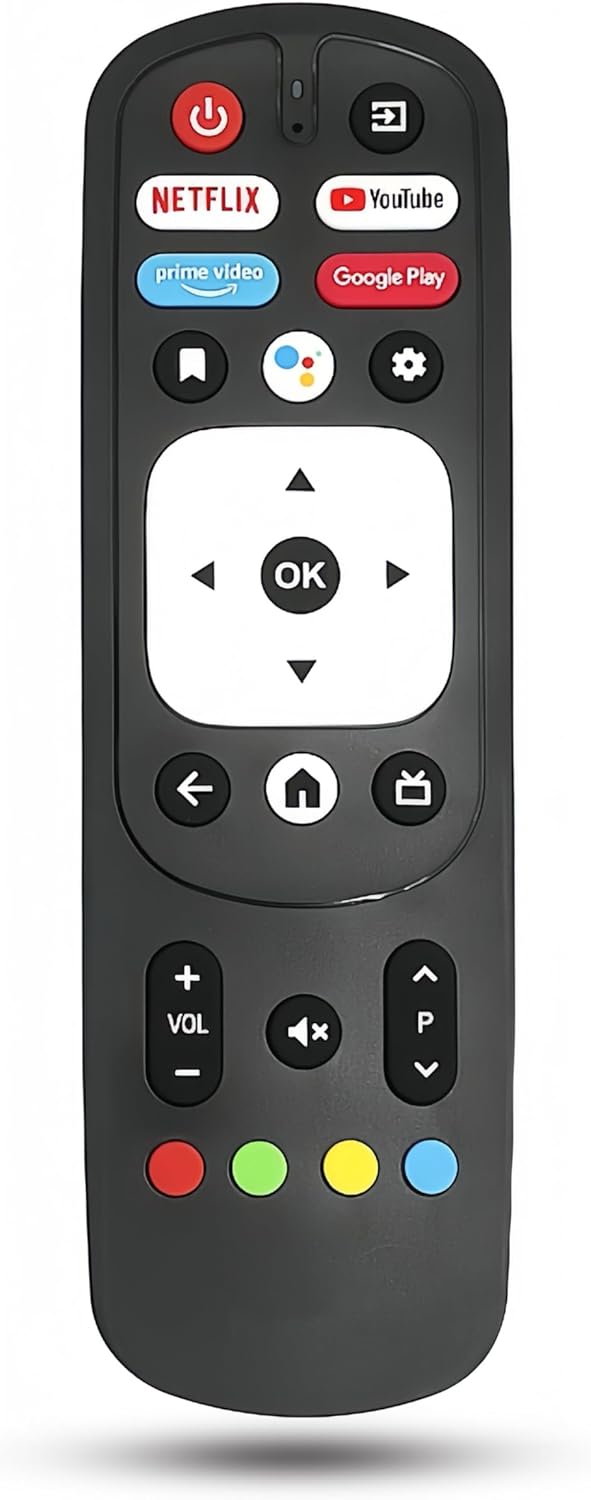
This image displays the full front view of the RM-C3287 remote control, clearly showing the arrangement and labeling of all buttons, including dedicated app buttons and navigation controls.
- Power Button (): Turns the TV on or off.
- Input/Source Button (): Switches between different input sources (HDMI, AV, etc.).
- Netflix, YouTube, Prime Video, Google Play Buttons: Direct access buttons for popular streaming services and the Google Play Store.
- Navigation Pad (Up, Down, Left, Right): Used to navigate menus and select options.
- OK Button: Confirms selections.
- Back Button (): Returns to the previous screen or menu.
- Home Button (): Returns to the TV's home screen.
- Volume Up/Down (+/- VOL): Adjusts the TV's volume level.
- Mute Button (): Mutes or unmutes the TV sound.
- Program/Channel Up/Down (P ^/v): Changes TV channels.
- Color Buttons (Red, Green, Yellow, Blue): Functionality varies depending on the TV application or menu.
Voice Control Function
The RM-C3287 remote features a voice control function, allowing you to issue commands to your TV using your voice. Ensure the remote is properly paired as described in the Setup section.
- Press the Voice Control Button (microphone icon ) located near the top of the remote.
- Hold the remote close to your mouth and speak your command clearly. For example, you can say "Open Netflix," "Search for action movies," or "Switch to HDMI 1."
- The TV will process your command.
Maintenance
Proper maintenance ensures the longevity and optimal performance of your remote control.
- Cleaning: Wipe the remote control with a soft, dry cloth. For stubborn dirt, slightly dampen the cloth with water or a mild, non-abrasive cleaner. Do not use harsh chemicals or abrasive materials.
- Storage: When not in use for extended periods, store the remote control in a cool, dry place away from direct sunlight and extreme temperatures. Consider removing the batteries if storing for several months to prevent leakage.
- Battery Replacement: Replace batteries when the remote's response becomes sluggish or it stops functioning. Always replace both batteries at the same time.
Troubleshooting
If you encounter issues with your remote control, refer to the following table for common problems and solutions.
| Problem | Possible Cause | Solution |
|---|---|---|
| Remote not responding to TV. | Dead or incorrectly inserted batteries. Obstruction between remote and TV. Remote not paired (for voice/smart functions). | Check battery orientation and replace if necessary. Remove any obstructions. Ensure remote is pointed directly at the TV's IR receiver. Re-pair the remote if voice or smart functions are not working. |
| Voice control not working. | Remote not paired for voice functionality. Microphone blocked. TV's internet connection issue (for online voice commands). | Follow the pairing instructions in the Setup section. Ensure nothing is covering the microphone on the remote. Check your TV's internet connection. |
| Buttons are sticky or unresponsive. | Dirt or debris under the buttons. | Clean the remote control as described in the Maintenance section. Avoid spilling liquids on the remote. |
Specifications
Key specifications for the AZBME RM-C3287 Replacement Voice Remote Control:
| Feature | Detail |
|---|---|
| Model Number | RM-C3287 |
| Brand | AZBME |
| Compatible Devices | JVC Smart Android Televisions (e.g., RM-C3570, 65PFL5704/F7, 65PFL5504/F7, 65PFL5604/F7, 65PFL5766/F7, 50PFL5766) |
| Special Feature | Ergonomic, Voice Search |
| Color | Black |
| Power Source | 2 x 1.5V AAA Batteries (not included) |
| Item Weight | 1.2 ounces (approximately 34 grams) |
| Package Dimensions | 7.09 x 2.36 x 0.39 inches (approximately 18 x 6 x 1 cm) |
| Material | ABS Plastic |
Warranty and Support
For any questions, concerns, or support regarding your AZBME RM-C3287 Replacement Voice Remote Control, please contact the manufacturer or your point of purchase. Please refer to your product packaging or the seller's information for specific warranty details and customer service contact methods.