
1. Introduction
This manual provides instructions for the safe and effective operation of the Lybunair NJTY T58B Digital Multimeter. This device is designed for accurate measurement of AC/DC voltage, AC/DC current, frequency, resistance, and capacitance, making it suitable for various electrical tasks in industrial and household settings.
2. Safety Information
To ensure safe operation and avoid damage to the meter, please read and follow all safety instructions carefully:
- Do not exceed the maximum input values specified for each measurement range.
- Inspect test leads for damage before each use. Do not use if insulation is compromised.
- Do not operate the meter if it appears damaged or is not functioning properly.
- Ensure the correct function and range are selected before making any measurements.
- Always disconnect power to the circuit and discharge high-voltage capacitors before measuring resistance, continuity, diodes, or capacitance.
- Use caution when working with voltages above 30V AC RMS, 42V peak, or 60V DC, as these pose a shock hazard.
- Replace batteries promptly when the low battery indicator appears to maintain measurement accuracy.
3. Package Contents
Verify that all items listed below are present in your package:
- 1 x Lybunair NJTY T58B Digital Multimeter
- 1 x Pair of Test Leads
- 1 x Thermocouple
- 1 x Canvas Bag
- 1 x User Manual (English)
4. Product Overview and Features
The Lybunair NJTY T58B Digital Multimeter is a handheld device with a large 60000 counts LCD digital display. It includes features such as a backlight, flashlight, NCV (Non-Contact Voltage) detection, and automatic power-off.

Front view of the Lybunair NJTY T58B Digital Multimeter, showcasing its orange casing, large LCD display, rotary switch, and input jacks.

Side view of the Lybunair NJTY T58B Digital Multimeter, illustrating its physical dimensions: 187mm (7.36in) height, 95mm (3.74in) width, and 55mm (2.16in) thickness.
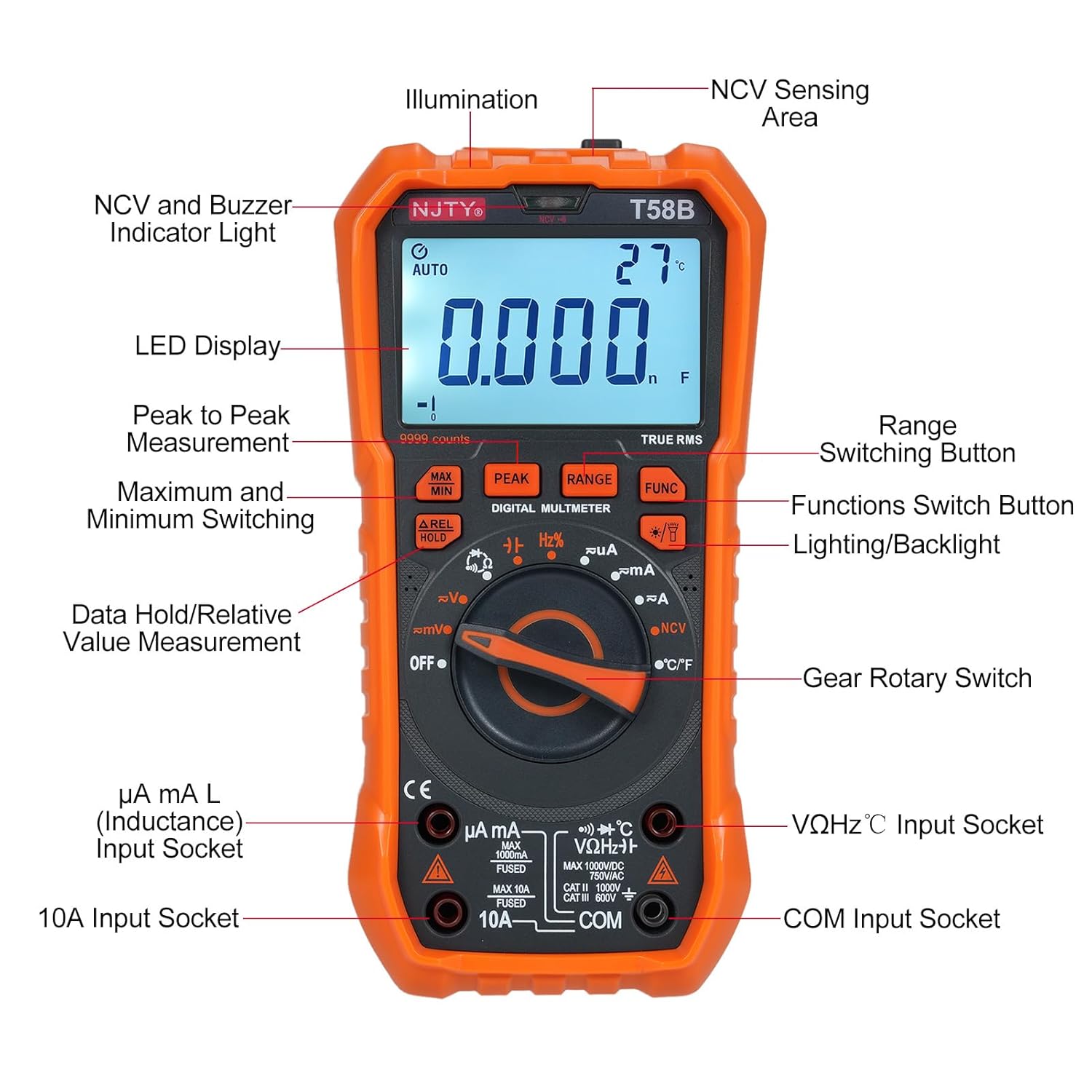
Detailed diagram identifying key components of the Lybunair NJTY T58B Digital Multimeter, including the LED Display, NCV Sensing Area, NCV and Buzzer Indicator Light, Peak to Peak Measurement, Maximum and Minimum Switching, Data Hold/Relative Value Measurement, Range Switching Button, Functions Switch Button, Lighting/Backlight, Gear Rotary Switch, Input Sockets (µA mA L, 10A, VΩHz°C), and COM Input Socket.
Integrated Stand and Test Lead Holder

The multimeter features a 90-degree adjustable back bracket for convenient hands-free operation and integrated slots for organizing test leads, preventing tangles and ensuring easy access.
The multimeter is equipped with a 90-degree adjustable back bracket for convenient hands-free viewing. It also includes thoughtful storage slots for test leads, ensuring they are organized and easily accessible.
5. Setup
Battery Installation
The multimeter requires batteries for operation. Open the battery compartment on the back of the device and insert the batteries, observing correct polarity. Secure the compartment cover.
Connecting Test Leads
Insert the black test lead into the "COM" jack and the red test lead into the appropriate input jack for your measurement (e.g., "VΩHz°C" for voltage, resistance, frequency, capacitance, or "10A" for high current, "µA mA L" for low current).
6. Operating Instructions
Power On/Off
Rotate the gear rotary switch from "OFF" to any desired measurement function to power on the device. Rotate back to "OFF" to power off.
Function Selection
Use the gear rotary switch to select the primary measurement function (e.g., V~ for AC Voltage, V- for DC Voltage, Ω for Resistance). Use the "FUNC" button to cycle through sub-functions within a selected range (e.g., AC/DC for voltage, diode/continuity for resistance).
Range Selection
The multimeter typically operates in auto-ranging mode. For manual range selection, press the "RANGE" button.
Backlight and Flashlight

The multimeter's screen backlight illuminates the display for clear reading in low-light conditions, and the integrated flashlight assists with visibility in dark work areas.
The device features a backlight for the LCD display and a flashlight for illuminating the work area. Refer to the component diagram for the button to activate these features.
NCV (Non-Contact Voltage) Test

Demonstration of the NCV function, where the top of the multimeter is placed near an electrical outlet. The device detects AC voltage and indicates signal strength with corresponding lights (low-yellow, high-red) and an audible alarm.
Rotate the rotary switch to the "NCV" position. Place the top of the meter close to the conductor you wish to test. If AC voltage is detected, the meter will illuminate corresponding signal strength indicators (low-yellow, high-red) and emit an audible alarm with varying frequency based on signal strength.
Auto Power Off

The multimeter features an automatic shutdown function that activates after approximately 15 minutes of inactivity to conserve battery life. An audible voice prompt will precede the shutdown.
To conserve battery life, the multimeter will automatically power off after approximately 15 minutes of inactivity. An audible prompt will sound before shutdown. Press any button to reactivate the device.
Data Hold / Relative Value Measurement
Use the "A.REL HOLD" button to hold the current reading on the display or to activate relative measurement mode.
MAX/MIN/PEAK Measurement
Use the "MAX MIN" or "PEAK" buttons to capture maximum, minimum, or peak values during a measurement.
7. Maintenance
Cleaning
Wipe the meter casing with a damp cloth and mild detergent. Do not use abrasive cleaners or solvents, as they may damage the casing or display.
Battery Replacement
When the low battery indicator appears on the display, replace the batteries promptly to ensure accurate readings and proper device function. Refer to the battery installation section for instructions.
Storage
Store the multimeter in a dry, dust-free environment, away from direct sunlight and extreme temperatures. If storing for extended periods, remove the batteries to prevent leakage.
8. Troubleshooting
If you encounter issues with your multimeter, refer to the following common troubleshooting steps:
- No Display/Power: Check battery installation and charge. Ensure the rotary switch is not in the "OFF" position.
- Inaccurate Readings: Verify test lead connections. Ensure the correct function and range are selected. Check for damaged test leads and replace if necessary.
- No NCV Detection: Ensure the NCV function is selected and the meter's sensing area is close enough to the AC voltage source.
- Display shows "OL": This indicates an overload, meaning the measured value exceeds the selected range. Switch to a higher range or a different function if applicable.
9. Specifications
| Parameter | Value |
|---|---|
| Model | T58B |
| Material | ABS |
| Safety Rating | 600V CAT III and 1000V CAT.II |
| Pollution Grade | 2 |
| Operating Altitude | Under 2000m |
| Working Temperature | 0-40°C |
| Storage Temperature | -10~60°C |
| Item Size | 187 x 95 x 55mm (7.36 x 3.74 x 2.16in) |
| Item Weight | 331g (11.67oz) |
| Display | 60000 Counts LCD |
| Features | True RMS, Backlight, Flashlight, NCV, Auto Power Off |
| Manufacturer | Lybunair |
| Item Model Number | Lybunair2iqvnduksx-2B |
| Country of Origin | China |

An image summarizing the key features of the T58B multimeter, including 9999 Counts display, Current/Resistance/Capacitance measurement, Temperature/Frequency measurement, and Jack Tip/Flashlight/Backlight functionalities.
10. Warranty and Support
Specific warranty information for the Lybunair NJTY T58B Digital Multimeter is not provided in this document. Please refer to the product packaging or contact your retailer for warranty details. For technical support or further assistance, please contact Lybunair customer service through the contact information provided with your purchase or on the official Lybunair website.
Ask a question about this manual
Ask about setup, troubleshooting, compatibility, parts, safety, or missing instructions. Manuals+ will review the question and use this page’s manual context to help answer it.