
1. Introduction
This manual provides instructions for the ROXIFETA XY-WFMS ESP-12F Wi-Fi Remote Controller Module. This module is designed for smart home applications, enabling remote control via the Sinilink App. It operates within a 5V-36V power range and integrates the ESP-12F Wi-Fi chip for wireless connectivity, offering a reliable electronic component for various projects.
2. Product Features
- High-quality electronic components ensure reliable and long-lasting performance.
- User-friendly design with clear instructions for straightforward installation and operation.
- Versatile applications suitable for industrial, automotive, and household electronic projects.
3. Safety Information
- Ensure power supply voltage is within the specified 5V-36V range to prevent damage.
- Disconnect power before making any wiring connections.
- Handle the module with care to avoid electrostatic discharge.
- Do not expose the module to moisture or extreme temperatures.
4. Package Contents
The package typically includes:
- 1 x ROXIFETA XY-WFMS ESP-12F Wi-Fi Remote Controller Module
- (Optional) Basic wiring diagram or quick start guide.
5. Setup and Installation
5.1. Power Supply Connection
Connect the module to a stable DC power source within the 5V-36V range. Observe correct polarity for positive and negative terminals.
5.2. Device Wiring
Connect your target device (e.g., light, motor) to the module's output terminals according to your application's requirements. Refer to the specific wiring diagram for your project.
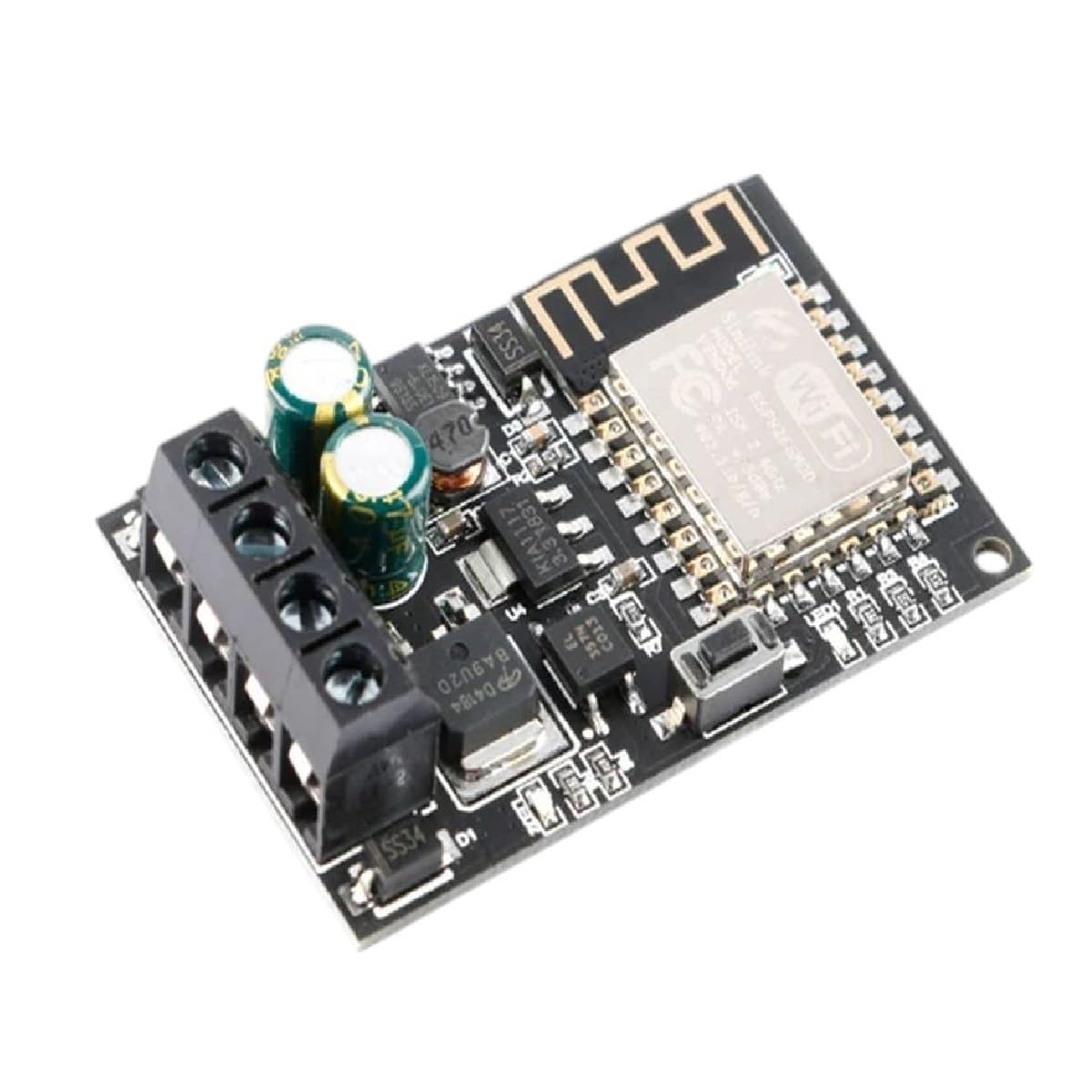
Image: The ROXIFETA XY-WFMS ESP-12F Wi-Fi Remote Controller Module, showing its terminal block for power and output connections, along with the ESP-12F chip and other surface-mounted components.
5.3. Sinilink App Installation
Download and install the "Sinilink" application on your mobile phone from your device's app store (e.g., Google Play Store or Apple App Store).
5.4. Module Pairing
Follow the in-app instructions to pair the XY-WFMS module with your Sinilink account. This typically involves putting the module into pairing mode (e.g., by pressing a button or power cycling) and connecting to its temporary Wi-Fi hotspot as guided by the app.
6. Operating Instructions
6.1. Remote Control
Once paired, use the Sinilink App to remotely control the connected device. The app interface will provide options to turn the device on/off or adjust its settings as configured within the application.
6.2. Scheduling and Automation
The Sinilink App may offer features for setting schedules or creating automation rules based on time, sensor input, or other conditions to enhance smart home functionality.
7. Troubleshooting
7.1. Module Not Powering On
- Check power supply voltage and polarity.
- Ensure all power connections are secure.
7.2. Unable to Connect to Wi-Fi
- Verify your Wi-Fi network name (SSID) and password.
- Ensure the module is within range of your Wi-Fi router.
- Try resetting the module and re-initiating the pairing process.
7.3. Connected Device Not Responding
- Check the wiring between the module and the device.
- Confirm the device itself is functional.
- Ensure the module has a stable Wi-Fi connection and is correctly configured in the app.
8. Specifications
- Model: XY-WFMS ESP-12F
- Brand: ROXIFETA
- Power Input: 5V-36V DC
- Wireless Connectivity: Wi-Fi (ESP-12F)
- Control App: Sinilink
- ASIN: B0F24LQNCD
- Date First Available: March 21, 2025
9. Maintenance
The XY-WFMS ESP-12F module requires minimal maintenance.
- Keep the module clean and free from dust.
- Avoid exposing it to extreme environmental conditions such as high humidity or direct sunlight.
- Periodically check wiring connections for security and integrity.
10. Warranty and Support
For warranty information and technical support, please refer to the ROXIFETA official website or contact your retailer. Keep your purchase receipt for any warranty claims or support inquiries.