
1. Introduction
Thank you for choosing the OIRFND A27 Pro Cordless Vacuum Cleaner. This manual provides essential information for the safe and efficient operation, maintenance, and troubleshooting of your new appliance. Please read it thoroughly before first use and keep it for future reference.
2. Safety Instructions
General Safety
- Read all instructions before using the appliance.
- Do not use the vacuum cleaner outdoors or on wet surfaces.
- Do not allow children to operate the vacuum cleaner. Close supervision is necessary when used near children.
- Do not pick up flammable or combustible liquids, such as gasoline, or use in areas where they may be present.
- Do not pick up anything that is burning or smoking, such as cigarettes, matches, or hot ashes.
- Keep hair, loose clothing, fingers, and all parts of the body away from openings and moving parts.
- Use only as described in this manual. Use only manufacturer's recommended attachments.
- If the appliance is not working as it should, has been dropped, damaged, left outdoors, or dropped into water, return it to a service center.
Battery Safety
- Use only the charger supplied by the manufacturer to recharge.
- Do not operate the vacuum cleaner while it is charging.
- Unplug the charger before turning on the vacuum cleaner.
- Do not incinerate the battery pack even if it is severely damaged. The batteries can explode in a fire.
3. Package Contents
Verify that all components are present upon unpacking:
- 1 x Vacuum Body
- 1 x Hose
- 1 x Adjustable Extension Tube
- 1 x 2-in-1 Crevice Tool
- 1 x Sofa Brush
- 1 x Battery Pack
- 2 x HEPA Filters
- 1 x Charger
- 1 x Wall Hanger
- 1 x User Manual

Image: The OIRFND A27 Pro Cordless Vacuum Cleaner shown with its main body, extension tube, floor brush, hose, crevice tool, sofa brush, and spare filters.
4. Setup and Assembly
Follow these steps to assemble your OIRFND A27 Pro Cordless Vacuum Cleaner:
- Install the Battery: Ensure the battery pack is fully charged. Align the battery with the slot on the main vacuum body and slide it in until it clicks securely into place.
- Attach the Extension Tube: Connect the adjustable extension tube to the main vacuum body. Press the release button on the tube to adjust its length to your preference, then release to lock.
- Attach the Floor Brush: Connect the main floor brush to the end of the extension tube. Ensure it clicks firmly into place.
- Wall Hanger Installation: Use the provided wall hanger and screws to mount the vacuum cleaner for convenient storage and charging.
Video: General guide on installation and troubleshooting for a similar stick vacuum. This video demonstrates battery installation, extension tube assembly, and floor brush attachment.

Image: Demonstration of removing, charging, and replacing the Lithium-Ion battery pack for the cordless vacuum.
5. Operating Instructions
Power On/Off and Suction Modes
- Power On: Press the power button on the main vacuum body to turn on the appliance.
- Adjust Suction: Use the '+' and '-' buttons on the LED display to cycle through the 3 customizable suction modes (Min, Mid, Max).
- Power Off: Press the power button again to turn off the appliance.
LED Display
The intuitive LED display provides real-time status updates:
- Battery Percentage: Shows the remaining battery life.
- Suction Level: Indicates the current suction mode (Min, Mid, Max).
- Clog Alerts: Notifies you if there is a blockage in the system.

Image: The vacuum's LED display indicating battery status, suction level, and control buttons.
Using Attachments
The 10-in-1 multifunctional design allows for versatile cleaning:
- Adjustable Extension Tube: Use for floors, ceilings, and high-reach areas.
- Hose: Connect for flexible cleaning in tight spaces, car interiors, or dryer vents.
- 2-in-1 Crevice Tool: Ideal for narrow gaps, corners, and edges.
- Sofa Brush: Designed for upholstery, pet hair on furniture, and delicate surfaces.

Image: The cordless vacuum used with the sofa brush attachment for pet hair removal from furniture.
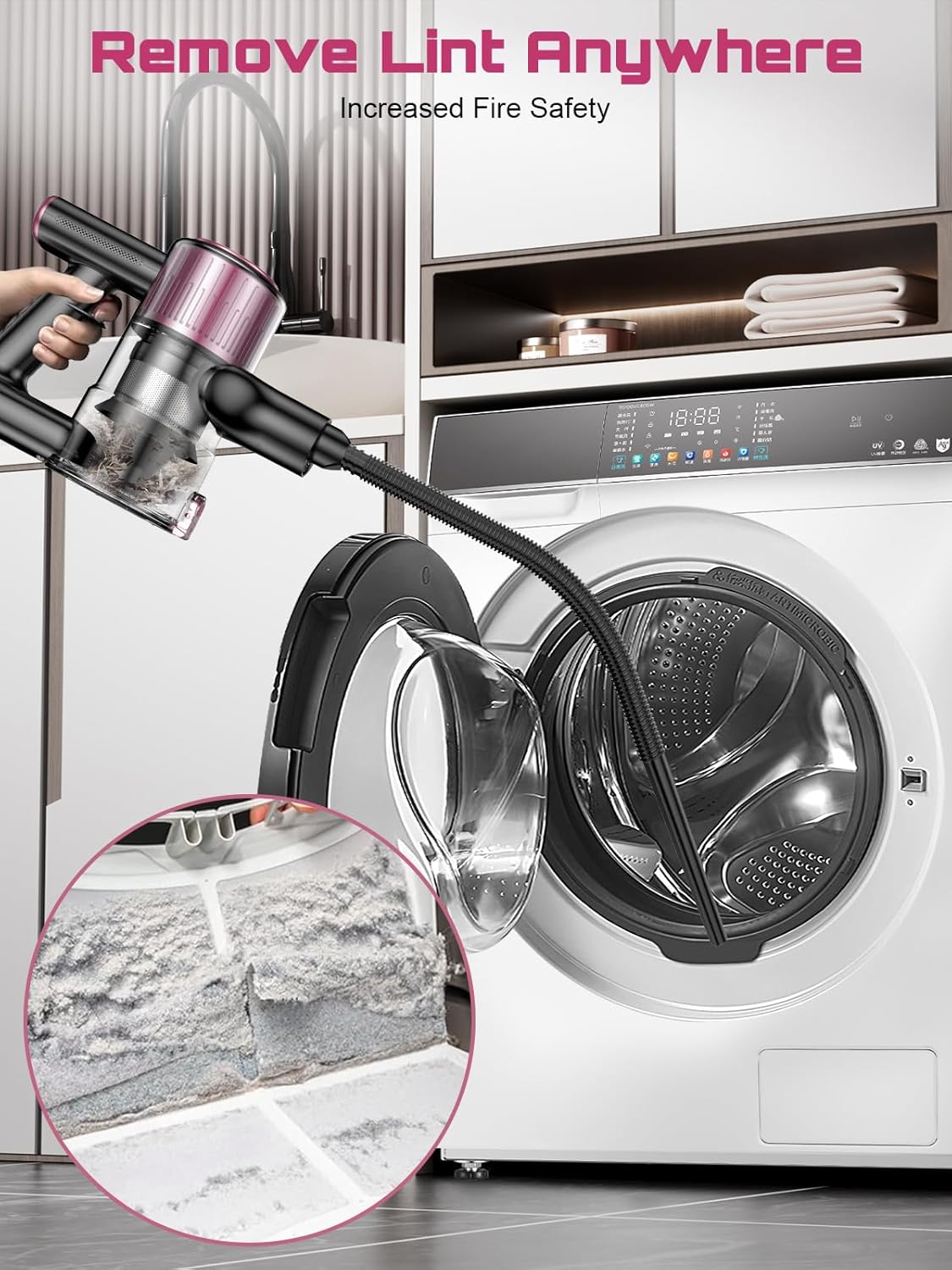
Image: The vacuum utilizing its extra-long hose to reach and clean a dryer vent, demonstrating its versatility.
Green LED Light & Anti-Tangle Brush
- The green LED light on the floor brush illuminates hidden dust and debris for a more thorough clean.
- The V-shaped anti-tangle brush is designed to prevent hair from wrapping around the roller, making it effective for pet hair and long hair.

Image: The green LED light feature on the floor brush highlights dust particles on the floor, ensuring no spot is missed.
6. Maintenance
Emptying the Dust Cup
The vacuum features a one-touch dust cup release for hygienic emptying:
- Hold the vacuum cleaner over a trash bin.
- Press the dust cup release button located on the side of the dust cup. The bottom flap will open, allowing debris to fall out.
- Close the dust cup flap securely after emptying.

Image: A user emptying the dust cup with a single touch, keeping hands clean.
Filter Cleaning
Regular cleaning of the filters is crucial for maintaining suction power and air quality. The 6-stage filtration system includes washable HEPA filters.
- Twist and detach the dust cup from the main vacuum body.
- Remove the HEPA filter, sponge filter, and metal filter assembly from the dust cup.
- Rinse the filters under running water until clean. Do not use detergent.
- Allow all filter components to air dry completely for at least 24 hours before reassembling. Ensure they are thoroughly dry to prevent motor damage.
- Reassemble the filters and dust cup, then reattach to the vacuum body.
Video: General guide on vacuum care, including charging tips, floor brush, and dust cup cleaning. This video demonstrates how to disassemble, clean, and reassemble the dust cup and filters.

Image: A user cleaning the washable filters under running water, highlighting the easy maintenance aspect.
Brush Roll Cleaning
The anti-tangle brush roll may still accumulate some hair or debris over time. Follow these steps to clean it:
- Turn off the vacuum cleaner and disconnect it from any power source.
- Flip the floor brush over. Locate the release mechanism for the brush roll.
- Remove the brush roll. Use scissors or the provided cleaning tool to cut and remove any tangled hair or fibers.
- Reinsert the brush roll, ensuring it clicks securely into place.
Video: General guide on vacuum care, including charging tips, floor brush, and dust cup cleaning. This video demonstrates how to clean the floor brush roll.
7. Troubleshooting
If you encounter any issues with your OIRFND A27 Pro, please refer to the following common problems and solutions:
| Problem | Possible Cause | Solution |
|---|---|---|
| Vacuum does not turn on | Battery is not charged or not installed correctly. Vacuum is charging. | Ensure battery is fully charged and properly installed. Unplug the charger before attempting to turn on. |
| Loss of suction power | Dust cup is full. Filters are clogged. Brush roll is tangled. | Empty the dust cup. Clean or replace filters. Remove any tangled debris from the brush roll. |
| Brush roll stops spinning | Brush roll is tangled with hair/debris. Obstruction in the floor brush. | Turn off the vacuum, remove the brush roll, and clear any obstructions. Check for clogs in the floor brush head. |
| LED display shows clog alert | Blockage in the air path (hose, tube, brush head). | Inspect all parts of the vacuum for blockages and clear them. Clean filters. |
If the problem persists, please contact customer service for assistance.
Video: General guide on installation and troubleshooting for a similar stick vacuum. This video demonstrates common troubleshooting steps for power and brush roll issues.
8. Specifications
| Feature | Detail |
|---|---|
| Brand | OIRFND |
| Model Name | A27 Pro |
| Special Features | 10-in-1 Multifunctional, Lightweight, Powerful Suction (45,000Pa), Green LED Searchlight, Friendly LED Display, 3 Suction Modes, High-efficiency Filtration |
| Filter Type | HEPA Filter (6-stage filtration, 99.97% efficiency) |
| Is Cordless? | Yes |
| Capacity | 1.5 Liters |
| Wattage | 350 watts |
| Form Factor | Stick |
| Battery Type | Lithium-Ion (1 AAA battery included) |
| Runtime | Up to 45 minutes |
| Product Dimensions | 8"L x 7.09"W x 17"H |
| Item Weight | 7.05 pounds |
9. Warranty and Support
Each OIRFND cordless vacuum cleaner comes with a 24-month protection plan. For any problems or inquiries, please contact our 24/7 customer service via message or email. We are committed to ensuring your satisfaction.