
1. Introduction
This manual provides essential instructions for the installation, operation, and maintenance of your LYAYYDS 6.2KW Hybrid Solar Inverter. This device is a pure sine wave inverter designed for both on-grid and off-grid solar power systems, featuring a built-in 120A MPPT charge controller. It integrates inverter, solar charger, and battery charger functions to provide reliable power support. Please read this manual thoroughly before installation and use to ensure proper function and safety.
Key features include:
- Pure sine wave output (on/off Grid capability)
- Operation without battery support
- One-key restoration to factory settings
- Built-in lithium battery automatic activation
- Integrated 120A MPPT solar charge controller
- High PV input voltage range (90~450VDC)
- Built-in anti-dust kit for harsh environments
- Smart battery charge design for optimized battery life
- Dual output functionality
2. Safety Instructions
Please observe the following safety precautions during installation, operation, and maintenance of the inverter. Failure to comply may result in electric shock, fire, or severe injury.
- Qualified Personnel: Only qualified personnel should install and maintain this device.
- Electrical Hazard: This inverter operates with high voltages. Do not open the casing or attempt repairs unless specifically instructed by the manufacturer.
- Disconnect Power: Always disconnect all power sources (PV array, utility, battery) before performing any wiring or maintenance.
- Proper Grounding: Ensure the inverter is properly grounded according to local electrical codes.
- Battery Safety: Batteries can produce explosive gases. Install in a well-ventilated area. Do not smoke or allow sparks/flames near batteries. Use appropriate circuit breakers between the battery and the inverter.
- Environmental Conditions: Do not expose the inverter to rain, snow, or excessive moisture. Ensure adequate ventilation around the unit.
- Overload Protection: Do not overload the inverter beyond its rated capacity.
3. Product Overview
The LYAYYDS 6.2KW Hybrid Solar Inverter is a compact unit designed for efficient power conversion and management in solar energy systems. It features a clear display for monitoring and configuration.
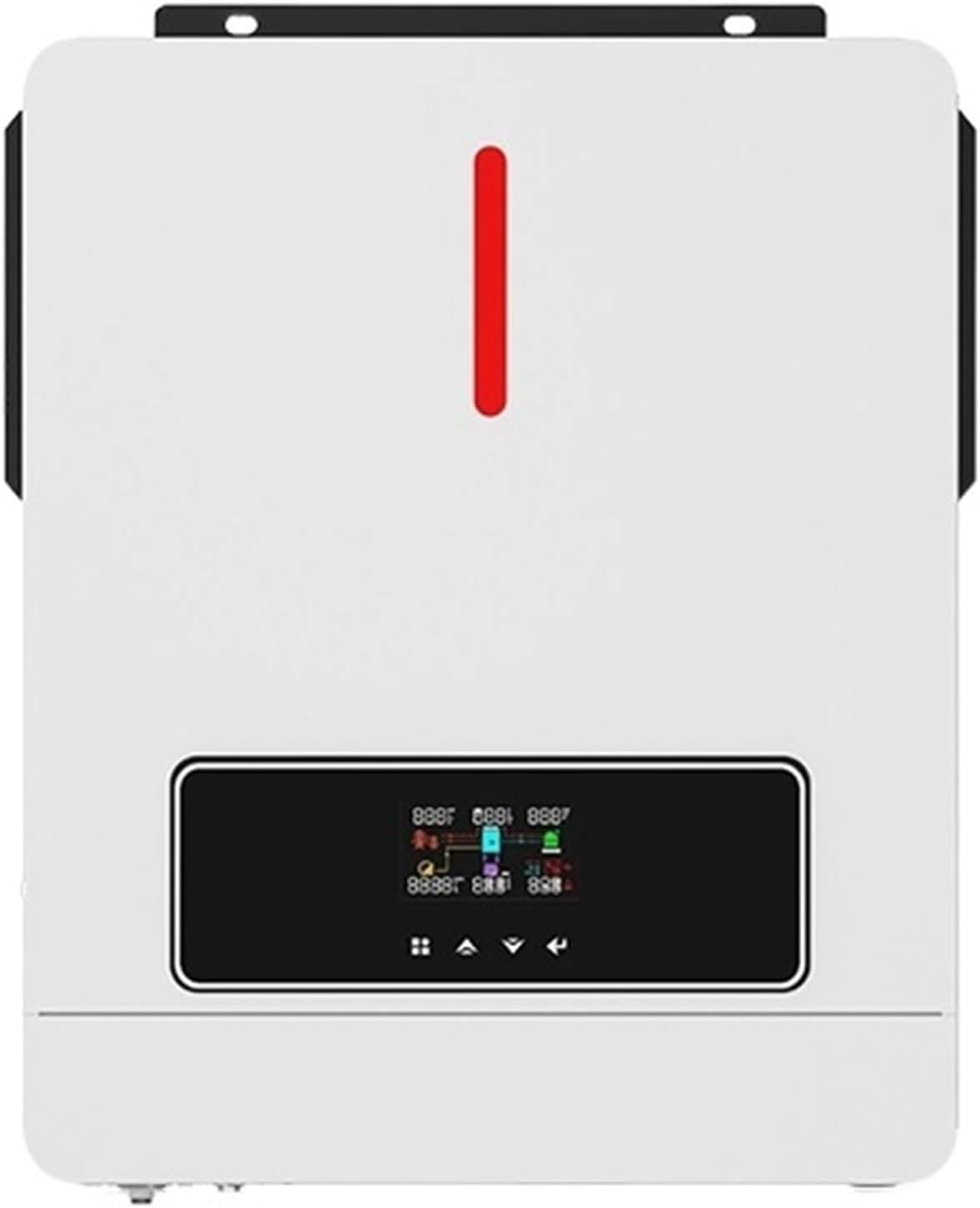
Figure 3.1: Front view of the LYAYYDS 6.2KW Hybrid Solar Inverter, showing the display panel and indicator lights.
The inverter's dimensions are approximately 420mm (height) x 310mm (width) x 110mm (depth).
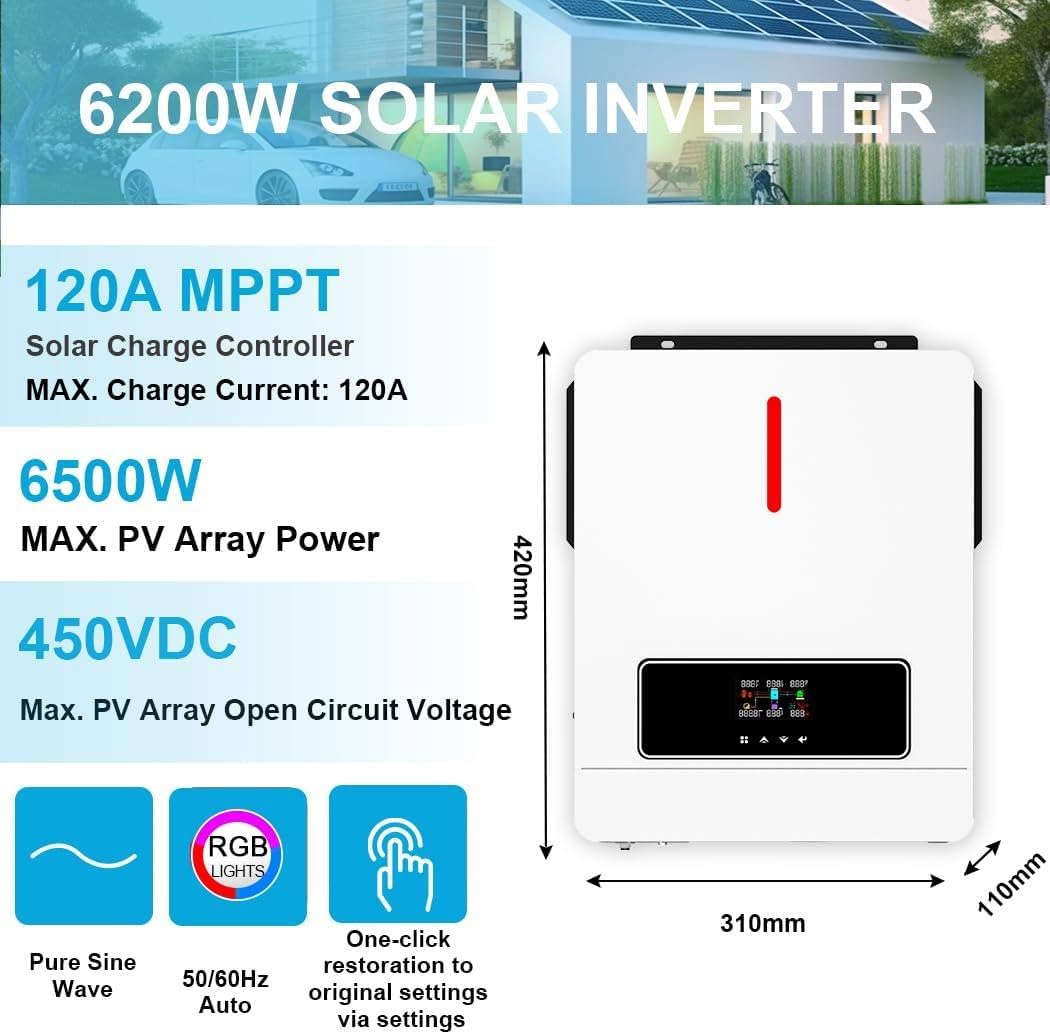
Figure 3.2: Inverter dimensions (420mm H x 310mm W x 110mm D) and key specifications including 120A MPPT, 6500W Max PV Array Power, and 450VDC Max PV Array Open Circuit Voltage.
The unit supports Pure Sine Wave output, 50/60Hz auto frequency detection, and features a one-click restoration to original settings via the user interface.
4. Setup
4.1 System Diagram
The inverter can be integrated into a hybrid power system, drawing power from solar panels, utility grid, or a generator, and supplying power to home appliances. It can operate with or without a battery.

Figure 4.1: Diagram illustrating the hybrid power system setup, showing connections for solar power, generator, utility, battery (optional), and output to home appliances.
4.2 Battery Connection
The inverter is compatible with Lead-Acid (Seal, Gel, Flooded) and Lithium batteries. For Lithium batteries, settings may need to be configured via the 'User-Defined' option. Always use a circuit breaker between the battery and the inverter.
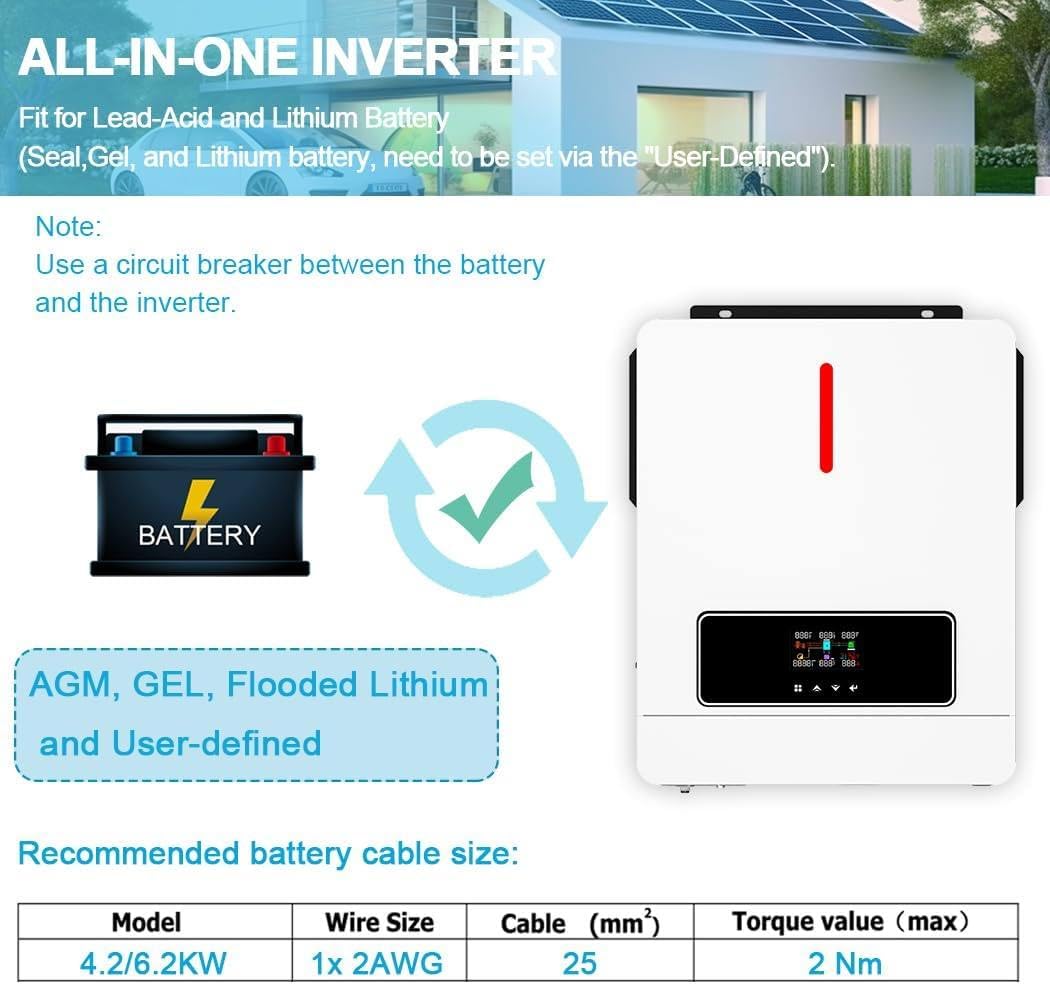
Figure 4.2: Inverter compatibility with AGM, GEL, Flooded Lead-Acid, and User-defined Lithium batteries. Recommended battery cable size for 6.2KW model is 1x 2AWG (25 mm²) with a maximum torque value of 2 Nm.
4.3 PV Array Connection
Connect your solar panel array to the designated PV input terminals. Ensure the PV array open circuit voltage and power are within the inverter's specifications (Max. PV Array Power: 6500W, Max. PV Open Circuit Voltage: 450Vdc, PV Array MPPT Voltage Range: 60~450Vdc).
4.4 AC Input/Output Connection
Connect the utility grid to the AC input and your loads to the AC output terminals. The inverter features a dual output functionality (Main OUT and Second OUT).
5. Operating Instructions
5.1 Powering On/Off
Follow the specific power-up sequence outlined in the full manual to avoid damage. Generally, connect batteries first, then PV, then AC input, and finally turn on the inverter. Reverse the sequence for powering off.
5.2 Display and Settings
The inverter features an LCD display for monitoring system status and configuring parameters. Refer to the detailed menu structure in the complete manual for navigation and setting adjustments.
5.3 Charging Modes
The inverter supports four charging modes:
- Utility First: Prioritizes utility power for charging.
- Solar First: Prioritizes solar power for charging.
- Solar & Utility: Uses both solar and utility power for charging.
- Battery & Solar: Charges from both battery and solar.
5.4 Output Modes
The inverter offers three output priority modes:
- PV Priority: Prioritizes solar power for loads.
- Utility Priority: Prioritizes utility power for loads.
- Load SBU Priority: Prioritizes solar, then battery, then utility for loads.

Figure 5.1: Visual representation of the four charging modes (Solar Charging, Utility Charge, Solar Priority, Solar+Utility Charging) and three output priority modes (PV Priority, Utility Priority, Load SBU Priority).
5.5 Dual Output Functionality
The inverter features a dual output. The Main OUT port may stop working if the battery voltage falls below a set range. The Second OUT port will continue to operate. For the 6.2KW model, the setting range for this threshold is 40.0V to 46.0V, with 0.1V increments. If the battery voltage is higher than 46V, the Main OUT port will continue to function. This feature is useful in areas with frequent power outages to ensure critical loads remain powered.
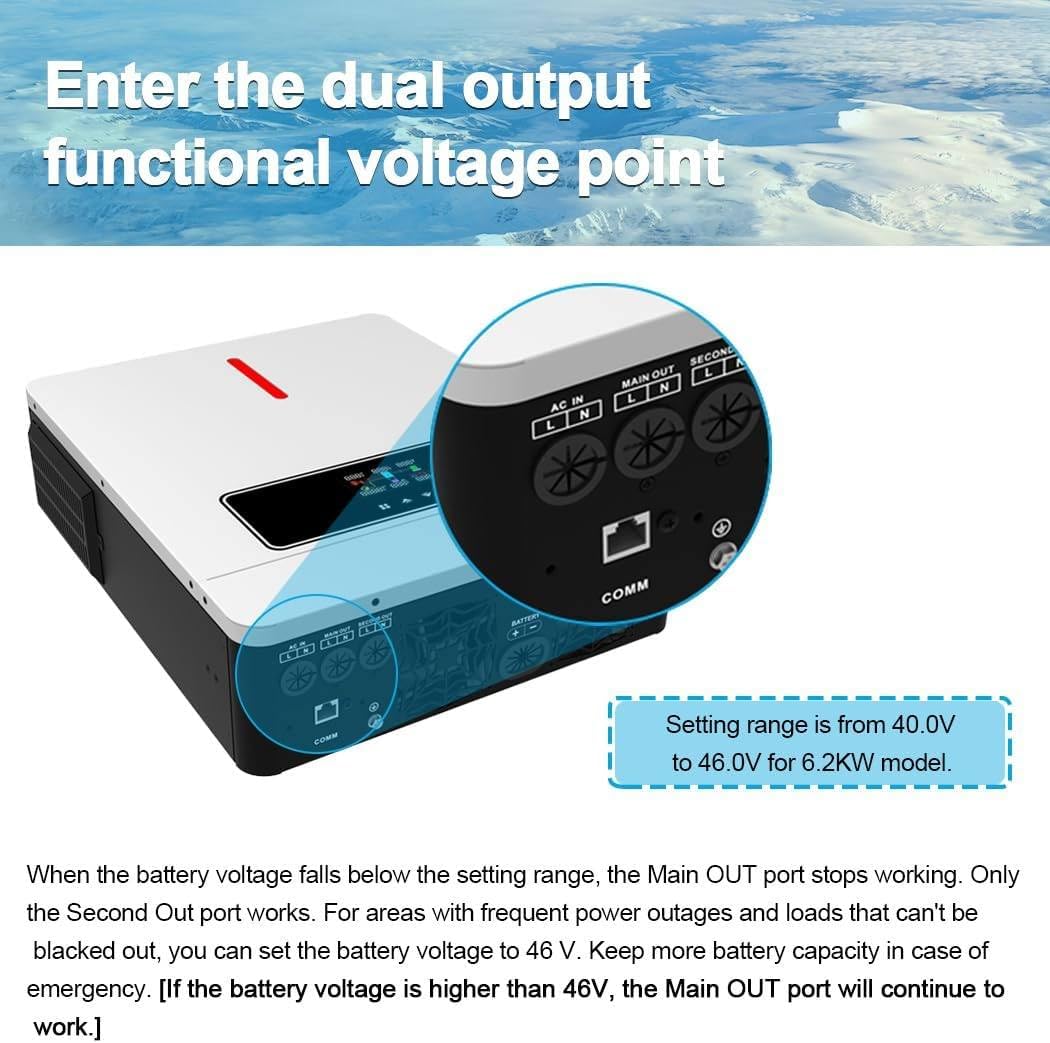
Figure 5.2: Illustration of the dual output ports (AC IN, Main OUT, Second OUT) and the explanation of the battery voltage setting range (40.0V to 46.0V) that affects Main OUT operation.
5.6 One-Click Restore to Factory Settings
The inverter includes a function to restore system settings to default with a single click. This can be used to correct setting errors and prevent potential machine damage.
5.7 Cold Start Function
The inverter supports a battery cold start function (at 46V) and automatic restart when AC power is restored, enhancing system protection.
5.8 WiFi Communication (Optional)
An optional WiFi module allows for remote monitoring and parameter adjustment of the inverter via a mobile application. The WiFi module is not included in the standard package.

Figure 5.3: Depiction of the optional WiFi communication function, showing how a module (e.g., with ID Q2721100111238) can be connected to monitor and change inverter parameters via a mobile app. Note: WiFi module is sold separately.
6. Maintenance
Regular maintenance ensures optimal performance and longevity of your inverter.
- Cleaning: Periodically clean the inverter's exterior and ventilation openings to prevent dust accumulation. Use a dry, soft cloth. Do not use liquid cleaners.
- Connections: Annually inspect all electrical connections for tightness and corrosion. Tighten any loose connections.
- Battery Inspection: If using lead-acid batteries, check electrolyte levels and terminal condition as per battery manufacturer guidelines.
- Environment: Ensure the installation environment remains within specified temperature and humidity ranges.
7. Troubleshooting
This section provides guidance for common issues. For complex problems, contact technical support.
- No Power Output: Check battery connections, PV input voltage, AC input, and circuit breakers. Ensure the inverter is powered on.
- Low Output Power: Verify PV array performance, battery charge level, and ensure no overloads are connected.
- Error Codes: If an error code appears on the display, consult the full manual's troubleshooting section for specific code meanings and solutions.
- Inverter Overheating: Check for blocked ventilation, excessive ambient temperature, or sustained overload conditions.
8. Specifications
Detailed technical specifications for the LYAYYDS 6.2KW Hybrid Solar Inverter (Model AGH-6.2KW-PRO).
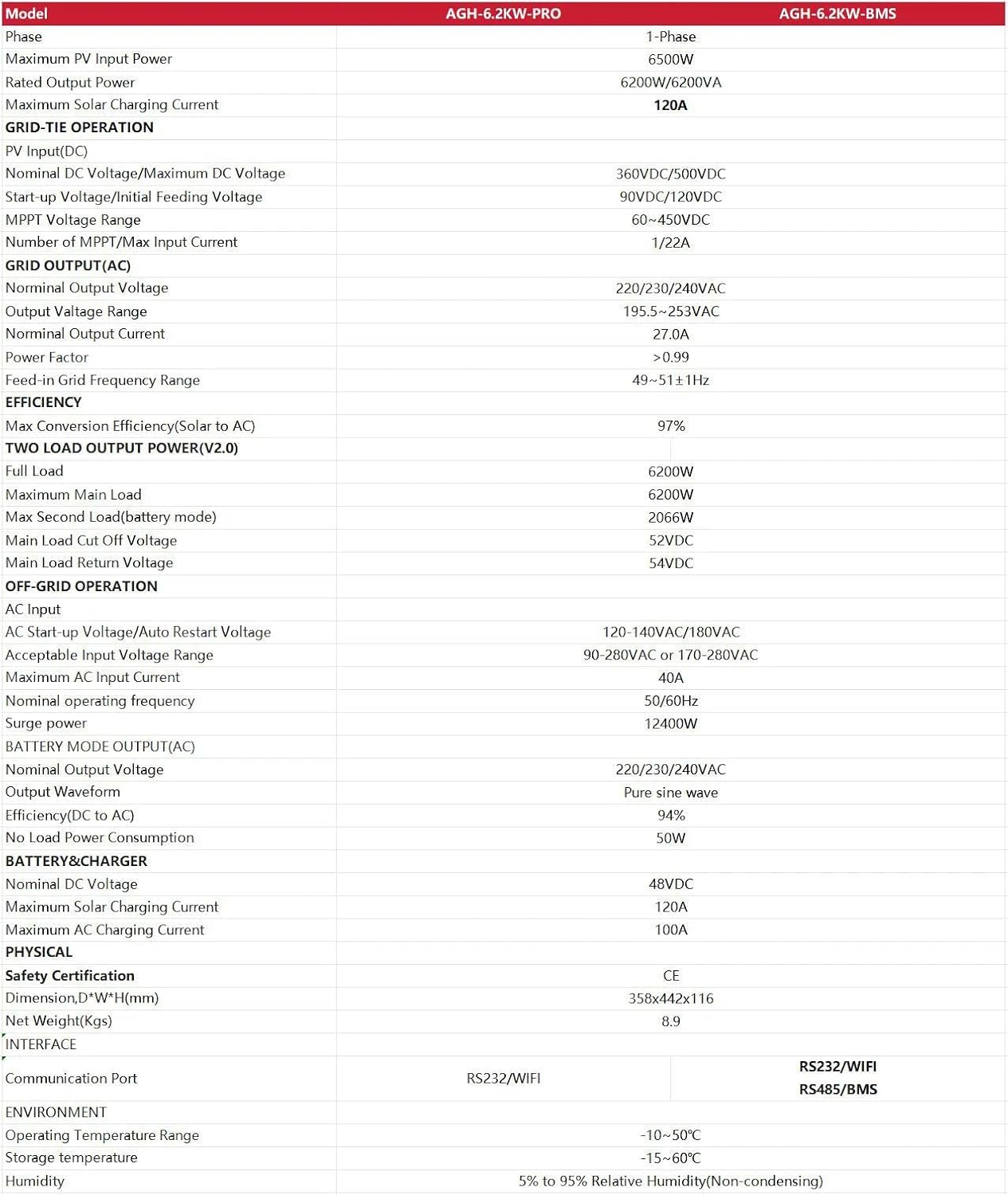
Figure 8.1: Comprehensive technical specifications for the AGH-6.2KW-PRO model, including input/output voltages, power ratings, MPPT range, efficiency, and physical dimensions.
| Parameter | Value |
|---|---|
| Model | AGH-6.2KW-PRO |
| Phase | 1-Phase |
| Maximum PV Input Power | 6500W |
| Rated Output Power | 6200W/6200VA |
| Maximum Solar Charging Current | 120A |
| PV Input Voltage (DC) | 360VDC/500VDC |
| MPPT Voltage Range | 60-450VDC |
| Nominal AC Output Voltage | 220/230/240VAC |
| Max Conversion Efficiency (Solar to AC) | 97% |
| Battery Voltage | 48VDC |
| Communication Port | RS232/WIFI |
| Operating Temperature Range | -10~50°C |
| Dimensions (D*W*H) | 358x442x116 mm |
| Net Weight | 8.9 Kgs |
9. Warranty and Support
For warranty information, please refer to the terms and conditions provided at the time of purchase or contact your vendor. In case of technical issues or support inquiries, please reach out to the manufacturer or authorized service provider with your product model and serial number.