
1. Product Overview
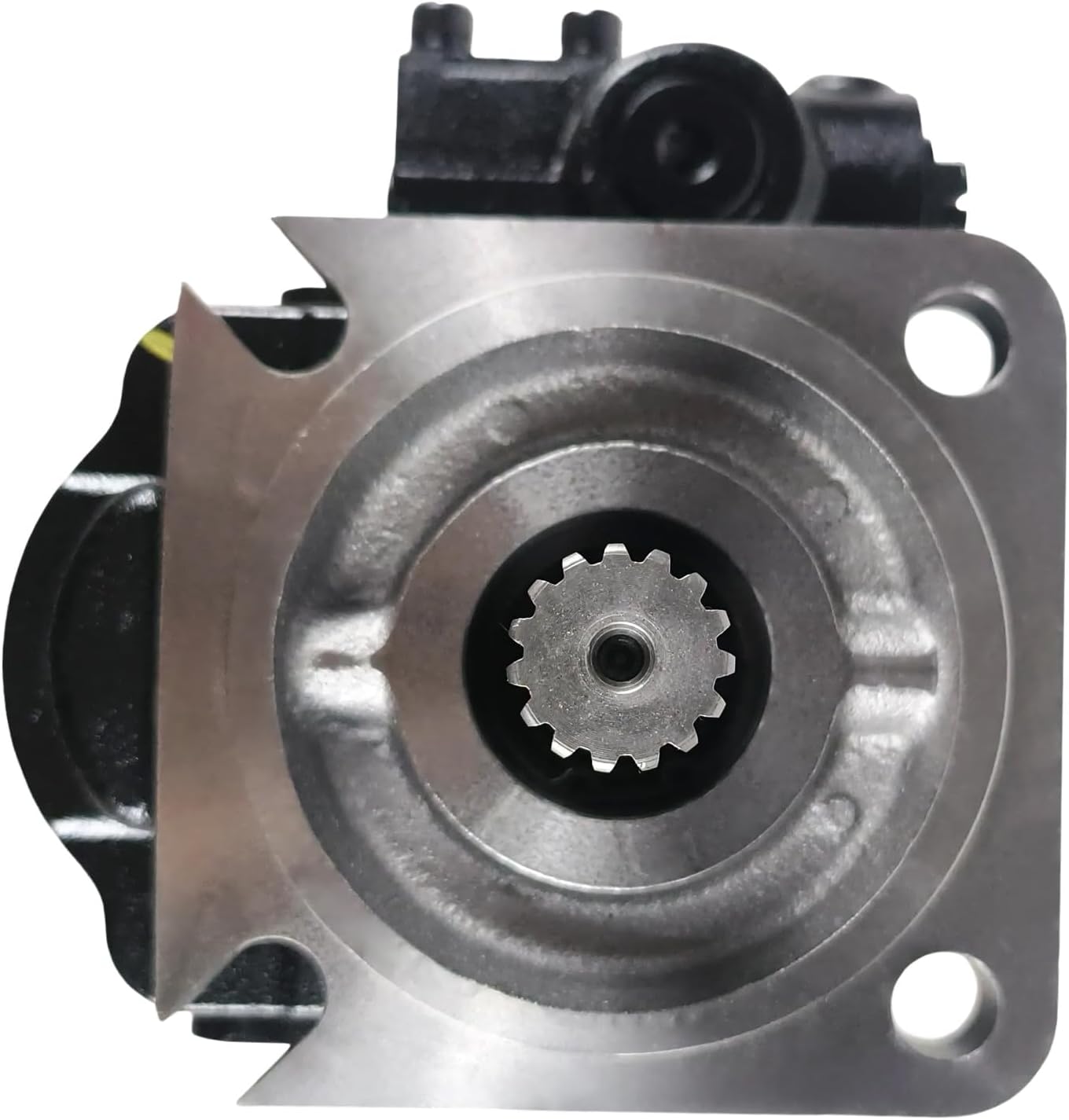
This manual provides essential information for the proper installation, operation, and maintenance of the IMIFAFTAbT Hydraulic Pump, part number 332/E6671 332E6671. This hydraulic pump is designed for specific heavy machinery applications, ensuring reliable performance when correctly integrated and maintained.
2. Product Identification
- Product Name: Hydraulic pump 332/E6671 332E6671
- Part Number: 332/E6671 332E6671
- Brand: IMIFAFTAbT
- Manufacturer Part Number: 332/E6671 332E6671
- ASIN: B0F245XM4C
3. Application
This hydraulic pump is specifically designed to fit the following JCB Telescopic Forklift models:
- JCB 535-140
- JCB 535-125
- JCB 550-140
4. Package Contents
Upon opening the package, please verify that all components are present and undamaged:
- 1 x Hydraulic pump (Part Number: 332/E6671 332E6671)
5. Important Notes
Before proceeding with installation or operation, please observe the following critical notes:
- Part Number Confirmation: It is crucial to confirm that the product shown and its part number (332/E6671 332E6671) are precisely what you require for your equipment.
- Compatibility Verification: If you are uncertain about compatibility, please contact the supplier with your engine serial number and equipment nameplate details for verification.
- Post-Purchase Communication: Some parts may have multiple variations. Please monitor your email after purchase, as the supplier may need to contact you to confirm details to ensure the correct product is dispatched.
6. Product Images



7. Setup and Installation
7.1 Safety Precautions
- Always wear appropriate personal protective equipment (PPE), including safety glasses and gloves.
- Ensure the equipment is powered off and hydraulic systems are depressurized before beginning any work.
- Refer to the JCB forklift's service manual for specific safety procedures related to hydraulic component replacement.
7.2 Pre-Installation Checks
- Inspect the new hydraulic pump for any signs of shipping damage.
- Verify that the mounting flange, shaft, and porting match the existing pump or the equipment's specifications.
- Ensure all necessary seals, gaskets, and fasteners are available and in good condition.
7.3 Installation Procedure
- Drain the hydraulic fluid from the system according to the forklift manufacturer's guidelines.
- Carefully disconnect all hydraulic lines and electrical connections from the old pump, labeling them to ensure correct re-connection.
- Remove the mounting bolts and carefully detach the old pump.
- Clean the mounting surface on the forklift thoroughly, removing any old gasket material or debris.
- Install new gaskets or O-rings as required on the new pump.
- Position the new IMIFAFTAbT hydraulic pump onto the mounting surface, ensuring proper alignment of the drive shaft.
- Secure the pump with the appropriate mounting bolts, tightening them to the manufacturer's specified torque.
- Reconnect all hydraulic lines and electrical connections, ensuring they are securely fastened and free from leaks.
- Refill the hydraulic system with the recommended type and quantity of hydraulic fluid.
- Bleed the hydraulic system as per the forklift manufacturer's instructions to remove any trapped air.
8. Operating Instructions
8.1 Initial Start-up
- After installation and fluid refill, perform a preliminary check for any visible leaks or loose connections.
- Start the forklift engine and allow it to idle for a few minutes to circulate the hydraulic fluid.
- Slowly actuate each hydraulic function (e.g., lift, tilt, extend) through its full range of motion several times to ensure proper bleeding and operation.
- Monitor the hydraulic fluid level and top up if necessary after the system has reached operating temperature and all air has been purged.
8.2 Normal Operation
- Operate the hydraulic system within the specified pressure and flow limits of the JCB forklift.
- Avoid sudden, jerky movements that can put excessive stress on the hydraulic pump and system components.
- Regularly check for unusual noises, vibrations, or excessive heat from the pump, which may indicate a problem.
9. Maintenance
9.1 Routine Checks
- Daily: Inspect the pump and hydraulic lines for leaks, damage, or loose connections.
- Weekly/Bi-weekly: Check the hydraulic fluid level and condition. Ensure it is clean and free from contamination.
- Monthly/Quarterly: Inspect mounting bolts for tightness. Check for excessive vibration or noise during operation.
9.2 Fluid Management
- Use only the type of hydraulic fluid recommended by the JCB forklift manufacturer.
- Change hydraulic fluid and filters at the intervals specified in the forklift's maintenance schedule. Contaminated fluid is a leading cause of pump failure.
- Ensure proper disposal of used hydraulic fluid in accordance with local environmental regulations.
9.3 Cleaning
- Keep the exterior of the hydraulic pump clean to prevent dirt and debris from entering the system.
- Avoid using high-pressure washers directly on the pump or its connections.
10. Troubleshooting
This section provides guidance for common issues. For complex problems, consult a qualified technician or the equipment manufacturer's service manual.
| Problem | Possible Cause | Solution |
|---|---|---|
| No hydraulic function | Low hydraulic fluid level; Air in system; Clogged filter; Drive shaft not engaging. | Check and refill fluid; Bleed system; Replace filter; Inspect drive coupling. |
| Weak hydraulic power | Contaminated fluid; Worn pump components; Relief valve malfunction. | Change fluid and filters; Inspect pump for wear (professional service); Check/adjust relief valve. |
| Excessive noise/vibration | Air in system; Cavitation; Loose mounting bolts; Contaminated fluid. | Bleed system; Ensure adequate fluid supply; Tighten bolts; Change fluid and filters. |
| Hydraulic fluid leaks | Loose fittings; Damaged seals/gaskets; Cracked housing. | Tighten fittings; Replace seals/gaskets; Replace pump if housing is cracked. |
11. Specifications
| Attribute | Detail |
|---|---|
| Manufacturer | IMIFAFTAbT |
| Brand | IMIFAFTAbT |
| Country of Origin | China |
| Manufacturer Part Number | 332/E6671 332E6671 |
| ASIN | B0F245XM4C |
| Date First Available | March 21, 2025 |
12. Warranty and Support
Specific warranty information for this product is typically provided at the point of purchase or within the product packaging. Please retain your proof of purchase for any warranty claims.
For technical support, inquiries regarding product compatibility, or assistance with troubleshooting beyond the scope of this manual, please contact the seller or manufacturer directly. When contacting support, please provide the product's part number (332/E6671 332E6671) and your equipment's details to facilitate a quicker resolution.