
1. Introduction
The Energycell Z27 is a versatile 3-in-1 Qi2 certified wireless charging station designed to simultaneously charge your iPhone, Apple Watch, and AirPods. This device features 15W fast magnetic charging for compatible iPhones, efficient charging for Apple Watch and AirPods, and includes a sleep-friendly LED light. Its compact design helps reduce cable clutter and optimize space.

Image 1.1: The Energycell Z27 charging station in use, simultaneously charging an iPhone, Apple Watch, and AirPods.
2. Package Contents
Please verify that all items are present in the package:
- Energycell Qi2 3-in-1 Wireless Charging Station
- 30W Fast Power Adapter
- 1m USB-C to USB-C Cable
- User Manual (This document)
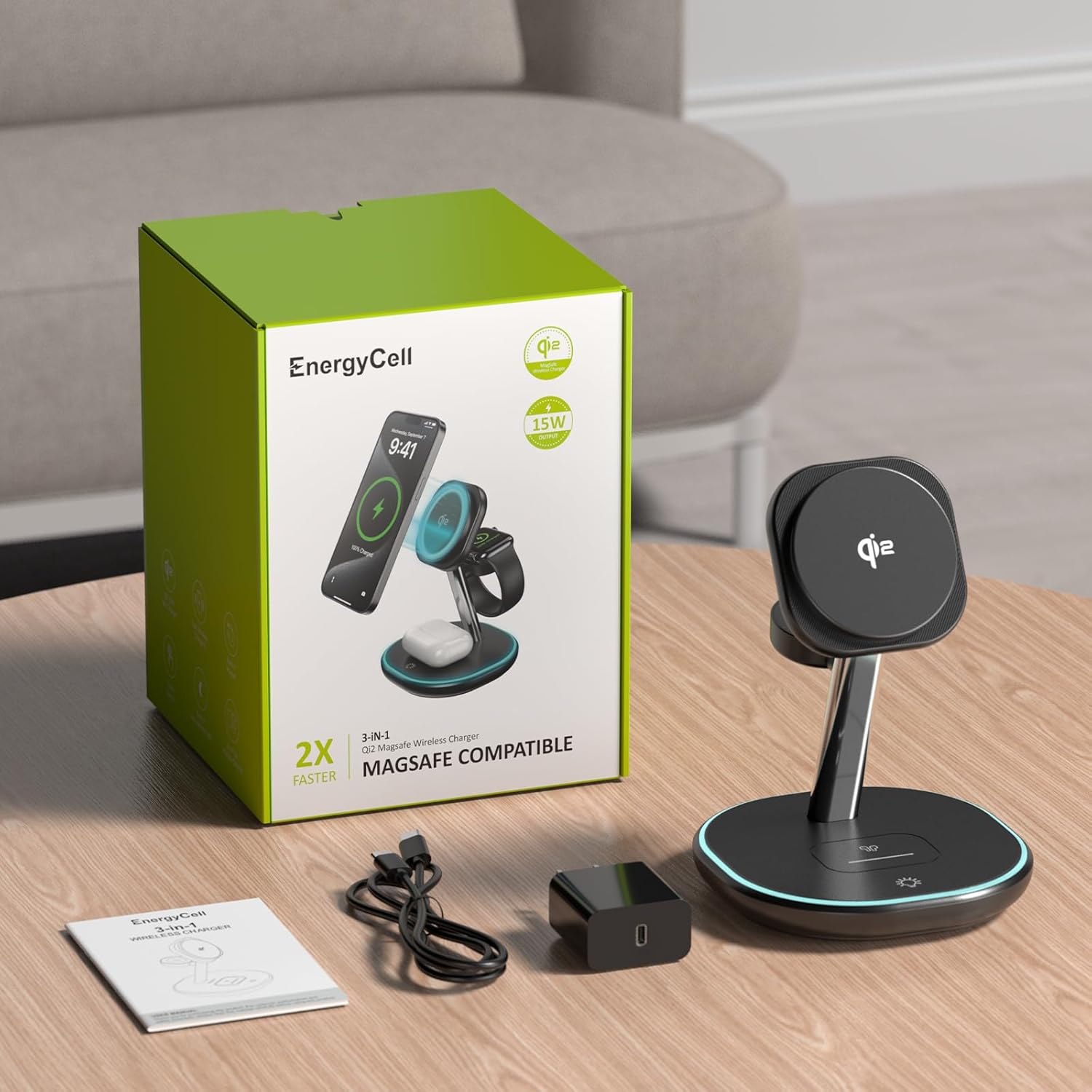
Image 2.1: All components included in the Energycell Z27 product package.
3. Product Features
- 3-in-1 Charging Capability: Charge your iPhone, Apple Watch, and AirPods simultaneously. The strong magnetic force ensures your phone remains securely in place.
- 15W High-Speed Qi2 Charging: Benefit from authentic 15W fast wireless charging for compatible iPhones, providing efficient and stable power delivery. The station supports 15W max for iPhone, 5W max for AirPods, and 2.5W max for Apple Watch.
- Qi2 Certified: Certified by the Wireless Power Consortium for optimal charging efficiency and stability, ensuring compatibility with most Apple devices.
- Integrated Safety Protections: Features foreign object detection, radiation shielding, overcurrent protection, overvoltage protection, and optimal heat dissipation for safe charging.
- Adjustable Nightlight: A built-in circular LED light offers two modes for a sleep-friendly environment. The soft glow can be easily turned on or off with a touch.

Image 3.1: Power distribution for iPhone, Apple Watch, and AirPods on the 3-in-1 charging station.

Image 3.2: Visual representation of the 15W Qi2 charging speed compared to standard chargers.
4. Setup Instructions
- Connect the Power Adapter: Insert the USB-C end of the provided cable into the charging station's input port.
- Plug into Power: Connect the other end of the USB-C cable to the 30W fast power adapter, then plug the adapter into a wall outlet.
- Placement: Place the charging station on a flat, stable surface, ensuring adequate ventilation.

Image 4.1: The charging station set up on a desk, demonstrating its space-saving design.
5. Operating Instructions
5.1 Charging Your Devices
- For iPhone (Magnetic Charging): Align your compatible iPhone (iPhone 12 series or newer with MagSafe/Qi2) with the magnetic charging pad. The phone will snap into place, and charging will begin automatically. Ensure your phone case is MagSafe compatible for optimal magnetic connection.
- For Apple Watch: Place your Apple Watch on the dedicated Apple Watch charging module. Ensure it is properly seated for charging to initiate.
- For AirPods: Place your AirPods charging case (with wireless charging capability) on the base charging pad. The charging indicator on your AirPods case will illuminate to confirm charging.

Image 5.1: Illustrates how to magnetically attach an iPhone for charging, highlighting MagSafe compatibility.
5.2 Using the LED Nightlight
The charging station features a circular LED light at its base. To activate or adjust the light, gently touch the designated touch-sensitive area on the base. There are two brightness modes, and a third touch will turn the light off.

Image 5.2: The charging station with its integrated LED nightlight active.
6. Safety Information
To ensure safe and efficient operation, please observe the following safety guidelines:
- Use only the provided 30W power adapter and USB-C cable.
- Avoid placing metal objects or foreign materials on the charging pads, as this may interfere with charging or cause overheating.
- Do not expose the device to water, moisture, or extreme temperatures.
- Do not disassemble, modify, or attempt to repair the charging station.
- Keep the device away from strong magnetic fields to prevent damage.
- Ensure proper ventilation around the charging station during use.

Image 6.1: Overview of the integrated safety protections.
7. Troubleshooting
| Problem | Possible Cause | Solution |
|---|---|---|
| Device not charging |
|
|
| Slow charging |
|
|
| LED light not working |
|
|

Image 7.1: Illustrates the difference between stable and unstable charging, emphasizing compatibility.
8. Specifications
| Feature | Detail |
|---|---|
| Model Number | Z27 |
| Input Voltage | 9 Volts |
| Output Wattage (Max) | 15W (iPhone), 5W (AirPods), 2.5W (Apple Watch) |
| Output Current | 3 Amps |
| Connector Type | USB Type C |
| Special Features | Fast Charging, Qi2 Certification, Wireless Charging, LED Nightlight |
| Compatible Devices | iPhone 12/13/14/15/16 series, Apple Watch, AirPods (with wireless charging case) |
| Item Weight | 12.3 ounces |
| Package Dimensions | 6.69 x 5.12 x 5.12 inches |
| Manufacturer | Shenzhen Aodehong Electronic Technology Co.,Ltd. |
9. Maintenance
To maintain the performance and longevity of your charging station:
- Cleaning: Disconnect the power before cleaning. Use a soft, dry, lint-free cloth to wipe the surface. Do not use abrasive cleaners or solvents.
- Storage: When not in use for extended periods, store the charging station in a cool, dry place away from direct sunlight.
- Handling: Avoid dropping or subjecting the device to strong impacts.
10. Warranty and Support
This Energycell Qi2 3-in-1 Wireless Charging Station comes with a 24-month warranty from the date of purchase. This warranty covers manufacturing defects and normal operational failures.
For technical support, warranty claims, or any inquiries, please contact our customer support team. Refer to the product packaging or the seller's information for contact details.