
1. Introduction
This manual provides comprehensive instructions for the installation, programming, operation, and maintenance of your Avisontek 877MAX Universal Garage Door Opener Keypad. Please read these instructions carefully before use to ensure proper functionality and safety.
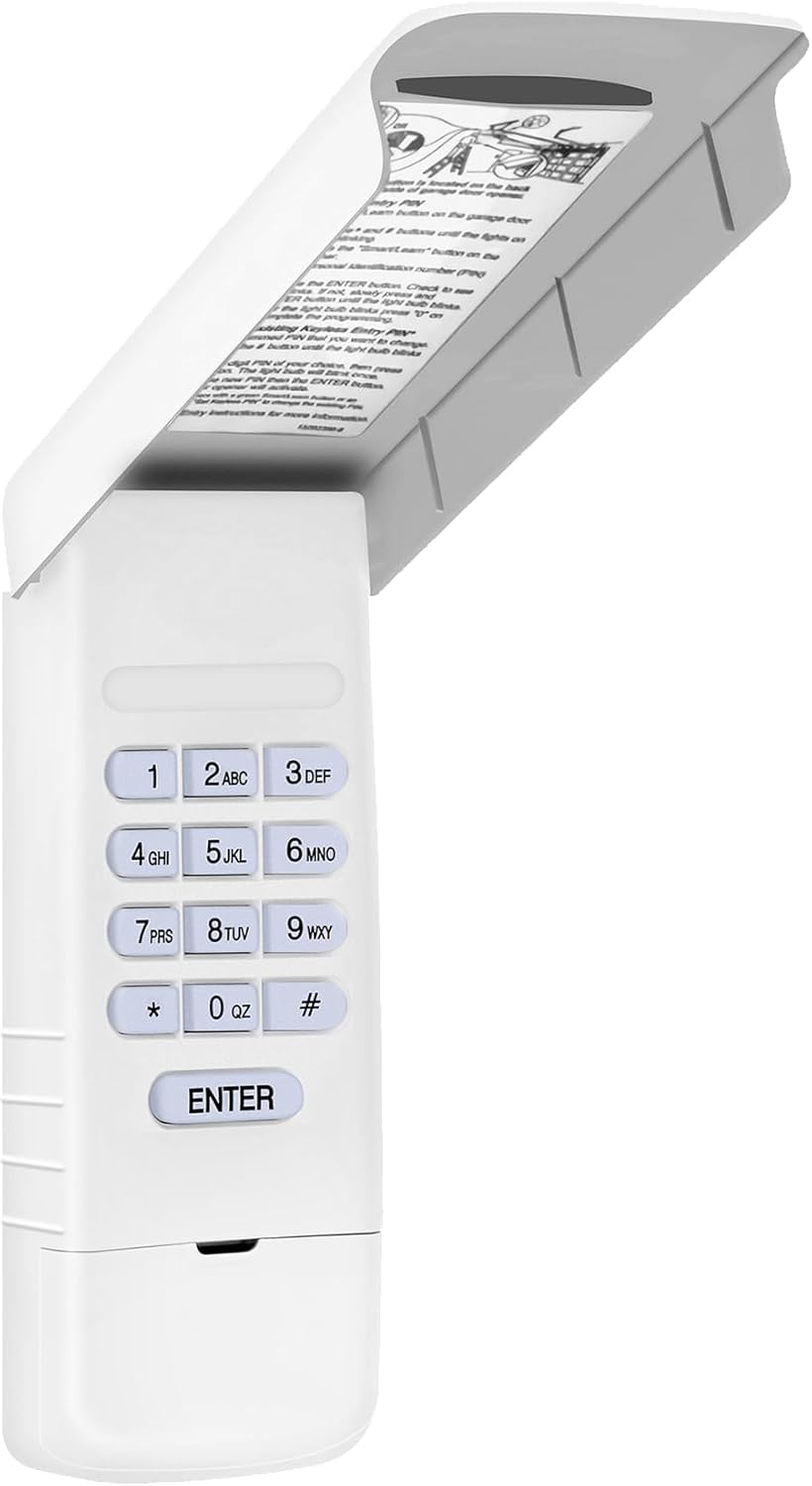
Image 1: Avisontek 877MAX Universal Garage Door Opener Keypad with cover open.
2. Compatibility
The Avisontek 877MAX Keypad is designed for wide compatibility with various garage door opener systems. It is compatible with LiftMaster, Chamberlain, and Sears Craftsman garage door openers manufactured from 1993 to the present.
Important Compatibility Notes:
- Compatible with garage door openers featuring a Purple, Yellow, Red, Orange, or Green color Learn Button.
- Replaces models such as 877MAX, 878MAX, 877LM, 377LM, 977LM, and 66LM.
- Not compatible with Dip Switch Opener systems.

Image 2: Visual guide to compatible garage door opener brands (LiftMaster, Chamberlain, Sears Craftsman) and learn button colors (Yellow, Purple, Green, Orange, Red) with associated manufacturing years.
3. Features
The Avisontek 877MAX Keypad offers a range of features designed for convenience, security, and durability:
- Enhanced Security: Utilizes Rolling Code Technology (Security 2.0+) for superior anti-theft protection.
- Wireless Installation: Effortless setup without the need for complex wiring.
- Extended Battery Life: Powered by a high-capacity 9V Alkaline battery for long-lasting operation.
- Weatherproof Housing: Durable construction designed to withstand various weather conditions, including sun, snow, and rain.
- User-Friendly Functions: Includes a temporary password feature for guests and a built-in night light for visibility in low-light conditions.
- FCC Certified: Ensures reliable performance and quality assurance.
- Wide Control Range: Operates effectively up to 164 feet from the garage door opener.
4. Setup and Installation
Follow these steps to install and program your Avisontek 877MAX Keypad.
4.1. Battery Installation
The keypad requires one 9V Alkaline battery (included). To install:
- Open the battery compartment cover on the back of the keypad.
- Insert the 9V battery, ensuring correct polarity.
- Close the battery compartment cover securely.

Image 3: The keypad with a 9V battery, highlighting its extended battery life.
4.2. Locating the Learn Button
Before programming, locate the Learn button on your garage door opener. The location and color of this button may vary depending on your opener model. Refer to your garage door opener's manual if needed.

Image 4: Examples of garage door opener Learn button locations and colors.
4.3. Programming Initial PIN
Follow these steps to program your personal identification number (PIN) and sync the keypad with your garage door opener:
- Step 1: Press and hold the * and # buttons simultaneously until the keypad's light begins to blink.
- Step 2: Enter your desired 4-digit PIN, then press the # button.
- Step 3: Press and release the ENTER button the number of times that corresponds with your garage door opener type:
- 1 time for Security+ 2.0 (Yellow Learn button)
- 2 times for 315 MHz Security+ (Purple Learn button)
- 3 times for 390 MHz Security+ (Red/Orange/Green Learn button)
- Step 4: To exit programming mode, press the 0 button.
- Step 5: Press and release the Learn button on your garage door opener. The Learn LED will light. You have 30 seconds to complete the next step.
- Step 6: Enter the 4-digit PIN you programmed in Step 2, then press and release the ENTER button. The garage door opener light will flash or click twice, indicating successful programming.
- Step 7: To test, press the ENTER button. The garage door will activate.
To program the keypad to more than one garage door opener, repeat the steps above using a new PIN for each additional opener.
Note: To test operation, enter the PIN then press the ENTER button. The door opener will activate. The keypad will remain active for 20 seconds; during this time, pressing the ENTER button can be used to stop, start, or reverse the door.
4.4. Mounting the Keypad
The keypad is designed for wireless installation. Choose a convenient location outside your garage, ensuring it is within the 164ft control range of your garage door opener. Use the provided mounting hardware to secure the keypad to a flat surface.
5. Operating Instructions
Once programmed, operating your garage door with the Avisontek 877MAX Keypad is straightforward:
- Opening/Closing the Garage Door: Enter your programmed 4-digit PIN, then press the ENTER button. The garage door will activate.
- Temporary Password Function: For guests or temporary access, you can set a temporary password. Refer to the keypad's internal instructions (under the cover) for detailed steps on setting and managing temporary passwords.
- Night Light Function: The keypad features a built-in night light for easy visibility and operation in the dark. This light activates automatically when buttons are pressed.
6. Maintenance
To ensure optimal performance and longevity of your Avisontek 877MAX Keypad, follow these maintenance guidelines:
- Battery Replacement: When the keypad's backlight dims or it becomes unresponsive, it's time to replace the 9V Alkaline battery. Follow the battery installation steps in Section 4.1.
- Cleaning: Wipe the keypad with a soft, damp cloth. Avoid using abrasive cleaners or solvents, as these can damage the surface.
- Environmental Protection: The keypad is weatherproof, but extreme conditions can still affect battery life. Ensure the cover is properly closed to protect internal components.
7. Troubleshooting
If you encounter issues with your Avisontek 877MAX Keypad, consider the following:
- Keypad not responding: Check the battery. Replace if necessary.
- Garage door not activating: Ensure the keypad is within range of the garage door opener. Re-verify programming steps (Section 4.3). Confirm your garage door opener has a compatible Learn button color.
- Incorrect PIN entry: Ensure you are entering the correct 4-digit PIN. The keypad will not activate if an incorrect PIN is entered.
- Interference: Other wireless devices or strong radio signals might cause temporary interference. Try operating the keypad from a slightly different position.
If problems persist, please contact customer support for assistance.
8. Specifications
Below are the technical specifications for the Avisontek 877MAX Universal Garage Door Opener Keypad:

Image 5: Detailed product specifications for the Avisontek 877MAX Keypad.
| Parameter | Value |
|---|---|
| Model | 877MAX / 878MAX |
| Working Range | 164 Feet |
| Working Voltage | DC 9V |
| Frequency | 310/315/390 MHz |
| Channel | 5 |
| Battery Model | 9V 6F22 (Alkaline) |
| Shell Material | ABS |
| Product Size | 7.4 x 2.87 x 1.34 inches (approx. 11.8*2.51*1.1 inches from image) |
| Product Weight | 5.3 ounces (approx. 0.33 lbs from image) |
| Color | White |
| Code Type | Security 2.0+ Rolling Code |
| Compatible Devices | 1993-Present LiftMaster, Chamberlain, Sears Craftsman Garage Door Openers |
9. Warranty and Support
Avisontek provides a 3-year warranty for the 877MAX Universal Garage Door Opener Keypad, including no-condition return or exchange. We are committed to ensuring your satisfaction with our product.
For any queries, technical assistance, or warranty claims, please contact Avisontek customer support. We aim to respond to all inquiries within 24 hours.

Image 6: Avisontek customer support and warranty information.