
Xspeedonline DA97-12625A,3527780,AP5620329,PS4176636
Xspeedonline Refrigerator Auto Close Lever Instruction Manual
Model: DA97-12625A, 3527780, AP5620329, PS4176636
1. Product Overview
The Xspeedonline Auto Close Lever is a replacement part designed to restore the proper closing mechanism of your Samsung refrigerator door. This component ensures that the refrigerator door smoothly and securely closes, maintaining optimal temperature and energy efficiency.
Each package contains two auto close levers, crafted from durable plastic with a smooth roller and heavy-duty solid pin axle, ensuring long-lasting performance and reliability.

Image: Two Xspeedonline Refrigerator Auto Close Levers, showing their design and the roller mechanism.
2. Compatibility
This auto close lever is compatible with a wide range of Samsung refrigerator models. Please verify your refrigerator's model number against the list below to ensure compatibility.
Compatible Samsung Refrigerator Models:
Models beginning with F261, RF22, RF23, RF24, RF25, RF26, RF27, RF28, RF29, RF30, RF31, RF32.
- RF28R7551SR/AA, RF28R7551SR/AC, RF28R6201SG/AA, RF23R6201SR/AAD, RF36C100SR/DA
- RF23HCEDTSR/AA, RF31FMESBSR/AA, RF30HDEDTSR/AA, RF28HFPDBSR/AA, RF323TEDBWW/AA
- RF31FMEDBWW/AA, RF32FMQDBSR/AA, RF31FMEDBBC/AA, RF323TEDBBC/AA, RF263BEAESP/AA
- RF261BEAESP/AA, RF23HCEDBWW/AA, RF260BEAEWW/AA, RF23M8070SG/AA, RF261BEAEWW/AA
- RF23M8570SR/AA, RF25HMEDBWW/AA, RF23M8960MT/AA, RF28HMEDBSG/AA, RF261BEAEBC/AA
- RF263BEAEWW/AA, RF28NHEDBSR/AA, RF30KMEDBSG/AA, RF25HMEDBSR/AA, RF28NHEDBSG/AA
- RF23M8960S4/AA, RF22NPEDBSG/AA, RF260BEAESR/AA, RF22NPEDBSR/AA, RF23M8570SG/AA
- RF28N9780SG/AA, RF23M8590SG/AA, RF22N9781SG/AA, RF28M9580SR/AA, RF25HMEDBBC/AA
- RF23HTEDBSR/AA, RF31FMEDBSR/AA, RT18M6215SR/AA, RF263BEAESR/AA, RF23M8090SR/AA
- RF260BEAESP/AA, RF23M8090SG/AA, RF28HMELBSR/AA, RF23M8590SR/AA, RF23J9011SR/AA
- RF22N9781SR/AA, RF28N9780SR/AA, RF28M9580SG/AA, RF28HFEDTBC/AA, RF28HFEDTWW/AA
- RF23HCEDBBC/AA, RF28HFEDTSR/AA, RF24FSEDBSR/AA, RF28HFEDBWW/AA, RF22M9581SR/AA
- RF22M9581SG/AA, RF23HCEDBSR/AA, RF263BEAEBC/AA, RF263TEAEBC/AA, RF28HFEDBSR/AA
- RF23HSESBSR/AA, RF263TEAEWW/AA, RF28HMEDBBC/AA, RF23M8070SR/AA, RF263TEAESR/AA
- RF28HDEDTSR/AA, RF28K9380SR/AA, RF28K9380SG/AA, RF28JBEDBSR/AA, RF23J9011SG/AA
- RF22K9381SR/AA, RF22K9381SG/AA, RF22KREDBSR/AA, RF28HDEDPBC/AA, RF22KREDBSG/AA
- RF23J9018SR/AA, RF28HDEDPWW/AA, RF28K9070SG/AA, RF30KMEDBSR/AA, RF28K9070SR/AA
- RF261BEAESR/AAF261BEAESR/AA, RF28K9580SR/AA, RF28K9580SG/AA, RF22K9581SR/AA
- RF22K9581SG/AA, RF22K9588SG/AA, RF28JBEDBSG/AA, RF28HMEDBWW/AA, RF28HDEDBSR/AA
- RF28HFEDBBC/AA, RF28HMEDBSR/AA, RF323TEDBSR/AA, RF30HBEDBSR/AA, etc.
Replaces Part Numbers:
- DA97-12625A
- 3527780
- AP5620329
- DA97-13070A
- PS4176636
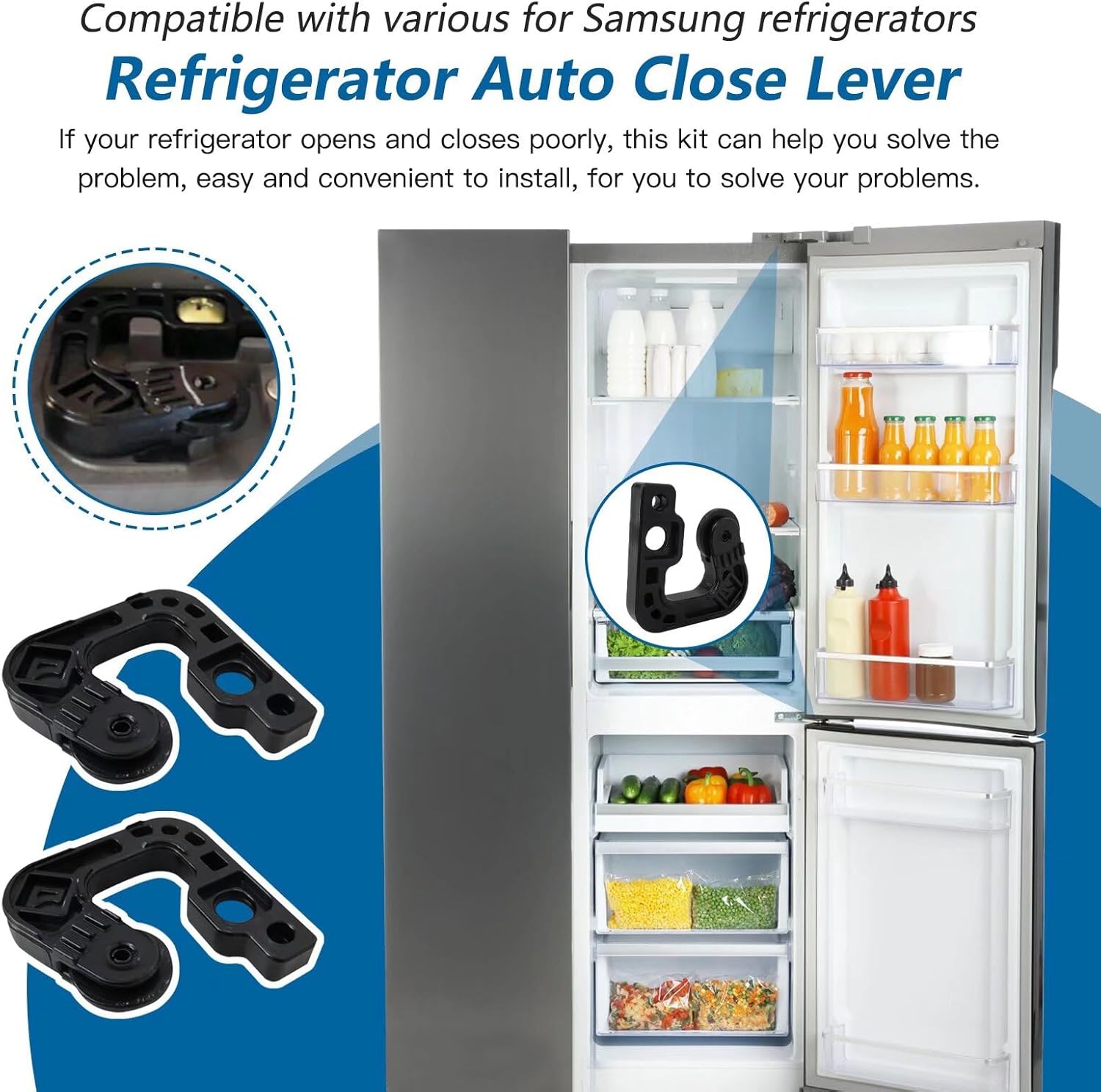
Image: Illustration showing the auto close lever's location and compatibility with various Samsung refrigerators.
3. Package Contents
Upon opening your package, you will find the following items:
- 2 x Xspeedonline Refrigerator Auto Close Levers
4. Installation Guide
Replacing the auto close lever requires careful attention. If you are unsure about any step, it is recommended to consult a qualified appliance technician.
Safety Precautions:
- Always unplug the refrigerator from the power outlet before beginning any repair or maintenance.
- Wear appropriate safety gear, such as gloves, to protect your hands.
- Ensure the refrigerator door is stable and supported during the process.
Step-by-Step Installation:
- Prepare the Refrigerator: Unplug the refrigerator from the wall outlet. Open the refrigerator door fully to access the top hinge area where the auto close lever is located.
- Locate the Existing Lever: The auto close lever is typically situated at the top of the refrigerator door, near the hinge mechanism. It may be covered by a plastic cap or trim.
- Remove the Old Lever: Carefully remove any covering or trim. Identify how the existing lever is attached. It may involve screws or clips. Use appropriate tools (e.g., screwdriver) to detach the old lever. Note its orientation for correct installation of the new part.
- Install the New Lever: Position the new Xspeedonline auto close lever in the same orientation as the one you removed. Secure it using the existing screws or clips. Ensure it is firmly seated and does not wobble.
- Test the Mechanism: Gently close the refrigerator door to ensure the new lever engages properly and allows the door to close smoothly and completely. Open and close the door several times to confirm its function.
- Restore Power: Once satisfied with the installation, replace any covers or trim. Plug the refrigerator back into the power outlet.

Image: Visual representation highlighting the quality materials and ease of installation of the auto close lever, with an inset showing its placement on a refrigerator door.
5. Function and Operation
Once installed, the Xspeedonline Auto Close Lever works by providing a smooth rolling surface and a precise pivot point for the refrigerator door. This mechanism assists the door in gently pulling itself shut when it is within a certain angle, preventing it from being left ajar and ensuring a tight seal. This contributes to maintaining the internal temperature of the refrigerator and reducing energy consumption.
6. Care and Maintenance
The auto close lever is designed for durability and requires minimal maintenance. To ensure its longevity and continued smooth operation:
- Regular Inspection: Periodically inspect the lever for any signs of wear, cracks, or damage.
- Cleaning: If dust or debris accumulates around the lever or its roller, gently wipe it clean with a soft, damp cloth. Avoid using harsh chemicals or abrasive cleaners.
- Avoid Force: Do not apply excessive force when opening or closing the refrigerator door, as this can prematurely wear out the lever or other door components.
7. Troubleshooting
If you experience issues with your refrigerator door after installing the new auto close lever, consider the following:
Door Not Closing Properly:
- Check Installation: Ensure the lever is installed correctly and securely, matching the orientation of the original part. Verify all screws or clips are tightened.
- Obstructions: Check for any items inside the refrigerator or freezer that might be blocking the door from closing fully.
- Door Gasket/Seal: Inspect the rubber gasket around the door for tears, cracks, or debris that might prevent a proper seal. A faulty gasket can also cause the door to not close completely.
- Leveling: Ensure the refrigerator itself is level. An unlevel appliance can cause door alignment issues.
- Other Worn Parts: If the issue persists, other components of the door hinge assembly or door itself might be worn or damaged.
If troubleshooting steps do not resolve the issue, it is advisable to seek assistance from a qualified appliance repair technician.
8. Specifications
| Attribute | Detail |
|---|---|
| Product Name | Refrigerator Auto Close Lever |
| Brand | Xspeedonline |
| Part Numbers Replaced | DA97-12625A, 3527780, AP5620329, DA97-13070A, PS4176636 |
| Material | Durable Plastic with Metal Pin Axle |
| Dimensions (Approx.) | 1.9 x 1.89 x 1.89 inches (4.83 x 4.80 x 4.80 cm) |
| Package Quantity | 2 Levers |

Image: Detailed diagram illustrating the product dimensions of the refrigerator auto close lever.
9. Warranty and Support
Specific warranty information for this product is not provided in the available documentation. For any inquiries regarding warranty, returns, or technical support, please contact the seller or manufacturer directly through your purchase platform.
no relevant documents
Ask a question about this manual
Ask about setup, troubleshooting, compatibility, parts, safety, or missing instructions. Manuals+ will review the question and use this page’s manual context to help answer it.