
1. Product Overview
The BUABMEQ YYK-Q16 Pro Intelligent Touch Screen Open Ear Earbuds are designed for comfort and versatility, featuring bone conduction technology, Bluetooth 5.4 connectivity, and IPX7 waterproofing. These earbuds are ideal for various activities including running, fitness, and sports, allowing users to enjoy audio while remaining aware of their surroundings.

Image: The BUABMEQ YYK-Q16 Pro earbuds with their intelligent touch screen charging case. The earbuds feature an open-ear design with ear hooks for secure and comfortable wear.
What's in the Box:
- 2 * Over Open Headphones (Earbuds)
- 1 * Intelligent Touch Screen Charging Case
- 1 * Charging Cable
- 1 * User Manual
- 1 * Box (Packaging)
2. Setup Guide
2.1 Initial Charging
Before first use, fully charge the earbuds and the charging case. Connect the provided charging cable to the charging case and a compatible USB power source. The intelligent touch screen on the case will display the charging status.
2.2 Pairing with Your Device
- Ensure the earbuds are charged and inside the charging case.
- Open the charging case. The earbuds will automatically power on and enter pairing mode.
- On your device (smartphone, tablet, computer), navigate to the Bluetooth settings.
- Search for available devices and select "YYK-Q16 Pro" from the list.
- Once selected, the earbuds will connect automatically. A voice prompt will confirm successful pairing.
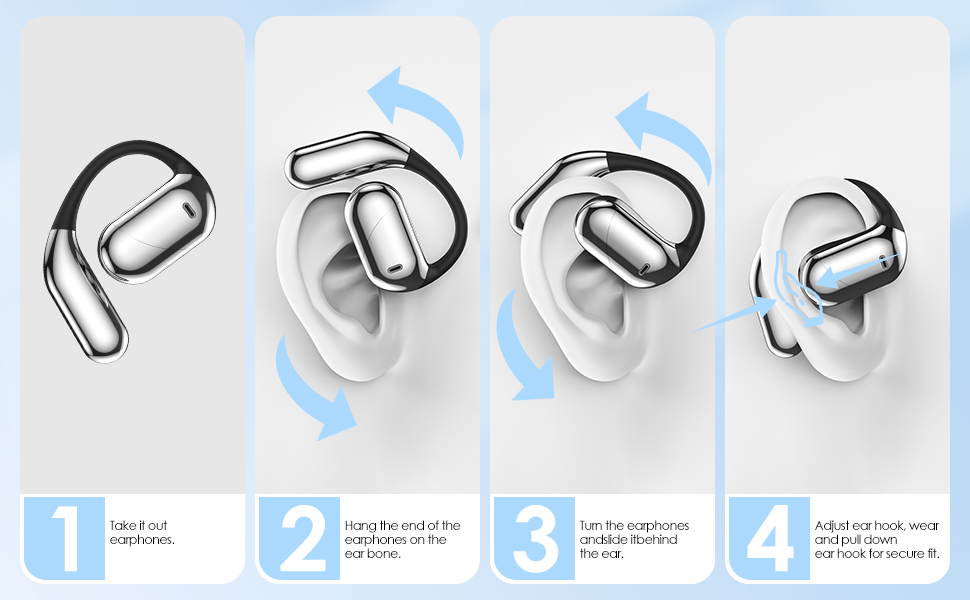
Image: Diagram illustrating the open ear wireless design and key features including Bluetooth 5.4 and auto-pairing, compatible with iOS, Android, and Windows devices.
2.3 Wearing the Earbuds
The YYK-Q16 Pro earbuds feature an ergonomic open-ear design with ear hooks for a secure and comfortable fit. This design reduces pressure on the ear canal and allows for situational awareness.
- Take out the earbuds from the charging case.
- Hang the end of the ear hooks over your ear bone.
- Turn the earbuds and slide them behind the ear.
- Adjust the ear hook, wear, and pull down the ear hook for a secure and comfortable fit.
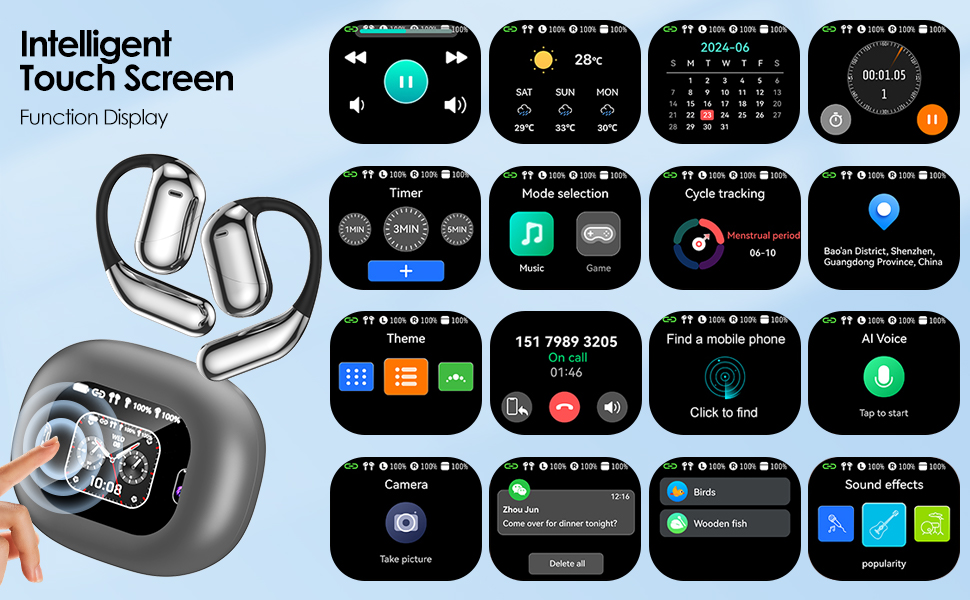
Image: A visual guide demonstrating the four steps to correctly wear the open-ear earbuds, ensuring a secure and comfortable fit.
3. Operating Instructions
3.1 Intelligent Touch Screen Controls (Charging Case)
The charging case features an intelligent touch screen for various functions and settings. Navigate through options by swiping and tapping the screen.
Image: A detailed display of the intelligent touch screen interface on the charging case, showing various functions such as music playback, weather, calendar, timer, find mobile phone, AI voice assistant, camera control, and sound effects.
3.2 Earbud Touch Controls
The earbuds are equipped with touch-sensitive areas for easy control of audio playback and calls.
| Action | Control | Function |
|---|---|---|
| Click (x1) | L/R Earbud | Pause/Play Music, Answer Call |
| Click (x2) | Left Earbud | Volume - |
| Click (x2) | Right Earbud | Volume + |
| Long Press (1s) | Left Earbud | Previous Song |
| Long Press (1s) | Right Earbud | Next Song |
| Long Press (1s) | L/R Earbud | Reject Call / Hang Up Call |
| Click (x3) | L/R Earbud | Activate Siri (or other voice assistant) |
| Click (x2) + Long Press (2s) | L/R Earbud | Reset Earbuds (Unpairing) |
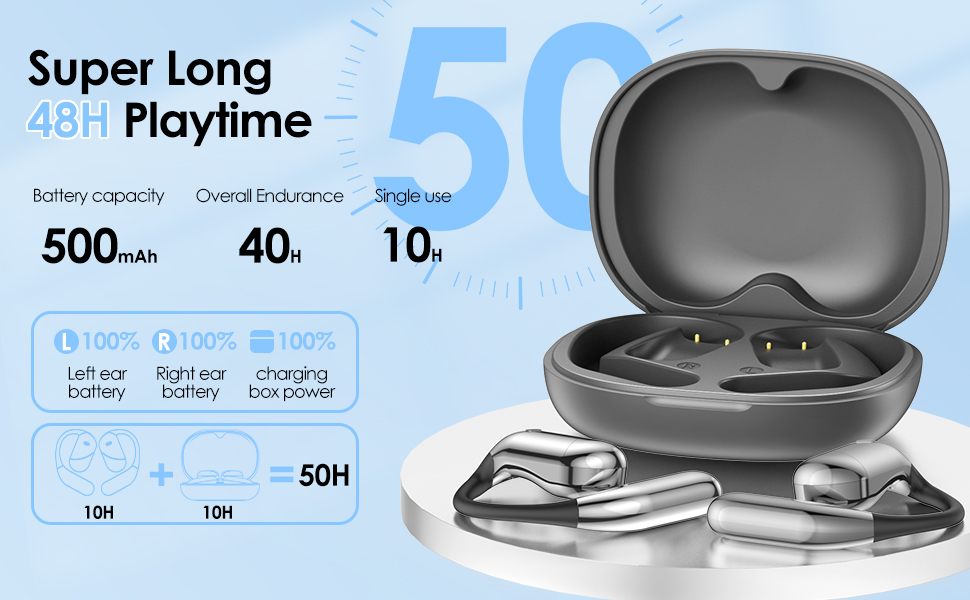
Image: A visual representation of the touch control gestures on the earbuds and their corresponding functions for music, calls, and voice assistant.
3.3 Sound Quality and Modes
The Q16Pro earbuds feature a 14.2mm vibration diaphragm speaker driver for excellent sound transmission. The intelligent touch screen on the charging case allows for equalizer adjustments and selection of four sound modes: Balanced Bass, Jazz, and Vocals. Additionally, three spatial sound effects (Smart Music, Game, Movie modes) can be switched freely for an immersive experience.

Image: Illustration highlighting the Hi-Fi audio capabilities and ground-breaking spatial audio for an immersive listening experience.
4. Maintenance and Care
4.1 Cleaning
Regular cleaning helps maintain the performance and longevity of your earbuds. Use a soft, dry, lint-free cloth to wipe the earbuds and charging case. Avoid using abrasive materials, alcohol, or chemical cleaners.
4.2 Storage
When not in use, store the earbuds in their charging case to protect them from dust and damage. Store the case in a cool, dry place away from direct sunlight and extreme temperatures.
4.3 Water Resistance (IPX7)
The earbuds are IPX7 waterproof, meaning they can withstand immersion in water up to 1 meter for 30 minutes. While suitable for workouts and light rain, they are not designed for swimming or prolonged submersion. Ensure the earbuds are dry before placing them back in the charging case to prevent damage.
5. Troubleshooting
5.1 Connectivity Issues
- Earbuds not pairing: Ensure Bluetooth is enabled on your device and the earbuds are in pairing mode. Try turning Bluetooth off and on again on your device.
- Frequent disconnections: Ensure the earbuds are within the 33-foot Bluetooth range of your device. Avoid obstacles that may interfere with the signal.
- Only one earbud working: Place both earbuds back into the charging case, close the lid, wait a few seconds, then take them out again. This often re-syncs them.
5.2 Charging Problems
- Earbuds not charging: Ensure the charging contacts on the earbuds and inside the case are clean and dry. Verify the charging cable is securely connected to both the case and the power source.
- Case not charging: Try a different charging cable or USB power adapter.
5.3 Sound Quality Issues
- Low volume or distorted sound: Check the volume levels on both your device and the earbuds. Ensure the earbuds are clean and free from debris.
- Poor call clarity: Ensure the microphone area is not obstructed.
5.4 Resetting the Earbuds
If you experience persistent issues, you can reset the earbuds to their factory settings:
- Disconnect the earbuds from your phone's Bluetooth settings (Forget Device).
- Quickly press the left and right earbud touch buttons 5 times at the same time to reset.
6. Specifications
| Feature | Detail |
|---|---|
| Model Name | YYK-Q16 Pro |
| Brand | BUABMEQ |
| Connectivity Technology | Bluetooth 5.4 |
| Water Resistance Level | IPX7 Waterproof |
| Control Type | Touch Control |
| Audio Driver Size | 14.2 Millimeters |
| Earpiece Shape | Hook |
| Material | Plastic |
| Carrying Case Material | Plastic |
| Carrying Case Color | Grey |
| Impedance | 14 Ohm |
| Playtime (Single Use) | Up to 10 hours |
| Overall Endurance (with case) | Up to 48 hours |
| Charging Case Battery Capacity | 500mAh |

Image: A visual representation of the battery life, indicating 10 hours of single-use playtime for each earbud and a total of 48 hours with the 500mAh charging case.
7. Warranty and Support
For warranty information and customer support, please refer to the contact details provided on the product packaging or the official BUABMEQ website. Keep your purchase receipt as proof of purchase for any warranty claims.
The product typically comes with a standard return policy of 30 days for refund or replacement, as per retailer terms.
For further assistance, please contact BUABMEQ customer service.