1. Introduction
Product Overview
The Vasco Translator E1 earbuds are an advanced instant voice translator device designed to facilitate global communication. They offer real-time translation across more than 50 languages, making them ideal for travelers, business professionals, and language learners. The unique over-ear design ensures comfort and hygiene, suitable for sharing in multi-person conversations.

Figure 1.1: Vasco Translator E1 earbuds and their charging case, showcasing the sleek design.
Key Features
- Instant Translation: Real-time translation in over 50 languages for natural and smooth conversations.
- AI-Driven Technology: Utilizes advanced AI algorithms for high translation accuracy.
- Touchless & Natural Flow: Enables hands-free communication without the need for app or device interaction.
- Hygienic Over-Ear Design: Unique construction designed for comfort and cleanliness, ideal for sharing.
- Easy Customization: Personalize settings via a dedicated free app for Android & iOS.
- Multi-Person Conversations: Supports simplified dialogues with LED color assignments for participants and languages.

Figure 1.2: Visual representation of the AI algorithms that power the Vasco Translator E1 for unmatched translation accuracy.
2. Setup
2.1. Unboxing and Package Contents
Carefully open the product packaging and ensure all components are present. The standard package includes the Vasco Translator E1 earbuds, their charging case, a USB charging cable, and a Quick Start Guide.
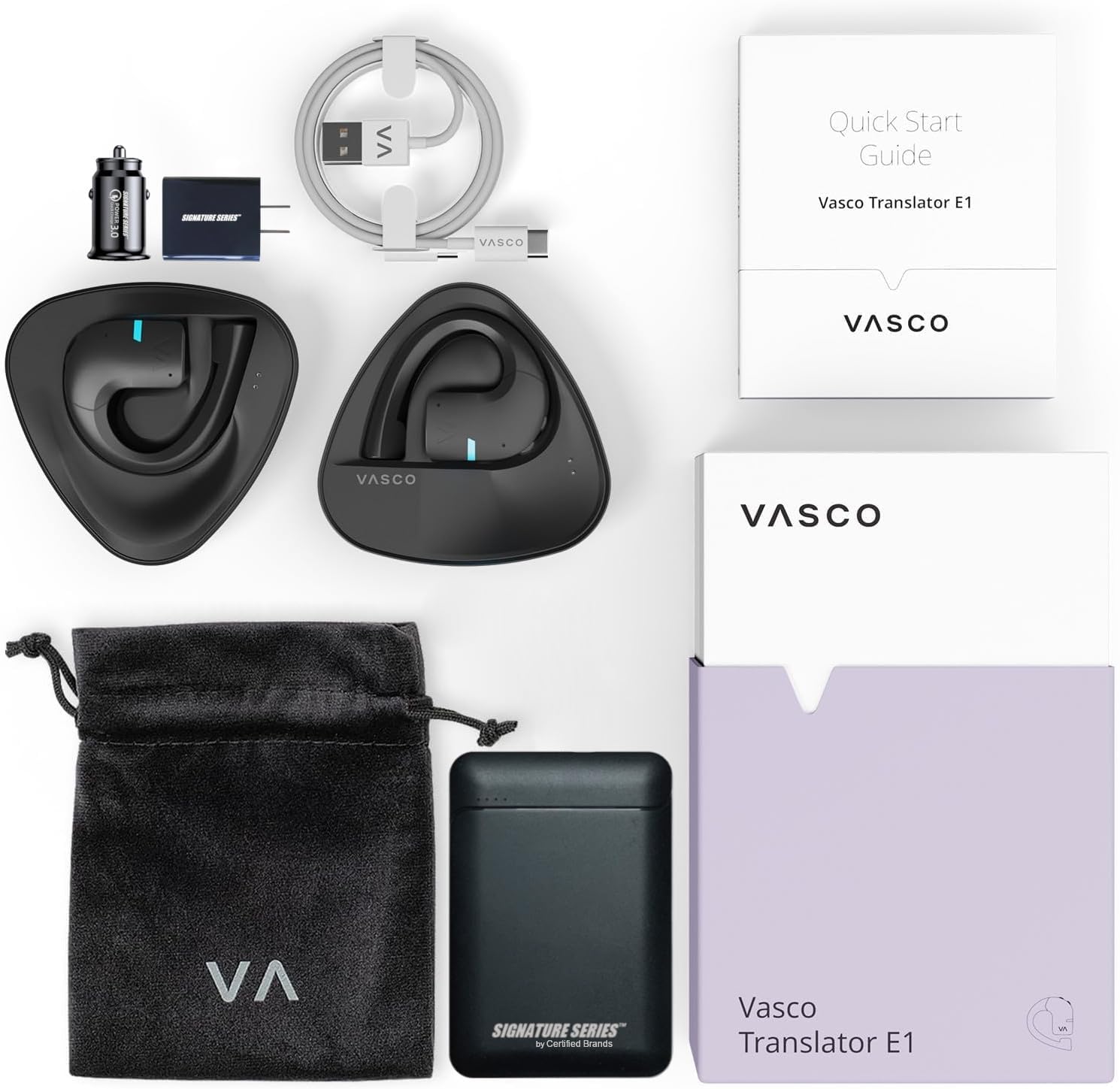
Figure 2.1: All items included in the Vasco Translator E1 Signature Exclusive Kit, laid out for inspection.
2.2. Initial Charging
Before first use, fully charge the earbuds and their charging case. Connect the provided USB cable to the charging case and a compatible USB power source. The LED indicators on the case will show the charging status. A full charge typically takes approximately 2 hours.

Figure 2.2: The Vasco Translator E1 earbuds securely seated within their charging case, ready for charging.
2.3. App Installation and Pairing
- Download the dedicated Vasco Translator E1 app from your device's app store (available for Android and iOS).
- Open the app and follow the on-screen instructions to pair your earbuds. Ensure Bluetooth is enabled on your smartphone.
- The app will guide you through selecting your preferred languages and initial settings.
3. Operating Instructions
3.1. Real-Time Translation
The Vasco Translator E1 earbuds provide instant, real-time translation. Once paired with the app and configured, simply speak naturally. The earbuds will process your speech and translate it into the selected target language, playing it back to the other party through their earbud or a connected device.

Figure 3.1: A user engaging in a hands-free business conversation with the aid of Vasco Translator E1 earbuds.
3.2. Touchless Operation
The E1 earbuds are designed for intuitive, touchless operation. This allows for a natural conversational flow without needing to press buttons or interact with a separate device. Simply speak, and the earbuds handle the translation seamlessly.

Figure 3.2: Individuals participating in a conversation using the touchless translation mode of the Vasco Translator E1, maintaining a natural interaction.
3.3. Multi-Person Conversations
For group discussions or meetings, the Vasco Translator E1 can simplify multi-person dialogues. The app allows for assigning different LED colors to participants and their respective languages, making it easier to follow who is speaking and in what language. Up to 10 languages can be used in one conversation.

Figure 3.3: A group meeting where participants are utilizing the Vasco Translator E1 earbuds to facilitate communication across multiple languages.
3.4. App Customization
The dedicated Vasco app provides various customization options. You can adjust language pairs, translation speed, audio settings, and manage device connections. Refer to the in-app help section for detailed guidance on all available features.
4. Maintenance
4.1. Cleaning
To maintain hygiene and optimal performance, regularly clean your Vasco Translator E1 earbuds. Use a soft, dry, lint-free cloth to wipe the surfaces. Avoid using abrasive materials, solvents, or harsh chemicals. Do not submerge the earbuds or charging case in water.
4.2. Battery Care
The earbuds are powered by Lithium Ion batteries. To prolong battery life:
- Avoid extreme temperatures.
- Store the device with a partial charge if not used for extended periods.
- Use only the provided charging cable and a certified power adapter.
5. Troubleshooting
Common Issues and Solutions
- Earbuds not pairing: Ensure Bluetooth is enabled on your smartphone and the earbuds are charged. Try restarting both the earbuds (by placing them in the case and taking them out) and your phone.
- No sound/poor audio quality: Check the volume settings on your phone and within the Vasco app. Ensure earbuds are properly seated in your ears.
- Translation inaccuracies: Ensure clear speech and minimal background noise. Verify that the correct source and target languages are selected in the app.
- App not responding: Close and reopen the app. If the issue persists, try reinstalling the app.
- Battery not charging: Check the charging cable and power source. Ensure the earbuds are correctly placed in the charging case.
For further assistance, refer to the in-app help section or contact customer support.
6. Specifications
| Feature | Detail |
|---|---|
| Product Dimensions | 2.24 x 0.98 x 1.81 inches |
| Item Weight | 0.441 ounces |
| Item Model Number | 5903111339999 Gift Bundle |
| Batteries | 4 Lithium Ion batteries required (included) |
| Manufacturer | Certified Brands |
| Date First Available | March 20, 2025 |
7. Warranty and Support
7.1. Warranty Information
Specific warranty details for the Vasco Translator E1 are typically provided with your purchase documentation or can be found on the manufacturer's official website. Please retain your proof of purchase for warranty claims.
7.2. Customer Support
For technical support, troubleshooting assistance, or any inquiries regarding your Vasco Translator E1, please visit the Certified Brands Store on Amazon or refer to the contact information provided in the product packaging or the Vasco app.
8. Official Product Videos
No official product videos from the seller were provided in the available data for embedding in this manual.


