
1. Introduction
This manual provides detailed instructions for the Mivi Duopods I6 True Wireless Earbuds. Please read this manual thoroughly before using the product to ensure proper operation and to maximize your listening experience. Keep this manual for future reference.
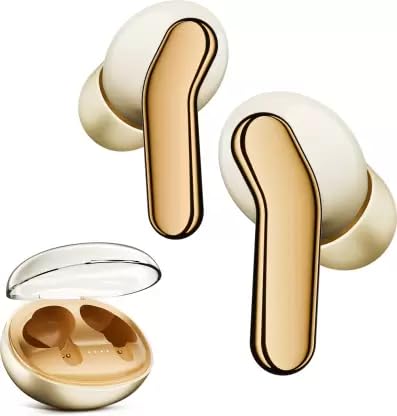
Image: Mivi Duopods I6 True Wireless Earbuds in their charging case.
2. What's in the Box
Verify that all items are present in the packaging:
- Mivi Duopods I6 True Wireless Earbuds (Left and Right)
- Charging Case
- USB Charging Cable
- Multiple Sizes of Eartips
- User Manual
- Warranty Card
3. Product Overview
3.1 Key Features
- Fluidic Curve Design: Ergonomically designed for a comfortable and secure fit.
- 13mm Drivers: Delivers enhanced audio quality.
- IPX4 Sweat-resistant: Provides protection against sweat and splashes, suitable for workouts.
- Mivi Audio Technology: Optimized sound performance.
- Multi-device Connectivity: Seamlessly connect to smartphones, tablets, and laptops.
- Up to 55 Hours Combined Playtime: Extended battery life with the charging case.
- Bluetooth v5.3: Ensures stable and efficient wireless connection.
- AI-ENC for Clear Calls: Environmental Noise Cancellation for improved call clarity.

Image: A collage highlighting key features of the Mivi Duopods I6, such as Fluidic Curve Design, 13mm drivers, IPX4 rating, Mivi Audio, multi-device connectivity, 55 hours playtime, and Bluetooth v5.3.
3.2 Components
The Mivi Duopods I6 consist of two earbuds (left and right) and a portable charging case. Each earbud features touch controls for managing audio playback, calls, and voice assistant activation.

Image: Mivi Duopods I6 earbuds and charging case positioned on a running track, illustrating their suitability for athletes.
4. Setup
4.1 Initial Charge
- Place both earbuds into the charging case.
- Connect the USB charging cable to the charging port on the case and to a power source.
- Allow the earbuds and case to fully charge before first use. The indicator lights on the case will show charging status.
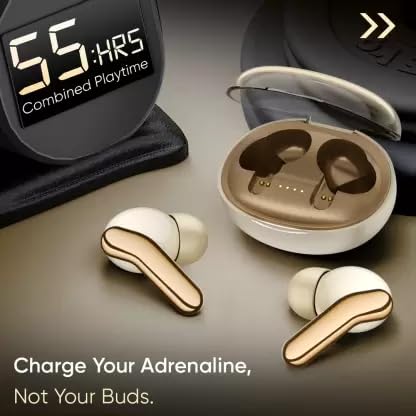
Image: The Mivi Duopods I6 charging case with earbuds, showing a digital display indicating "55:HRS Combined Playtime".
4.2 Pairing with a Device
- Open the charging case. The earbuds will automatically enter pairing mode.
- On your device (smartphone, tablet, laptop), enable Bluetooth.
- Search for available Bluetooth devices and select "Mivi Duopods I6" from the list.
- Once connected, a confirmation sound will play, and the indicator lights on the earbuds will change.
5. Operation
5.1 Wearing the Earbuds
Insert the earbuds into your ears and gently rotate them to find a comfortable and secure fit. Experiment with different eartip sizes to achieve optimal sound quality and comfort.

Image: A woman wearing Mivi Duopods I6 earbuds, highlighting the ergonomic "Fluidic Curve Design" for a secure fit during activity.
5.2 Touch Controls
The Mivi Duopods I6 feature intuitive touch controls on each earbud:
- Play/Pause: Single tap on either earbud.
- Next Track: Double tap on the right earbud.
- Previous Track: Double tap on the left earbud.
- Answer/End Call: Single tap on either earbud.
- Reject Call: Long press on either earbud.
- Activate Voice Assistant: Triple tap on either earbud.
5.3 Charging the Earbuds and Case
To charge the earbuds, place them back into the charging case. The case will automatically begin charging them. To charge the case, connect it to a power source using the provided USB cable. The LED indicators on the case will show the charging status and battery level.
6. Maintenance
6.1 Cleaning
- Regularly clean the earbuds and charging case with a soft, dry, lint-free cloth.
- Remove eartips and clean them with mild soap and water, then dry thoroughly before reattaching.
- Avoid using abrasive cleaners or solvents.
6.2 Storage
When not in use, store the earbuds in their charging case to protect them and keep them charged. Store in a cool, dry place away from extreme temperatures.

Image: A person wearing Mivi Duopods I6 earbuds during a workout, demonstrating their IPX4 sweat-resistant feature.
7. Troubleshooting
| Problem | Solution |
|---|---|
| Earbuds not pairing | Ensure earbuds are charged. Turn off and on Bluetooth on your device. Forget "Mivi Duopods I6" from your device's Bluetooth list and re-pair. |
| No sound from one earbud | Check if both earbuds are charged. Try placing both earbuds back in the case and taking them out again. Re-pair the earbuds. |
| Charging case not charging | Verify the USB cable is securely connected to both the case and the power source. Try a different USB cable or power adapter. |
| Touch controls unresponsive | Ensure your fingers are clean and dry. Restart the earbuds by placing them in the case and taking them out. |
8. Specifications
| Feature | Detail |
|---|---|
| Brand | Mivi |
| Model Name | Duopods I6 |
| Model Number | TEDPI6 |
| Ear Placement | In Ear |
| Form Factor | In Ear |
| Impedance | 32 Ohms |
| Control Type | Touch Control |
| Noise Control | Active Noise Cancellation (AI-ENC for calls) |
| Audio Driver Type | Dynamic Driver (13mm) |
| Water Resistance Level | IPX4 (Sweat Resistant) |
| Wireless Technology Type | Bluetooth |
| Bluetooth Version | 5.3 |
| Bluetooth Range | 10 Millimetres (Note: This value is as provided in product specifications. Typical Bluetooth range is 10 meters.) |
| Battery Charge Time | 8.5 Hours (This value is as provided in product specifications. Actual charging time for earbuds is typically shorter.) |
| Battery Average Life | 55 Hours (Combined with charging case) |
| Item Weight | 44 Grams |
| Material | Plastic |

Image: Graphic illustrating the "3D Sound Stage" feature of the Mivi Duopods I6, suggesting immersive audio.
9. Warranty and Support
The Mivi Duopods I6 come with a 1 Year Manufacturer Warranty. For warranty claims, technical support, or further assistance, please contact Mivi customer service. Refer to the warranty card included in your package for specific terms and conditions.
Manufacturer Contact Information: Plot No, 29, Rd Number 76, Jubilee Hills, Hyderabad, Telangana 500033.

Image: Multiple Mivi Duopods I6 earbuds and cases in different colors, emphasizing the product's "Truly Indian" origin.


