
Piudekei b5335396-31f4-4bc1-b990-62984dfac29a
Piudekei Backlit Remote Control for Hisense Smart Google TVs: Instruction Manual
Model: b5335396-31f4-4bc1-b990-62984dfac29a
Introduction
This manual provides instructions for the Piudekei Backlit Remote Control, designed for use with various Hisense Smart Google TV models. This remote offers direct functionality without requiring programming or pairing.
Package Contents
- 1 x Piudekei Backlit Remote Control
Setup
Battery Installation
- Locate the battery compartment on the back of the remote control.
- Slide open the battery cover.
- Insert two (2) AAA batteries, ensuring correct polarity (+ and -).
- Close the battery cover securely.
The remote is ready for use immediately after battery installation. No programming or pairing is required.

Figure 1: Back of the remote control. The battery compartment is located here.
Operating Instructions
Button Functions
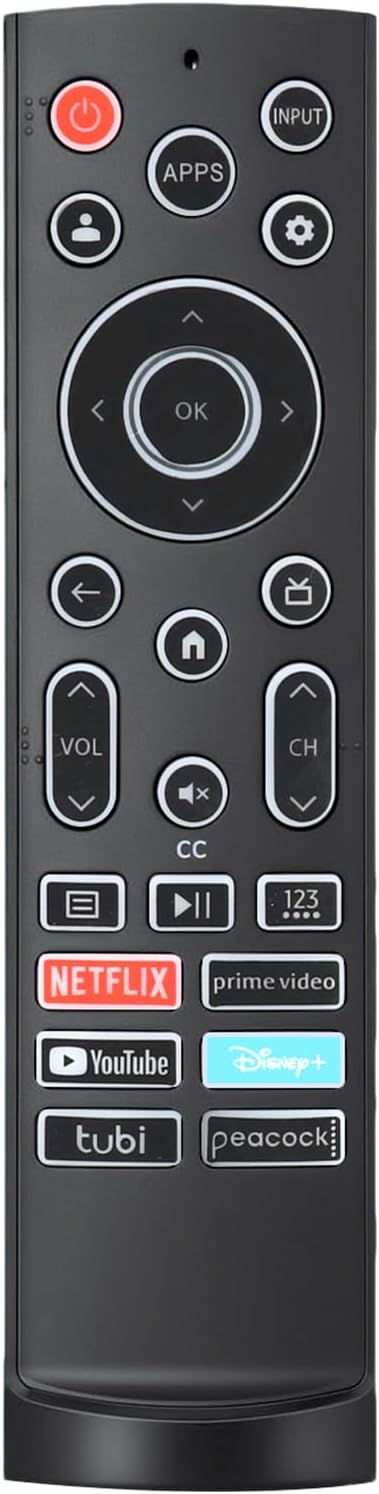
Figure 2: Overview of the remote control buttons.
- Power Button (●): Turns the TV on or off.
- Input Button: Selects the input source (HDMI, AV, etc.).
- Apps Button: Accesses the applications menu.
- Settings Button: Opens the TV settings menu.
- Navigation Pad (Up, Down, Left, Right, OK): Used to navigate menus and confirm selections.
- Back Button: Returns to the previous screen or menu.
- Home Button: Returns to the main home screen of the Google TV interface.
- TV Button: Switches to live TV or the last viewed TV channel.
- Volume Up/Down: Adjusts the TV volume.
- Mute Button: Mutes or unmutes the TV audio.
- Channel Up/Down: Changes TV channels.
- Closed Caption (CC) Button: Toggles closed captions on or off.
- Menu Button: Opens context-sensitive menus.
- Play/Pause Button: Controls media playback.
- 123 Button: Accesses numeric keypad for channel entry.
Backlit Buttons Feature
The remote control features backlit buttons for improved visibility in low-light conditions.
- When any button is pressed, the backlights will illuminate.
- The backlights will automatically turn off after approximately 10 seconds of inactivity to conserve battery power.

Figure 3: Backlit buttons for use in dark environments.
Shortcut Buttons
The remote includes dedicated shortcut buttons for quick access to popular streaming services:
- Netflix
- Prime Video
- YouTube
- Disney+
- Tubi
- Peacock

Figure 4: Dedicated shortcut buttons for streaming applications.
Compatibility
This remote control is compatible with the following Hisense Smart Google TV Series:
- A6 Series
- A65H Series
- A6H Series
- A7 Series
- U6 Series
- U6H Series
- U7H Series
- U8H Series
- U7 Series
- U6K Series
- U8 Series
- UX Series

Figure 5: Compatible Hisense Smart Google TV series.
Maintenance
- Clean the remote control with a soft, dry cloth. Do not use liquid cleaners or abrasive materials.
- Avoid exposing the remote to extreme temperatures, humidity, or direct sunlight.
- If the remote will not be used for an extended period, remove the batteries to prevent leakage.
Troubleshooting
Remote Not Responding
- Check Batteries: Ensure batteries are inserted correctly with the correct polarity. Replace with fresh AAA batteries if necessary.
- Line of Sight: Ensure there is a clear line of sight between the remote control and the TV's infrared receiver. Obstructions can block the signal.
- Distance: Operate the remote within a reasonable distance from the TV.
Backlight Not Activating
- Ensure batteries have sufficient power. Replace if low.
- The backlight activates only when a button is pressed. It will turn off after 10 seconds of inactivity.
Specifications
| Feature | Detail |
|---|---|
| Product Dimensions | 6.4 x 1.77 x 1.1 inches |
| Item Weight | 1.76 ounces |
| Batteries Required | 2 x AAA batteries (not included) |
| Special Feature | Backlit Buttons |
| Color | Black |
| Compatible Devices | Hisense Smart Google TVs |
| Model Number | b5335396-31f4-4bc1-b990-62984dfac29a |
Warranty and Support
This product comes with an unlimited return and refund service for 60 days from the date of purchase. If you encounter any issues or have questions regarding your Piudekei remote control, please contact the seller for assistance.