1. Introduction
Thank you for choosing the GCZ Dehumidifier. This appliance is designed to effectively remove excess moisture from the air, creating a more comfortable and healthier environment in your home or office. This manual provides detailed instructions for the safe operation, maintenance, and troubleshooting of your dehumidifier. Please read it thoroughly before use and keep it for future reference.
2. Important Safety Instructions
To reduce the risk of fire, electric shock, or injury, always follow these basic safety precautions:
- Read all instructions before using the appliance.
- Only use the dehumidifier on a stable, level surface to prevent tipping and water spillage.
- Do not operate the dehumidifier with a damaged cord or plug. If the cord is damaged, it must be replaced by the manufacturer or a qualified service agent.
- Do not block the air inlet or outlet. Maintain at least 20 cm (8 inches) clearance from walls and furniture.
- Do not insert fingers or foreign objects into the air inlets or outlets.
- Always unplug the dehumidifier before cleaning, servicing, or moving it.
- Do not use the appliance in wet or damp environments such as bathrooms or laundry rooms where it may come into contact with water.
- Keep children and pets away from the appliance during operation.
- Do not attempt to repair or modify the dehumidifier yourself. Refer all servicing to qualified personnel.
- Ensure the voltage indicated on the rating label matches your local power supply.
3. Product Overview
3.1 Dehumidifier Components

Figure 3.1: Front view of the GCZ Dehumidifier, showcasing its compact design and front air intake grille.
- Control Panel: Touch-sensitive interface for operating the unit.
- Air Inlet: Located at the front, where humid air is drawn in.
- Air Outlet: Located at the top/rear, where dry air is expelled.
- Water Tank: Removable tank for collecting condensed water.
- Continuous Drainage Port: For connecting a hose for continuous water removal.
- Washable Air Filter: Located at the rear, for filtering dust and particles.
- Handles: Integrated handles for easy portability.
3.2 Control Panel

Figure 3.2: Detailed view of the touch control panel with LED display.
- Power Button: Turns the unit ON/OFF.
- Humidity Setting Button: Adjusts the desired humidity level (e.g., 30%-80% RH).
- Timer Button: Sets the auto ON/OFF timer (1-24 hours).
- Speed Button: Adjusts fan speed (Low/High).
- LED Display: Shows current humidity, timer settings, and error codes.
- Tank Full Indicator: Illuminates when the water tank is full.
- Defrost Indicator: Illuminates when the unit is defrosting.
4. Setup Guide
4.1 Unpacking
- Carefully remove the dehumidifier from its packaging.
- Remove all packing materials, including any tape or protective films.
- Inspect the unit for any signs of damage. If damaged, do not operate and contact customer support.
4.2 Placement
Proper placement is crucial for efficient operation:
- Place the dehumidifier on a firm, level surface that can support its weight when the water tank is full.
- Ensure there is at least 20 cm (8 inches) of space around all sides of the unit to allow for proper airflow.
- Do not place the unit near heat sources (e.g., radiators, ovens) or in direct sunlight.
- For best results, operate the dehumidifier in an enclosed area, closing all doors and windows.
5. Operating Instructions
5.1 Powering On/Off
- Plug the power cord into a grounded electrical outlet.
- Press the Power button on the control panel to turn the unit ON. The LED display will show the current room humidity.
- Press the Power button again to turn the unit OFF.
5.2 Setting Desired Humidity
- With the unit ON, press the Humidity Setting button repeatedly to cycle through desired humidity levels (e.g., 30%, 35%, ..., 80% RH).
- The unit will automatically turn ON or OFF to maintain the set humidity level.
5.3 Fan Speed Adjustment
- Press the Speed button to switch between Low and High fan speeds.
- High speed provides faster dehumidification, while Low speed offers quieter operation.
5.4 Timer Function

Figure 5.1: The timer function allows you to program the dehumidifier's operation for convenience.
- Auto-Off Timer: With the unit ON, press the Timer button to set the number of hours (1-24) after which the unit will automatically turn OFF.
- Auto-On Timer: With the unit OFF, press the Timer button to set the number of hours (1-24) after which the unit will automatically turn ON.
5.5 Drainage Options
Your GCZ Dehumidifier offers two drainage methods:
5.5.1 Manual Drainage (Water Tank)

Figure 5.2: The 2-liter water tank collects condensed moisture. The unit can extract up to 6 liters per day.
- When the water tank is full, the unit will automatically shut off, and the Tank Full indicator will illuminate.
- Carefully pull out the water tank from the front of the unit.
- Empty the collected water.
- Slide the empty water tank back into the unit until it clicks into place. The unit will resume operation.
5.5.2 Continuous Drainage

Figure 5.3: Setup for continuous drainage using the included hose.
- Locate the continuous drainage port at the back of the unit.
- Connect the included drainage hose to the port, ensuring a secure fit.
- Direct the other end of the hose to a suitable drain (e.g., floor drain, large bucket). Ensure the hose is sloped downwards to allow gravity drainage.
- Once connected, the unit will continuously drain water without needing to empty the tank.
5.6 Automatic Shut-off

Figure 5.4: The float sensor in the water tank triggers automatic shut-off when full.
The dehumidifier is equipped with an automatic shut-off feature for safety and convenience:
- Tank Full: The unit will automatically turn off when the water tank is full to prevent overflow.
- Desired Humidity Reached: The compressor will stop when the ambient humidity reaches the set desired level, saving energy. The fan may continue to run briefly.
- Defrost: If frost builds up on the evaporator coils, the unit will automatically enter defrost mode to melt the ice, indicated by the Defrost light.
5.7 Quiet Operation
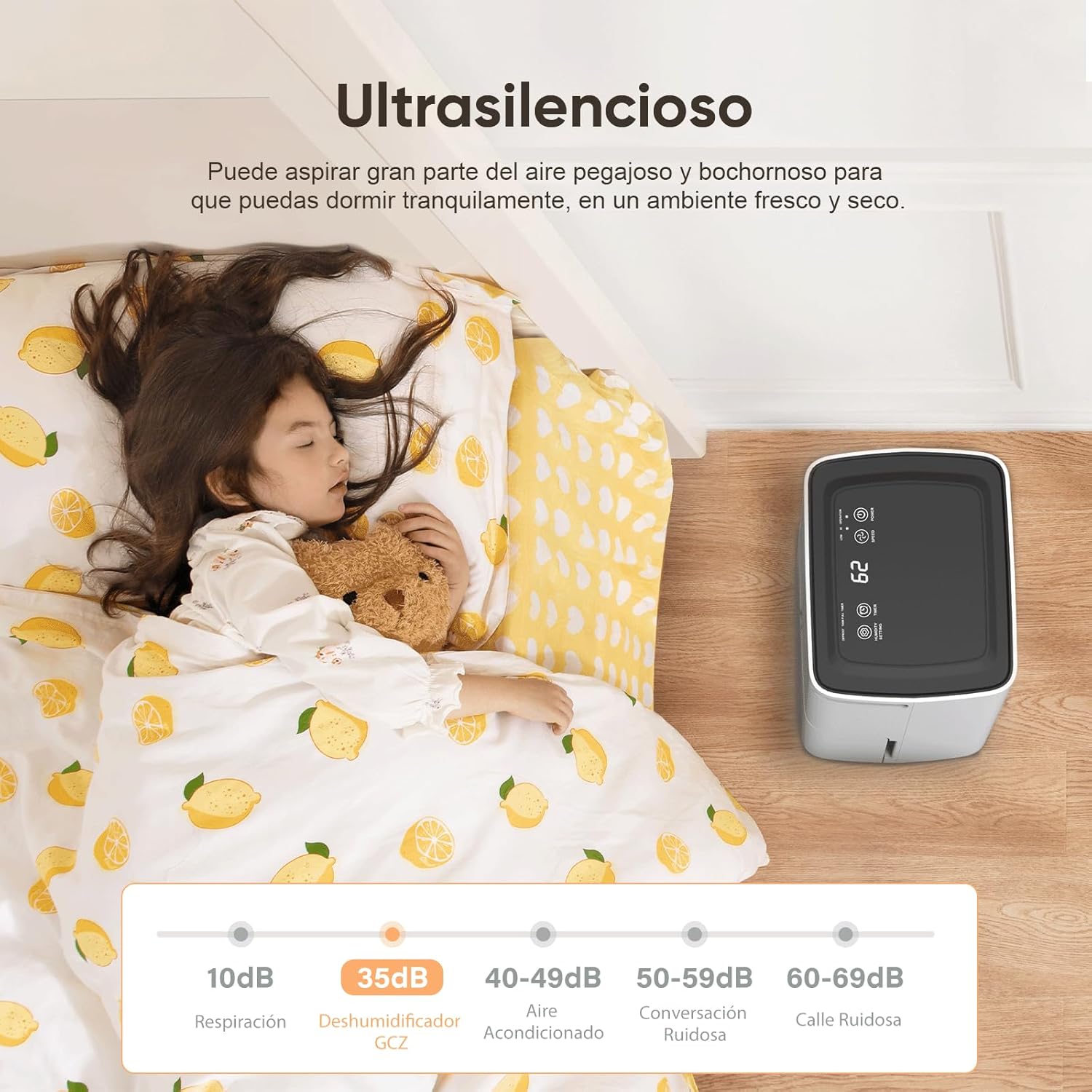
Figure 5.5: The GCZ Dehumidifier operates at a low noise level, suitable for bedrooms and quiet spaces.
The GCZ Dehumidifier is designed for ultra-quiet operation, ensuring minimal disturbance in living spaces, bedrooms, or offices. Its noise level is comparable to a whisper, allowing for comfortable sleep or work environments.
6. Maintenance and Care
Regular maintenance helps ensure optimal performance and extends the lifespan of your dehumidifier.
6.1 Cleaning the Air Filter

Figure 6.1: The washable filter prevents large particles from entering the unit.
The air filter should be cleaned every two weeks or more frequently depending on usage and air quality.
- Turn off the dehumidifier and unplug it from the power outlet.
- Remove the air filter from the back of the unit.
- Wash the filter with warm, soapy water. Rinse thoroughly.
- Allow the filter to air dry completely before reinstalling it. Do not use a dryer or direct heat.
- Reinsert the dry filter back into the unit.
6.2 Cleaning the Water Tank
Clean the water tank regularly to prevent mold and mildew growth.
- Remove the water tank from the unit.
- Wash the tank with mild detergent and warm water.
- Rinse thoroughly and dry before placing it back into the dehumidifier.
6.3 Storage
If storing the dehumidifier for an extended period:
- Empty and clean the water tank.
- Clean the air filter.
- Unplug the unit and coil the power cord neatly.
- Cover the unit with a plastic bag or cloth to protect it from dust.
- Store the dehumidifier in a cool, dry place.
7. Troubleshooting Guide
Before contacting customer support, please refer to the following table for common issues and their solutions:
| Problem | Possible Cause | Solution |
|---|---|---|
| Dehumidifier does not turn on. | No power supply. Power cord not properly plugged in. Water tank full or not correctly installed. | Check power outlet. Ensure power cord is securely plugged in. Empty water tank and ensure it is correctly seated. |
| No water collected. | Room humidity is too low. Temperature is too low. Air filter is clogged. Unit is in defrost mode. | Increase desired humidity setting. Ensure room temperature is above 5°C (41°F). Clean the air filter. Wait for defrost cycle to complete. |
| Unit runs constantly. | Desired humidity set too low. Room size too large. Doors/windows are open. | Increase desired humidity setting. Ensure unit is suitable for room size. Close all doors and windows. |
| Loud noise during operation. | Unit not on a level surface. Air filter clogged. Foreign object in fan. | Place unit on a flat, stable surface. Clean the air filter. Turn off and unplug, then check for obstructions. |
| Bad odor from unit. | Water tank needs cleaning. Air filter needs cleaning. | Clean the water tank thoroughly. Clean or replace the air filter. |
8. Product Specifications
| Feature | Specification |
|---|---|
| Brand | GCZ |
| Model | B0F21T697B |
| Color | White |
| Dimensions (L x W x H) | 20 x 30 x 40 cm |
| Weight | 7.5 kg |
| Dehumidification Capacity | 6 Liters/day (at 30°C, 80% RH) |
| Water Tank Capacity | 2 Liters |
| Power | 150 watts |
| Material | Plastic, Metal |
| Coverage Area | Up to 120 m² |
| Special Features | Automatic Shut-off, Automatic Defrost, Continuous Drainage, Adjustable Humidity Control, Timer |
9. Warranty and Customer Support
GCZ provides a comprehensive 1-year after-sales service for this dehumidifier, with a dedicated repair center located in Tultitlán, Mexico, ensuring quick and efficient solutions for any issues.
For technical assistance, warranty claims, or any questions regarding your GCZ Dehumidifier, please contact our customer support team through the platform's chat after receiving your order. Please have your model number (B0F21T697B) and purchase date ready.
An official fiscal invoice is available upon request. Please send your tax information via the platform's chat after receiving your order to obtain your invoice without additional cost.