
Introduction
This manual provides essential instructions for the safe assembly, operation, and maintenance of your HolliWill 80-inch Electric Fireplace TV Stand. Please read all instructions carefully before use and retain this manual for future reference.
Important Safety Information:
- Ensure the product is placed on a stable, level surface.
- Do not overload the TV stand or shelves.
- Keep flammable materials away from the electric fireplace insert.
- Always unplug the fireplace before cleaning or maintenance.
- This product is designed for indoor use only.
Package Contents
The HolliWill 80-inch Electric Fireplace TV Stand is shipped in two separate packages. These packages may arrive at different times. Please verify all components are present before beginning assembly.
- TV Stand components (engineered wood panels, hardware)
- Electric Fireplace Insert
- Remote Control for Fireplace
- Assembly Hardware Kit
- Instruction Manual (this document)

Figure 1: Product dimensions and shipping information. The stand measures 80 inches wide, 13.6 inches deep, and 37.6 inches high. The fireplace insert is 30 inches wide, 5.12 inches deep, and 17.3 inches high. The product is delivered in two separate packages.

Figure 2: Visual representation of the two-package delivery process for the fireplace and TV stand components.
Assembly Instructions (Setup)
Assembly of the HolliWill Electric Fireplace TV Stand requires careful attention to detail. Please follow the step-by-step instructions provided in the separate assembly guide included with your product. It is recommended to have two people for assembly.
- Unpack Components: Carefully remove all parts from the packaging. Lay them out on a clean, soft surface to prevent scratches.
- Identify Hardware: Match all hardware to the parts list in the assembly guide.
- Follow Steps: Assemble the TV stand frame and shelves according to the numbered steps in the assembly guide.
- Install Fireplace Insert: Once the main structure is complete, carefully insert the electric fireplace into its designated opening. Ensure it is securely seated.
- Connect Power: Plug the electric fireplace into a standard 120V AC outlet. Do not use extension cords.
Note: The fireplace insert is designed to fit precisely. Do not force it into place.
Operating Instructions
Electric Fireplace Operation
The electric fireplace can be controlled using the touch buttons on the unit or the included remote control.
- Power On/Off: Press the power button to turn the fireplace on or off.
- Heat Function: Activate the heater to warm areas up to 400 square feet. The heater provides 1400W of power (5,000 BTU).
- Temperature Adjustment: Adjust the desired room temperature between 62°F and 82°F.
- Flame Brightness: Select from 3 levels of flame brightness to suit your ambiance preference.
- Timer: Set the operational timer for 1 to 6 hours. The unit will automatically shut off after the set time.
- Overheating Protection: The unit is equipped with an automatic shut-off feature to prevent overheating.

Figure 3: Electric fireplace control panel and remote control features, including temperature, timer, and flame settings.

Figure 4: Adjustable flame brightness levels, allowing users to customize the visual effect.

Figure 5: The electric fireplace can operate with or without the heating element, providing ambiance year-round.
Remote Control Usage
The remote control allows for convenient adjustment of the fireplace settings from a maximum distance of 26 feet. Ensure the remote has working batteries and is pointed towards the fireplace unit.
Storage Features
The TV stand features three open shelves on each side of the electric fireplace, providing ample storage for media devices, books, and decorative items. The shelves are adjustable and removable to accommodate various item sizes.

Figure 6: Adjustable and removable shelves offer flexible storage configurations for various items.
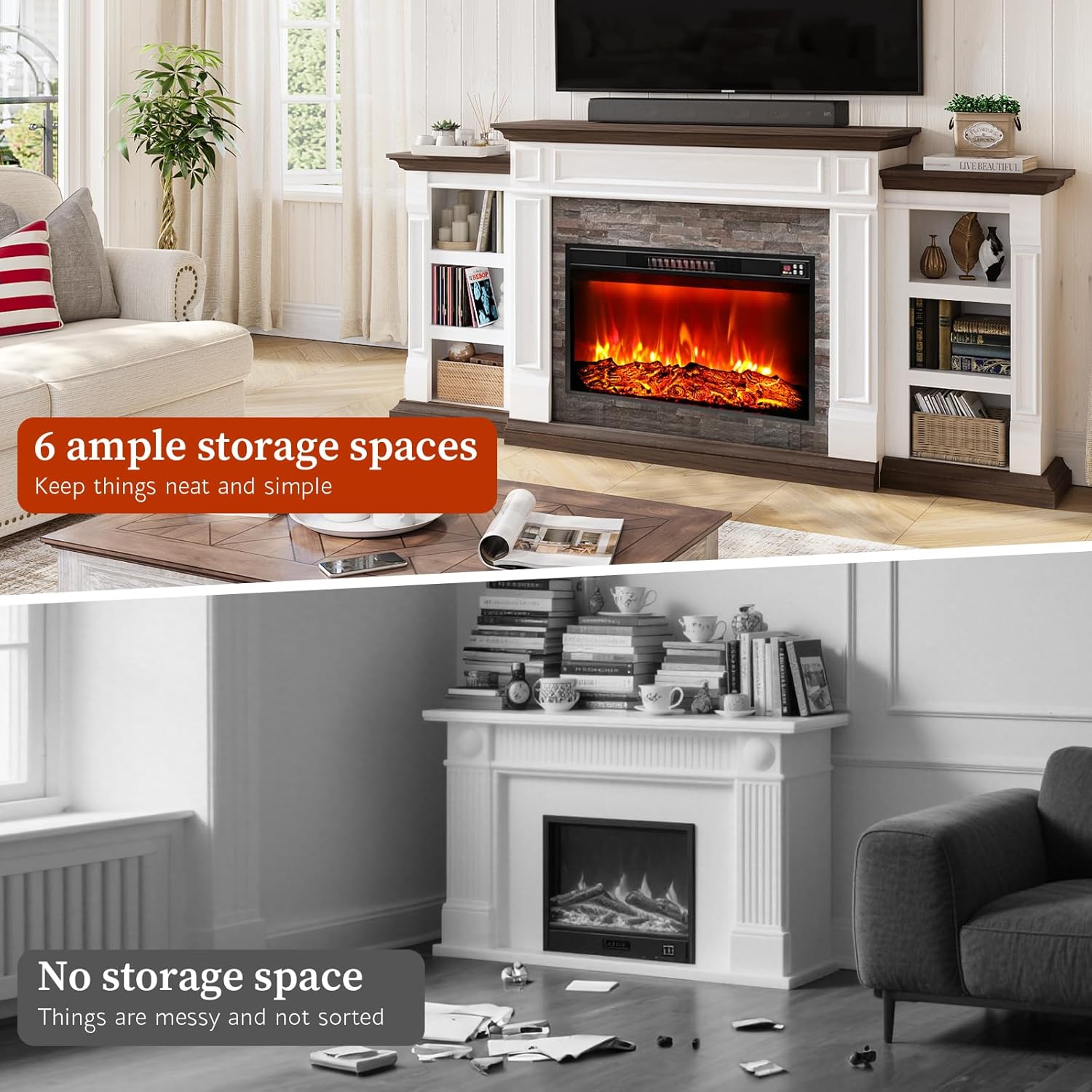
Figure 7: The TV stand provides six ample storage spaces for organization.
Maintenance
Regular maintenance ensures the longevity and optimal performance of your electric fireplace TV stand.
- Cleaning the Stand: Wipe the engineered wood surfaces with a soft, damp cloth. Avoid abrasive cleaners or harsh chemicals that may damage the finish.
- Cleaning the Fireplace Insert: Ensure the fireplace is unplugged and cool before cleaning. Gently wipe the glass and exterior surfaces with a soft, lint-free cloth. Do not spray liquids directly onto the unit.
- Dust Removal: Periodically dust the air intake and exhaust vents of the fireplace insert to maintain proper airflow and prevent overheating.
- Cord Inspection: Regularly inspect the power cord for any signs of damage. If damaged, discontinue use and contact customer support.
Troubleshooting
| Problem | Possible Cause | Solution |
|---|---|---|
| Fireplace does not turn on. | No power, unit unplugged, circuit breaker tripped. | Check power connection, ensure outlet is functional, reset circuit breaker. |
| No heat output. | Heater function not activated, temperature setting too low, overheating protection engaged. | Activate heater, increase temperature setting, allow unit to cool if overheating protection is active. |
| Flames are not visible or dim. | Flame brightness set too low. | Adjust flame brightness setting. |
| Remote control not working. | Dead batteries, obstruction, out of range. | Replace batteries, remove obstructions, operate within 26 ft range. |
| Unusual noise from fireplace. | Dust accumulation in fan, loose component. | Unplug and clean vents. If noise persists, contact customer support. |
Specifications
- Model: HH-EF-80-BR
- Product Dimensions: 80" W x 13.6" D x 37.6" H
- Fireplace Insert Dimensions: 30" W x 5.12" D x 17.3" H
- Material: Engineered Wood
- Installation Type: Freestanding
- Heat Output: 1400 Watts / 5,000 BTU
- Heating Coverage: Up to 400 sq ft
- Power Source: Corded Electric (120V AC)
- Special Features: 30-inch Electric Fireplace, Adjustable Flame Brightness (3 levels), 1-6 Hour Timer, Overheating Protection, Remote Control, 62°F-82°F Adjustable Temperature.
- Item Weight: Approximately 123.5 pounds

Figure 8: The 80-inch TV stand is designed to accommodate televisions up to 90 inches.

Figure 9: Comparison of 72-inch and 80-inch stand dimensions, with the 80-inch model suited for larger living rooms (15'x20' or 4.5m x 6m or bigger).
Warranty Information
This HolliWill product comes with a limited warranty. Please refer to the warranty card included in your package for specific terms, conditions, and duration of coverage. Retain your proof of purchase for any warranty claims.
Customer Support
For any questions, assistance with assembly, troubleshooting, or warranty inquiries, please contact HolliWill customer support. Refer to the contact information provided in your product packaging or visit the official HolliWill brand store for further details.
HolliWill Brand Store: Visit HolliWill Store on Amazon