
1. Introduction
Thank you for choosing the CZPBXOX ST05 Adjustable Aluminum Laptop Stand. This manual provides essential information for the proper setup, operation, and maintenance of your new laptop stand. Please read these instructions carefully before use to ensure optimal performance and longevity of the product.
2. Safety Instructions
- Ensure the stand is placed on a stable, flat surface before placing a device on it.
- Do not exceed the maximum weight capacity of 8kg (17.6lb) to prevent damage or instability.
- Keep fingers clear of hinge mechanisms when adjusting the stand to avoid pinching.
- Avoid placing the stand in areas where it could be easily knocked over.
- Do not attempt to modify the stand in any way.
3. Package Contents
Upon unpacking, please verify that all items are present and in good condition:
- CZPBXOX ST05 Adjustable Aluminum Laptop Stand (Silver)
- Storage Bag
4. Setup Instructions
Follow these steps to set up your laptop stand:
- Unfold the Stand: Carefully unfold the stand from its compact, folded position. The hinges are designed to be firm to maintain stability.
- Position the Base: Place the stand's base on a flat, stable surface. Ensure the anti-slip pads on the bottom are making full contact with the surface.
- Adjust Height and Angle: Gently adjust the two arms of the stand to your desired height and viewing angle. The stand offers a wide range of adjustments for ergonomic comfort.
- Place Your Device: Carefully place your laptop or tablet onto the top platform of the stand. Ensure it rests securely against the front stoppers and the anti-slip pads.

Image: The CZPBXOX ST05 laptop stand in its compact, folded configuration, ready for transport or storage.

Image: A laptop placed on the CZPBXOX ST05 stand, demonstrating its elevated position for improved ergonomics.
5. Operating Instructions
The CZPBXOX ST05 stand is designed for versatile use and ergonomic benefits.
5.1. Adjusting Height and Angle
The stand features dual-axis adjustment, allowing you to customize both the height and the viewing angle of your device. The top platform can be adjusted from 0-90 degrees, and the base arms from 0-70 degrees. This flexibility helps achieve an ergonomic setup, reducing strain on your neck, shoulders, and spine.
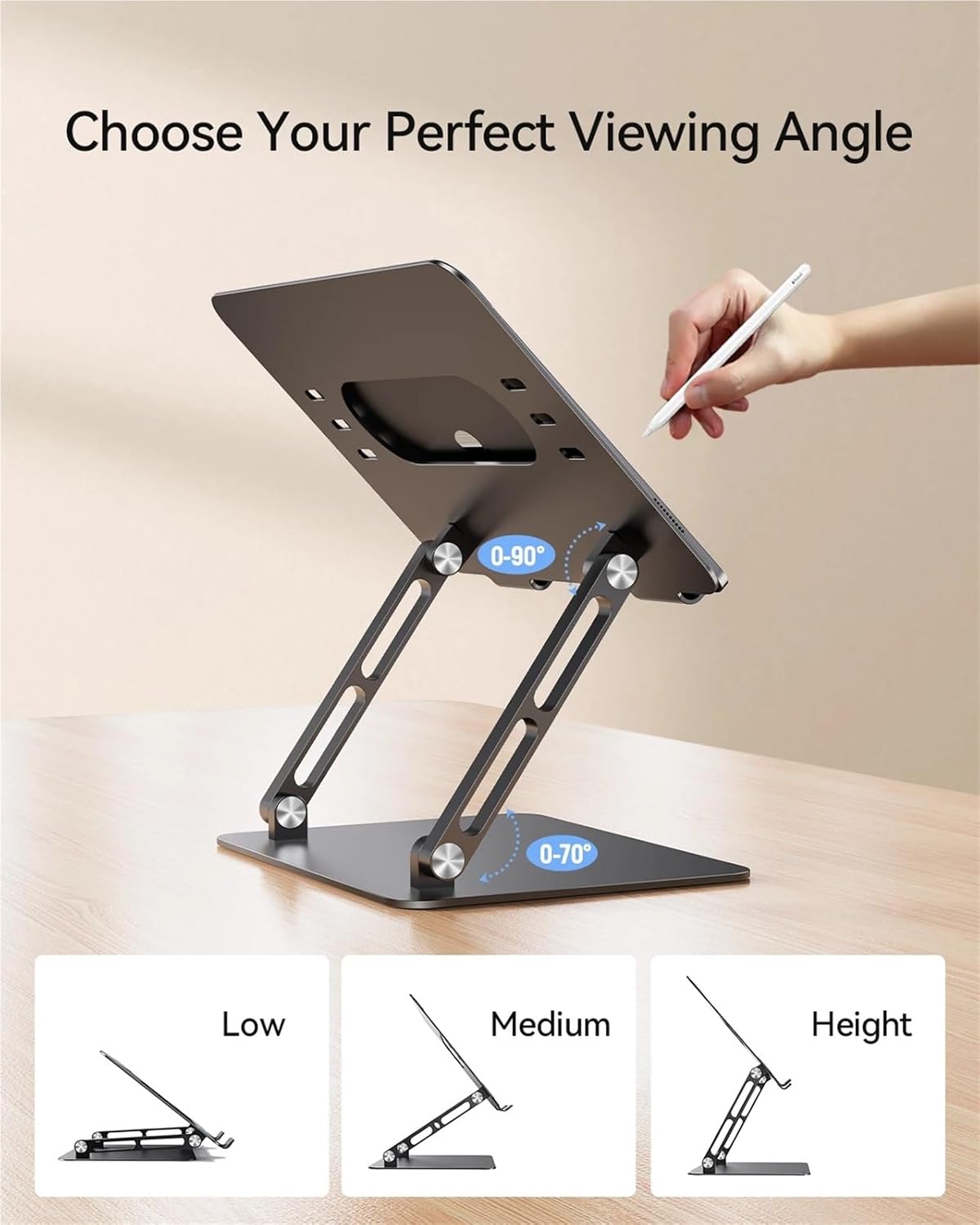
Image: Diagram demonstrating the adjustable viewing angles (0-90 degrees for the top platform, 0-70 degrees for the base) and height options (Low, Medium, Height) of the stand.

Image: Diagram illustrating the ergonomic benefits of using the laptop stand, showing correct posture for neck, shoulder, and spine relief.
5.2. 360° Rotatable Base
The stand features a 360° rotatable base, allowing you to easily swivel your device to share your screen with others without repositioning the entire stand. This is particularly useful in collaborative environments or for presentations.
5.3. Heat Dissipation
The open design of the stand promotes airflow around your laptop, aiding in heat dissipation and preventing your device from overheating during extended use.

Image: Highlighting the heat dissipation feature of the stand, showing airflow beneath a laptop to prevent overheating.
5.4. Space-Saving Design
When elevated, the stand creates valuable desk space underneath your laptop, allowing for storage of an external keyboard, mouse, or other accessories, contributing to a more organized workspace.

Image: Showcasing the space-saving design of the stand, with a laptop elevated and external keyboard/mouse used below.
5.5. Wide Compatibility
The stand is compatible with a wide range of devices, supporting laptops and tablets from 11 to 17.3 inches in size.

Image: Detailing the wide compatibility of the stand, supporting laptops from 11 to 17.3 inches and a weight capacity of 8kg (17.6lb).
6. Maintenance
- Cleaning: Wipe the stand with a soft, damp cloth. Avoid using abrasive cleaners or solvents that could damage the aluminum finish or rubber pads.
- Storage: When not in use, fold the stand into its compact form and store it in the provided storage bag to protect it from dust and scratches.
- Inspection: Periodically check the hinges and screws to ensure they remain tight. Do not overtighten.
7. Troubleshooting
- Stand feels unstable: Ensure the stand is fully unfolded and placed on a flat, level surface. Verify that your device is centered on the platform and within the weight limit.
- Difficulty adjusting hinges: The hinges are designed to be firm to provide stability. Apply steady, even pressure when adjusting. Do not force the hinges beyond their intended range of motion.
- Device sliding: Ensure the anti-slip rubber pads on the top platform are clean and free of debris. Verify that your device is properly seated against the front stoppers.
8. Specifications
| Feature | Detail |
|---|---|
| Model | ST05 |
| Material | Aluminum Alloy |
| Color | Silver |
| Product Dimensions (Folded) | 595.7 x 1.7 inches (MAX) - Note: This dimension seems unusually large for a folded stand. Please refer to actual product for precise folded dimensions. |
| Item Weight | 420g (1.76 ounces) - Note: There is a discrepancy between 420g and 1.76 ounces. 420g is approximately 14.8 ounces. Please refer to actual product for precise weight. |
| Compatibility | Tablets, pads, and cellphones (suggested 4-13 inch), Laptops (11-17.3 inches) |
| Weight Capacity | 8kg (17.6lb) |
| Rotation | 360° rotatable base |
| Adjustable Angles | Top platform: 0-90°, Base arms: 0-70° |
9. Warranty and Support
For warranty information or technical support, please refer to the product packaging or contact the manufacturer directly through their official website or customer service channels. Keep your purchase receipt as proof of purchase.