
1. Introduction
This manual provides detailed instructions for the installation and care of your new TV base stand legs. These legs are designed to provide stable support for your LG 43-inch TV, model 43UP7670PUC.
Compatibility: This set of legs and screws is specifically compatible with LG TV model 43UP7670PUC. Please verify your TV model number on the sticker located on the back of your TV or through your TV's settings menu (usually under 'About TV'). If your TV model is not listed, please contact the seller for assistance in finding the correct part.
2. Safety Information
- Always ensure the TV is placed on a clean, stable, and level surface during installation to prevent accidental falls or damage.
- Handle the TV with care. It is recommended to have at least two people for handling and lifting the TV.
- Use only the provided screws and a Phillips screwdriver for installation. Using incorrect tools or fasteners may damage your TV or the stand.
- After installation, ensure all screws are tightened securely and the TV is stable before use.
3. Package Contents
Before beginning installation, please check the package to ensure all components are present:
- 1x Left TV Base Stand Leg
- 1x Right TV Base Stand Leg
- Required Screws for attachment
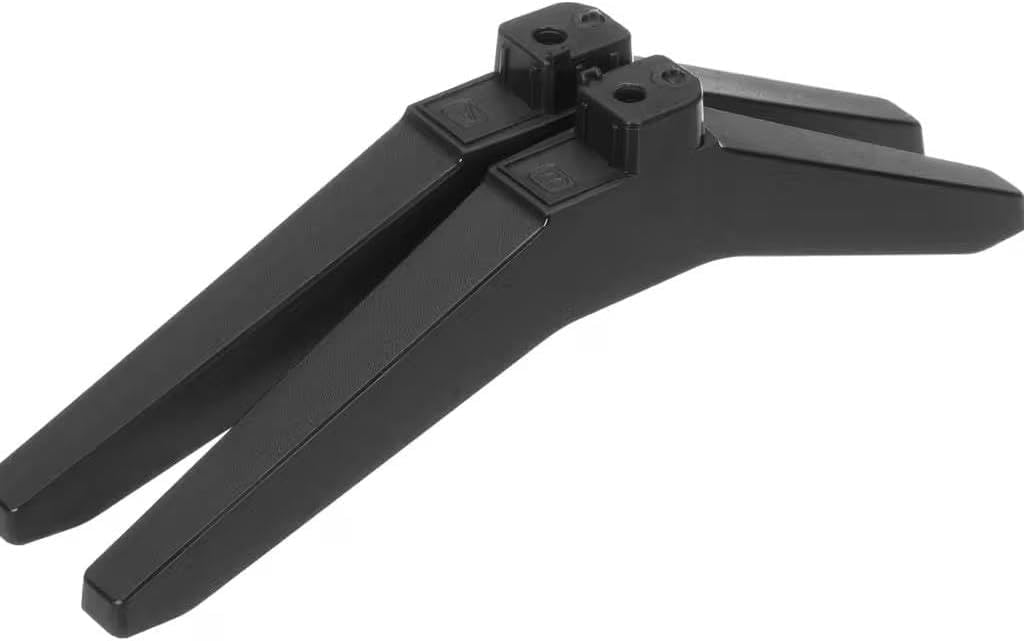
Image: The two TV base stand legs included in the package.
Video: This video demonstrates the sturdy packaging and contents of the TV stand legs, ensuring robust protection during transit.
4. Setup and Installation
Follow these steps to install the TV base stand legs:
- Prepare the TV: Carefully place your TV screen-down on a soft, clean, and stable surface (e.g., a blanket or padded table) to prevent scratches or damage. Ensure the surface is large enough to support the entire TV.
- Identify Legs: Locate the left and right stand legs. They are typically marked (e.g., 'L' for left, 'R' for right) or designed to fit only one way.
- Align Legs: Align the screw holes on each TV stand leg with the corresponding holes on the bottom of your TV.
- Secure Legs: Insert the provided screws into the aligned holes. Using a Phillips screwdriver, tighten the screws firmly until the legs are securely attached to the TV. Do not overtighten.
- Position TV: With assistance, carefully lift the TV and place it upright on a stable and level surface. Ensure the TV is balanced and does not wobble.

Image: Top view of the TV stand legs, highlighting the screw attachment points for proper alignment.
Video: This video provides a visual guide for installing replacement TV legs, specifically for 40-43 inch LG TVs, demonstrating the simple screw-in process.
5. Operating
These TV base stand legs are designed for static support of your television. Once installed, they provide a stable foundation for placing your TV on a flat surface such as a TV stand, cabinet, or desk. No active operation is required.
6. Maintenance
To ensure the longevity and appearance of your TV stand legs:
- Cleaning: Wipe with a dry cloth to remove dust and smudges. Avoid abrasive cleaners or solvents that may damage the finish.
- Inspection: Periodically check the screws to ensure they remain tight. If any looseness is detected, gently retighten them.
- Environment: Keep the stand legs away from excessive moisture or direct sunlight to prevent material degradation.
7. Troubleshooting
If you encounter any issues with your TV base stand legs, consider the following:
- TV Wobbles: Ensure all screws are securely tightened. Verify that the TV is placed on a completely flat and stable surface. Uneven surfaces can cause instability.
- Legs Don't Fit: Double-check your TV model number against the compatible model (43UP7670PUC). If the model numbers do not match, these legs are not compatible. Contact the seller for assistance.
- Missing Parts: If any components were missing from the package, please contact the seller immediately for replacement parts.
8. Specifications
| Feature | Detail |
|---|---|
| Brand | Generic |
| Model Number | 43UP7670PUC |
| Material | Acrylonitrile Butadiene Styrene (ABS) |
| Color | Black |
| Item Weight | 16 ounces |
| Item Dimensions | 4 x 4 x 15 inches |
| Installation Type | Screw-In |
| Required Assembly | No (simple screw attachment) |
| Included Components | Left leg, Right leg, Required screws |
Video: This video highlights the product details of the TV stand legs, showcasing their material and design features.
9. Warranty and Support
For warranty information or technical support, please refer to the product packaging or contact the seller directly through the platform where the purchase was made. Ensure you have your purchase details and TV model number readily available for faster assistance.


