
1. Introduction
Thank you for purchasing the YUEHISY 48MP 2.7K Waterproof Digital Camera. This camera is designed for capturing high-resolution photos and videos, featuring a 48-megapixel image sensor and 2.7K video recording capabilities. Its waterproof design allows for use up to 10 feet (3 meters) underwater, making it suitable for various outdoor and aquatic activities. The dual-screen design enhances convenience for both standard photography and selfies.
2. Safety Information
- Waterproof Seal: Before each use, especially underwater, ensure the battery compartment door is securely locked. Failure to do so will compromise the waterproof seal and may damage the camera.
- Depth and Time Limits: The camera is waterproof up to 10 feet (3 meters) for approximately one hour per use. Exceeding these limits may result in water ingress.
- Temperature: Avoid exposing the camera to extreme temperatures.
- Cleaning: After using the camera in saltwater, rinse it thoroughly with fresh water and dry it completely before opening any compartments.
- Battery Safety: Use only recommended batteries. Do not attempt to open or modify the battery. Dispose of batteries properly.
- Children: Keep the camera and its accessories out of reach of small children to prevent choking hazards.
3. Package Contents
Verify that all items are present in your package:
- YUEHISY 48MP 2.7K Waterproof Digital Camera
- USB Charging Cable
- Camera Pouch
- Wrist Strap
- User Manual (this document)
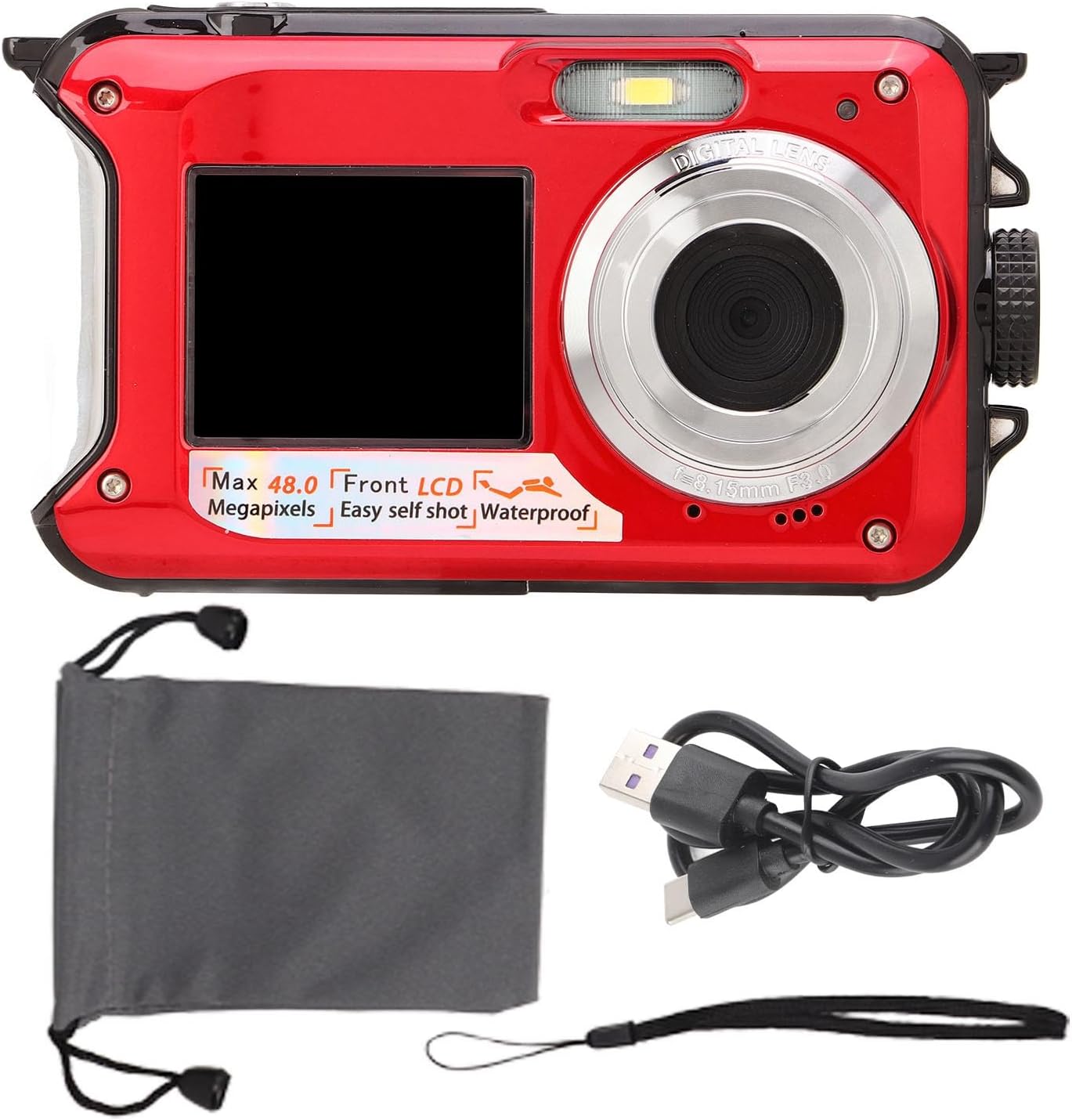
Image 3.1: Camera with included USB cable and carrying pouch.
4. Product Overview and Parts Identification
Familiarize yourself with the camera's components:

Image 4.1: Detailed diagram showing the camera's various buttons, screens, and ports.
- Shutter Key: Press to take a photo or start/stop video recording.
- Power Key: Turns the camera on or off.
- Display Screen Switching Key: Toggles between the front (selfie) and rear LCD screens.
- Rope Hole: Attachment point for the wrist strap.
- Flash Light: Provides illumination in low-light conditions.
- Selfie Screen (Front LCD): 1.8-inch display for self-portraits.
- Selfie Indicator: Light indicating selfie mode.
- Lens: The primary optical component for capturing images.
- Battery Cover / TF Card / USB Compartment: Sealed compartment for battery, microSD card, and USB port.
- Battery Cover Lock: Mechanism to secure the battery compartment.
- Main Screen (Rear LCD): 2.7-inch display for viewing and menu navigation.
- Power Indicator: Light indicating power status.
- Zoom In / Up Key: Zooms in during photo/video mode, navigates up in menus.
- Zoom Out / Down Key: Zooms out during photo/video mode, navigates down in menus.
- Flash Light / Right Key: Controls flash settings, navigates right in menus.
- Delete / Left Key: Deletes files, navigates left in menus.
- Mode Key: Switches between photo, video, and playback modes.
- Menu Key: Accesses camera settings and options.
- OK Key: Confirms selections in menus.
5. Setup
5.1 Installing the Battery
- Locate the battery compartment on the side of the camera.
- Press the battery cover lock with one hand.
- With the other hand, push out the battery cover and open the door.
- Insert the provided battery, ensuring correct polarity (+/-).
- Close the battery door firmly and ensure the lock clicks into place. It is crucial that the battery door is completely sealed and locked before any water exposure.
5.2 Inserting a Memory Card
This camera supports microSD cards up to 128GB (not included, please purchase separately).
- Open the battery compartment door as described in Section 5.1.
- Locate the microSD card slot inside the compartment.
- Insert the microSD card with the gold contacts facing the front of the camera until it clicks into place.
- Close the battery door securely.
5.3 Charging the Camera
The camera has a 650mAh battery capacity, providing 2 to 3 hours of continuous operation. It supports recording while charging.
- Open the battery compartment door.
- Connect the USB charging cable to the camera's USB port.
- Connect the other end of the USB cable to a power source (e.g., computer USB port, USB wall adapter).
- The power indicator light will illuminate during charging.
- Once fully charged, the indicator light may change or turn off. Disconnect the cable and close the battery door securely.
6. Operating Instructions
6.1 Power On/Off
- To Power On: Press and hold the Power Key until the screen illuminates.
- To Power Off: Press and hold the Power Key again until the screen turns off.
6.2 Taking Photos
- Ensure the camera is in Photo Mode (press the Mode Key if necessary).
- Frame your shot using the rear or front screen.
- Press the Shutter Key halfway down to focus (if applicable).
- Press the Shutter Key fully down to capture the photo.
6.3 Recording Videos
- Press the Mode Key to switch to Video Mode.
- Press the Shutter Key to start recording. A red indicator or timer will appear on the screen.
- Press the Shutter Key again to stop recording.
6.4 Using Dual Screens and Selfie Mode
The camera features a rear 2.7-inch LCD and a front 1.8-inch LCD for versatile shooting.
- Switching Screens: Press the Display Screen Switching Key to toggle between the rear and front screens.
- Selfie Timer: The camera has built-in 2-second, 5-second, and 10-second selfie timers. Access these options through the camera's menu settings.

Image 6.1: The camera's front screen displaying a selfie, highlighting the dual-screen design.
6.5 Underwater Photography
This camera is designed for underwater use up to 10 feet (3 meters).
- Pre-Dive Check: Always ensure the battery compartment door is completely sealed and locked before submerging the camera.
- Depth and Time: Do not exceed 10 feet (3 meters) depth or 1 hour of continuous underwater use.
- Post-Dive Care: After use in saltwater, rinse the camera thoroughly with fresh water and dry it completely with a soft cloth before opening any compartments.

Image 6.2: The camera being used underwater to capture images of swimmers.
6.6 Playback and Deletion
- Playback: Press the Mode Key to enter Playback Mode. Use the Left/Right Keys to navigate through your photos and videos.
- Delete: While viewing a photo or video in Playback Mode, press the Delete Key. Confirm deletion when prompted.
6.7 Menu Navigation
- Press the Menu Key to access camera settings.
- Use the Up/Down Keys to scroll through options.
- Use the Left/Right Keys to adjust settings or navigate sub-menus.
- Press the OK Key to confirm a selection.
- Press the Menu Key again to exit the menu.
7. Maintenance
- Cleaning: Use a soft, lint-free cloth to clean the camera body and screens. For stubborn dirt, slightly dampen the cloth with water. Do not use harsh chemicals or abrasive materials.
- Lens Care: Use a lens cleaning cloth or brush to gently remove dust and smudges from the lens. Avoid touching the lens surface with your fingers.
- Storage: When not in use, store the camera in a cool, dry place away from direct sunlight and extreme temperatures. Remove the battery if storing for extended periods.
- Battery Care: Recharge the battery regularly, even if not in use, to maintain its lifespan. Avoid fully discharging the battery frequently.
8. Troubleshooting
- Camera does not power on:
- Ensure the battery is fully charged.
- Check if the battery is inserted correctly.
- Try pressing and holding the Power Key for a few seconds. - Cannot take photos/record videos:
- Check if a microSD card is inserted and has sufficient free space.
- Ensure the microSD card is formatted correctly (FAT32 recommended).
- The battery might be too low; charge the camera. - Images are blurry:
- Ensure the lens is clean and free from smudges or condensation.
- Check lighting conditions; use flash if necessary.
- Hold the camera steady while shooting. - Water leakage after underwater use:
- Immediately power off the camera and remove the battery.
- This indicates the battery compartment was not properly sealed. Do not attempt to use the camera again. Contact customer support. - Camera freezes or becomes unresponsive:
- Remove and reinsert the battery to perform a hard reset.
9. Specifications
| Feature | Specification |
|---|---|
| Image Resolution | 48 Megapixels |
| Video Resolution | 2.7K |
| Waterproof Depth | Up to 10 feet (3 meters) |
| Front Screen | 1.8 inch LCD |
| Rear Screen | 2.7 inch LCD |
| Battery Capacity | 650mAh |
| Continuous Working Time | 2-3 hours |
| Memory Card Support | MicroSD up to 128GB (not included) |
| Item Weight | 9.1 ounces |
| Package Dimensions | 5.91 x 4.72 x 1.97 inches |
| Model Number | YUEHISYvfrcsz7oge-12 |
| Manufacturer | YUEHISY |
10. Warranty and Support
For warranty information or technical support, please refer to the documentation provided at the time of purchase or contact your retailer. Keep your proof of purchase for any warranty claims.