
hazlewolke DD960
DD960 Metal Detector User Manual
Model: DD960 | Brand: Hazlewolke
1. Introduction
Thank you for choosing the Hazlewolke DD960 Metal Detector. This manual provides detailed instructions for the assembly, operation, and maintenance of your new metal detector. Please read this manual thoroughly before use to ensure optimal performance and longevity of your device.
2. Package Contents
Please verify that all items listed below are included in your package:
- DD960 Metal Detector Unit (Control Box, Adjustable Stem, 14-inch DD Search Coil)
- 2 x PC211 9V 1000mAh Rechargeable Lithium-ion Batteries
- USB-C Charging Cable
- Carrying Bag
- Headphones
- Digging Tool

Image: Complete Hazlewolke DD960 Metal Detector package contents, including the detector, rechargeable batteries, and various accessories.
3. Product Features
- 14-inch Large DD Coil: Features a unique Double-D design for improved detection depth and stability, minimizing random signals. The expanded coil size provides a wider scanning range, aiding in quick discovery of high-value metals.
- Strong Anti-interference Ability: Equipped with an advanced DSP chip for faster information processing and reception, ensuring higher accuracy in detecting precious metals. Includes a built-in ground balance function, fiberglass rod, and aviation plug wire to minimize interference during detection.
- Sturdy and Durable: The search coil is constructed from high-quality waterproof materials and is IP68 certified, allowing for reliable use in various environments, including rivers, streams, and coastlines.
- 9V Rechargeable Battery: Comes with Hazlewolke PC211 9V lithium batteries, providing 1000mAh (approximately 3700 mWh) of long-lasting power. These eco-friendly rechargeable batteries are an economical choice for frequently used devices, reducing waste and pollution.
- Long Battery Life: The USB-C 9 Volt rechargeable batteries offer 1000+ recycling times and no memory effect, providing a longer lifespan compared to alkaline batteries, saving you money over time.
4. Components Overview
Familiarize yourself with the main components and display elements of your DD960 Metal Detector:

Image: Detailed view of the DD960 Metal Detector's LCD display, highlighting various indicators and control buttons.
- Target Category
- Depth Indication
- Target Value
- Function Select
- Battery Indication
- Power ON/OFF Button
- Decrease Button
- Pinpoint Button
- Increase Button
- Function Setting Button
- Backlight Button
5. Setup
Follow these steps to assemble your DD960 Metal Detector:
- Attach Search Coil: Connect the 14-inch DD search coil to the lower stem. Ensure it is securely fastened.
- Assemble Stem: Connect the lower stem to the middle stem, and then connect the middle stem to the upper stem which houses the control box. Adjust the stem length to a comfortable position for your height.
- Secure Cables: Route the search coil cable along the stem and secure it with the provided clips or Velcro straps to prevent tangling and false signals. Connect the aviation plug to the control box, ensuring a firm connection.
- Install Batteries: Open the battery compartment on the control box. Insert the two PC211 9V rechargeable batteries, ensuring correct polarity. Close the compartment securely.
6. Operating Instructions
6.1 Powering On/Off
To power on the detector, press and hold the Power ON/OFF button (6) on the control panel. The LCD display will illuminate. To power off, press and hold the same button until the display turns off.
6.2 Detection Modes
The DD960 offers different detection modes to suit various searching conditions:
- ALL METAL Mode: Detects all types of metal. Ideal for finding all targets or when the target composition is unknown.
- DISC (Discrimination) Mode: Allows you to eliminate unwanted metals (e.g., iron trash) from detection. Use the Increase (9) and Decrease (7) buttons to adjust the discrimination level.
6.3 Sensitivity Adjustment
Sensitivity controls the detector's ability to find small or deep targets. Press the Function Setting button (10) to select sensitivity, then use the Increase (9) and Decrease (7) buttons to adjust. Higher sensitivity increases detection depth but may also increase false signals in mineralized ground or areas with electromagnetic interference.
6.4 Ground Balance
The DD960 features a built-in ground balance function to minimize interference from ground mineralization. This function automatically adjusts to the ground conditions, providing stable operation and accurate detection.

Image: Diagram illustrating the 14-inch Double-D search coil, emphasizing its wider scanning range and depth capabilities.
6.5 Pinpoint Function
Once a target is detected, press the Pinpoint button (8) to narrow down its exact location. Move the coil slowly over the target area; the detector will provide a continuous tone and depth indication when centered over the target.

Image: Visual representation of the DD960's anti-interference capabilities, including the advanced DSP chip, waterproof coil, built-in ground balance, and specialized cable/rod design.
7. Battery Information
Your Hazlewolke DD960 Metal Detector comes with two PC211 9V 1000mAh rechargeable lithium-ion batteries. These batteries are designed for long-lasting performance and convenience.
7.1 Charging the Batteries
Use the provided USB-C charging cable to recharge the batteries. Connect the cable to a standard USB power adapter (not included) and the battery's USB-C port. The charging indicator on the battery will show its status.
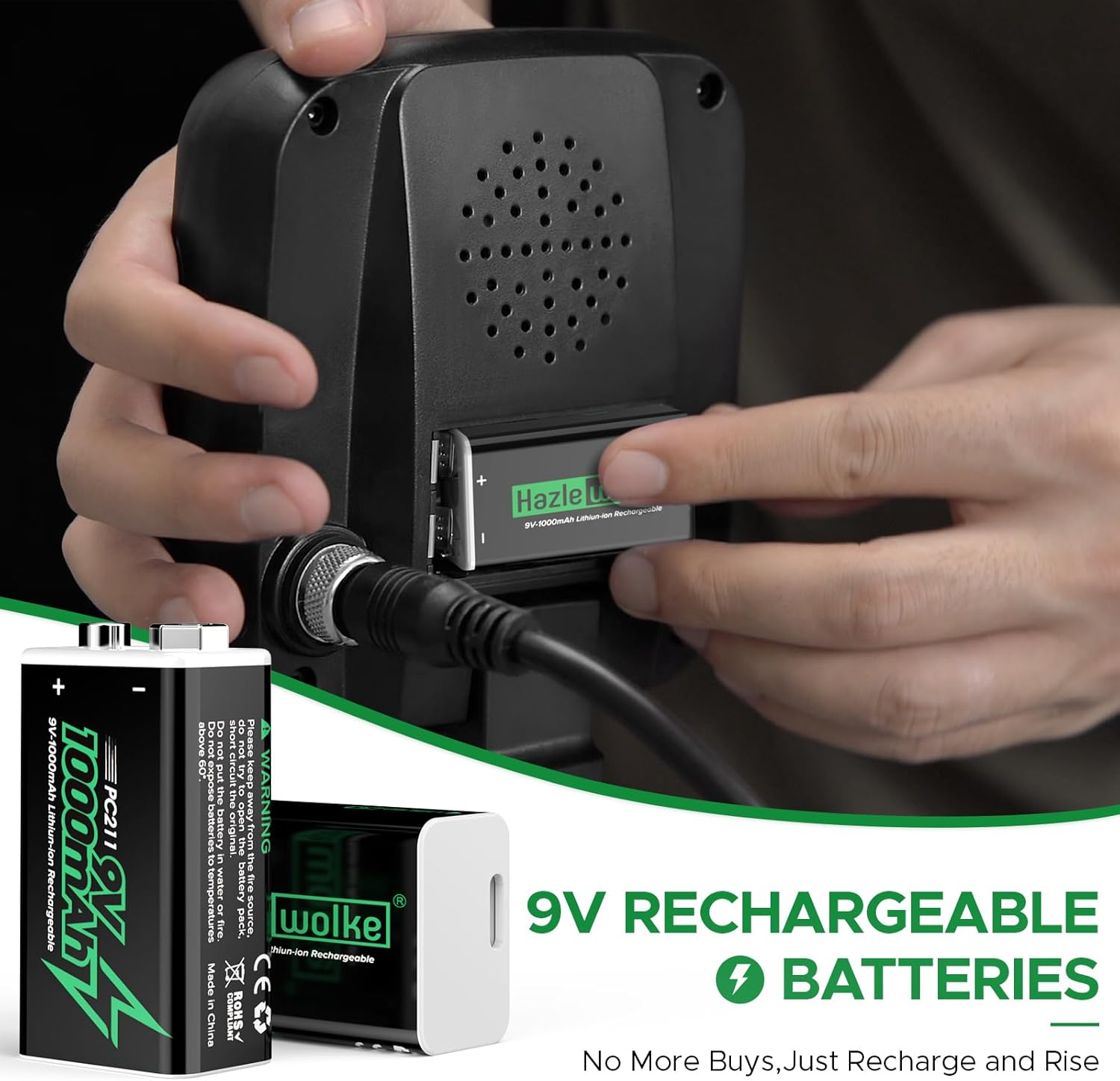
Image: Demonstration of installing a 9V rechargeable battery into the Hazlewolke metal detector's control box.
7.2 Battery Life
A fully charged 9V 1000mAh battery can provide approximately 13 hours of continuous operation for the DD960 metal detector. Battery life may vary based on usage patterns and environmental conditions.

Image: Illustration showing the long-lasting power of Hazlewolke 9V batteries, indicating approximate usage hours for different devices.
7.3 Battery Safety
The PC211 batteries incorporate superior safety features, including a fireproof casing, high-density polymer cell, advanced charging control, and a phone-standard smart circuit to ensure safe operation and charging.

Image: Diagram detailing the superior safety features built into the Hazlewolke 9V rechargeable battery, such as fireproof casing and smart circuit.
8. Maintenance
- Cleaning: After each use, especially in wet or sandy conditions, wipe the search coil with a damp cloth. Clean the control box with a soft, dry cloth. Do not use abrasive cleaners or solvents.
- Storage: Store the metal detector in a cool, dry place when not in use. If storing for an extended period, remove the batteries from the control box.
- Coil Protection: Avoid striking the search coil against hard objects. While waterproof, avoid unnecessary submersion of the control box.
9. Troubleshooting
Refer to the table below for common issues and their solutions:
| Problem | Possible Cause | Solution |
|---|---|---|
| Detector does not power on. | Batteries are dead or incorrectly installed. | Ensure batteries are fully charged and inserted with correct polarity. |
| Excessive false signals. | High sensitivity, ground mineralization, or electromagnetic interference (EMI). | Reduce sensitivity. Perform ground balance. Move away from power lines or other electronic devices. |
| No detection of metal targets. | Incorrect mode, discrimination set too high, or coil not connected properly. | Switch to ALL METAL mode. Lower discrimination level. Check search coil cable connection. |
| Inaccurate pinpointing. | Coil movement too fast or not centered. | Move the coil slowly and steadily over the target area. Ensure the coil is centered. |
10. Specifications
| Feature | Specification |
|---|---|
| Brand | hazlewolke |
| Model | DD960 |
| Color | Black |
| Search Coil | 14-inch Double-D (DD) |
| Waterproof Rating | IP68 (Search Coil) |
| Batteries Required | Yes |
| Power Source | Battery Powered (2x 9V PC211 Rechargeable Lithium-ion) |
| Battery Capacity | 1000mAh (approx. 3700 mWh) per battery |
| Recommended Uses | Metal Detection |
| Display Type | LCD |
| ASIN | B0F1YN4VMG |
11. Warranty and Support
For warranty information or technical support, please contact Hazlewolke customer service through the retailer's platform or the official Hazlewolke website. Please retain your proof of purchase for warranty claims.
Ask a question about this manual
Ask about setup, troubleshooting, compatibility, parts, safety, or missing instructions. Manuals+ will review the question and use this page’s manual context to help answer it.