
1. Product Overview
The LETSCEE QG15-B is an advanced outdoor security camera system featuring dual lenses, solar power capabilities, and both 2.4GHz and 5G Wi-Fi connectivity. Designed for comprehensive home security, it offers 2K Ultra HD resolution, color night vision, two-way audio, and motion detection with customizable zones. This camera is built to withstand various weather conditions with its IP65 weatherproof rating and provides flexible storage options without mandatory subscription fees.

Image 1.1: The LETSCEE QG15-B camera showcasing its dual-lens design and a smartphone displaying the dual-view app interface. One lens monitors the driveway, and the other monitors the entrance, providing comprehensive coverage.
- Dual-Lens System: One fixed upper lens for key area monitoring and one lower lens with 330° horizontal and 90° vertical rotation (PTZ) for dynamic coverage.
- 2K Ultra HD Resolution & Color Night Vision: Each 3MP/2K lens delivers sharp images and videos. Features 8 built-in LEDs for extraordinary color night vision, configurable for motion-triggered or always-on illumination.
- Two-Way Audio: Built-in microphone and speaker allow for remote communication.
- Motion Detection & Zones: Configurable motion detection with custom zones to receive alerts only for relevant activity.
- Wi-Fi Connectivity: Supports both 2.4GHz and 5G Wi-Fi networks for flexible and stable connection.
- Solar Powered: Equipped with a solar panel for continuous charging, reducing the need for manual recharging.
- IP65 Weatherproof: Designed to withstand rain, snow, and high temperatures, suitable for outdoor installation.
- Flexible Storage: Offers lifetime free cloud storage (3 days playback) and supports local storage via an SD card (up to 128GB, not included). No subscription fees required.
2. What's in the Box
Carefully unpack the contents and ensure all items are present:
- LETSCEE QG15-B Security Camera (x1)
- Solar Panel (x1)
- Instruction Manual (x1)
- Mounting Screws (x1 set)
- Camera Bracket (x1)
- Solar Panel Bracket (x1)
- USB Charging Cable (x1)
Video 2.1: An unboxing video for the LETSCEE QG15-B camera, demonstrating the contents of the package including the camera, solar panel, mounting accessories, and user manual.
3. Charging the Camera
Before initial use, fully charge the camera using the provided USB charging cable. This ensures optimal battery performance.
- Locate the charging port on the camera.
- Connect the USB charging cable to the camera and a suitable power adapter (not included).
- Charging typically takes 8-13 hours for a full charge.
- The indicator light will change from red to green once fully charged.

Image 3.1: A visual guide demonstrating how to connect the USB charging cable to the camera and the indicator light changing from red to green upon full charge.
4. App Installation and Setup
To control and monitor your camera, download and install the dedicated mobile application.
- Download the App: Search for "O-KAM Pro" in your device's App Store (iOS) or Google Play Store (Android) and download it.
- Register an Account: Open the O-KAM Pro app and follow the on-screen instructions to register a new account.
- Power On Camera: Turn on the camera. You will hear a prompt speech. If no speech, press the reset button for 4 seconds until you hear "Reset complete and the device is restarting."
- Add Device: In the app, tap "Add a new device" or the '+' icon.
- Connect via Bluetooth: The app will search for nearby devices. Select your camera (e.g., "MC-LWB0365092UJTS") and tap "Connect."
- Wi-Fi Configuration: Choose your home Wi-Fi network (supports 2.4GHz and 5G) and enter the password. The camera will connect to the network.
- Name Your Camera: Once connected, name your camera (e.g., "Front Door," "Yard") and tap "Get started."

Image 4.1: A visual representation of the app setup process, including downloading the O-KAM Pro app, connecting to the camera, and configuring Wi-Fi settings.
5. Key Features and Operation
5.1 Dual-Lens Monitoring
The camera features two lenses for extended coverage. The upper lens provides a fixed view, while the lower lens offers Pan-Tilt-Zoom (PTZ) functionality, allowing you to remotely adjust its viewing angle via the app.
Image 5.1.1: Illustrates the dual-lens capability, showing how one camera effectively covers two distinct areas simultaneously.
5.2 2K Ultra HD Resolution & Night Vision
Experience clear and detailed surveillance footage with 2K resolution. The camera supports both standard black and white night vision and enhanced color night vision, which can be activated by motion or set to be always on.

Image 5.2.1: Demonstrates the 2K high-resolution image quality from both the upper and lower lenses, providing clear and crystal-clear visuals.
5.3 Two-Way Audio
Utilize the built-in microphone and speaker to communicate with individuals near the camera, such as delivery personnel or visitors.

Image 5.3.1: Shows the two-way audio feature in action, allowing a user to speak to a person at their door through the camera.
Video 5.3.2: A demonstration of the camera's two-way audio function, showing real-time communication between a user and a person detected by the camera.
5.4 Motion Detection and Alerts
The camera detects motion and can send instant alerts to your smartphone. You can define specific motion zones to reduce false alarms and focus on critical areas.

Image 5.4.1: An illustration showing how to set up custom motion detection zones within the app to monitor specific areas.
5.5 Cloud Storage and SD Card Recording
The camera offers lifetime free cloud storage for 3 days of rolling playback. For extended storage, an SD card (up to 128GB) can be inserted (not included).

Image 5.5.1: Highlights the camera's free cloud storage and support for local SD card recording, emphasizing no monthly fees.
6. Installation
The LETSCEE QG15-B camera is designed for simple installation. Choose a suitable location with good Wi-Fi signal and adequate sunlight for the solar panel.
- Select Location: Identify a mounting spot that provides the desired viewing angle and receives direct sunlight for the solar panel.
- Mount the Camera: Use the provided camera bracket and mounting screws to securely attach the camera to a wall or other stable surface.
- Mount the Solar Panel: Attach the solar panel to its bracket and position it to maximize sun exposure. Connect the solar panel cable to the camera.
- Adjust Angles: Adjust the camera's PTZ (Pan-Tilt-Zoom) angle and the solar panel's orientation for optimal performance.

Image 6.1: Depicts the simple installation process of the camera and solar panel on an outdoor wall.
7. Specifications
| Feature | Detail |
|---|---|
| Model Name | QG15-B |
| Indoor/Outdoor Usage | Indoor, Outdoor |
| Power Source | Solar Powered |
| Connectivity Protocol | Wi-Fi (2.4GHz & 5G) |
| Video Capture Resolution | 1296p (2K) |
| Special Feature | Dual Lens, Motion Detection, Night Vision, 2-Way Audio |
| Controller Type | Android, iOS |
| Mounting Type | Wall Mount |
| Weatherproof Rating | IP65 |
| Product Dimensions | 8.5 x 5.3 x 7.5 inches |
| Item Weight | 4.4 pounds (2 Kilograms) |
| Batteries | 2 C batteries required (included) |
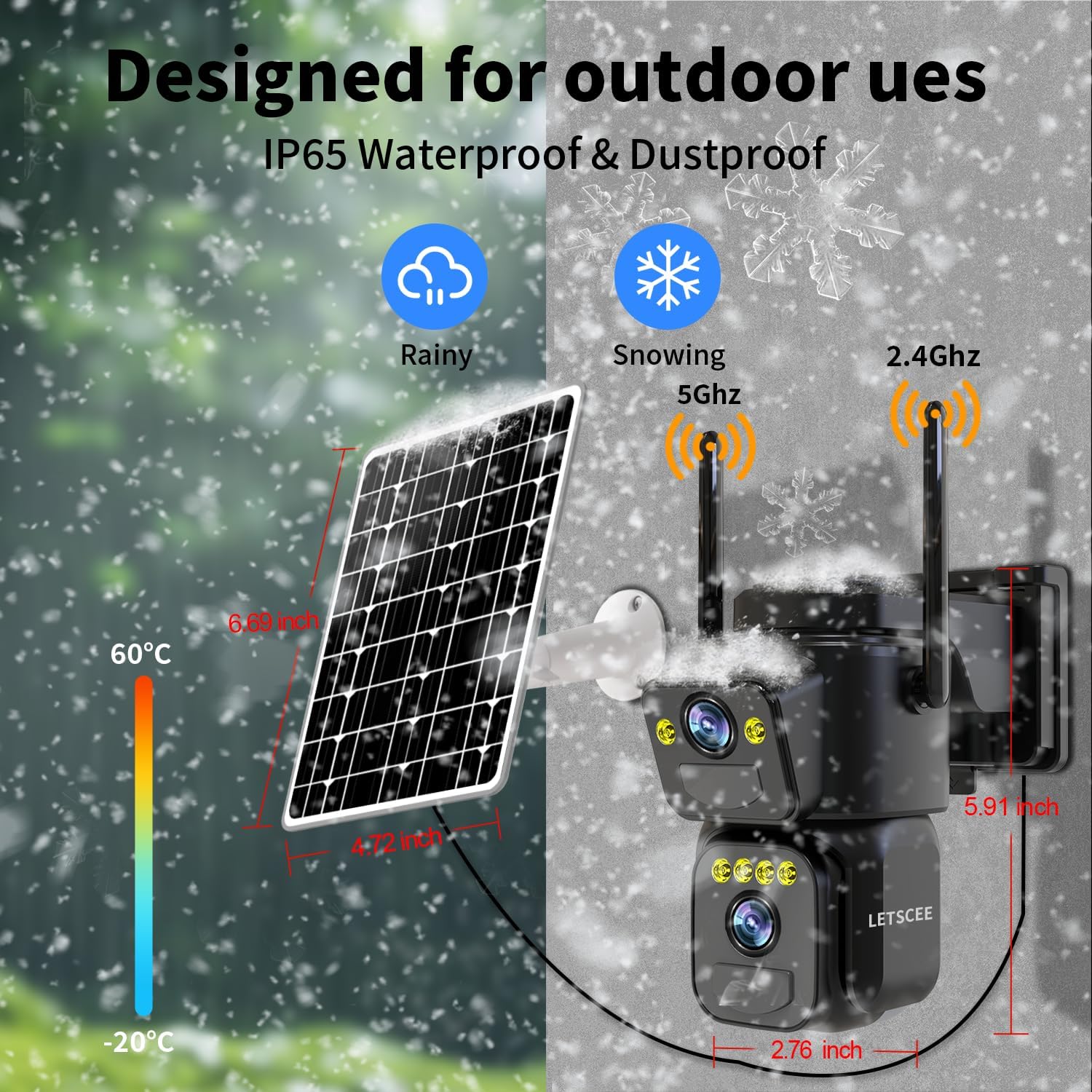
Image 7.1: Highlights the IP65 weatherproof and dustproof design, showing the camera's resilience in rainy and snowy conditions, along with its operating temperature range.
Video 7.2: A demonstration of the camera undergoing a waterproof test, showing its ability to function effectively while being sprayed with water.
8. Maintenance
Regular maintenance ensures the longevity and optimal performance of your LETSCEE QG15-B security camera.
- Clean Lenses: Periodically wipe the camera lenses with a soft, damp cloth to remove dust and smudges that may affect image clarity.
- Check Solar Panel: Ensure the solar panel is clean and free from obstructions (e.g., leaves, dirt) to maintain efficient charging.
- Firmware Updates: Check the O-KAM Pro app regularly for firmware updates to ensure your camera has the latest features and security enhancements.
- Battery Health: Monitor battery levels via the app. While solar-powered, extreme weather or prolonged low light may require occasional manual charging.
- Secure Mounting: Periodically check that the camera and solar panel mounts are secure and have not loosened due to weather or vibrations.
9. Troubleshooting
If you encounter issues with your LETSCEE QG15-B camera, refer to the following common solutions:
- Camera Not Connecting to Wi-Fi:
- Ensure your Wi-Fi network is 2.4GHz or 5G and the password is correct.
- Move the camera closer to your Wi-Fi router to improve signal strength.
- Perform a camera reset by pressing the reset button for 4 seconds.
- Poor Image Quality:
- Clean the camera lenses.
- Ensure there are no obstructions in the camera's field of view.
- Check your internet connection speed; a slow connection can affect live view quality.
- No Motion Detection Alerts:
- Verify that motion detection is enabled in the O-KAM Pro app settings.
- Check if motion detection zones are correctly configured.
- Ensure the app has notification permissions enabled on your smartphone.
- Battery Not Charging:
- Ensure the solar panel is receiving direct sunlight and is clean.
- Check the connection between the solar panel and the camera.
- If necessary, manually charge the camera using the USB cable.
10. Warranty and Support
LETSCEE provides a standard warranty for this product. For detailed warranty information, technical support, or service inquiries, please refer to the contact information provided in the original product packaging or visit the official LETSCEE website.

Image 10.1: Information regarding LETSCEE's after-sales service, indicating channels for support.