
Introduction
This manual provides comprehensive instructions for the setup, operation, and maintenance of your LETSCEE QG15-B Dual Lens Solar Security Camera. This camera features 2K Ultra HD resolution, 5G/2.4G WiFi connectivity, motion detection, color night vision, two-way audio, and an IP65 weatherproof design, powered by solar energy.

Figure 1: LETSCEE QG15-B Dual Lens Solar Security Camera with included solar panel and a view of the mobile application interface.
What's in the Box
Verify that all components are present in the package:
- LETSCEE QG15-B Dual Lens Solar Security Camera
- Solar Panel
- Instruction Manual
- Mounting Screws
- USB Charging Cable
- Camera Bracket
- Solar Panel Bracket

Figure 2: Package contents of the LETSCEE QG15-B camera system.
Video 1: Unboxing and initial setup guide for the LETSCEE QG15-B camera.
Setup Instructions
1. Initial Charging
Before first use, fully charge the camera using the provided USB charging cable. A full charge typically takes 8-13 hours. The indicator light will change from red to green when charging is complete.

Figure 3: Charging port and indicator light location on the camera.
2. App Download and Registration
- Download the "O-KAM Pro" app from your smartphone's app store (iOS or Android).
- Register for a new account or log in if you already have one.

Figure 4: Steps for downloading and setting up the O-KAM Pro application.
3. Connecting to Wi-Fi
- Turn on the camera. You will hear a prompt speech. If no speech, press the reset button for 4 seconds (located under the TF card slot cover).
- In the O-KAM Pro app, tap "Add a device" and select "Wireless camera".
- Tap "Connect" when the app discovers the new device.
- Choose your home Wi-Fi network (supports 2.4GHz and 5GHz) and enter the password.
- Wait for the connection to complete. The camera will confirm successful connection.
The camera supports both 2.4GHz and 5GHz Wi-Fi networks for flexible connectivity.

Figure 5: Wireless setup showing 2.4GHz and 5GHz Wi-Fi support.
Operating Instructions
1. Dual Lens Functionality
The camera features two lenses for extended surveillance coverage. The fixed upper lens monitors a key area, while the lower lens offers pan-tilt-zoom (PTZ) capabilities for dynamic viewing.

Figure 6: Illustration of dual lens coverage for different areas.

Figure 7: Visual representation of the fixed and rotatable lenses.
2. Pan-Tilt-Zoom (PTZ) Control
The lower lens supports 330° horizontal rotation and 90° vertical rotation. You can remotely adjust the camera's viewing angle through the O-KAM Pro app.

Figure 8: Remote PTZ control via the mobile application.
3. 2K Ultra HD Resolution & Color Night Vision
Each lens provides 3MP/2K resolution for sharp images and detailed video. The camera is equipped with 8 LEDs, allowing for extraordinary color night vision. The lights can be set to activate upon motion, remain always on, or stay off at night.

Figure 9: Example of 2K resolution from both camera lenses.

Figure 10: High-resolution image clarity from both lenses.
4. Two-Way Audio
The built-in microphone and speaker enable two-way communication. You can remotely speak to individuals near the camera through the app.
Video 2: Demonstration of the two-way audio feature.

Figure 11: Using two-way audio to communicate.
5. Motion Detection & Alerts
The camera features advanced PIR motion detection. When motion is detected, you can receive real-time alerts on your smartphone. You can also define specific motion detection zones to reduce false alarms.

Figure 12: Real-time motion detection alerts.

Figure 13: Customizing motion detection zones.
The camera can be configured to trigger an auto alarm (light or siren) at night when motion is detected, providing an additional layer of security.

Figure 14: Nighttime auto alarm functionality.
6. Storage Options
The camera offers lifetime free cloud storage with 3 days of playback. It also supports local recording to an SD card (up to 128GB, not included).

Figure 15: Cloud and SD card storage options.

Figure 16: Details on free cloud storage and SD card capacity.
7. Multi-user Sharing
The camera supports multiple user logins, allowing you to share camera access with family members for live viewing and playback.
Maintenance
1. Weatherproof Design
The LETSCEE QG15-B camera features an IP65 weatherproof design, ensuring it can withstand various outdoor conditions such as rain, snow, and extreme temperatures (-20°C to 60°C).
Video 3: Waterproof testing of the LETSCEE security camera.
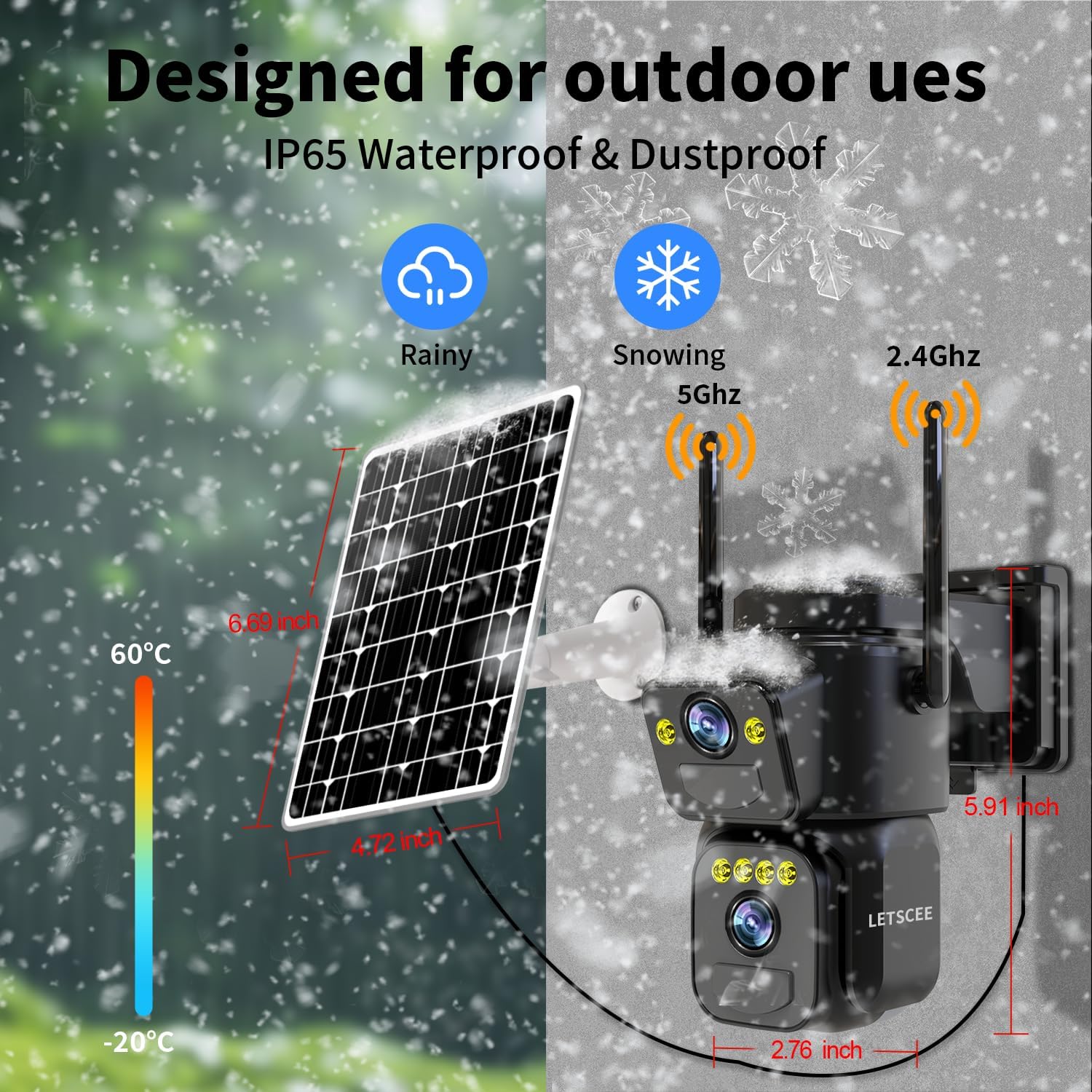
Figure 17: IP65 weatherproof design for outdoor use.

Figure 18: Weatherproof design details.
2. Solar Panel Care
Ensure the solar panel is positioned to receive maximum direct sunlight for optimal charging. Regularly clean the surface of the solar panel to remove dust, dirt, or debris that may obstruct sunlight and reduce charging efficiency.
Troubleshooting
- Camera frequently disconnects from Wi-Fi: Ensure the camera is within range of your Wi-Fi router. Check for strong signal interference from other devices. Consider repositioning the camera or router, or using a Wi-Fi extender.
- Battery not holding charge: Ensure the solar panel is clean and receiving adequate direct sunlight. If the camera is installed in a shaded area, consider relocating it or providing supplemental charging via the USB port. Extreme cold can also affect battery performance.
- No prompt speech during setup: If the camera does not provide voice prompts after being turned on, press and hold the reset button for 4 seconds. The camera will then announce "Reset complete" and restart, after which it should provide the Wi-Fi configuration prompt.
- Solar panel or camera scratches/damage: If you find that the solar panel is broken or the camera has scratches during transportation, please contact customer support immediately for a replacement.

Figure 19: Guidance on handling damaged components.
Specifications
| Feature | Detail |
|---|---|
| Model Name | QG15-B |
| Brand | LETSCEE |
| Indoor/Outdoor Usage | Indoor, Outdoor |
| Power Source | Solar Powered |
| Connectivity Technology | Wireless (Wi-Fi) |
| Wi-Fi Frequency | 2.4GHz, 5GHz |
| Video Capture Resolution | 1296p (2K) |
| Special Feature | Dual Lens, Motion Detection, Color Night Vision, 2-Way Audio |
| Controller Type | Android, iOS (Smartphone App) |
| Mounting Type | Wall Mount |
| Item Dimensions (L x W x H) | 8.5 x 5.3 x 7.5 inches |
| Item Weight | 2.31 pounds (1.05 Kilograms) |
| Batteries | 2 C batteries required (included) |
| Weather Resistance | IP65 Weatherproof |
Warranty and Support
Specific warranty details are not provided in this manual. For warranty information, technical support, or any inquiries regarding your LETSCEE QG15-B camera, please refer to the contact information provided with your purchase or visit the official LETSCEE website.

