
1. Important Safety Information
- Read all instructions carefully before installation and use.
- Professional installation is recommended to avoid damage to the unit or vehicle.
- Do not operate the device in a way that distracts you from driving.
- Ensure all wiring connections are secure and properly insulated to prevent short circuits.
- Keep the unit away from water and excessive heat.
2. Package Contents
Verify that all items are present in the package:
- Car radio (1280*720) with frame x1
- User manual x1
- Power cord x1
- USB 4Pin x1
- USB 6Pin x1
- GPS antenna x1
- CVBS 720P rear view camera x1
- RCA Cable x1

Image: Overview of the FeirTon car stereo package contents, showing the main unit, various cables, GPS antenna, and a backup camera.
3. Compatibility
This touchscreen car radio is designed for specific vehicle models and years. Please ensure your vehicle matches the compatibility list below. If your vehicle's original radio or wiring harness does not match the 'Not Fit' examples, contact support for assistance.
- GMC Sierra: 2007-2013
- GMC Yukon: 2007-2014
- GMC Sierra 3rd Gen: 2010-2014
- Chevrolet Tahoe: 2007-2014
- Chevrolet Suburban: 2006-2012
- Chevrolet Suburban 10th Gen: 2007-2014
- Chevrolet Silverado 2nd Gen: 2010-2014
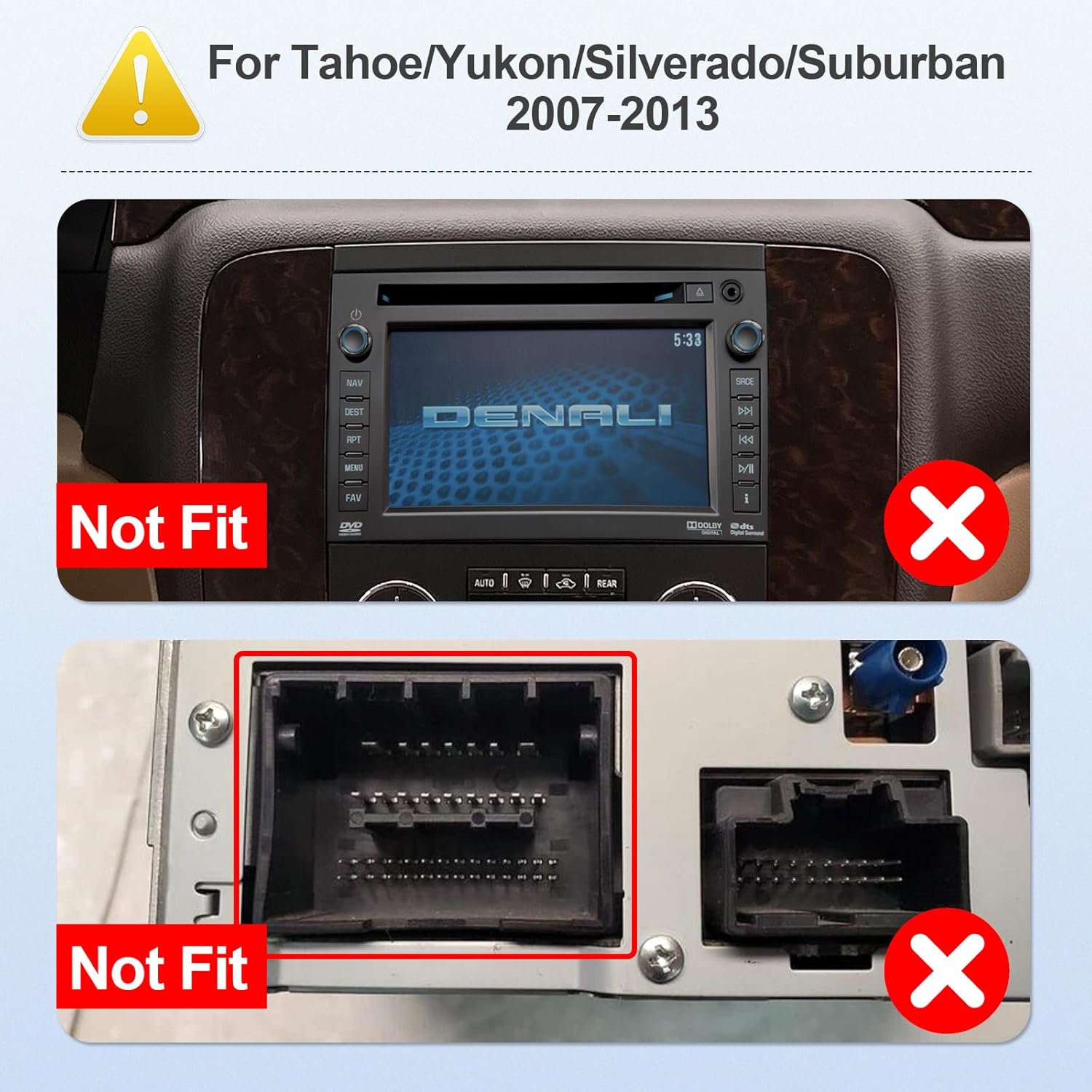
Image: Visual guide indicating incompatible car stereo models and wiring harnesses for Tahoe/Yukon/Silverado/Suburban 2007-2013.
4. Setup & Installation
This section provides general guidance for installing your FeirTon car stereo. Due to variations in vehicle models, professional installation is highly recommended.
4.1 Pre-Installation Checklist
- Disconnect the vehicle's battery before starting any electrical work.
- Ensure all necessary tools are available (e.g., trim removal tools, screwdrivers, wire strippers).
- Confirm the vehicle's wiring harness matches the provided harness.
4.2 Wiring Connections
Connect the provided power cord, USB cables, GPS antenna, and RCA cables to the corresponding ports on the car stereo and your vehicle's wiring system. Refer to the wiring diagram included with your specific power cord for detailed connections.
4.3 Mounting the Unit
Carefully install the car stereo into the dashboard opening. Secure it using the appropriate mounting brackets and screws. Reinstall any removed trim pieces.
4.4 Backup Camera Installation
The included CVBS 720P rear view camera should be mounted at the rear of the vehicle. Connect its video output to the camera input on the car stereo and its power to the vehicle's reverse light circuit for automatic activation.

Image: The car stereo screen displaying a backup camera feed with dynamic parking guidelines, indicating support for OEM and aftermarket cameras.
5. Operating Instructions
This section details the primary functions and features of your FeirTon Android 13 Car Stereo.
5.1 Initial Power On and System Overview
After installation, reconnect the vehicle battery. The unit will power on, displaying the Android 13 interface on its 9-inch IPS touchscreen (1280*720P resolution).

Image: A comparison showing the clarity and resolution of the 1280x720P IPS HD screen versus a lower resolution screen.
5.2 CarPlay & Android Auto
The unit supports both wired CarPlay and Android Auto. Connect your Apple or Android smartphone using a USB data cable to access compatible apps, navigation, music, and calls directly on the car stereo screen.

Image: The car stereo displaying both Apple CarPlay and Android Auto interfaces, showing various app icons and navigation.
5.3 Bluetooth 5.4 Connectivity
Pair your smartphone via Bluetooth 5.4 for hands-free calling and audio streaming. Access your phone's contacts, call history, and music library directly from the stereo.

Image: Demonstrates Bluetooth 5.4 capabilities for hands-free phone calls and playing music from a connected device.
5.4 GPS Navigation
Utilize the built-in GPS module for navigation. Connect to Wi-Fi or a mobile hotspot to download and use online navigation apps, or use pre-installed offline maps.
5.5 Wi-Fi 6 (2.4G & 5Ghz)
The unit features built-in Wi-Fi 6, supporting both 2.4Ghz and 5Ghz bands for faster and more stable internet connectivity. This allows for app downloads, online streaming, and real-time updates.

Image: Illustrates the speed advantages of WiFi 6 compared to older WiFi standards, highlighting faster transfer rates.
5.6 FM Radio
Access local FM radio stations. The interface allows for easy station tuning and saving presets.
5.7 Steering Wheel Control (SWC)
The car stereo supports the original vehicle's steering wheel control functions. Use the 'Settingwheel' app on the unit to configure and map your steering wheel buttons for convenient control of audio and other features.

Image: The car stereo screen showing the interface for configuring steering wheel controls, allowing users to assign functions to physical buttons.
5.8 Media Playback
The unit supports 4K HD video playback and various audio formats. Play media from local storage via USB or stream online content through installed apps.
Image: The car stereo displaying high-definition video content, emphasizing its 4K HD video playback capability on the IPS screen.
5.9 App Store Access
With Wi-Fi connectivity, you can access the Google Play Store to download and install a wide range of Android applications, expanding the functionality of your car stereo.

Image: The car stereo screen showing the Google Play Store interface, indicating the ability to download various Android applications.
5.10 Product Features Overview Video
Video: An official product video from the seller, Afeir, demonstrating various features of the car stereo including the desktop, main menu, CarPlay, Android Auto, Mirror Link, real-time weather, Bluetooth calls and music, GPS navigation, app store, AHD 720P camera, steering wheel controls, FM radio, EQ settings, local video playback, and online video streaming.
6. Maintenance
- Screen Cleaning: Use a soft, lint-free cloth to clean the touchscreen. Avoid abrasive cleaners or solvents.
- Software Updates: Periodically check for system software updates via the settings menu to ensure optimal performance and access to new features.
- General Care: Keep the unit free from dust and debris. Avoid exposing it to extreme temperatures or direct sunlight for prolonged periods.
7. Troubleshooting
- No Power: Check all power connections and the vehicle's fuse box. Ensure the battery is properly reconnected.
- No Sound: Verify speaker connections, volume settings, and audio source selection. Check the EQ settings.
- Touchscreen Unresponsive: Try restarting the unit. If the issue persists, a factory reset might be necessary (note: this will erase user data).
- GPS Signal Lost: Ensure the GPS antenna is properly installed and has a clear view of the sky.
- CarPlay/Android Auto Not Connecting: Use the original USB cable. Ensure the phone's operating system is up to date and that CarPlay/Android Auto is enabled in the phone's settings.
- Bluetooth Pairing Issues: Ensure Bluetooth is enabled on both the stereo and your device. Delete previous pairings and try again.
8. Specifications
| Brand | FeirTon |
| Model Name | for Tahoe/Yukon/Silverado/Suburban 2007-2013 |
| Screen Size | 9 Inches |
| Display Type | IPS |
| Resolution | 1280*720P |
| Operating System | Android 13 |
| Memory Storage Capacity | 32 GB |
| Connectivity Technology | Bluetooth 5.4, Wi-Fi 6 (2.4G & 5Ghz) |
| Special Features | Touchscreen, CarPlay, Android Auto, GPS Navigation, FM Radio, Steering Wheel Control, Backup Camera Support |
| Audio Output Mode | Stereo |
| Supported Satellite Navigation System | GLONASS |
9. Warranty & Support
FeirTon provides a 12-month quality assurance warranty for this touchscreen car radio. Our professional after-sales team is available 7 days a week, 24 hours a day, to assist with any questions during installation or use.
For warranty claims or technical support, please contact the seller directly through your purchase platform or refer to the contact information provided in the product packaging.
Optional Protection Plans
Additional protection plans may be available for purchase to extend coverage beyond the standard warranty period:
- 2-Year Protection Plan
- 3-Year Protection Plan
- Complete Protect (monthly renewal)
Details regarding these plans, including pricing and coverage, can be found at the point of purchase or by contacting the plan provider.