
1. Introduction
This manual provides instructions for the HYS HT Push-to-Talk (PTT) Cable with a 3.5mm audio adapter. This accessory is designed to connect a 3.5mm listen-only earpiece to compatible two-way radios, enabling hands-free communication with an integrated PTT button and microphone.

Figure 1: HYS HT PTT Cable with 3.5mm Audio Adapter. This image displays the coiled cable, the PTT button with integrated microphone and lapel clip, the 3.5mm female audio jack, and the 2-pin K-type connector.
2. Product Features
- 2-Pin K-Type Connector: Compatible with various Kenwood, Baofeng, HYT, and Quansheng two-way radios.
- 3.5mm Female Audio Jack: Allows connection of standard 3.5mm listen-only earpieces. Note: This is a single-channel (mono) output.
- Integrated Push-to-Talk (PTT) Button: Enables transmission without needing to access the radio directly.
- Built-in Microphone: Captures voice for clear communication.
- Lapel Clip: Secures the PTT unit to clothing for convenient access.
- Durable Construction: Features a PU cable reinforced by Kevlar for extended lifespan.

Figure 2: Detailed view of the 3.5mm female audio jack and the 2-pin K-type connector. The 3.5mm jack is designed for listen-only earpieces, and the 2-pin connector plugs into the radio.
3. Setup Instructions
- Connect to Radio: Insert the 2-pin K-type connector into the corresponding port on your compatible two-way radio. Ensure a firm connection.
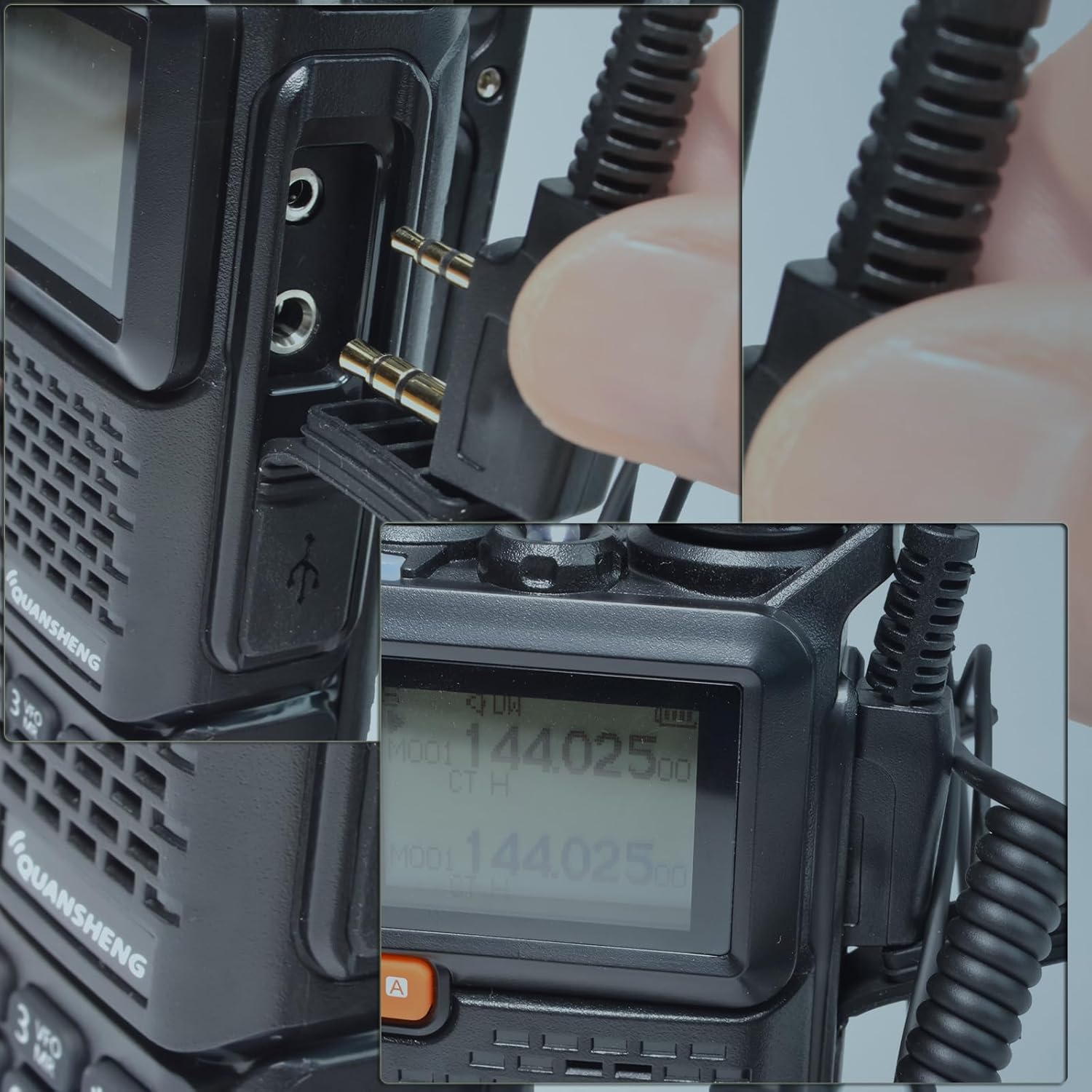
Figure 3: Illustration of the 2-pin K-type connector being inserted into the radio's accessory port. The connector is designed to fit securely.
- Connect Earpiece: Plug your 3.5mm listen-only earpiece into the 3.5mm female audio jack on the PTT cable.

Figure 4: The HYS PTT cable connected to a two-way radio, with a listen-only earpiece (not included) plugged into the 3.5mm jack. This shows the complete setup for use.
- Secure PTT Unit: Use the integrated lapel clip to attach the PTT unit to your clothing (e.g., lapel, collar) for easy access.
4. Operating Instructions
- Receiving Audio: Once connected, audio from the radio will be routed through the 3.5mm earpiece.
- Transmitting (Push-to-Talk): To transmit, press and hold the PTT button on the cable. Speak clearly into the integrated microphone. Release the PTT button to stop transmitting and return to receive mode.
- Microphone Placement: For optimal voice clarity, ensure the microphone on the PTT unit is positioned close to your mouth.
5. Compatibility
The HYS HT PTT Cable is designed for two-way radios utilizing a 2-pin K-type connector. It is compatible with a wide range of models from various manufacturers.
Compatible Radio Models:
- Kenwood: K1 connector type radios.
- Baofeng: UV-5R, BF-F8HP, GM-21, and similar models.
- Quansheng: UV-K5, UV-K6, and similar models.
- WouXun: KG-699, KG-689, KG-669, KG-679, KG-703, KG-659, KG-639, KG-833, KG-889, KG-869, KG-819, KG-816, KG-UVD1P, KG-UV6D, KG-UVA1, etc.
- HYT: TH-F2, TH-F3, TH-F5, TH-F6, TH-F7, TH-F8, TH-UVF8D, TH-UVF1, TH-UVF9/D, etc.
Incompatible Devices:
- Motorola Icom 2-pin radios.
- Earpieces requiring a 2.5mm jack.

Figure 5: Technical diagram illustrating the dimensions of the universal 2-pin K-type connector, showing pin spacing and diameters for compatibility reference.
6. Maintenance
- Cleaning: Wipe the cable and PTT unit with a soft, dry cloth. Avoid using harsh chemicals or abrasive cleaners.
- Storage: Store the cable in a cool, dry place away from direct sunlight and extreme temperatures when not in use.
- Handling: Avoid excessive pulling or bending of the cable, especially near the connectors, to prevent damage.
7. Troubleshooting
| Issue | Possible Cause | Solution |
|---|---|---|
| No audio from earpiece. |
|
|
| Audio only in one ear (mono). |
|
|
| Cannot transmit (PTT not working). |
|
|
8. Specifications
- Model Number: HYSRF08K
- Connector Type (Radio): 2-Pin K-Type
- Connector Type (Earpiece): 3.5mm Female Audio Jack (Mono)
- Cable Material: PU reinforced by Kevlar
- Features: Integrated PTT button, built-in microphone, lapel clip.
- Package Dimensions: Approximately 7 x 5 x 1 inches
- Item Weight: Approximately 0.16 ounces
9. Warranty and Support
This product is covered by a standard return policy. For technical support, warranty claims, or further assistance, please contact HYS Communication directly through your purchase platform or their official website. Please have your model number (HYSRF08K) and purchase details available when contacting support.