
IMIPAW DU3L-WY
IMIPAW Automatic Cat Feeder User Manual
Model: DU3L-WY
1. Introduction
The IMIPAW Automatic Cat Feeder is designed to provide convenient and precise feeding for your pet. With features like app remote control, programmable timed feeding, and a dual power supply, it ensures your pet receives meals consistently and on schedule. This manual provides detailed instructions for setting up, operating, and maintaining your new feeder.

Image: IMIPAW Automatic Cat Feeder with its accompanying mobile application interface.
2. Product Components
Upon receiving your IMIPAW Automatic Cat Feeder, please ensure all components are present and in good condition:
- Feeder Body (main unit with control panel)
- Feeder Lid (top cover for food tank)
- Food Bowl (detachable for easy cleaning)
- User Guide / Instruction Manual
- Power Adapter and Charging Cable

Image: All components of the IMIPAW Automatic Cat Feeder, including the main body, food bowl, and lid.
3. Setup Guide
3.1 Physical Installation
- Place the feeder body on a stable, flat surface.
- Attach the food bowl to the front of the feeder body, ensuring it clicks securely into place.
- Pour dry pet food (recommended kibble size 2-10mm) into the food tank.
- Securely close the feeder lid by aligning the indication mark and rotating the upper cover until it locks.
3.2 Power Supply
The feeder supports dual power supply options for uninterrupted operation:
- AC Power: Plug the power adapter into the feeder's power port and then into a wall outlet.
- Battery Backup: For power outage protection, install 3 x D-size alkaline batteries (not included) into the battery compartment at the bottom of the feeder.

Image: The feeder can be powered by AC adapter or 3 D-size batteries (not included).
3.3 App Connection Steps
To unlock the full smart features of your feeder, connect it to the 'PetTech' app:
- Download the 'PetTech' app from your smartphone's app store (App Store for iOS, Google Play for Android).
- Open the app and register/log in to your account.
- Ensure your phone's Bluetooth and Wi-Fi are enabled.
- On the feeder, press and hold the 'SET' button for 6 seconds until you hear a 'dididi' sound and the blue light flashes rapidly, indicating Wi-Fi configuration mode.
- In the app, tap 'Add Device' or the '+' icon. The app should automatically discover the feeder. Select 'Pet Feeder (2.4GHz & 5GHz)'.
- Follow the on-screen prompts to connect the feeder to your home Wi-Fi network (supports both 2.4GHz and 5GHz).
- Once connected, the app will confirm successful pairing.
Video: Demonstrates how to connect the device using a mobile phone and the PetTech app.
Video: Detailed steps for APP Connection, including resetting the device and confirming indicator status.
4. Operation
4.1 Setting Automated Feeding Schedules
Use the 'PetTech' app to create a customized feeding plan for your pet:
- In the app, navigate to 'Meal Plan'.
- Add new feeding times and specify the number of portions (1-20 servings per meal).
- You can set up to 10 meals per day.
- Customize the days of the week for each feeding schedule.
Video: Demonstrates various app functions, including setting feeding schedules, viewing records, and remote manual feeding.
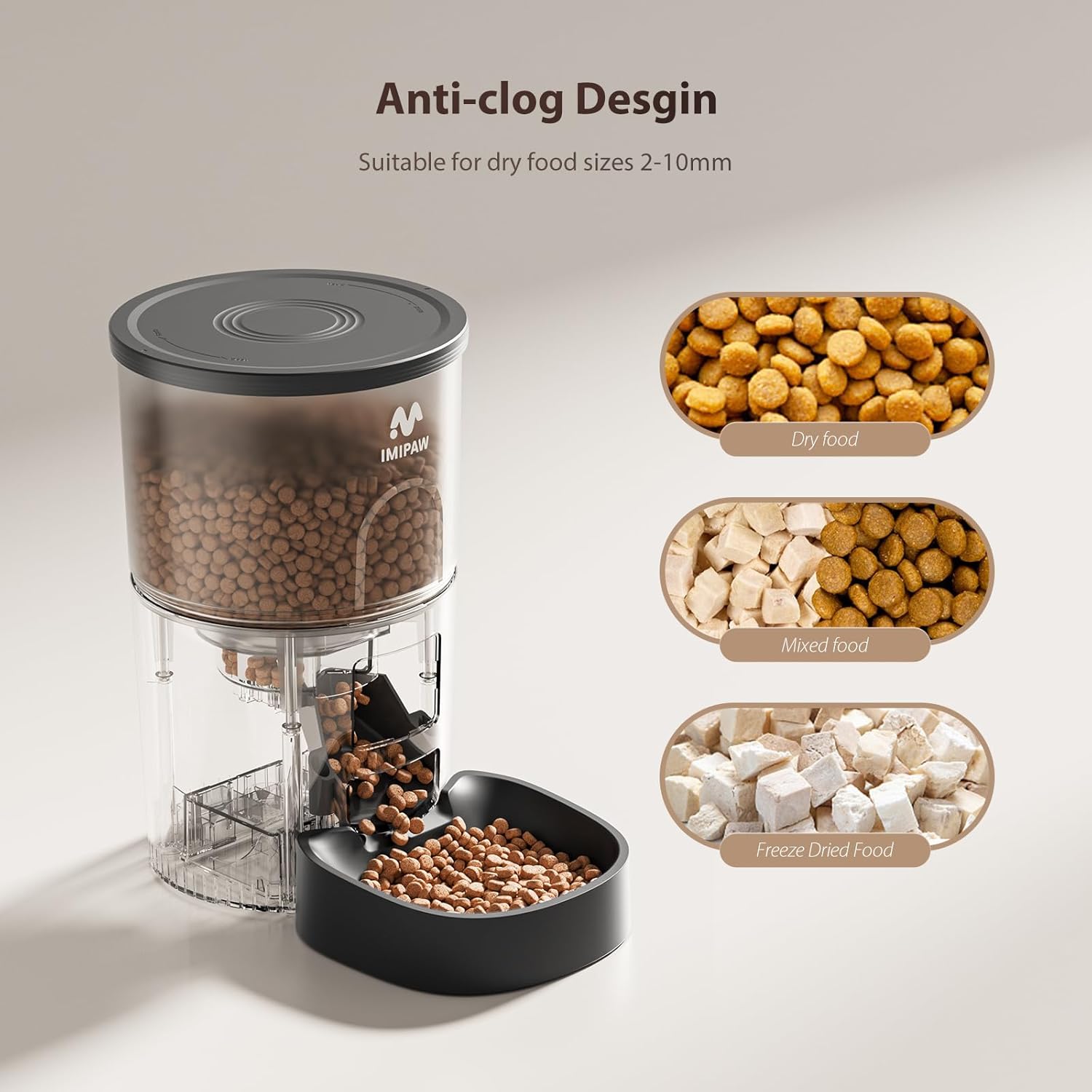
Image: Screenshot of the app interface displaying options for customized feeding schedules.
4.2 Manual Feeding
You can dispense food manually at any time, without affecting your scheduled feedings:
- Via App: On the main app interface, tap the 'Manual' button and select the desired number of portions to dispense immediately.
- Via Device: Press the 'FEED' button on the feeder's control panel to dispense one portion of food.
Video: Shows how to manually dispense food using the feeder's button.
4.3 Portion Control and Food Types
The feeder is designed for precision and versatility:
- Kibble Size: Suitable for dry food sizes between 2-10mm to prevent clogging.
- Dual Rotor Structure: Ensures smooth and consistent food delivery, preventing jams.
- Food Types: Compatible with single-shaped dry kibble, mixed-shaped dry kibble, and freeze-dried food.

Image: Visual representation of the anti-clog design and various dry food types compatible with the feeder.
5. Maintenance
Regular cleaning ensures optimal performance and hygiene for your pet:
- Food Bowl: The food bowl is detachable and can be washed with water and mild soap. Ensure it is completely dry before reattaching.
- Food Tank: Periodically empty the food tank and wipe it clean with a dry cloth. Do not wash the main feeder body with water.
- Rotor Mechanism: Inspect the internal rotor for any food residue or blockages and clean as necessary.
Video: Shows the process of disassembling and cleaning the food bowl.
6. Troubleshooting
| Issue | Possible Cause | Solution |
|---|---|---|
| Feeder not dispensing food. | Food tank empty; kibble size too large; food jammed; power issue. | Refill food tank; ensure kibble is 2-10mm; clear any jams in the rotor; check power connection/batteries. |
| App not connecting to feeder. | Incorrect Wi-Fi password; feeder not in pairing mode; Wi-Fi signal weak. | Re-enter Wi-Fi password; reset feeder to pairing mode (hold SET for 6s); move feeder closer to router. |
| Scheduled feeding not occurring. | Schedule not saved; feeder offline; incorrect time zone. | Verify schedule in app; check feeder's power and Wi-Fi connection; ensure app and device time zones match. |
| Lid not closing securely. | Misalignment; debris on seal. | Align lid correctly with the indication mark; clean the lid and feeder rim. |
For further assistance, please refer to the contact information in the Warranty and Support section.
7. Specifications
| Feature | Detail |
|---|---|
| Model Number | DU3L-WY |
| Brand | IMIPAW |
| Capacity | 3 Liters (approx. 3.12 pounds of dry food) |
| Power Supply | AC Power Adapter (5V/1A) / 3 x D-size Batteries (not included) |
| Connectivity | 5G WiFi / 2.4G WiFi (via PetTech App) |
| Feeding Schedule | Up to 10 meals per day, 1-20 portions per meal |
| Kibble Size | 2-10mm diameter |
| Material | Acrylonitrile Butadiene Styrene |
| Dimensions (LxWxH) | 7 x 7 x 12 inches |
| Item Weight | 3.12 pounds |
8. Warranty and Support
IMIPAW products are designed for reliability and pet well-being. For any questions, technical support, or warranty inquiries, please contact our after-sales service team. Refer to the contact information provided in your product packaging or on the official IMIPAW website.
We are committed to providing excellent customer service and ensuring your satisfaction with the IMIPAW Automatic Cat Feeder.
Ask a question about this manual
Ask about setup, troubleshooting, compatibility, parts, safety, or missing instructions. Manuals+ will review the question and use this page’s manual context to help answer it.