
1. Introduction
The AEXCVG ZK-HT21 is a 2.1 channel Bluetooth amplifier board designed to power passive speakers and a subwoofer. It features multiple input options including Bluetooth, AUX, and USB, along with independent control for treble, bass, and subwoofer frequency. This manual provides essential information for the proper installation, operation, and maintenance of your amplifier board.

Figure 1: AEXCVG ZK-HT21 Bluetooth Amplifier Board with included screwdriver.
2. Package Contents
Please verify that all items are present in your package:
- ZK-HT21 Bluetooth Amplifier Board
- Screwdriver
- Mounting hardware (standoffs, screws)

Figure 2: Contents of the ZK-HT21 package.
3. Product Features
- Multiple Audio Inputs: Supports AUX (3.5mm), Bluetooth 5.0, and USB flash drive inputs.
- 2.1 Channel Output: Provides two channels for left/right speakers (up to 160W each) and one channel for a subwoofer (up to 220W).
- TDA7498E Chip: Equipped with two TDA7498E amplifier chips for efficient power delivery.
- Tone Control: Independent controls for treble, bass, subwoofer volume, and subwoofer frequency.
- Protection Mechanisms: Includes overvoltage, undervoltage, overheating, DC detection, and short circuit protection.
- Multifunctional Dial Button: Single control for pause/play, input mode switching, and track navigation.
- Cooling Fan: Integrated fan for thermal management during operation.
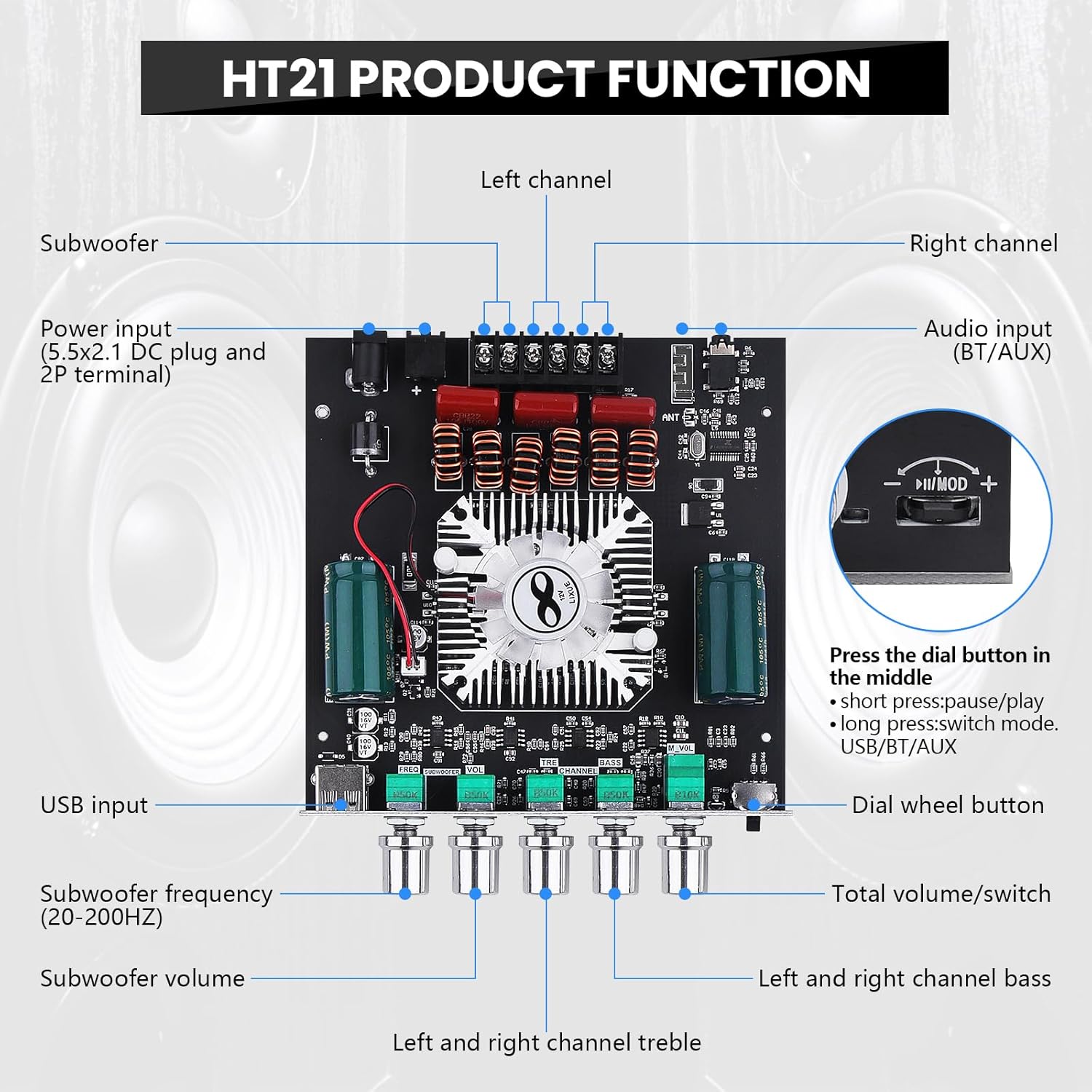
Figure 3: ZK-HT21 Product Function Overview.
4. Setup Instructions
4.1 Power Supply Connection
The ZK-HT21 requires a DC power supply between 15V and 36V. Ensure the power supply can deliver sufficient current (e.g., 5A or more) for optimal performance. Connect the power supply to the designated DC input terminal on the board.
Note: Undervoltage protection activates below 9V. Higher voltage generally allows for higher output power.
4.2 Speaker Connections
This amplifier board is compatible with passive speakers with an impedance of 4-8Ω and a power rating of 30-200W. Connect your left and right passive speakers to the R&L Channel outputs. Connect your passive subwoofer to the Subwoofer output.
Important: Do not connect Bluetooth speakers or active (powered) speakers directly to the amplifier outputs.

Figure 4: Example of speaker connections.
4.3 Audio Input Connections
The ZK-HT21 supports three input methods:
- Bluetooth: For wireless connection from smartphones, tablets, or laptops.
- AUX: For wired connection via a 3.5mm audio cable from devices like cellphones, laptops, or TVs. (AUX cable not included).
- USB: For playing audio files directly from a USB flash drive.

Figure 5: Multiple Input Methods.
5. Operating Instructions
5.1 Power On/Off and Volume Control
The main volume knob also functions as the power switch. Rotate it clockwise to power on and increase volume, and counter-clockwise to decrease volume and power off.
5.2 Input Mode Selection
The multifunctional dial button (located next to the main volume knob) allows you to switch between input modes:
- Long press the dial button: Switches between Bluetooth, AUX, and USB input modes.
Note: When using AUX mode, ensure any active Bluetooth connection to the amplifier board is disconnected.
5.3 Bluetooth Pairing
When in Bluetooth mode, the amplifier board will be discoverable. On your device (smartphone, tablet), search for Bluetooth devices and select "ZK-HT21" to pair. A successful connection will be indicated by an audible prompt.

Figure 6: Bluetooth Pairing.
5.4 Audio Playback Controls (Multifunctional Dial Button)
The dial button provides additional playback control:
- Press Down (Short press): Pause/Play audio.
- Dial Right (Short press): Play the next music track.
- Dial Right (Long press): Increase volume.
- Dial Left (Short press): Play the previous music track.
- Dial Left (Long press): Decrease volume.

Figure 7: Multifunctional Dial Wheel Controls.
5.5 Tone and Subwoofer Controls
Adjust the dedicated knobs for:
- Treble: Adjusts high-frequency response for left and right channels.
- Bass: Adjusts low-frequency response for left and right channels.
- Subwoofer Volume: Controls the output level of the subwoofer.
- Subwoofer Frequency (FREQ): Adjusts the crossover frequency for the subwoofer, typically between 20-200Hz.
6. Specifications
| Feature | Specification |
|---|---|
| Bluetooth Version | 5.2 (unobstructed, 10 meters range) |
| Input Method | Bluetooth + AUX + USB |
| Number of Channels | 2.1 Channels |
| Power Amplifier Chip | TDA7498E (x2) |
| Adapted Power Supply | DC 15-36V (Undervoltage protection below 9V) |
| Adapted Speaker Impedance | 4-8Ω |
| Adapted Speaker Power | 30-200W |
| Output Power (R&L Channels) | ≤ 160W per channel |
| Output Power (Subwoofer) | ≤ 220W |
| Product Dimensions | 5.71 x 4.92 x 1.06 inches (145 x 125 x 27 mm) |

Figure 8: Product Dimensions and Specifications.
6.1 Power Output Comparison Table (at 1KHz)
The actual output power depends on the input voltage and speaker impedance. Refer to the table below for typical values:
| Input Voltage | R&L Channel Output | Subwoofer Output | ||
|---|---|---|---|---|
| Speaker Impedance | Output Power | Speaker Impedance | Output Power | |
| 15V | 8Ω | 40W+40W | 8Ω | 70W+70W |
| 4Ω | 70W+70W | 4Ω | 120W+120W | |
| 24V | 8Ω | 90W+90W | 8Ω | 120W+120W |
| 4Ω | 120W+120W | 4Ω | 160W+160W | |
| 36V | 8Ω | 160W+160W | 8Ω | 160W+160W |
| 3Ω | 110W+110W | 3Ω | 110W+110W | |
Attention: Sufficient output power is achieved only when the power supply voltage and current are adequate. Higher voltage and current result in higher output power. Lower speaker impedance (ohm) also contributes to higher output power. The recommended adapter power supply is DC15-36V, 5A or more. Ensure the adapter power supply is higher than the actual working power required by the amplifier.

Figure 9: Power Output Comparison Table.
7. Maintenance
7.1 Cooling Fan
The ZK-HT21 amplifier board includes an integrated cooling fan to prevent overheating during operation. The fan is designed to operate quietly. Ensure the fan area is not obstructed to allow for proper airflow.

Figure 10: Cooling Fan.
7.2 General Care
- Keep the amplifier board in a dry environment, away from moisture and direct sunlight.
- Avoid exposing the board to extreme temperatures.
- Clean the board gently with a dry, soft cloth. Do not use liquid cleaners.
- Ensure proper ventilation around the board to prevent heat buildup.
8. Troubleshooting
If you encounter issues with your ZK-HT21 amplifier board, refer to the following common problems and solutions:
| Problem | Possible Cause | Solution |
|---|---|---|
| No power / Unit does not turn on | Incorrect power supply voltage or current; Loose power connection. | Verify power supply is DC 15-36V and provides sufficient current (e.g., 5A+). Check all power connections are secure. |
| No sound output | Incorrect input mode selected; Loose speaker connections; Muted volume; Incompatible speakers. | Ensure the correct input mode (Bluetooth/AUX/USB) is selected. Check all speaker wires are securely connected. Increase main volume. Confirm speakers are passive and within specifications (4-8Ω, 30-200W). |
| Bluetooth connection issues | Amplifier not in Bluetooth mode; Device too far; Interference; Previously connected to another device. | Switch to Bluetooth input mode. Ensure your device is within 10 meters. Disconnect from other Bluetooth devices. Try restarting both the amplifier and your Bluetooth device. |
| Distorted sound | Volume too high; Insufficient power supply; Speaker impedance mismatch; Poor audio source quality. | Reduce volume. Ensure power supply meets requirements. Verify speaker impedance is 4-8Ω. Test with a different audio source. |
| Protection mechanism activated (audio cuts out) | Overvoltage, undervoltage, overheating, or short circuit detected. | Check power supply voltage. Ensure proper ventilation. Inspect speaker wiring for any short circuits. Reduce load if possible. The unit will automatically resume once the condition is resolved. |
| Fan not operating | Fan malfunction; Not enough heat generated to trigger fan (if temperature-controlled). | Ensure the unit is under load and generating heat. If the fan consistently fails to operate under normal operating temperatures, contact support. |

Figure 11: Integrated Protection Mechanisms.
9. Safety Information
- Do not operate the device in wet conditions or near water.
- Avoid placing the device in direct sunlight or near heat sources.
- Ensure proper ventilation to prevent overheating.
- Do not attempt to disassemble or modify the amplifier board. This may void any warranty and poses a risk of electric shock.
- Use only the specified power supply voltage (DC 15-36V).
- Keep out of reach of children.
10. Warranty and Support
For warranty information or technical support, please refer to the retailer or manufacturer's official website where the product was purchased. Keep your purchase receipt as proof of purchase.