1. Important Information and Compatibility
This remote control is specifically designed for use with certain ENSO Flex EZZ FE1200 and ENSO Metro adjustable bed bases. It is not a universal remote. To ensure compatibility, it is crucial to verify that your existing control box model matches one of the following:
- MACB0023
- C144980C90123
- MACB00230
Your current remote control must also have the same button layout as this replacement remote. If your control box model or remote button layout differs, this remote may not function correctly with your adjustable bed.

Figure 1.1: Important compatibility note. This image illustrates the necessity of providing clear pictures of your control box and old remote (front & back) to ensure the correct remote is matched to your bed. Examples of control box labels (MODEL: JLDP 03, ITEM #: AB-APR83Q, ML150) are shown.
2. Product Overview
The remote control features an ergonomic design with clearly labeled buttons for easy operation of your adjustable bed base.

Figure 2.1: Front view of the remote control, showing the button layout.
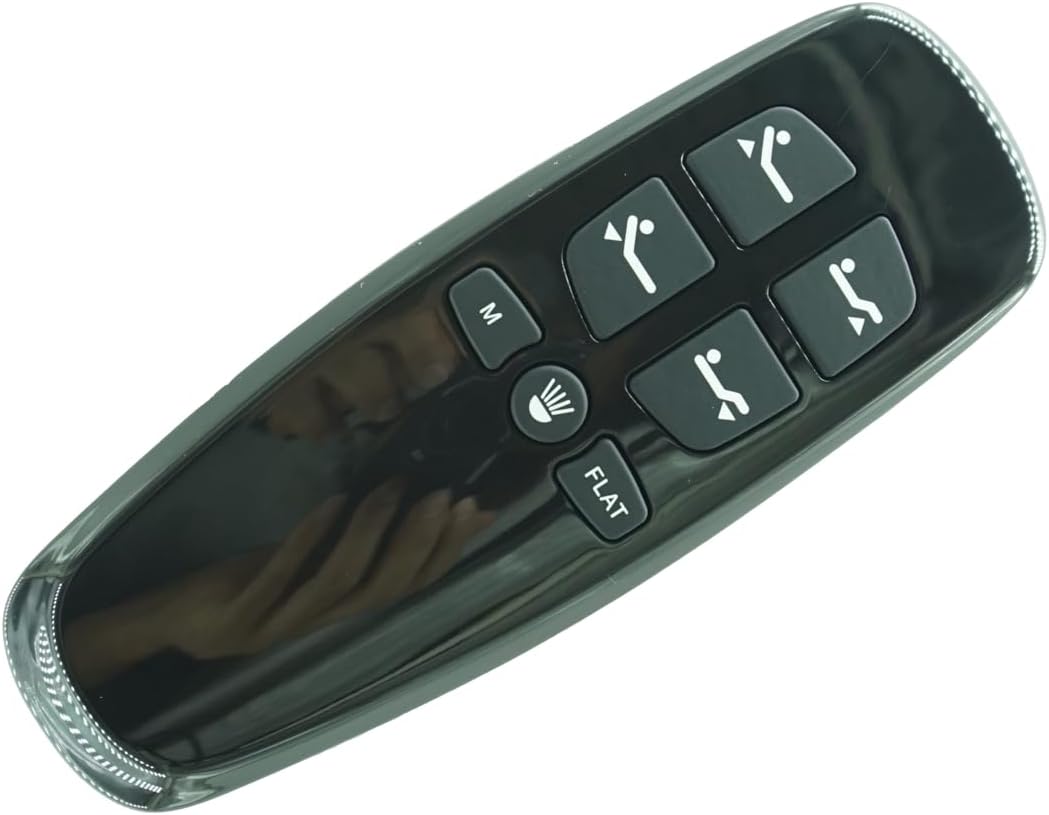
Figure 2.2: Back view of the remote control, with the battery compartment visible.
2.1 Button Functions
- HEAD UP / HEAD DOWN: Adjusts the head section of the bed.
- FOOT UP / FOOT DOWN: Adjusts the foot section of the bed.
- FLAT: Returns the bed to a flat position.
- M (Memory): Activates a pre-set memory position.
- Light: Controls any integrated bed lighting (if applicable).
3. Setup
3.1 Battery Installation
The remote control requires 2 AAA batteries (not included).
- Locate the battery compartment on the back of the remote control (refer to Figure 2.2).
- Slide open the battery compartment cover.
- Insert two AAA batteries, ensuring correct polarity (+ and - terminals).
- Close the battery compartment cover securely.
3.2 Pairing the Remote Control
Follow these steps to pair your new remote control with your adjustable bed base:
- Ensure the remote control batteries are functioning correctly. Replace them if necessary.
- Verify that the adjustable bed's power cord is securely plugged into a functional power outlet.
- On the remote control, simultaneously press and hold the HEAD UP and FOOT UP buttons.
- While still holding the HEAD UP and FOOT UP buttons, also press and hold the blue button located on the control box cord (under the bed).
- Continue holding all three buttons until you hear two beeps from the control box. This indicates successful pairing.
- Release all buttons. The remote is now paired and ready for use.
4. Operating Instructions
Once paired, use the remote control to adjust your adjustable bed base:
- Press and hold the HEAD UP or HEAD DOWN buttons to raise or lower the head section.
- Press and hold the FOOT UP or FOOT DOWN buttons to raise or lower the foot section.
- Press the FLAT button to return both the head and foot sections to a completely flat position.
- Press the M (Memory) button to move the bed to a pre-programmed memory position. (Refer to your bed base manual for programming memory positions, if applicable).
- Press the Light button to turn on or off any integrated bed lighting.
5. Maintenance
5.1 Battery Replacement
Replace batteries when the remote's response becomes sluggish or stops working. Always replace both AAA batteries at the same time with new ones.
5.2 Cleaning
Wipe the remote control with a soft, dry cloth. Do not use liquid cleaners, aerosols, or harsh chemicals, as these may damage the remote's surface or internal components.
6. Troubleshooting
- Remote not responding:
- Check if the batteries are correctly installed and have sufficient charge. Replace if necessary.
- Ensure the adjustable bed base is properly plugged into a working power outlet.
- Attempt to re-pair the remote control following the instructions in Section 3.2.
- Bed functions intermittently:
- This could indicate low battery power in the remote. Replace batteries.
- Check all power connections to the bed base.
- Remote does not pair:
- Confirm that your control box model is one of the compatible models listed in Section 1.
- Ensure your old remote had the exact same button layout.
- Make sure you are pressing the correct buttons on both the remote and the control box cord during the pairing process.
7. Specifications
| Brand | Generic |
| Model | FE1200 (Compatible with specific ENSO Flex EZZ / Metro control boxes) |
| Power Source | 2 x AAA Batteries (not included) |
| Compatible Devices | Adjustable Bed Base (specific control box models only) |
| Max Number of Supported Devices | 1 |
| Color | Black |
| Manufacturer | SZHKHXD |
| ASIN | B0F1Y3X2T4 |
8. Warranty and Support
8.1 Warranty Information
No specific warranty information is provided with this product. Please refer to your purchase documentation or contact your retailer for details regarding any applicable warranty.
8.2 Customer Support
For further assistance, troubleshooting, or inquiries regarding this remote control, please contact the manufacturer, SZHKHXD, or your product retailer.