
1. Introduction
Thank you for choosing the Tvdugim 118S Indoor Exercise Bike. This manual provides essential information for the safe assembly, operation, and maintenance of your exercise equipment. Please read it thoroughly before use and retain it for future reference.

Image 1.1: Overview of the Tvdugim 118S Indoor Exercise Bike. This image displays the complete exercise bike with its main components, including the handlebars, seat, pedals, flywheel, and LCD display.
2. Safety Information
To ensure safe operation and prevent injury, observe the following safety precautions:
- Consult a physician before starting any new exercise program.
- Ensure all bolts and nuts are securely tightened before each use.
- Place the exercise bike on a flat, stable surface. Use a mat to protect flooring.
- Keep children and pets away from the equipment during operation.
- The maximum user weight capacity for this bike is 150 kg (330 lbs). Do not exceed this limit.
- Wear appropriate exercise attire and footwear. Avoid loose clothing that could get caught in moving parts.
- Stop exercising immediately if you feel faint, dizzy, or experience pain.
- Do not attempt to modify the equipment.
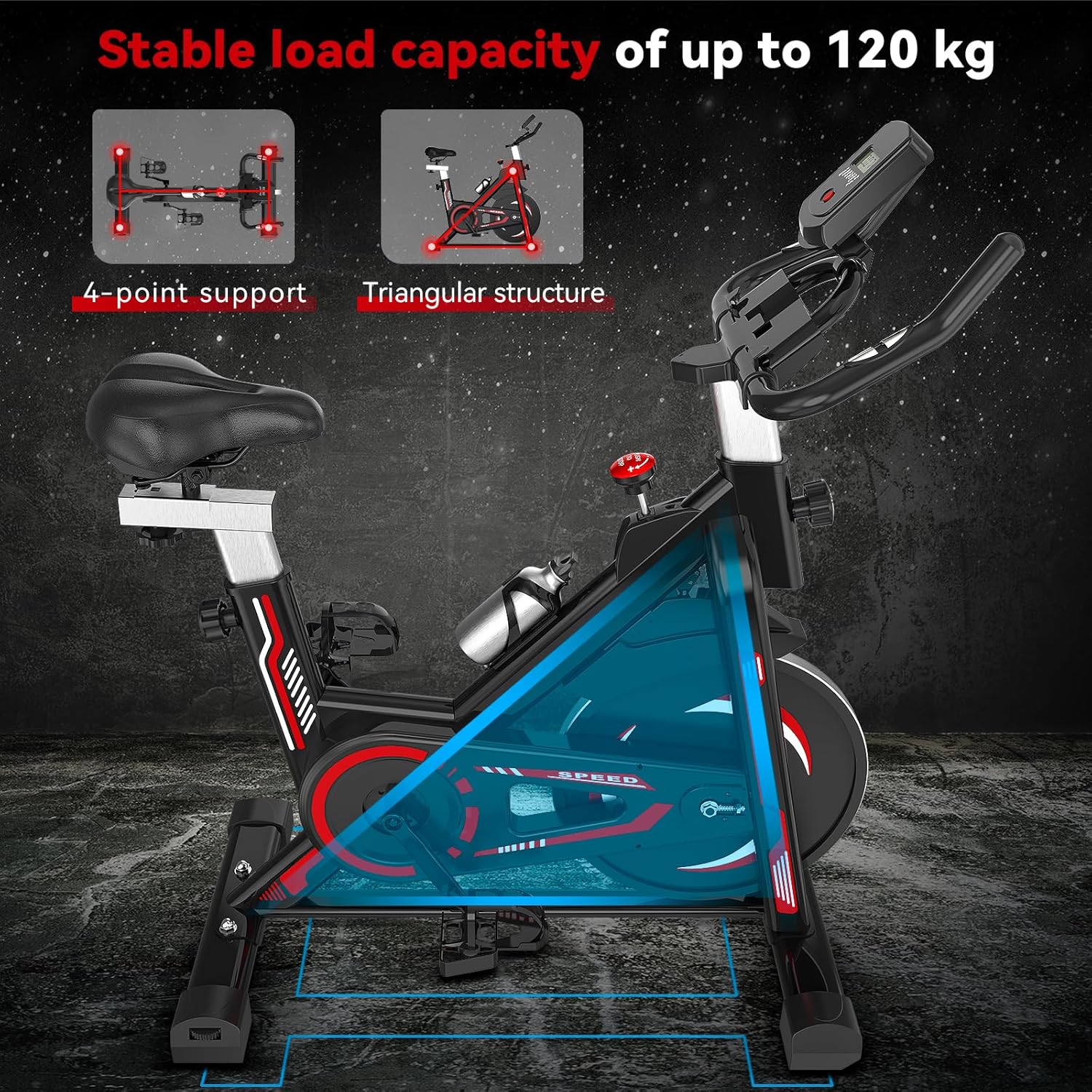
Image 2.1: Illustration of the bike's stable triangular frame and 4-point support system. This image highlights the structural design that contributes to the bike's stability during use.
3. Package Contents
Upon unpacking, verify that all components are present and undamaged. All necessary components for assembly are included. If any parts are missing or damaged, contact customer support.
4. Setup and Assembly
Follow these general steps for assembly. Refer to the included assembly guide for detailed, step-by-step instructions and diagrams.
- Unpack all components and lay them out on a clean, flat surface.
- Attach the front and rear stabilizers to the main frame.
- Install the pedals, ensuring the left and right pedals are correctly oriented (L for left, R for right).
- Mount the seat post and seat, then adjust to a comfortable height.
- Attach the handlebar post and handlebars, then adjust to a comfortable position.
- Install the LCD monitor onto the handlebar post and connect the sensor wires.
- Insert 2 AAA batteries (not included) into the LCD monitor.

Image 4.1: Diagram illustrating the adjustable seat and handlebar positions. This image shows how to adjust the seat in 4 directions (height 82.3-103.1 cm) and handlebars in 2 directions (height 91.7-101.3 cm) for optimal user comfort.
5. Operating Instructions
5.1 Adjusting the Bike
- Seat Adjustment: The padded seat can be adjusted in 4 directions (up/down, forward/backward) to accommodate users with heights between 1.3m and 1.8m. The height range is 82.3 cm to 103.1 cm. Loosen the adjustment knob, move the seat to the desired position, and tighten the knob securely.
- Handlebar Adjustment: The handlebars can be adjusted in 2 directions (up/down). The height range is 91.7 cm to 101.3 cm. Loosen the adjustment knob, move the handlebars to the desired position, and tighten the knob securely.
5.2 Resistance Adjustment
The Tvdugim 118S features smooth, stepless resistance adjustment. Rotate the resistance knob clockwise to increase resistance and counter-clockwise to decrease it. For emergency stops, press down firmly on the resistance knob.

Image 5.1: Close-up of the resistance adjustment knob. This image demonstrates how to adjust the resistance level and use the push-to-stop emergency brake function.

Image 5.2: Illustration of the magnetic resistance system. This image shows the non-contact magnetic air wheel, which provides smooth and quiet operation by eliminating friction.
5.3 Using the LCD Display
The enhanced digital display tracks and records your exercise data in real-time. It provides information on:
- Time: Duration of your workout.
- Speed: Current cycling speed.
- Distance: Distance covered during the workout.
- Calories: Estimated calories burned.
- Total Distance: Accumulative distance.
- Heart Rate: Your pulse when holding the sensors (if equipped).
Use the button on the monitor to cycle through different display modes or reset values.

Image 5.3: User interacting with the LCD monitor. This image demonstrates how the monitor intuitively displays various exercise metrics such as time, speed, distance, calories, total distance, and heart rate.
5.4 Additional Features
- Tablet Holder: A dedicated holder is integrated into the handlebars for your tablet or smartphone, allowing for entertainment or guided workouts.
- Water Bottle Holder: A dual-slot water bottle holder is provided to keep hydration accessible during your workout and store personal items.
6. Maintenance
Regular maintenance ensures the longevity and safe operation of your exercise bike.
- Cleaning: Wipe down the bike with a damp cloth after each use to remove sweat and dust. Avoid abrasive cleaners.
- Inspection: Periodically check all bolts, nuts, and moving parts for tightness and wear. Tighten any loose fasteners.
- Lubrication: No specific lubrication is required for the belt drive system.
- Storage: Store the bike in a dry, cool place away from direct sunlight and moisture.
7. Troubleshooting
If you encounter issues, refer to the following common solutions:
- Bike is unstable: Ensure the bike is on a flat surface. Adjust the leveling feet on the stabilizers if necessary. Check that all assembly bolts are tightened.
- Unusual noise during operation: Check for any loose parts or friction points. Ensure pedals are securely tightened. The belt drive system is designed for quiet operation.
- LCD display not working: Check if batteries are correctly installed and not depleted. Replace batteries if needed (2 AAA batteries). Ensure sensor wires are properly connected.
- Resistance not changing: Verify the resistance knob is functioning correctly and the internal mechanism is engaged.
For issues not resolved by these steps, contact customer support.
8. Specifications
| Feature | Specification |
|---|---|
| Brand | Tvdugim |
| Model Number | 118S |
| Drive System | Belt Drive |
| Material | Acrylonitrile Butadiene Styrene (ABS) |
| Flywheel Weight | 6.8 kg |
| Max User Weight Capacity | 150 kg (330 lbs) |
| Recommended User Height | 1.3 m to 1.8 m (4'3" to 5'11") |
| Handlebar Adjustment | 2-way adjustable (91.7 cm - 101.3 cm height) |
| Seat Adjustment | 4-way adjustable (82.3 cm - 103.1 cm height) |
| Resistance Mechanism | Friction (Stepless adjustable) |
| Display | LCD (Time, Speed, Distance, Calories, Total Distance, Heart Rate) |
| Power Source | Pedal-powered (non-electric), LCD requires 2 AAA batteries (not included) |
| Product Dimensions (L x W x H) | 91.5 x 76 x 19 cm |
| Product Weight | 24 kg |
| Special Features | Adjustable resistance, silent operation, LCD display with heart rate monitor, robust triangular structure, tablet holder, water bottle holder. |
9. Warranty and Support
This product is designed for durability and performance. For warranty information, product support, or to order replacement parts, please refer to the contact information provided at the point of purchase or visit the official Tvdugim website. Please have your model number (118S) and purchase date available when contacting support.