
Introduction
This manual provides essential instructions for the installation, operation, and maintenance of your IYZPCTMC H14 HEPA Filter Set. This set is designed to be compatible with specific Sharp Air Purifier models, ensuring optimal air quality in your environment. Please read this manual thoroughly before installing or replacing the filters.
Product Overview
The IYZPCTMC H14 HEPA Filter Set provides a comprehensive 2-in-1 filtration system, including a High-Efficiency Particulate Air (HEPA) filter, an Activated Carbon filter, and a Humidifying filter. These components work together to capture airborne particles, absorb odors, and maintain proper humidity levels, contributing to cleaner and fresher indoor air.

Image: The complete IYZPCTMC H14 HEPA, Activated Carbon, and Humidifying Filter Set, showing the three distinct filter types.
- H14 HEPA Filter: Captures up to 99.995% of airborne particles as small as 0.1 microns, including dust, pollen, pet dander, and mold spores.
- Activated Carbon Filter: Effectively absorbs odors from cooking, pets, smoke, and volatile organic compounds (VOCs).
- Humidifying Filter: Designed to work with the air purifier's humidification function, ensuring efficient moisture distribution.

Image: A close-up comparison showing the pleated structure of the HEPA filter on the right and the honeycomb structure of the Activated Carbon filter on the left.
Compatibility
This filter set is compatible with the following Sharp Air Purifier models:
- Sharp KC-D40E-W
- Sharp KC-D40E
- Sharp KC-E50
- Sharp KC-D50
- Sharp KC-F50
It replaces the following Sharp filter part numbers:
- HEPA Filter: FZ-D40HFE, FZ-D50HFE
- Active Carbon Filter: FZ-D40DFE
- Humidifying Filter: FZ-A60MFE, FZ-A61MFR
Package Contents
Your 3-piece filter set includes:
- 1 x H14 HEPA Filter
- 1 x Activated Carbon Filter
- 1 x Humidifying Filter
Setup and Installation
Follow these general steps to replace the filters in your compatible Sharp Air Purifier. For detailed, model-specific instructions, always refer to your air purifier's original user manual.
- Power Off and Unplug: Before beginning any filter replacement, ensure your air purifier is turned off and unplugged from the power outlet to prevent electrical hazards.
- Access Filter Compartment: Open the front panel or filter cover of your air purifier. The method for opening may vary by model.
- Remove Old Filters: Carefully remove the used HEPA, Carbon, and Humidifying filters. Dispose of them according to local regulations.
- Install New Filters:
- Humidifying Filter: Install the new humidifying filter into its designated slot. Ensure it is seated correctly.
- Activated Carbon Filter: Place the new activated carbon filter into its compartment. This filter typically has a black honeycomb structure.

Image: A single activated carbon filter with its characteristic black honeycomb pattern.

Image: A close-up view of the activated carbon filter, highlighting the intricate honeycomb structure designed for odor absorption.
- H14 HEPA Filter: Insert the new H14 HEPA filter. Ensure the airflow direction, if indicated, matches the purifier's design. This filter typically has pleated white material.
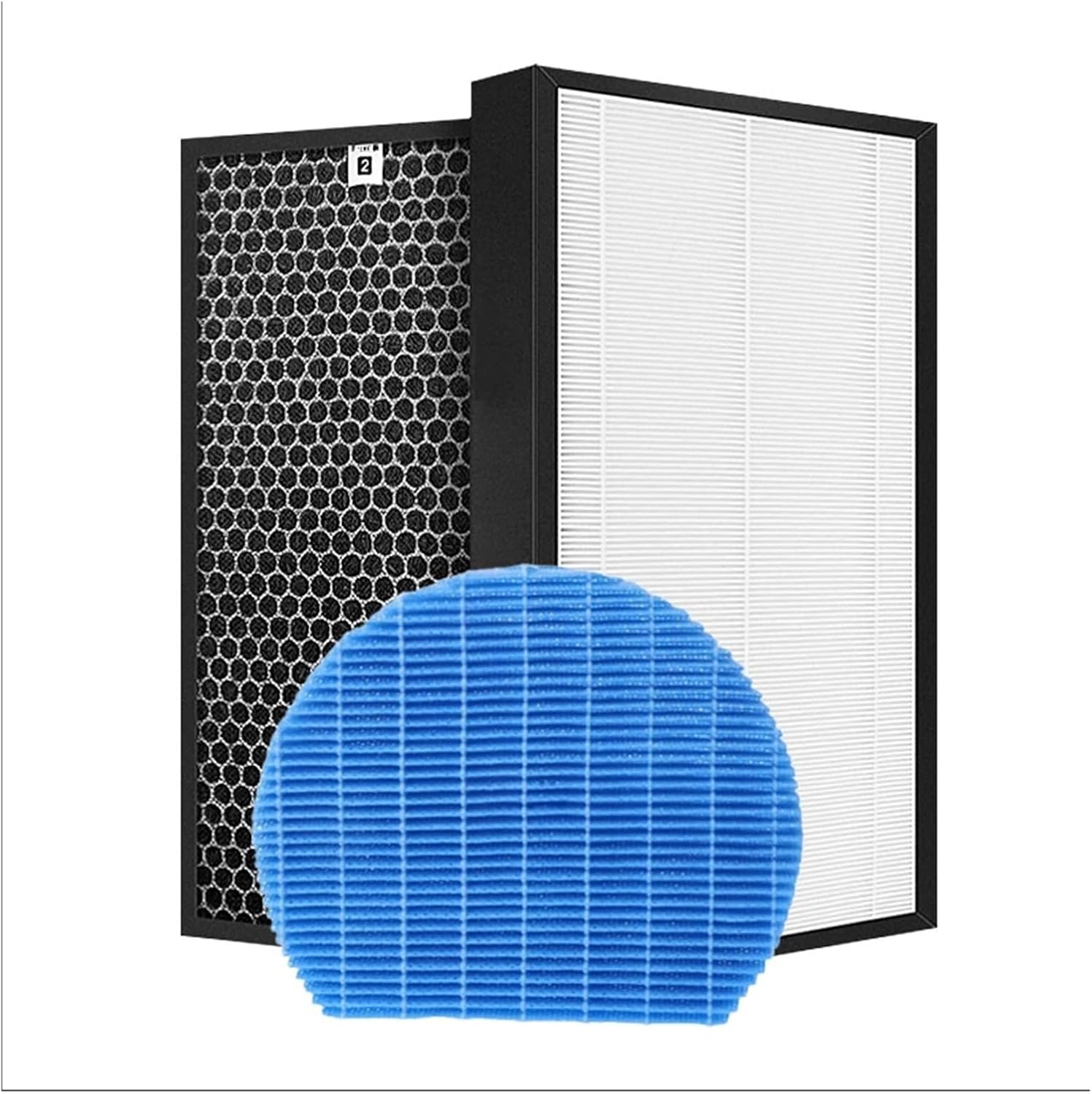
Image: A single H14 HEPA filter with its pleated white filtration material.

Image: A detailed view of the H14 HEPA filter's pleated design, which maximizes surface area for particle capture.
Note: The design of these filters allows for easy, tool-free installation.
- Close Compartment: Securely close the front panel or filter cover until it clicks into place.
- Restore Power: Plug the air purifier back into the power outlet and turn it on.
- Reset Filter Indicator (if applicable): If your air purifier has a filter replacement indicator, follow your device's instructions to reset it. This usually involves pressing and holding a specific button for a few seconds.
Operating and Replacement Frequency
Once installed, the filters operate automatically with your air purifier. To maintain optimal performance and air quality, regular filter replacement is crucial. The lifespan of filters can vary based on air quality, usage frequency, and environmental factors.
- HEPA and Carbon Filters: Generally, these filters should be replaced every 6-12 months.
- Humidifying Filter: This filter may require more frequent cleaning or replacement, typically every 3-6 months, depending on water quality and usage.
Always refer to your Sharp Air Purifier's user manual for specific recommendations on filter replacement intervals and indicator light meanings.
Maintenance
Proper maintenance extends the life of your filters and ensures consistent air purification.
- Regular Cleaning: Periodically clean the exterior of your air purifier and the filter compartment to prevent dust buildup.
- Humidifying Filter Care: The humidifying filter may accumulate mineral deposits. Consult your air purifier's manual for instructions on cleaning or descaling this specific filter.
- Do Not Wash HEPA/Carbon Filters: The HEPA and Activated Carbon filters are not washable and should not be cleaned with water or detergents. Washing can damage the filter media and reduce their effectiveness.
Troubleshooting
If you experience issues after installing new filters, consider the following:
- Reduced Airflow:
- Ensure all filters are installed correctly and seated firmly in their compartments.
- Check that the air purifier's intake and output vents are not obstructed.
- Persistent Odors:
- Verify the activated carbon filter is installed correctly.
- If odors persist after a short period of operation, the environment may have unusually high levels of VOCs or pollutants, requiring more frequent carbon filter replacement.
- Filter Indicator Light Remains On:
- After replacing filters, you must manually reset the filter indicator on your air purifier. Refer to your air purifier's manual for the specific reset procedure.
- Humidification Issues:
- Ensure the humidifying filter is clean and properly installed.
- Check the water tank for sufficient water levels.
If problems persist, consult your air purifier's original user manual or contact the manufacturer of your air purifier for further assistance.
Specifications
| Feature | Detail |
|---|---|
| Filter Type | H14 HEPA, Activated Carbon, Humidifying Filter |
| HEPA Filter Dimensions | 400 x 220 x 28 mm (approx. 15.75 x 8.66 x 1.1 inches) |
| Active Carbon Filter Dimensions | 400 x 220 x 8 mm (approx. 15.75 x 8.66 x 0.31 inches) |
| Humidifier Filter Dimensions | 225 x 190 x 32 mm (approx. 8.86 x 7.48 x 1.26 inches) |
| Filtration Efficiency | H14 HEPA (99.995% at 0.1 microns) |
| Item Weight (Total Set) | Approximately 1.76 ounces (individual filter weights vary) |
| Model Number | XPD40-A60M |
Warranty and Support
For any questions regarding the IYZPCTMC H14 HEPA Filter Set, including warranty information or technical support, please contact the seller directly through your purchase platform. Please retain your proof of purchase for any warranty claims.