1. Introduction
This manual provides essential instructions for the safe and effective use, installation, and maintenance of your YC Yier 12V 20AH Sealed Lead-Acid Battery Kit. This kit includes two 12V 20AH batteries, a 24V charger, a battery box, a charging port, and a battery cable, designed for various applications such as mobility scooters, lawn mowers, motorcycles, and wheelchairs.
Important Safety Information
WARNING: This product can expose you to chemicals including lead and lead compounds, which are known to the State of California to cause cancer and birth defects or other reproductive harm. For more information, go to www.P65Warnings.ca.gov.
- Always wear appropriate personal protective equipment (PPE) such as gloves and eye protection when handling batteries.
- Do not short-circuit the battery terminals.
- Keep batteries away from open flames, sparks, and heat sources.
- Ensure proper ventilation during charging and operation.
- Do not disassemble, puncture, or modify the battery.
- Dispose of batteries according to local regulations.
2. Package Contents
Verify that all items listed below are present in your package:
- 2 x YC Yier 12V 20AH Sealed Lead-Acid Batteries (Model: 6-DMF-20)
- 1 x 24V Battery Charger
- 1 x Battery Box
- 1 x Charging Port
- 1 x Battery Cable

Figure 2.1: Overview of the YC Yier 12V 20AH Battery Kit components.
3. Specifications
| Feature | Specification |
|---|---|
| Battery Type | Sealed Lead-Acid (SLA) / AGM Technology |
| Voltage | 12 Volt (per battery) |
| Capacity | 20 Ah (per battery) |
| Terminals | Nut & Bolt |
| Dimensions (L x W x H) | 180mm (7.1") x 78mm (3.1") x 170mm (6.7") |
| Weight | Approximately 14.1 lbs (per battery) |
| Maintenance | Maintenance-Free, Factory Activated |
| Kit Model Number | TE071+TE033 |
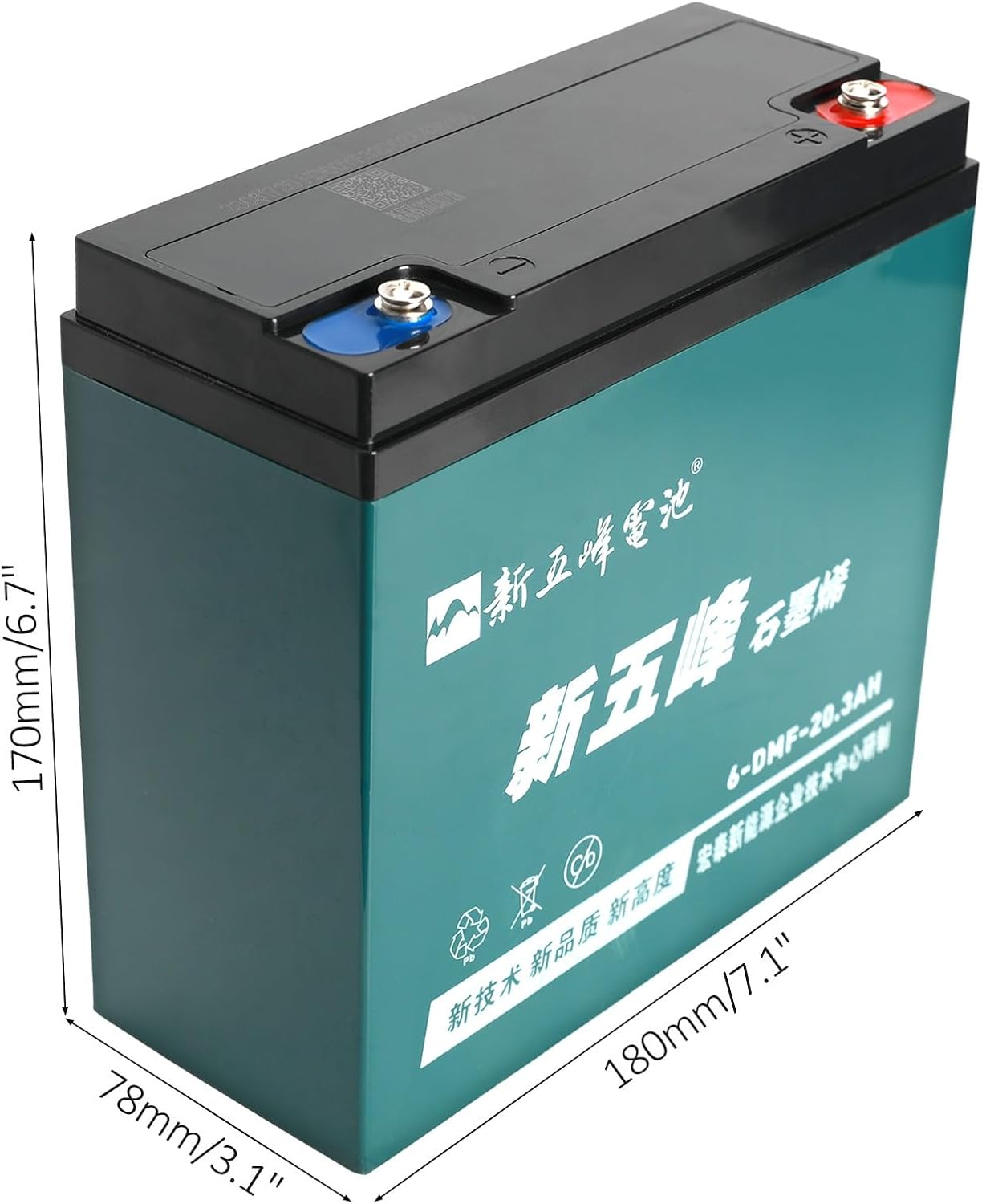
Figure 3.1: Battery dimensions for proper fit and installation.

Figure 3.2: Front view of a single YC Yier 12V 20AH battery.
4. Setup and Installation
This kit is designed for 24V systems, requiring both 12V batteries to be connected in series. Always ensure the power is off before connecting or disconnecting batteries.
4.1 Battery Box Assembly
- Open the battery box.
- Carefully place both 12V 20AH batteries inside the battery box. Ensure they fit snugly and are oriented correctly for terminal access.
- Route the battery cable and charging port cable through the designated openings in the battery box.

Figure 4.1: Top view of the battery terminals.
4.2 Battery Connection (Series for 24V)
To achieve 24V output from two 12V batteries, they must be connected in series:
- Connect the positive terminal of the first battery to the negative terminal of the second battery using the provided battery cable.
- The remaining unconnected positive terminal of one battery and the negative terminal of the other battery will be your 24V output terminals.
- Connect the charging port to the appropriate terminals as indicated by the port's wiring. Typically, the charging port connects across the final 24V positive and negative terminals.
- Ensure all connections are tight and secure using the nut and bolt terminals.
- Close the battery box securely.
Note: Incorrect wiring can damage the batteries, charger, or the device it powers. If unsure, consult a qualified technician.
5. Operating Instructions
5.1 Charging the Batteries
Use only the provided 24V charger with this battery kit. Using an incompatible charger can damage the batteries or pose a safety risk.
- Ensure the battery box is closed and the charging port is accessible.
- Plug the 24V charger into a standard wall outlet.
- Connect the charger's output plug to the charging port on the battery box.
- Observe the indicator light on the charger. It typically shows red for charging and green for fully charged.
- Once fully charged, disconnect the charger from the charging port, then unplug it from the wall outlet.
Important: Do not overcharge the batteries. While AGM batteries are less prone to damage from overcharging than some other types, prolonged overcharging can reduce battery life.
5.2 General Usage Guidelines
- Ensure the battery kit is securely installed in your device (e.g., mobility scooter, lawn mower).
- Avoid deep discharges. Recharge the batteries after each significant use, or when the voltage drops below recommended levels for your application.
- Operate the batteries within their specified temperature range. Extreme temperatures can affect performance and lifespan.
- Regularly check connections for tightness and corrosion.
6. Maintenance
The YC Yier 12V 20AH batteries are sealed and maintenance-free, meaning no water addition is required. However, general care is still important:
- Cleaning: Keep the battery terminals and the battery box clean and dry. Use a damp cloth to wipe away dust or dirt. If corrosion is present on terminals, clean with a wire brush and a solution of baking soda and water, then rinse and dry thoroughly.
- Inspection: Periodically inspect the battery box and cables for any signs of damage, cracks, or loose connections.
- Storage: If storing the battery kit for an extended period, ensure the batteries are fully charged before storage. Store in a cool, dry place, and recharge every 3-6 months to prevent self-discharge and maintain battery health.

Figure 6.1: QR code and serial number on the battery for product information. Link: http://www.pzcode.cn/pwb/3146762023081720ND00YF32D02A430104
7. Troubleshooting
| Problem | Possible Cause | Solution |
|---|---|---|
| Batteries not charging | Charger not plugged in; faulty charger; loose connections; faulty charging port. | Check power outlet and charger connection; inspect all cables and connections; test charger if possible; replace faulty components. |
| Low power output / Short run time | Batteries not fully charged; old batteries; excessive load; cold temperature. | Ensure full charge; consider battery replacement if old; reduce load if possible; operate in warmer conditions. |
| Battery box not closing properly | Batteries not seated correctly; cables obstructing closure. | Re-seat batteries; re-route cables to ensure no obstruction. |
| Corrosion on terminals | Exposure to moisture or chemicals; lack of maintenance. | Clean terminals with a wire brush and baking soda solution; apply anti-corrosion grease. |
If you encounter issues not listed here or if the suggested solutions do not resolve the problem, please contact customer support.
8. Warranty and Support
YC Yier products are manufactured to high-quality standards. For information regarding warranty coverage, technical support, or replacement parts, please refer to the contact information provided with your purchase or visit the official YC Yier website. Please have your model number (TE071+TE033) and purchase date available when contacting support.