
1. Safety Instructions
Please read and understand all safety instructions before using this product. Keep this manual for future reference.
- Do not expose the device to rain, moisture, or extreme temperatures.
- Avoid dropping or subjecting the device to strong impacts.
- Do not disassemble, repair, or modify the device yourself. Contact qualified service personnel for assistance.
- Keep the device away from heat sources, direct sunlight, and flammable materials.
- Use only the provided charging cable and adapter to prevent damage or fire.
- Ensure proper ventilation when operating the speaker.
2. Package Contents
Verify that all items are included in your package:
- Speaker x 1
- Wireless Microphone x 2
- AUX Cable x 1
- Type-C Charging Cable x 1
- User Manual x 1
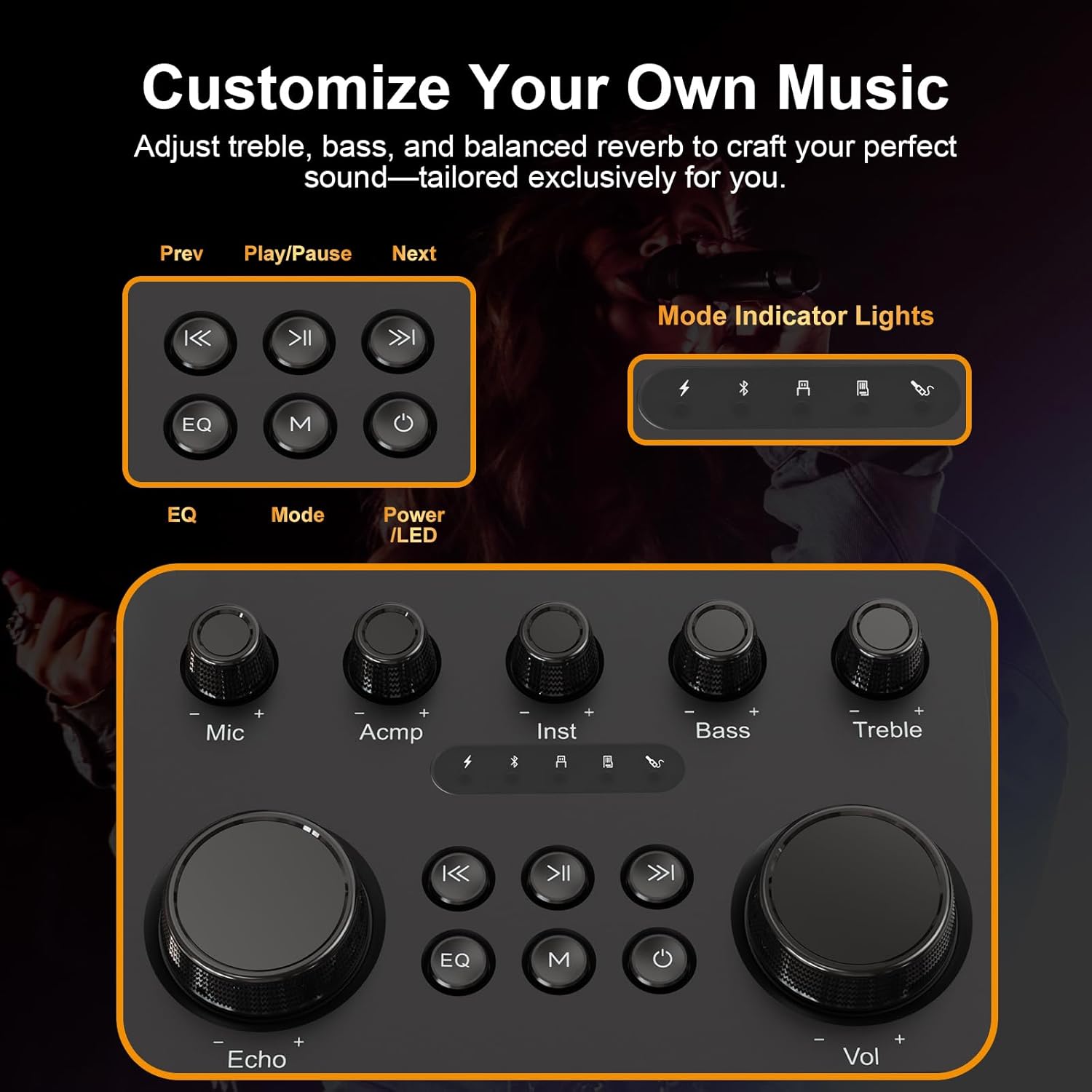
Figure 2.1: Contents of the HUABAO A110 package.
3. Product Overview
3.1 Speaker Design and Features
The HUABAO A110 features a sleek design with a mirror strip and dynamic RGB lights that offer multiple lighting modes to enhance your audio experience. It is equipped with five powerful drivers for high-fidelity sound: dual 10W tweeters, a 20W subwoofer, and dual side diaphragms for enhanced bass.

Figure 3.1: Front view of the HUABAO A110 speaker and microphones.

Figure 3.2: Internal speaker components for sound optimization.
3.2 Control Panel
The top panel provides intuitive controls for volume, mode selection, lighting, and microphone adjustments.

Figure 3.3: Detailed view of the speaker's control panel.
3.3 Input/Output Ports
The speaker supports multiple connectivity options including Bluetooth 5.4, AUX, USB, TF card, OTG, and a 6.5mm jack for wired microphones or instruments.

Figure 3.4: Connectivity ports and modes.
3.4 Wireless Microphones
Two rechargeable wireless microphones are included, featuring DSP voice processors for clear vocals, real-time noise reduction, and various voice effects.

Figure 3.5: Wireless microphones with voice effect options.
4. Setup
4.1 Charging the Speaker and Microphones
- Connect the Type-C charging cable to the speaker's DC 5V charging port and a compatible USB power adapter (not included).
- The built-in 4000mAh lithium battery provides 6-8 hours of playtime when fully charged.
- The wireless microphones are also rechargeable via their respective Type-C ports.

Figure 4.1: Battery capacity and playtime details.
4.2 Powering On/Off
- Speaker: Press and hold the Power button on the control panel to turn the speaker on or off.
- Microphones: Long press the power button on each microphone to turn it on or off. They will automatically pair with the speaker.
5. Operating Instructions
5.1 Mode Selection
Press the 'M' (Mode) button on the control panel to cycle through available input modes: Bluetooth, AUX, USB, TF Card, and OTG.
5.2 Bluetooth Connectivity
- Turn on the speaker and select Bluetooth mode. The speaker will enter pairing mode.
- Enable Bluetooth on your mobile device and search for 'HUABAO A110'.
- Select the speaker to pair. A confirmation sound will indicate successful connection.
5.3 AUX/USB/TF Card Playback
- AUX: Connect your audio device using the provided AUX cable. Select AUX mode on the speaker.
- USB/TF Card: Insert a USB drive or TF card with audio files. The speaker will automatically switch to the corresponding mode and begin playback.
5.4 Microphone Usage and Voice Effects
- Turn on the wireless microphones. They will automatically connect to the speaker.
- Use the 'Mic' knob on the speaker or the volume buttons on the microphone to adjust microphone volume.
- Press the 'Voice Effects' button on the microphone to cycle through different voice modes (Monster, Kid, Male, Female).
- Adjust the 'Reverb' knob on the speaker for desired echo effect.
5.5 Vocal Removal
Activate the vocal cancellation mode to remove vocals from original tracks, allowing you to sing along to instrumental versions. This feature is typically activated via a dedicated button on the control panel or microphone.
5.6 EQ and Treble/Bass Adjustment
- Use the 'Treble' and 'Bass' knobs on the control panel to fine-tune the audio output to your preference.
- The 'EQ' button allows you to select different equalizer presets for various music genres.
5.7 RGB Lighting Modes
The speaker features built-in RGB light strips. Use the 'Power/LED' button to cycle through different lighting modes: multi-color pulse, single-color breath, dual-color fade, and more.

Figure 5.1: Speaker with active RGB lights.
6. Maintenance
- Clean the speaker and microphones with a soft, dry cloth. Do not use abrasive cleaners or solvents.
- Store the device in a cool, dry place away from direct sunlight and extreme temperatures.
- Charge the battery regularly, even if not in use, to maintain battery health.
7. Troubleshooting
| Problem | Possible Cause | Solution |
|---|---|---|
| No power | Low battery; Device off | Charge the speaker/microphones; Press and hold the Power button. |
| No sound | Volume too low; Incorrect mode; Device not connected | Increase volume; Select correct input mode; Re-pair Bluetooth or check cable connections. |
| Microphone not working | Microphone off; Low battery; Not paired | Turn on microphone; Charge microphone; Ensure microphone is paired. |
| Poor sound quality | Interference; Distance from device; EQ settings | Reduce interference; Move closer to speaker; Adjust EQ, treble, or bass settings. |
8. Specifications
- Model Number: A110
- Item Weight: 5.6 pounds (2.5 kg)
- Product Dimensions: 7.9 x 5.2 x 9.7 inches (20.1 x 13.2 x 24.6 cm)
- Battery: 4000mAh Lithium Ion (7.4V, 29.6Wh)
- Playtime: 6-8 hours (continuous)
- Speaker Count: 3 (Dual 10W Tweeters, 20W Subwoofer)
- Connectivity: Bluetooth 5.4, AUX, USB, TF Card, OTG, 6.5mm Jack
- Voltage: 5 Volts
- Special Features: Echo Effect, RGB Lights, Portable, Rechargeable, Voice Changer
9. Warranty and Support
HUABAO offers a 1-year warranty and lifetime technical support for this product. Our customer service team is available to assist you before and after purchase. For any questions or issues, please contact us at support@huabaosound.com.
Since 2008, HUABAO has been dedicated to the speaker industry, combining cutting-edge technology with artistry to deliver exceptional audio performance.