
1. Introduction
This manual provides essential instructions for the safe and efficient use of your Tunhail 10.1 Inch Tablet, model UL101Y. Please read this manual thoroughly before operating your device to ensure optimal performance and longevity. Keep this manual for future reference.
2. Product Overview
2.1 Key Features
- High Performance: Equipped with a Core m3-8100Y processor (up to 3.40GHz) and UHD Graphics 615 for smooth operation.
- Vibrant Display: 10.1-inch IPS touch screen with 800x1280 HD resolution, offering clear and bright visuals.
- Ample Memory & Storage: 12GB RAM and 256GB ROM for efficient multitasking and extensive storage.
- Connectivity: Supports 5G/2.4G WiFi and Bluetooth 5.0 for fast wireless connections.
- Versatile 2-in-1 Design: Includes a detachable wireless keyboard with backlight for enhanced productivity.
- Multiple Ports: Features full-function Type-C, microHDMI, and USB-A 3.0 interfaces for diverse connectivity needs.
- Long Battery Life: 25.84Wh high-capacity battery for extended usage.
2.2 Package Contents
Ensure all items are present in the package:
- Tunhail 10.1 Inch Tablet UL101Y
- Detachable Wireless Keyboard
- Stylus Pen (if included)
- Charging Cable (Type-C)
- Power Adapter
- User Manual (this document)
2.3 Device Layout
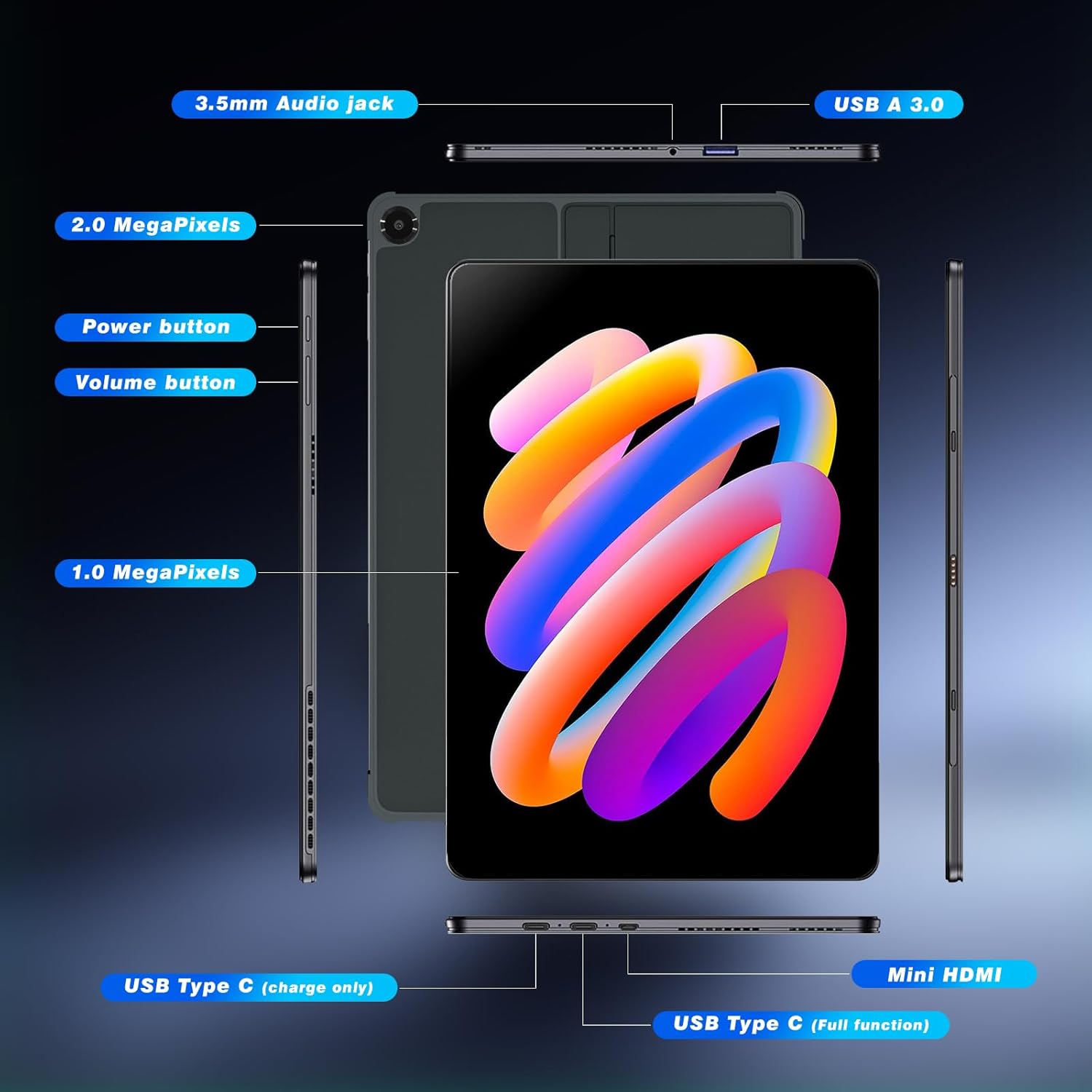
Image 2.3.1: Overview of the Tunhail 10.1 Inch Tablet UL101Y, highlighting its various ports and buttons. These include the 3.5mm Audio jack, USB A 3.0 port, 2.0 Megapixel camera, Power button, Volume buttons, 1.0 Megapixel camera, USB Type C (charge only), USB Type C (full function), and Mini HDMI port.
- 3.5mm Audio Jack: For connecting headphones or external speakers.
- USB A 3.0: For connecting USB devices like flash drives or mice.
- Power Button: To turn the tablet on/off or put it to sleep/wake it up.
- Volume Buttons: To adjust the audio volume.
- USB Type-C (Charge Only): For charging the tablet.
- USB Type-C (Full Function): Supports charging, data transfer, and video output.
- Mini HDMI: For connecting to external displays.
- Cameras: Front (1MP) and Rear (2MP) cameras for photos, videos, and video calls.
3. Setup
3.1 Initial Charging
Before first use, fully charge your tablet. Connect the provided Type-C charging cable to the tablet's USB Type-C (Charge Only) port and the power adapter to a wall outlet. The charging indicator will show the charging status.
3.2 Powering On/Off
- To Power On: Press and hold the Power button until the screen lights up.
- To Power Off: Press and hold the Power button, then select "Power off" from the options on the screen.
- Sleep/Wake: Briefly press the Power button to put the tablet to sleep or wake it up.
3.3 Connecting the Wireless Keyboard

Image 3.3.1: The Tunhail 10.1 Inch Tablet UL101Y connected to its detachable wireless keyboard, shown with a stylus pen. This image demonstrates the 2-in-1 functionality of the device.
- Ensure the keyboard is charged (if it has a separate battery) or connected to the tablet via its magnetic connectors.
- Turn on the keyboard's power switch (if applicable).
- On the tablet, go to Settings > Connected devices > Bluetooth.
- Enable Bluetooth and search for available devices.
- Select the keyboard from the list (e.g., "Tunhail Keyboard") and follow any on-screen pairing instructions.
- The keyboard backlight can be activated or adjusted via dedicated function keys on the keyboard.
3.4 Wi-Fi Connection
- Go to Settings > Network & internet > Wi-Fi.
- Turn on Wi-Fi.
- Select your desired Wi-Fi network from the list.
- Enter the network password if prompted and tap Connect.
4. Operating Instructions
4.1 Touch Screen Gestures
- Tap: Select an item or open an application.
- Tap and Hold: Access contextual menus or drag items.
- Swipe: Scroll through pages or move between screens.
- Pinch-to-Zoom: Zoom in or out on images and web pages.

Image 4.1.1: A user interacting with the Tunhail 10.1 Inch Tablet UL101Y using a stylus, demonstrating the touch screen capabilities. The image also highlights key display features such as 10.1" screen size, IPS technology, eye protection, and 1280x800 Full HD resolution.
4.2 Using the Keyboard and Stylus
The detachable keyboard allows for comfortable typing, similar to a laptop. The integrated trackpad provides mouse functionality. The stylus can be used for precise input, drawing, or note-taking on the touch screen.
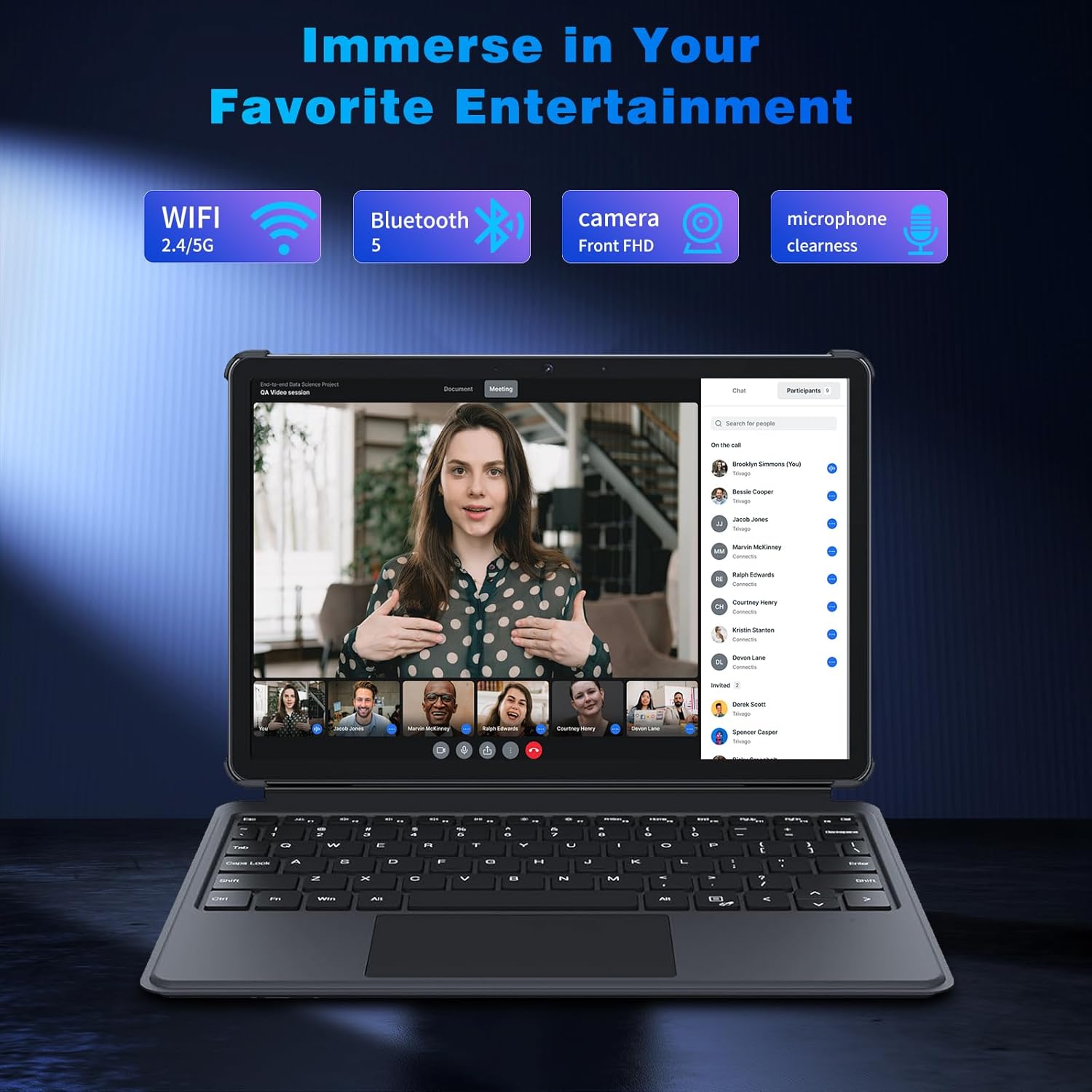
Image 4.2.1: The Tunhail 10.1 Inch Tablet UL101Y with its keyboard attached, displaying a video conference. This illustrates the tablet's capability for communication and entertainment, supported by Wi-Fi, Bluetooth, front camera, and clear microphone.
4.3 Stand Positions
The tablet's design allows for various viewing angles and modes:

Image 4.3.1: The Tunhail 10.1 Inch Tablet UL101Y showcasing its versatility with four distinct stand positions: Landscape Mode, Floating Mode, Portrait Mode, and Painting Mode. These modes cater to various user activities from media consumption to creative work.
- Landscape Mode: Ideal for watching videos or using the keyboard.
- Floating Mode: Provides an elevated viewing angle.
- Portrait Mode: Suitable for reading documents or browsing social media.
- Painting Mode: Offers a low angle for drawing or writing with the stylus.
4.4 Connecting External Devices
- USB-A 3.0: Connect USB flash drives, external hard drives, or other USB peripherals.
- Mini HDMI: Use a Mini HDMI to HDMI cable to connect your tablet to a TV or monitor for a larger display.
- USB Type-C (Full Function): This port supports data transfer, video output, and can be used with a compatible docking station or hub for expanded connectivity, including an external Ethernet dongle for Gigabit network connection.
5. Maintenance
5.1 Cleaning the Tablet
Use a soft, lint-free cloth to clean the screen and body of the tablet. For stubborn smudges, slightly dampen the cloth with water or a screen-cleaning solution. Avoid using harsh chemicals, abrasive materials, or excessive moisture.
5.2 Battery Care
- Avoid exposing the tablet to extreme temperatures (hot or cold), as this can degrade battery performance.
- For optimal battery longevity, avoid completely draining the battery frequently.
- Use only the provided or certified charging accessories.
5.3 Software Updates
Regularly check for and install software updates to ensure your tablet has the latest features, security patches, and performance improvements. You can usually find this option in Settings > System > System update.
6. Troubleshooting
6.1 Common Issues and Solutions
| Problem | Possible Cause | Solution |
|---|---|---|
| Tablet does not power on. | Low battery, system crash. | Charge the tablet for at least 30 minutes. If still unresponsive, perform a force restart by holding the Power button for 10-15 seconds. |
| Keyboard not connecting or unresponsive. | Bluetooth not enabled, keyboard battery low, pairing issue. | Ensure keyboard is charged and powered on. Check tablet's Bluetooth settings. Re-pair the keyboard if necessary. |
| Wi-Fi connection issues. | Incorrect password, router issue, out of range. | Verify Wi-Fi password. Restart your router. Move closer to the Wi-Fi router. |
| Short battery life. | High screen brightness, many apps running in background, old battery. | Reduce screen brightness. Close unused apps. Disable unnecessary features like GPS or Bluetooth when not in use. |
| Tablet is slow or freezing. | Too many apps open, low storage, software glitch. | Close background applications. Clear cache. Free up storage space. Restart the tablet. |
7. Specifications
| Feature | Detail |
|---|---|
| Brand | Tunhail |
| Model Name | UL101Y |
| Screen Size | 10.1 Inches |
| Screen Resolution | 800 x 1280 Pixels (HD IPS) |
| Processor | Core m3-8100Y (up to 3.40GHz) |
| Graphics Coprocessor | UHD Graphics 615 900MHz |
| RAM | 12 GB |
| Storage (ROM) | 256 GB |
| Operating System | Android |
| Wireless Connectivity | Wi-Fi (5G/2.4G, 802.11ac), Bluetooth 5.0 |
| Ports | USB Type-C (Charge Only), USB Type-C (Full Function), USB-A 3.0, Mini HDMI, 3.5mm Audio Jack |
| Cameras | Front 1MP, Rear 2MP |
| Battery | 25.84Wh Lithium Ion (2 cells) |
| Dimensions | 24.5 x 16.5 x 1 cm |
| Weight | 1.45 Kilograms |
| Special Features | Detachable Keyboard, Stylus Support |
8. Warranty and Support
Your Tunhail 10.1 Inch Tablet UL101Y comes with a one-year product warranty from the date of purchase. This warranty covers manufacturing defects and malfunctions under normal use. It does not cover damage caused by misuse, accidents, unauthorized repairs, or normal wear and tear.
For technical assistance, troubleshooting, or warranty claims, please contact our customer service. We provide 24-hour after-sales service to ensure your satisfaction.
Please refer to your purchase documentation for specific contact details or visit the official Tunhail support website.