
Introduction
Thank you for choosing the DuneVoyager 61-Key Hot-Swappable Mechanical Gaming Keyboard. This manual provides essential information for the proper setup, operation, and maintenance of your new keyboard. Please read these instructions carefully before use to ensure optimal performance and longevity of your device.
Product Features
- 61-Key Compact Layout: Designed for efficiency and portability, saving desk space.
- Hot-Swappable Red Mechanical Switches: Experience smooth and sensitive feedback with the ability to easily change switches without soldering.
- Dynamic RGB Backlighting: Customize your experience with 16.8 million colors and 20 distinct lighting effects across all keys.
- Full-Key Anti-Ghosting: Ensures every keystroke is registered accurately, even during intense gaming sessions.
- Dual Layout Keycaps: Features both Arabic and English characters for versatile use.
- USB-C Wired Connectivity: Reliable and fast connection with a detachable cable for improved portability.
- Ergonomic Design: Engineered for comfort during long-term use, reducing fatigue.
- Programmable Software: Allows users to set custom lighting effects and key functions according to their preferences.
- Included Accessories: Comes with a keycap puller, three white keycaps, and two extra red axis mechanical switches for customization and maintenance.
Setup Instructions
- Unpack the Keyboard: Carefully remove the keyboard and all accessories from the packaging.
- Connect the USB-C Cable: Insert one end of the provided USB-C cable into the port on the keyboard and the other end into an available USB port on your computer or compatible device.
- System Recognition: The keyboard is plug-and-play. Your operating system (PC, PS4, Xbox, Mac) should automatically detect and install the necessary drivers.
- Optional Software Installation: For advanced customization of lighting and key functions, download the dedicated DuneVoyager software from the official website (if available).
Operating Instructions
Basic Key Functions
The keyboard features a standard 61-key layout. Refer to the keycaps for primary functions. Secondary functions are often accessed using the 'Fn' key.
RGB Lighting Control
The DuneVoyager keyboard offers extensive RGB lighting customization. Use the following key combinations:
- Brightness Reduction: Press Fn + [{
- Brightness Increase: Press Fn + ]}
- Speed Reduction: Press Fn + <
- Speed Increase: Press Fn + >
- Lighting Effect Switching: Press Fn + |\
- Change Light Color: Press Fn + Shift

Image: The keyboard displaying various RGB lighting effects and the key combinations for adjusting brightness, speed, and switching effects or colors.
Programmable Software
The dedicated software allows for advanced customization. You can:
- Create and save custom lighting profiles.
- Remap keys to different functions.
- Set up macros for complex command sequences.
Refer to the software's built-in help guide for detailed instructions on using its features.

Image: A computer screen displaying the DuneVoyager programmable software, showing options for lighting effects, key remapping, and macro editing.
Maintenance
Cleaning
To maintain your keyboard's appearance and functionality:
- Disconnect the keyboard from your device before cleaning.
- Use a soft, lint-free cloth dampened with a small amount of water or a mild cleaning solution to wipe the keycaps and chassis.
- Avoid spraying liquids directly onto the keyboard.
- Use compressed air to remove dust and debris from between the keycaps.
Switch Replacement (Hot-Swappable)
The keyboard features hot-swappable switches, allowing for easy replacement without soldering.
- Use the included keycap puller to gently remove the desired keycap.
- Use the included switch puller to carefully grip the switch and pull it straight up to remove it from the PCB.
- Align the pins of the new switch with the holes on the PCB.
- Gently press the new switch into place until it clicks securely. Ensure the pins are not bent.
- Reattach the keycap.

Image: A hand using a switch puller to remove a red mechanical switch from the keyboard, highlighting the hot-swappable feature.

Image: The DuneVoyager keyboard alongside its accessories, including a keycap puller, extra keycaps, and additional red axis mechanical switches.
Troubleshooting
Keyboard Not Responding
- Ensure the USB-C cable is securely connected to both the keyboard and your device.
- Try connecting the keyboard to a different USB port on your device.
- Test the keyboard on another computer or device to rule out system-specific issues.
- Restart your computer or device.
RGB Lighting Not Working or Incorrect
- Ensure the keyboard is properly connected and powered.
- Use the lighting control key combinations (Fn + [{, Fn + ]}, Fn + <, Fn + >, Fn + |\, Fn + Shift) to adjust settings.
- If using the programmable software, ensure the correct lighting profile is active and the software is up to date.
- Perform a factory reset if available (refer to software or manufacturer support for specific instructions).
Specifications
| Feature | Detail |
|---|---|
| Brand | DuneVoyager |
| Model | 61-Key Mechanical Gaming Keyboard |
| Compatible Devices | PC, PlayStation 4, Xbox, Mac |
| Connectivity Technology | USB-C (Wired) |
| Key Switch Type | Red Axis Mechanical (Hot-Swappable) |
| Backlight Support | RGB (Red, Green, Blue color model) |
| Special Features | RGB Backlighting, Detachable Wrist Rest (not explicitly mentioned in features but in spec), Hot-Swappable Switches, Anti-Ghosting |
| Material | Plastic |
| Weight | Approximately 600g (0.75 kg mentioned in feature bullets, 600g in image) |
| Layout | 61-Key, Arabic/English Dual Layout |

Image: The 61-key keyboard illustrating its compact layout, approximate dimensions (29cm/11.5in width, 10cm/4in depth), and weight (600g).

Image: A user's hands positioned on the 61-key keyboard, demonstrating its ergonomic design for comfortable long-term use.
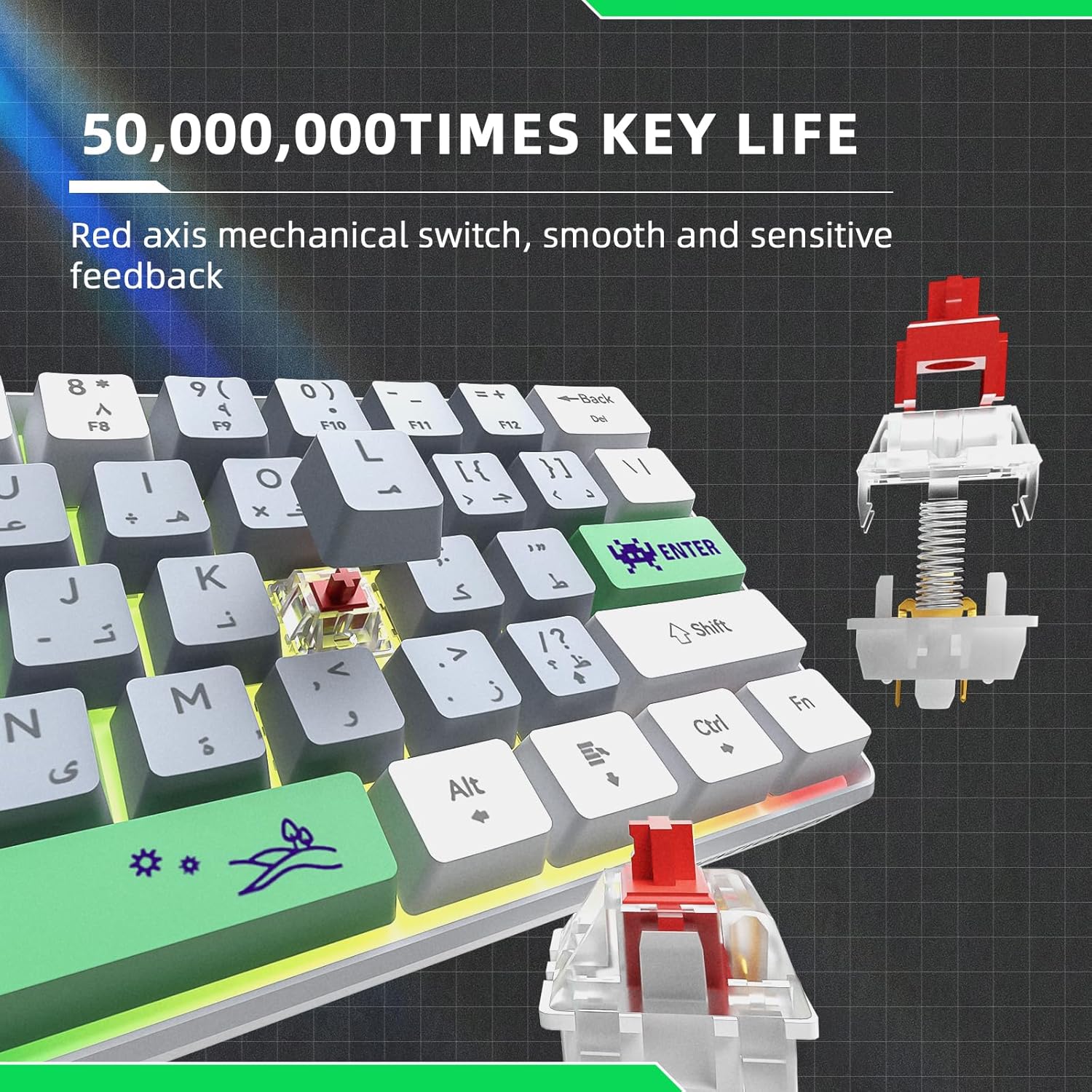
Image: A detailed view of a red axis mechanical switch, emphasizing its smooth and sensitive feedback, and indicating a 50 million keystroke key life.
Warranty and Support
For warranty information, technical support, or further assistance, please refer to the official DuneVoyager website or contact their customer service directly. Keep your purchase receipt as proof of purchase.