
Introduction
This manual provides detailed instructions for the CAMWORLD 5K 56MP Camcorder, model AC12C. Please read this guide thoroughly to ensure proper use and optimal performance of your device. Keep this manual for future reference.
What's in the Box
Verify that all items listed below are included in your package:
- 1 × Video Camera Camcorder
- 1 × 64GB SD Card
- 1 × USB Cable
- 1 × HDMI Cable
- 2 × Batteries
- 1 × Camcorder Bag
- 1 × Handheld Stabilizer
- 1 × Microphone
- 1 × Tripod
- 1 × Remote Control
- 1 × User Manual
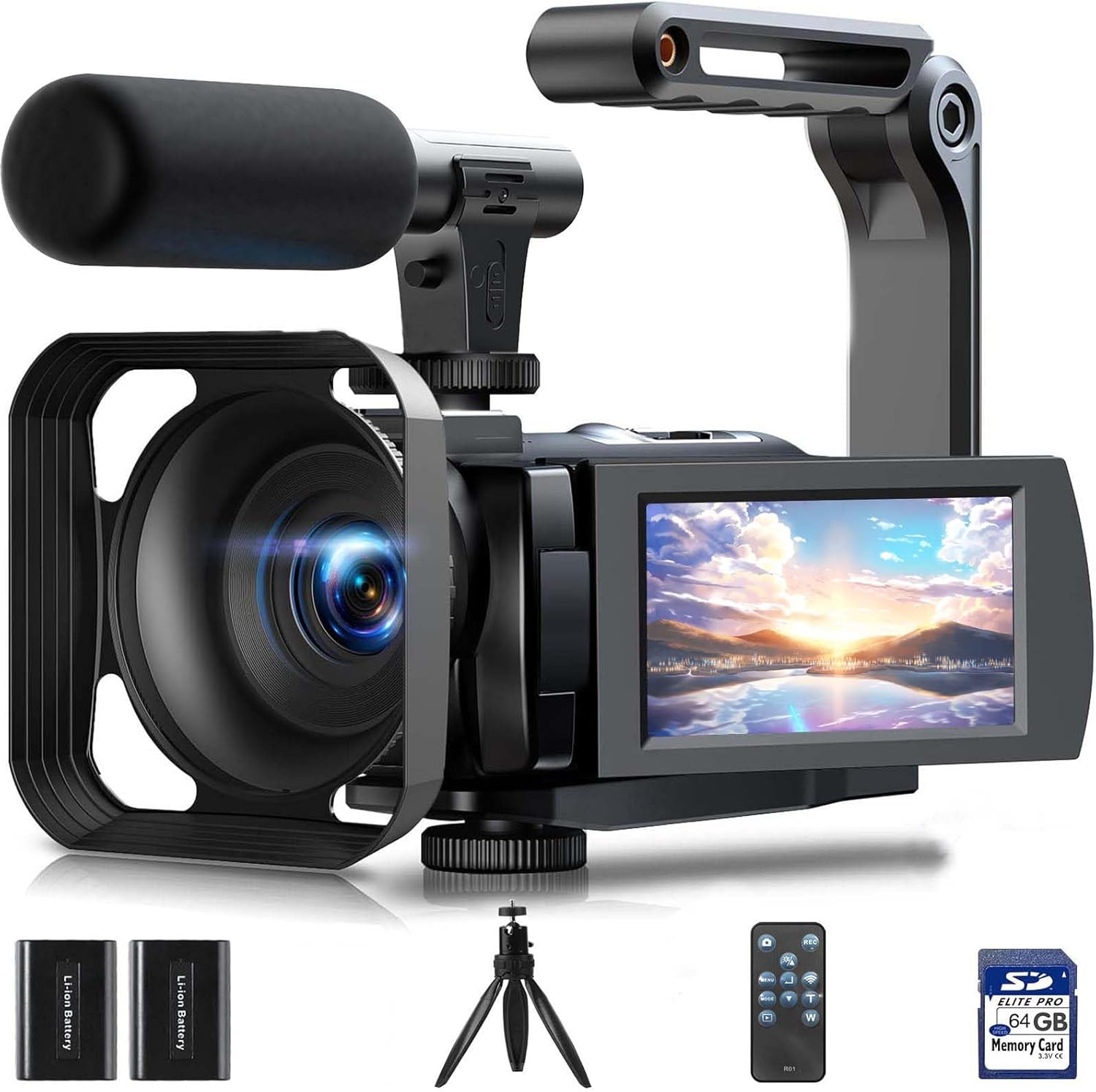
Image: CAMWORLD 5K 56MP Camcorder with all accessories laid out, including the camera, two batteries, a tripod, a remote control, a 64GB SD card, and a microphone.
Setup Guide
1. Battery Installation and Charging
The camcorder comes with two high-capacity 2400mAh batteries. Before initial use, ensure the battery is fully charged. The camera supports recording while charging, but it must be powered by a 5V/2A charger and not directly connected to a computer for this function.
- Open the battery compartment cover on the camcorder.
- Insert a charged battery, ensuring correct polarity.
- Close the battery compartment cover securely.
- To charge, connect the camcorder to a 5V/2A charger using the provided USB cable.
2. SD Card Installation and Formatting
A 64GB SD card is included. It is recommended to format the memory card before its first use with the camera to ensure compatibility and optimal performance.
- Locate the SD card slot, typically behind the rotatable screen.
- Insert the 64GB SD card into the slot until it clicks into place.
- Power on the camcorder.
- Navigate to the 'Settings' menu using the touchscreen or physical buttons.
- Select 'Format' and confirm to format the SD card. This will erase all data on the card.
3. Attaching Accessories
The camcorder includes several accessories to enhance your recording experience:
- Microphone: Attach the microphone to the hot shoe mount on top of the camcorder and connect its cable to the microphone input port.
- Lens Hood: The included lens hood helps block excess light and protects the lens. Attach it to the front of the lens.
- Handheld Stabilizer: For stable recording, attach the camcorder to the handheld stabilizer using the tripod screw mount at the bottom of the camera.
- Tripod: For stationary shots, attach the camcorder directly to the mini tripod using the tripod screw mount.

Image: The adjustable mini tripod and the foldable handheld stabilizer, demonstrating how they can be used with the camcorder.
Operating Instructions
1. Power On/Off and Touchscreen
To power on the camcorder, open the 3-inch IPS 270° rotatable touchscreen. The screen can be rotated to various angles for flexible viewing and self-recording. Use the touchscreen for navigation and settings adjustments.

Image: The camcorder displaying its 3.0-inch 270° rotatable IPS touchscreen, showing its flexibility for different shooting angles.
2. Recording Video and Taking Photos
The camcorder records UHD 5K video at 25 frames per second (FPS) and captures high-quality 56MP still images. The camera lens is a fixed-focus lens; it does not support autofocus or manual focus. The optimal shooting distance is 0.6 meters or more.

Image: Overview of the CAMWORLD 5K 56MP Camcorder's key features, highlighting its 5K UHD video, 56MP photo capabilities, and various modes.
3. Digital Zoom
The camcorder supports 16X digital zoom. Press the "W" or "T" button on the device or remote control to zoom in or out, allowing you to capture distant subjects.

Image: Illustrates the 16X digital zoom capability of the camcorder, showing different levels of magnification on a distant lighthouse.
4. IR Night Vision
For shooting in low-light or dark environments, the camcorder features infrared night vision and a fill light. Short-press the "Power" button to enable or disable the infrared night vision mode. This allows for clear black and white photos and videos in darkness.

Image: Comparison of standard night vision and IR night vision with LED fill light, showing improved clarity in dark conditions.
5. WiFi Function and Remote Control
The camcorder supports WiFi connectivity for control via a mobile application. Download the "Lercenker" app from your mobile device's app store (available for Android and iOS) or scan the QR code provided in the manual. This allows you to remotely control the camcorder, download, transfer, and share photos and videos. The included IR remote control can also be used to operate the camcorder from within 8 meters, ensuring it faces the remote receiver window.

Image: Demonstrates the camcorder's WiFi connectivity with a smartphone app and the included IR remote control for convenient operation.
Download the "Lercenker" app: https://app.adse.cc/app/distribution/lercenker/index
6. Webcam Function and HDMI Output
The camcorder can function as a webcam for video chatting and live streaming. Connect it to a PC via the USB cable and select 'PC Camera' mode. For viewing content on a larger screen, connect the camcorder to a TV using the provided HDMI cable.

Image: Illustrates the camcorder's versatility as a webcam for online communication and its ability to output video to a television via HDMI.
7. Additional Features
The CAMWORLD camcorder includes various other functions:
- Anti-shake: Helps stabilize footage for smoother videos.
- WDR (Wide Dynamic Range): Improves image quality in high-contrast lighting conditions.
- Playback: Review recorded videos and photos directly on the camcorder.
- Continuous Shooting: Capture a rapid sequence of photos.
- Time-lapse: Record events over a long period and play them back in a shorter, accelerated video.
- Slow Motion: Capture fast-moving action in slow motion.
- Loop Recording: Continuously record, overwriting the oldest footage when the memory card is full.

Image: Visual representation of the camcorder's diverse recording capabilities, including anti-shake, slow motion, and time-lapse.
Maintenance
- Keep the camcorder clean and free from dust and moisture. Use a soft, dry cloth for cleaning.
- Ensure the lens hood is attached to protect the lens from accidental damage and block excess light.
- Store the camcorder in its protective bag when not in use.
- Charge batteries regularly, even if not in frequent use, to maintain battery health.
Troubleshooting
If you encounter any issues with your CAMWORLD 5K 56MP Camcorder, please refer to the following general advice:
- Camera not turning on: Ensure the battery is correctly inserted and fully charged.
- Recording issues: Check if the SD card is properly inserted and formatted. Ensure there is sufficient storage space.
- Blurry video/photos: Verify that the shooting distance is 0.6 meters or more, as the lens is fixed-focus.
- Connectivity problems (WiFi/HDMI): Ensure cables are securely connected and the correct mode is selected on the camcorder. For WiFi, check app settings and network connection.
For further assistance, please contact customer support.
Specifications
| Feature | Detail |
|---|---|
| Brand | CAMWORLD |
| Model Number | AC12C |
| Video Capture Resolution | 5K (UHD 5K & 25FPS) |
| Photo Sensor Technology | CMOS |
| Still Image Resolution | 56MP |
| Screen Size | 3 Inches (270° Rotatable IPS Touchscreen) |
| Digital Zoom | 16X |
| Connectivity Technology | Wi-Fi |
| Special Features | Anti-Shake, Night Vision, Remote Control, Slow Motion, Time Lapse, WDR, Playback, Continuous Shooting, Loop Recording |
| Item Weight | 1.87 pounds |
| Product Dimensions | 2.16 x 2.36 x 5.12 inches |
| Batteries | 2 A batteries required (included) |
| Flash Memory Type | SDHC |
| Video Capture Format | MP4 |
| Supported Audio Format | MP4 |
Warranty and Support
The CAMWORLD 5K 56MP Camcorder comes with a 1-year hassle-free warranty. For any questions, concerns, or technical support regarding your product, please feel free to contact our customer service team. We aim to provide a timely and authoritative reply within 24 hours.
Customer Support Email: AC@yoomall.com
Official Product Videos
CAMWORLD 5K 56MP Vlogging Camera Overview
Video: An official overview of the CAMWORLD 5K 56MP Vlogging Camera, showcasing its features and capabilities for content creation.